


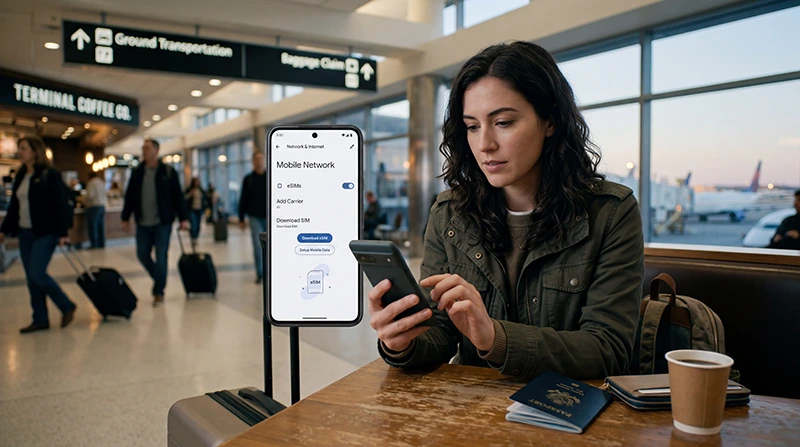

Activating a USA eSIM is usually simple when you install it before travel and choose the correct mobile data settings after arrival.
With a USA eSIM, you can use mobile data for Google Maps, WhatsApp, Uber, Lyft, hotel apps, airport transfers, road trips, hotspot, and everyday internet without inserting a physical SIM card.
Quick answer: to activate a USA eSIM, install the eSIM using the QR code or manual details while connected to WiFi, select the USA eSIM for mobile data after arrival, enable data roaming for the eSIM if required, and enter APN data.esim if your setup instructions require manual APN settings.
Top United States eSIMs

United States eSIM
Fixed
1 GB, 7 days€ 2.642 GB, 15 days€ 4.403 GB, 30 days€ 5.72Unlimited
Unlimited, 1 day€ 3.52Unlimited, 3 days€ 8.81Unlimited, 5 days€ 13.65
Before You Activate Your USA eSIM
Before activating your USA eSIM, make sure your phone is ready.
- Your phone supports eSIM
- Your phone is unlocked
- You have stable WiFi for installation
- Your eSIM QR code or manual installation details are available
- Your eSIM plan includes the United States
- Your phone software is updated
- You know whether APN settings are required
Check if your phone supports eSIM
When Should You Activate a USA eSIM?
It is best to install your USA eSIM before departure or while connected to stable WiFi.
Some eSIM plans activate when they connect to a supported network in the destination country. Others may activate after installation. Always follow the activation details provided with your eSIM.
For the smoothest arrival, install the eSIM before your trip and select it for mobile data after landing in the United States.
Where to Find Your USA eSIM QR Code
After purchase, your eSIM QR code and installation instructions are sent by email.
You can also find your eSIM details in your NoveSIM account under your order details. This is useful if you cannot find the email or need to access the installation information again.
How to Activate a USA eSIM: Quick Steps
- Connect your phone to stable WiFi.
- Open your eSIM QR code or manual installation details.
- Add the eSIM to your phone.
- Name the plan clearly, for example “USA eSIM”.
- Keep your regular SIM active if you need your normal number.
- After arrival, select the USA eSIM for mobile data.
- Enable data roaming for the USA eSIM if required.
- Enter APN data.esim if required.
- Toggle airplane mode on for 30 seconds, then off.
- Test mobile data with a browser or Google Maps.
How to Activate USA eSIM on iPhone
To install and activate a USA eSIM on iPhone:
- Open Settings.
- Tap Mobile Data or Cellular.
- Tap Add eSIM or Add Cellular Plan.
- Scan the QR code from your eSIM email.
- Follow the on-screen instructions.
- Name the eSIM “USA eSIM” or another clear label.
- After installation, go to Mobile Data.
- Select the USA eSIM for mobile data.
- Open the USA eSIM line and turn on Data Roaming if required.
- Toggle airplane mode for 30 seconds and test mobile data.
Read the full USA eSIM for iPhone guide
How to Activate USA eSIM on Android
To install and activate a USA eSIM on Android, menu names may vary by phone brand.
- Open Settings.
- Go to Connections, Network & Internet, or Mobile Network.
- Open SIM Manager, SIMs, or Mobile Plans.
- Tap Add eSIM, Add Mobile Plan, or Download a SIM instead.
- Scan the QR code from your eSIM email.
- Follow the on-screen instructions.
- Name the eSIM “USA eSIM”.
- Select the USA eSIM for mobile data.
- Enable data roaming for the USA eSIM if required.
- Enter APN data.esim if required.
- Toggle airplane mode for 30 seconds and test mobile data.
Read the full USA eSIM for Android guide
USA eSIM APN Settings
Some USA eSIMs may require manual APN settings.
For many NoveSIM USA eSIM setups, the APN should be:
| Setting | Value |
|---|---|
| APN | data.esim |
| Username | Leave blank |
| Password | Leave blank |
Enter data.esim exactly as shown. Do not add spaces or extra characters.
Read the full APN settings guide
Should Data Roaming Be On for USA eSIM?
Yes, many travel eSIMs require data roaming to be enabled.
Make sure data roaming is enabled for the USA eSIM, not accidentally for your regular SIM. If the USA eSIM is selected for mobile data, data roaming helps the travel eSIM connect to supported networks.
Should You Keep Your Regular SIM Active?
Yes, in most cases you can keep your regular SIM active for calls, SMS, or WhatsApp while using the USA eSIM for mobile data.
This setup is useful if you want to keep your normal number active during your USA trip.
How to Test If Your USA eSIM Is Activated
After setting up your USA eSIM, test mobile data.
- Turn WiFi off temporarily.
- Make sure the USA eSIM is selected for mobile data.
- Open a browser and load a website.
- Open Google Maps and search for a location.
- Send a message using WhatsApp or another messaging app.
If websites and apps load on mobile data, your USA eSIM is working.
What to Do If the USA eSIM Does Not Activate
If your USA eSIM does not activate or has no internet, try the following:
- Make sure the eSIM is installed and visible in settings
- Select the USA eSIM for mobile data
- Enable data roaming for the eSIM
- Enter APN data.esim if required
- Turn airplane mode on for 30 seconds, then off
- Restart your phone
- Turn WiFi off and test mobile data
- Try manual network selection
- Move to an area with better signal
Read the no internet USA eSIM guide
Manual Network Selection After Activation
If your phone does not connect automatically, try manual network selection.
On iPhone:
- Open Settings.
- Tap Mobile Data or Cellular.
- Select your USA eSIM.
- Tap Network Selection.
- Turn off Automatic.
- Choose an available supported network.
On Android:
- Open Settings.
- Go to Mobile Network settings.
- Tap Network Operators.
- Turn off automatic selection.
- Select an available supported network.
Can You Activate a USA eSIM Before Arrival?
You can usually install the eSIM before arrival, but full activation may depend on the plan type.
Some eSIMs begin validity after installation. Others activate when they first connect to a supported network in the United States. Always check the activation rules in your eSIM instructions.
Can You Reuse the Same eSIM QR Code?
In most cases, an eSIM QR code can be installed only once.
Do not delete your eSIM unless you are sure you no longer need it. If you delete an active eSIM, you may not be able to reinstall it with the same QR code.
Using USA eSIM After Activation
After activation, you can use your USA eSIM for common travel needs.
- Google Maps and Apple Maps
- WhatsApp and messaging apps
- Uber, Lyft, and taxi apps
- Hotel and airline apps
- Weather apps
- Email and browsing
- Road trip navigation
- Hotspot if supported by your plan
How Much Data Do You Need After Activation?
| Trip type | Suggested data | Best for |
|---|---|---|
| Short city trip | 3GB to 5GB | Maps, messages, rideshare, light browsing |
| 1 week USA trip | 10GB to 20GB | Daily apps, maps, bookings, photos |
| USA road trip | 20GB to 50GB | Navigation, music, uploads, hotspot |
| Heavy use or remote work | Large or unlimited data | Hotspot, video calls, uploads, streaming |
Read more about how much data you need for USA travel
Common Activation Mistakes
- Trying to install the eSIM without stable WiFi
- Scanning the same QR code on multiple devices
- Deleting the eSIM after installation
- Not selecting the USA eSIM for mobile data
- Forgetting to enable data roaming if required
- Entering the wrong APN
- Waiting until airport arrival without WiFi access
- Not checking whether the phone supports eSIM
- Not checking whether the phone is unlocked
Related USA eSIM Setup Guides
- USA eSIM for iPhone
- USA eSIM for Android
- APN Settings for USA eSIM
- No Internet on USA eSIM
- eSIM Not Working in the USA
- Does My eSIM Work in the USA?
- Why Is My eSIM Slow in the USA?
- Does WhatsApp Work in the USA?
- Using Google Maps in the USA
- eSIM Compatible Devices
FAQ: How to Activate a USA eSIM
How do I activate a USA eSIM?
Install the eSIM using the QR code or manual details while connected to WiFi, select the USA eSIM for mobile data, enable data roaming if required, and test mobile data after arrival.
Can I activate my USA eSIM before traveling?
You can usually install the eSIM before traveling, but full activation may depend on the plan. Some plans activate after installation, while others activate after connecting to a supported network in the USA.
Should data roaming be on for a USA eSIM?
Yes, many travel eSIMs require data roaming to be enabled. Turn on data roaming for the USA eSIM, not your regular SIM.
What APN should I use for USA eSIM?
If APN settings are required, use data.esim and leave username and password blank, unless your installation instructions say otherwise.
Can I keep my regular SIM active?
Yes. In most cases, you can keep your regular SIM active for calls or messages and use the USA eSIM for mobile data.
Why is my USA eSIM not activating?
The most common reasons are unstable WiFi during installation, device incompatibility, locked phone, missing mobile data selection, data roaming off, APN issues, or weak coverage.
Can I scan the same eSIM QR code twice?
Usually no. Most eSIM QR codes can be installed only once. Do not delete your eSIM unless you are sure you no longer need it.
How do I know if my USA eSIM is working?
Turn WiFi off, make sure the USA eSIM is selected for mobile data, then open a browser, Google Maps, or WhatsApp. If they load on mobile data, the eSIM is working.
Final Recommendation
The easiest way to activate a USA eSIM is to install it before departure on stable WiFi, keep your QR code and order details available, select the USA eSIM for mobile data after arrival, and enable data roaming if required.
If mobile data does not work, check APN data.esim, toggle airplane mode for 30 seconds, restart your phone, and try manual network selection.