


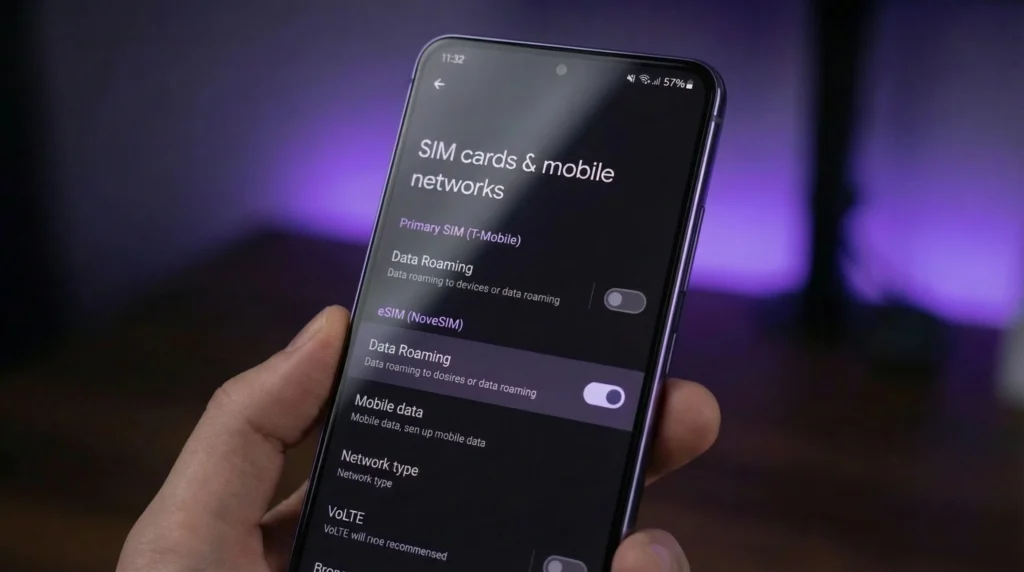

Yes, a NoveSIM travel eSIM normally needs Data Roaming turned on for the travel eSIM line. This allows the eSIM to connect through a supported partner network in the country covered by the plan. It does not mean that roaming must also be enabled on your primary SIM.
The safest dual-SIM arrangement is to select the travel eSIM for mobile data, enable roaming on that line, and keep data roaming off on the home SIM. Disable automatic mobile-data switching if you want to prevent the phone from falling back to the home line.
NoveSIM travel eSIMs are prepaid and data-only. We do not provide a local telephone number, conventional calls or SMS. Turning on roaming for the NoveSIM line does not create a separate pay-as-you-go roaming bill from NoveSIM, but activity on your home SIM remains subject to your home operator’s prices.
Quick answer: Turn Data Roaming on for a NoveSIM travel eSIM and off for the primary SIM. Select the travel eSIM for mobile data and disable automatic data switching. Roaming on the travel line does not charge the home SIM; the risk comes from allowing the primary line to use roaming data.
Top eSIMs

Do You Need Roaming for an eSIM on Every Plan?
No single setting applies to every eSIM. A NoveSIM travel eSIM normally requires Data Roaming on because it uses supported partner networks, while an eSIM issued directly by a domestic operator may work without roaming in its home country. Follow the instructions for the specific plan and change the setting on the correct SIM line.
Which SIM Line Should Have Data Roaming Enabled?
| Phone setting | NoveSIM travel eSIM | Primary or home SIM |
|---|---|---|
| Line enabled | On after arrival | Optional; keep it on only if you need its number |
| Mobile-data line | Selected | Not selected |
| Data Roaming | On | Off unless you deliberately use a home-carrier roaming plan |
| Automatic data switching | Off for predictable control | |
The two roaming switches are independent. Enabling roaming inside the settings for the travel eSIM does not automatically enable it for the home SIM. Before testing, open the travel line itself and confirm that you are changing the correct profile.
If you do not need ordinary calls, voicemail or SMS on the home number, turning the primary line off removes additional paths for accidental use. If you keep it active, read whether to turn off your primary SIM and check your operator’s charges for calls, incoming calls, voicemail and messages abroad.
Why Does a Travel eSIM Use Roaming?
A travel eSIM often connects to a local network through an international or regional mobile service. Your phone recognises that the profile is using a partner network and applies the Data Roaming control. In this situation, roaming is the intended technical connection rather than an accidental use of your home tariff.
The word “roaming” therefore describes two different decisions. On the travel eSIM, it permits access to a network included by the purchased plan. On the primary SIM, it may permit data billed under the home operator’s international terms. The line selected in the settings determines which situation applies.
This is also why installing an eSIM is not the same as connecting it. The profile can appear correctly on the phone while mobile data remains unavailable because the wrong line is selected or roaming is disabled. See when to install an eSIM before travel for the distinction between installation and activation.
Will Turning on eSIM Roaming Cause Extra Charges?
Turning on Data Roaming for a prepaid NoveSIM line does not add an open-ended roaming charge. Usage comes from the allowance and conditions of the plan you purchased. Check the live product page for its destinations, validity, data allowance, network information and any fair-use conditions.
The home SIM is separate. Your mobile operator can still charge for services carried by that line, including calls, voicemail or mobile data. To control this risk:
- Keep Data Roaming off on the primary SIM.
- Select the travel eSIM as the only mobile-data line.
- Disable automatic cellular-data switching or backup data.
- Review the home operator’s terms before receiving or making calls abroad.
- Check which line the phone is using before a cellular test.
Receiving an ordinary SMS is different from using mobile data, but policies and charges vary by operator and destination. Do not assume that keeping the home number active makes all calls, SMS or voicemail free.
How to Set Data Roaming on an iPhone
- Open Settings.
- Tap Cellular or Mobile Service.
- Open Cellular Data and select the NoveSIM travel eSIM.
- Turn off Allow Cellular Data Switching.
- Return to the list of SIMs and select the travel eSIM.
- Open Cellular Data Options and turn Data Roaming on.
- Select the primary SIM, open its data options and confirm that Data Roaming is off.
Apple’s menu wording can vary by region and iOS version. Apple also explains that Dual SIM users must select the relevant number before changing its roaming option. The NoveSIM iPhone roaming guide provides a focused walkthrough.
How to Set Data Roaming on Android
Android manufacturers organise SIM controls differently. On a Google Pixel, the path commonly begins at Settings > Network & internet > SIMs. On Samsung devices, it commonly begins at Settings > Connections > SIM manager or Mobile networks.
- Open the phone’s network, connections or SIM settings.
- Confirm that the NoveSIM travel eSIM is switched on.
- Choose it as the preferred SIM for mobile data.
- Open the travel eSIM’s settings and enable Roaming or Data Roaming.
- Open the primary SIM’s settings and keep its data roaming off.
- Disable automatic data switching, backup calling data or a similarly named fallback option.
If the path is different, search the Settings app for “roaming” and verify the line name before moving the switch. The Android data-roaming guide covers the device-specific decision without assuming one universal menu.
Can You Keep Your Main Number Active?
Yes, a compatible dual-SIM phone can keep the primary line available while the travel eSIM supplies mobile data. This can help you receive account messages or remain reachable on your usual number. It does not transfer the home number to the travel eSIM, and it does not make carrier calls or SMS part of the NoveSIM plan.
Data-based services such as WhatsApp, Signal, FaceTime and email can use the travel connection. Ordinary calls, SMS and voicemail continue through the line that owns the telephone number. The guide to using an eSIM for data while keeping your number explains this division in more detail.
What to Check If Roaming Is On but the eSIM Has No Internet
Do not delete the eSIM. Deletion can remove a profile that cannot be downloaded again without support. Work through reversible checks in this order:
- Turn Wi-Fi off so the test uses the cellular connection.
- Confirm that the travel eSIM is present and enabled.
- Verify that the purchased plan covers the current country and remains valid.
- Select the travel eSIM under Mobile Data.
- Confirm that Data Roaming is on for that travel line.
- Disable automatic mobile-data switching.
- Leave network selection on Automatic and wait several minutes for registration.
- Toggle Airplane Mode once, then test a normal website and a map.
If NoveSIM instructions require manual APN entry, use data.esim and leave username and password blank. Do not replace an automatically supplied, working APN. Continue with the connected-but-no-internet checks if the phone shows signal but data still fails.
When contacting support, provide the destination, exact phone model, operating-system version, displayed network status and safe screenshots of the data-line, roaming, network-selection and APN settings. Never share the QR code or activation credentials in a public screenshot.
Related Articles
- Should You Turn Off Your Primary SIM?
- Use an eSIM for Data and Keep Your Number
- Enable eSIM Data Roaming on iPhone
- Enable eSIM Data Roaming on Android
- Install an eSIM Before Travel
- eSIM Connected but No Internet
FAQ
Does an eSIM need data roaming turned on?
A NoveSIM travel eSIM normally needs Data Roaming on because it connects through a supported partner network. Enable roaming for the travel eSIM itself, not for the primary SIM.
Should data roaming be on for both SIMs?
No. Select the travel eSIM for mobile data and enable roaming on that line. Keep data roaming off on the home SIM unless you deliberately intend to use a roaming service from your home operator.
Will enabling roaming on my travel eSIM charge my primary SIM?
Not by itself, because each SIM has separate settings. Charges can still arise if the primary line carries data, calls, SMS or voicemail under the home operator’s international terms.
Why does my eSIM have no internet when roaming is already on?
Check that the travel profile is enabled, selected for mobile data and valid in the destination. Disable data switching, allow automatic network selection and verify the APN if instructed. Keep the eSIM installed while troubleshooting.
Final Recommendation
For a NoveSIM travel eSIM, turn Data Roaming on for the travel line and select that line for mobile data. Keep roaming off on the primary SIM and disable automatic data switching when avoiding home-carrier data charges.
Prepare the settings before departure, but follow the plan’s activation timing. After arrival, test with Wi-Fi off so you can confirm that the intended eSIM is carrying the connection.
If mobile data still fails, use reversible checks and the correct data.esim APN when manual entry is required. Do not delete the installed eSIM unless NoveSIM Support specifically instructs you to do so.