


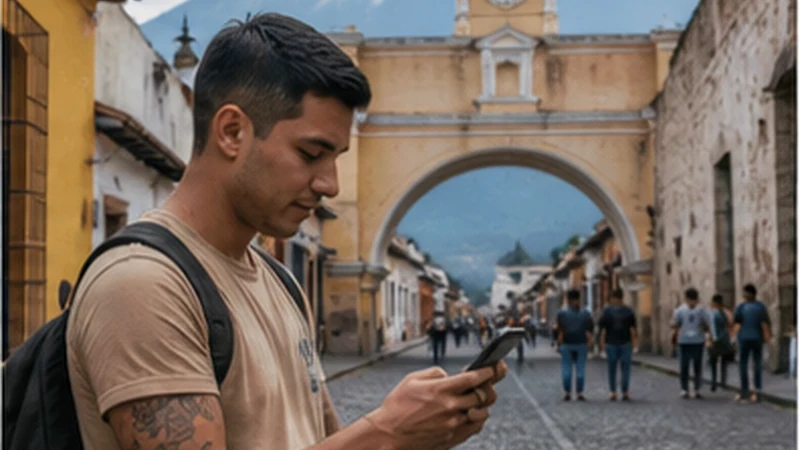

Mobile internet in Antigua Guatemala is rarely a simple question of whether the city has coverage. The more useful question is whether the connection works at the guest-room desk, inside a homestay, in a school courtyard or behind the walls of a restored colonial building. A phone may work normally in the street and lose speed only a few metres inside.
That distinction matters because people use Antigua in different ways. A two-night visitor may need little beyond maps, messages and a return transfer. A Spanish student or remote worker needs a connection that remains usable through a full week, not one successful speed test beside reception.
NoveSIM Guatemala plans provide mobile data without a Guatemalan phone number, ordinary voice calls or SMS. Internet calling and messaging apps still work over data, but travellers who must receive conventional local calls should plan for that separately.
Quick answer: Install the travel eSIM before arrival, save the full accommodation address and an offline map, then test both Wi-Fi and mobile data from the exact room or desk where they will be used. Keep large downloads on a verified fixed connection and preserve mobile data as an independent fallback.
Top Guatemala eSIMs

Guatemala eSIM
Fixed
1 GB, 7 days€ 5.792 GB, 15 days€ 9.353 GB, 30 days€ 12.03Unlimited
Unlimited, 1 day€ 5.35Unlimited, 3 days€ 17.82Unlimited, 5 days€ 24.94
Central America eSIM
Fixed
1 GB, 7 days€ 7.132 GB, 15 days€ 11.583 GB, 30 days€ 15.59Unlimited
Unlimited, 1 day€ 6.68Unlimited, 3 days€ 16.48Unlimited, 5 days€ 26.28Plan Mobile Internet in Antigua Guatemala by Address
Antigua’s central streets follow a recognisable grid, but a map pin alone may not identify the correct guest entrance. Before travelling, save the property’s full address, street and avenue references, entrance photograph if supplied, nearby landmark and host contact. Keep that information in a screenshot so it remains available if the driver, shuttle organiser or phone loses data.
Download the Antigua area in the mapping app and pin the accommodation, school, coworking space and departure point separately. A saved route is particularly useful on arrival, when cobbled streets, one-way traffic and an unfamiliar entrance can make the last few blocks slower than expected.
If travelling from La Aurora International Airport, arrange the transfer and exchange the driver’s details before leaving dependable internet. The Guatemala City-to-Antigua connectivity guide concentrates on that corridor, pickup changes and an offline arrival plan.
Why Reception Can Change Inside an Antigua Property
UNESCO describes Antigua’s surviving civic, religious and residential fabric as substantial colonial architecture arranged around a preserved historic grid. For a traveller, the practical consequence is building-level variability: thick walls, enclosed rooms and internal courtyards can separate an outdoor signal from the place where the phone is actually used.
Do not diagnose a faulty eSIM from one indoor dead spot. If data fails in the bedroom, check it in the courtyard, beside a window and immediately outside. When the outdoor result is healthy, the limitation is more likely to be the position within the building than the country-wide service.
The same test should be applied to fixed Wi-Fi. A router near reception may produce an excellent lobby result and a poor result behind several walls. Ask for the official network name, connect from the assigned room and test again with the door closed. The property name and a central location are not substitutes for this room-level check.
Choose Internet for a Spanish-School Stay
A student staying for several weeks has at least three separate connection points: the school, the accommodation or homestay, and mobile data while moving between them. Confirm each one independently. School Wi-Fi may be shared across classrooms or intended mainly for course activity, while the host property’s Wi-Fi may have different hours, equipment and household demand.
Before the first class, download course documents, the dictionary or translation resources used offline, and any audio exercises needed that day. Store the teacher’s or school’s contact channel and confirm whether schedule changes arrive by email, a messaging app or another platform. A data-only eSIM handles app communication, but it cannot receive a normal SMS sent to a Guatemalan number.
For a homestay, ask where the router is relative to the bedroom and whether other residents use the same connection for streaming or work. If evening performance matters, test it in the evening. A daytime result from an empty house does not establish what will happen when everyone returns.
Evaluate a Café or Coworking Space Properly
A café with Wi-Fi is not automatically a dependable workplace. Before committing to a call, check whether laptop work is welcome, whether seating has a time limit, where power is available and whether the connection requires repeated captive-portal logins. Keep calls discreet and do not leave devices unattended in a public room.
For scheduled work, a trial session at the intended hour is more informative than a list of advertised speeds. Test a representative upload, a short call and access to the services needed for work. Some connections perform well for browsing but struggle when several users upload or join video meetings at once.
A coworking space should be tested with the same discipline. Ask about backup internet and power, then verify mobile reception at the selected desk. Fixed Wi-Fi and a travel eSIM are useful together only when they do not fail for the same local reason. The Guatemala digital-nomad guide covers broader redundancy, power and long-stay planning.
Run a Five-Minute Work Test
Download speed is only one part of a usable work connection. From the actual desk, run a short test that reflects the job:
- Open the work platform and complete any required sign-in.
- Download a normal working file, then upload a small non-sensitive test file.
- Join a brief test call and watch for delay, frozen video or unstable audio.
- Check whether the laptop can use the eSIM phone as a hotspot.
- Disconnect Wi-Fi deliberately and confirm that the mobile fallback takes over.
Pause cloud photo backup, operating-system updates and large synchronisation jobs before using the hotspot. These background tasks can consume more data than the call that prompted the connection. Estimate work and personal use separately with the Guatemala mobile-data calculator.
Configure the Travel eSIM Without Disturbing the Home Line
Install the profile while dependable private Wi-Fi is available, label it clearly and keep its QR code confidential. On arrival, select the Guatemala eSIM for mobile data and enable Data Roaming on that travel line. Leave roaming disabled on the home line unless the home provider’s charges are understood.
| Phone control | Antigua setup | Reason |
|---|---|---|
| Mobile data | Travel eSIM | Keeps ordinary data use on the purchased plan |
| Data Roaming | On for travel eSIM | Allows the profile to use its partner network |
| Home-line roaming | Off | Reduces accidental home-provider charges |
| Automatic data switching | Off | Prevents an unnoticed move to the home line |
| Network selection | Automatic first | Lets the profile register on an available partner |
| Manual APN | data.esim only if required | Avoids changing a working setup unnecessarily |
The NoveSIM product information checked on 2 September 2026 listed potential access through Claro and Comunicaciones Celulares S.A. with 5G, and Movistar with 3G. This is product-level information, not a promise that a particular network, radio type or speed will be available at every Antigua address. Local load, the handset and the room still matter.
Decide Whether Data-Only Service Is Enough
For many short stays, app-based contact with a host, school, driver or restaurant is sufficient. Keep the home SIM enabled for its number only if incoming SMS is needed, but prevent it from carrying mobile data. Charges for calls and messages on the home line remain subject to the home provider.
A local voice number may be more appropriate for a long tenancy, work requiring conventional calls or a service that insists on local-number verification. That is a functional decision, not a coverage decision. Buying more eSIM data will not add voice or SMS capability to a data-only plan.
Use Antigua as the Download Point for Day Trips
Before leaving town, save the booking, meeting point, return arrangements, emergency contacts and offline map for the specific trip. Do this on verified accommodation or workspace Wi-Fi, then confirm that the files open while the phone is offline. Do not assume that a destination has the same connection conditions as central Antigua.
For Lake Atitlán, store the destination village and accommodation access details rather than only the lake name. Terrain and the exact shoreline location can change reception. The Lake Atitlán mobile-internet guide explains that destination separately.
Volcano access requires a current safety check, not merely a data plan. On 4 August 2026, Guatemala’s CONRED reported continuing access restrictions for Acatenango and Fuego during intense activity at Volcán de Fuego. Conditions and restrictions can change after publication, so verify the latest CONRED, INSIVUMEH and authorised-guide information before committing to a route. Mobile signal must never be treated as a mountain emergency system; the volcano hiking connectivity guide sets out the offline and battery plan.
Diagnose an Antigua Connection by Location
When the eSIM stops passing data, first move from the room to a window, courtyard or outdoor position. If the connection returns, preserve the working phone configuration and use Wi-Fi or the better part of the property indoors.
If it also fails outdoors, follow this order:
- Confirm that the travel eSIM is switched on and selected for mobile data.
- Check that Data Roaming is on for that line and automatic data switching is off.
- Enable Airplane Mode for 30 seconds, then reconnect.
- Restart the phone if registration does not return.
- Check the remaining allowance and enter data.esim only if the instructions require a manual APN.
Do not delete the eSIM. Some profiles cannot be installed again from the same code. If the problem remains, contact NoveSIM Support with the order number, exact phone model, current location, visible network state and screenshots that contain no QR code.
Related Articles
FAQ
Is mobile internet reliable in central Antigua Guatemala?
It can support normal travel use, but reliability must be judged at the specific property. A phone that works outside may perform differently behind substantial walls or inside a rear room.
Can I rely on school Wi-Fi during a Spanish course?
Confirm its permitted use, hours and performance with the individual school. Also test the accommodation connection and keep mobile data available, because the school and homestay are separate networks.
Is café Wi-Fi enough for remote work in Antigua?
It may handle casual tasks, but test the actual service, upload, call quality, power and working policy before a critical session. A verified workspace plus an independent mobile fallback is safer.
Does an Antigua eSIM include a Guatemalan phone number?
NoveSIM Guatemala plans are data-only. Apps work over data, but conventional local calls and SMS require a separate suitable service.
Final Recommendation
Treat mobile internet in Antigua Guatemala as a collection of specific connection points, not one uniform coverage zone. Save the exact address, install the eSIM before travel and test inside the assigned room.
For study or work, verify school, accommodation and workspace internet separately. Use fixed Wi-Fi for large transfers and retain mobile data as a tested fallback rather than consuming it on avoidable background downloads.
Prepare every day trip while still in town, recheck official volcano conditions close to departure and keep essential information offline. If indoor reception fails, test outdoors before changing or deleting a correctly installed eSIM.