


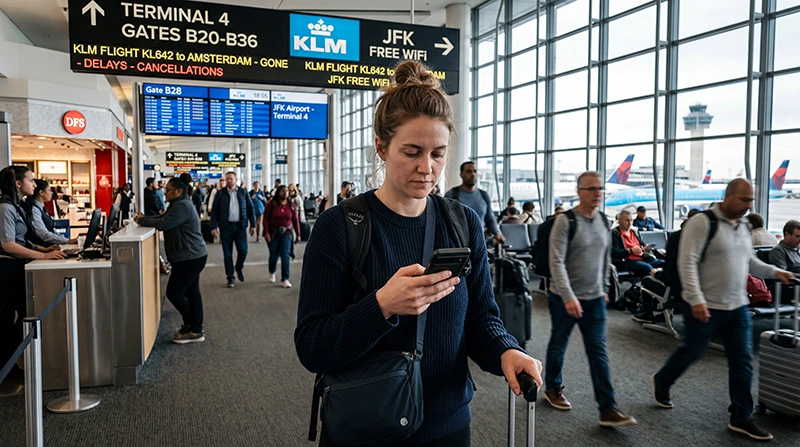

Airport Wi-Fi can cover the time inside the terminal, but it should not be treated as the connection for the onward journey from JFK Airport, New York. Verify the official network before joining it and be ready for captive portal.
Plan separately for the captive portal, the pickup or transfer area and mobile data after leaving JFK Airport, New York. A saved address and route are useful even when both Wi-Fi and the travel eSIM work normally.
The travel eSIM handles mobile data for browsing, maps and supported communication apps. It does not issue a local number or include standard voice minutes and SMS, so the cost of leaving the primary line active must be checked separately.
Quick answer: At JFK Airport, New York, join Wi-Fi only after confirming the official network name on current signage, with airport staff or on the airport website. Complete the legitimate captive portal and keep mobile data or offline documents ready for the journey outside the terminal.
Top United States eSIMs

United States eSIM
Fixed
1 GB, 7 days€ 2.662 GB, 15 days€ 4.443 GB, 30 days€ 5.77Unlimited
Unlimited, 1 day€ 3.55Unlimited, 3 days€ 8.87Unlimited, 5 days€ 13.75
Verify the JFK Network before Joining
Confirm the current official network name from Port Authority information, terminal signage or airport staff. Do not trust a hotspot merely because its name contains JFK, free Wi-Fi or the terminal number. Open the legitimate captive portal in a normal browser and avoid installing certificates, profiles or unfamiliar apps just to gain access. Check live destination coverage and validity.
Allow for Different Conditions between Terminals
JFK is a multi-terminal airport, and signal quality can change with the gate area, arrivals hall, congestion and movement between buildings. If the portal stalls, forget the verified network, reconnect and try a simple non-sensitive webpage. Move towards a staffed public area instead of repeatedly changing security settings. The guide to Wi-Fi and eSIM setup helps with advance installation.
Prepare for AirTrain and the New York Transfer
Terminal Wi-Fi is not a connection plan for the complete journey. Save the AirTrain route, onward rail or taxi details, accommodation address and booking reference offline. Test the travel data line before leaving the terminal so that navigation and pickup messages remain available outside airport coverage. Use the travel-data allowance guide to estimate these activities.
Use Mobile Data for Sensitive Tasks
Prefer a trusted mobile connection for payments, password changes and confidential work. A VPN can add protection on public Wi-Fi, but it does not make an unverified hotspot legitimate. Keep operating-system sharing features off and do not approve unexpected login or certificate prompts. Before buying, verify the exact device model.
Restore the Travel eSIM Safely
Enable the eSIM, select it for Mobile Data and turn on Data Roaming for that line. Keep the home line protected from automatic data use and wait for Automatic Network Selection. If manual NoveSIM APN entry is required, use data.esim; preserve the installed profile while troubleshooting. Use the device compatibility checks when the handset variant is uncertain.
Practical Checklist: JFK Airport Wi-Fi: How to Connect Safely
Verify the network and captive portal at JFK Airport, New York first, then separate terminal access from connectivity needed for the transfer. A working Wi-Fi session inside arrivals does not prove that maps or pickup messages will work outside the building.
A Safe Final Connection Check
- Confirm that the travel eSIM is still visible and enabled.
- Select it for Mobile Data without changing the voice line by accident.
- Turn on Data Roaming for the travel line and turn off automatic data switching.
- Wait for Automatic Network Selection before testing a normal website.
- Enter data.esim only when the NoveSIM instructions require a manual APN.
If the result is still wrong, keep the installed eSIM and record the device model, present location, selected lines and visible network status. Provide Support with the visible status and steps already tried, never with a publicly shared QR code. Remove the profile only if Support explicitly requests that step.
Related Articles
- Install an eSIM on iPhone
- Install an eSIM on Android
- Use Data Roaming with a travel eSIM
- Check whether manual APN settings are needed
- How NoveSIM travel eSIMs work
- Browse NoveSIM destinations
- Check an eSIM showing no signal
- Fix an eSIM connected without internet
- Read NoveSIM frequently asked questions
FAQ
JFK Airport Wi-Fi: How to Connect Safely
At JFK Airport, New York, join Wi-Fi only after confirming the official network name on current signage, with airport staff or on the airport website. Complete the legitimate captive portal and keep mobile data or offline documents ready for the journey outside the terminal.
What should I know about verify the jfk network before joining?
Confirm the current official network name from Port Authority information, terminal signage or airport staff. Test this while help is available.
What should I allow for with for Different Conditions between Terminals?
JFK is a multi-terminal airport, and signal quality can change with the gate area, arrivals hall, congestion and movement between buildings. Record the result before continuing.
How should I prepare for AirTrain and the New York Transfer?
Terminal Wi-Fi is not a connection plan for the complete journey. Confirm this before departure.
Final Recommendation
JFK Airport Wi-Fi: How to Connect Safely At JFK Airport, New York, join Wi-Fi only after confirming the official network name on current signage, with airport staff or on the airport website. Complete the legitimate captive portal and keep mobile data or offline documents ready for the journey outside the terminal.
Save the transfer route and accommodation address offline, use the verified airport network for routine tasks and prefer mobile data for sensitive account activity.
Test the travel line before leaving a staffed area, keep the eSIM installed during troubleshooting and carry enough battery for the onward journey.