


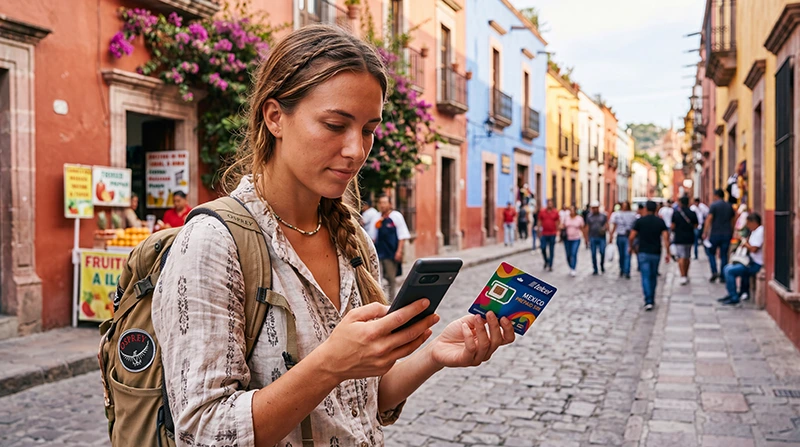

Choose between a local mobile service and a travel eSIM in Mexico by checking the services you need first. A Mexican number, ordinary calls or local SMS may point towards a domestic offer; a separate data allowance may be enough for maps, bookings and internet messaging.
Physical SIM and eSIM describe how a profile is supplied, not what it includes. A domestic service may also be available as an eSIM. Compare the actual plan rather than assuming every eSIM is data-only or every physical SIM includes the same calling services.
NoveSIM travel eSIMs are prepaid and data-only. We do not provide a Mexican number, conventional calls or carrier SMS. Existing internet messaging and calling accounts can use the travel data connection.
Quick answer: Consider a domestic line if a Mexican number or specific local service is essential. Consider a travel eSIM if you mainly need data and your exact device is compatible and unlocked. Compare route coverage, registration, usable data, validity and total cost. Check what starts the purchased plan’s validity before installing it.
Top Mexico eSIMs

Mexico eSIM
Fixed
1 GB, 7 days€ 3.562 GB, 15 days€ 5.353 GB, 30 days€ 7.13Unlimited
Unlimited, 1 day€ 3.56Unlimited, 3 days€ 8.46Unlimited, 5 days€ 13.36
North America eSIM
Fixed
1 GB, 7 days€ 4.012 GB, 15 days€ 7.133 GB, 30 days€ 9.80Unlimited
Unlimited, 1 day€ 5.79Unlimited, 3 days€ 15.15Unlimited, 5 days€ 24.95Central America eSIM
Fixed
1 GB, 7 days€ 7.132 GB, 15 days€ 11.583 GB, 30 days€ 15.59Unlimited
Unlimited, 1 day€ 6.68Unlimited, 3 days€ 16.48Unlimited, 5 days€ 26.28Local SIM or Travel eSIM: What Changes?
| Factor | Domestic Mexican service | NoveSIM travel eSIM |
|---|---|---|
| Number and services | Check whether the offer includes a Mexican number, ordinary calls and SMS, and their limits. | Data-only, without a Mexican number, conventional calls or carrier SMS. |
| Format and compatibility | A physical SIM needs a suitable slot; a domestic eSIM needs supported hardware and operator eligibility. | The exact device and regional version must support eSIM and be carrier-unlocked. |
| Registration | Confirm the chosen operator’s identity-linking process and documents before purchase. | Follow the purchase and profile instructions supplied for the selected travel offer. |
| Preparation | Confirm where and how the seller can register, activate and test the service. | Download the profile over reliable internet at the time permitted by the plan. |
| Home line | A physical replacement can displace the home SIM on a device with only one usable slot. | May coexist with the home line, subject to the supported active-SIM combination. |
| Coverage | Check the selected operator and actual itinerary. | Check the selected plan’s permitted partner access and actual itinerary. |
| Cost and duration | Include the line, activation, usable allowance, expiry and any renewal needed. | Include the chosen allowance and duration, limits and any extra purchase needed. |
Compare our Mexico eSIM plans with the domestic services described in the Mexico SIM-card guide. A long stay does not automatically make one format better; renewal terms and the need for a local number matter more.
Choose According to the Trip
- You need maps, bookings and an existing messaging account: a data-only travel eSIM may meet the requirement if the device and plan fit.
- A service requires SMS to a Mexican number: check a domestic offer that explicitly supplies that number and service. A data-only eSIM cannot provide it.
- Your device does not support eSIM: compare a compatible physical SIM or suitable home-carrier roaming instead.
- You need your usual number as well: verify the active-SIM combination and home-carrier charges before relying on two lines.
- You will stay for several weeks or months: compare renewal access, identity requirements, expiry and the complete cost across the stay.
If an existing home tariff already includes suitable Mexico service, another purchase may be unnecessary. The Mexico internet guide compares roaming and Wi-Fi with the other options.
Check Registration Before Buying a Domestic Line
Use an official operator or authorised seller and confirm that it can complete the required registration. Telcel’s current registration guidance specifies a valid passport or, where applicable, temporary foreigner CURP for foreign customers. Ask the chosen operator which documents and process apply to the exact offer.
Before leaving the seller, check the registered service, included allowance, expiry and receipt. Test mobile data and any calls or SMS you purchased. Do not assume that changing from a physical SIM to a domestic eSIM removes registration requirements.
Compare Coverage and the Complete Cost
A SIM’s format does not establish its coverage. Check the operator or permitted travel-plan partner for the accommodation, transfers and important stops. Reception in central Mexico City or a Cancún resort does not guarantee continuous service on rural roads or at a remote beach.
Compare general-purpose data, any app-specific allowance, daily high-speed restrictions, hotspot permission and validity. Include activation or delivery charges, travel to a seller and any extra purchase needed to finish the stay. Avoid comparing a short starting offer with a longer plan as if they covered the same trip.
Use the Mexico data-estimation guide to budget for uploads, hotspot and days without Wi-Fi. More data will not solve a gap in network coverage; keep essential routes and arrival details offline.
Install at the Right Time and Check Both Lines
Read what starts the purchased travel plan’s validity before installing or enabling it. Advance installation can be useful when the instructions permit it, but do not assume the countdown always waits until arrival. Follow our Mexico eSIM installation guide for the device steps.
- Confirm the exact device’s eSIM support, regional version and carrier-unlocked status.
- Install the profile over reliable internet at the time its instructions permit.
- In an included destination in Mexico, enable the travel line and select it for mobile data.
- Apply Data Roaming on that line as specified in the supplied instructions.
- Keep home-line data roaming off if you do not intend to use home-carrier data, and disable automatic data switching where available.
- Start with automatic network selection, briefly turn Wi-Fi off and test a webpage.
Keeping the home SIM active does not make calls, SMS or voicemail free. Check the home provider’s tariff and whether the device supports the intended two-line arrangement.
If the travel connection fails, keep the installed profile and use the Mexico eSIM troubleshooting guide. For NoveSIM, enter data.esim only when manual APN entry is required by the supplied instructions. Do not delete the eSIM unless NoveSIM Support instructs you to do so.
Related Articles
- Compare domestic SIM-card options in Mexico
- Check your device’s eSIM compatibility
- Compare Mexico networks for your route
FAQ
Is a local SIM or a travel eSIM better for Mexico?
Choose by the required service. A domestic offer may suit a Mexican number, ordinary calls or local SMS. A NoveSIM travel eSIM supplies data for a compatible unlocked device. Compare route coverage, validity and full cost rather than choosing by format alone.
Can a local Mexican service also use eSIM?
Yes, where the selected operator offers it and the device and customer meet its conditions. eSIM describes the profile format; it does not establish whether the service includes a local number, calls or SMS.
Can I keep my usual SIM while using NoveSIM?
That depends on the device and supported active-SIM combination. Review the selected data line, home-line roaming and automatic switching. Home-carrier calls, messages and voicemail can still incur charges.
When should I install the travel eSIM?
First check the purchased plan’s validity trigger and installation instructions. Use reliable internet at the permitted time; do not assume that installing early or keeping the line off postpones expiry.
Does a NoveSIM Mexico eSIM include local calls or SMS?
No. Our travel plans are data-only and do not provide a Mexican number, conventional calls or carrier SMS. Internet calling and messaging apps can use the data connection.
Final Recommendation
For Mexico, decide whether you need a domestic telephone service or a separate travel-data allowance. Compare physical SIM and eSIM formats only after identifying the services and device support required.
Check registration for the domestic offer, and validity and installation timing for the travel plan. Compare the full trip cost and coverage along the actual route.
Configure the chosen data line carefully, review charges on the home line and keep essential travel information offline.