


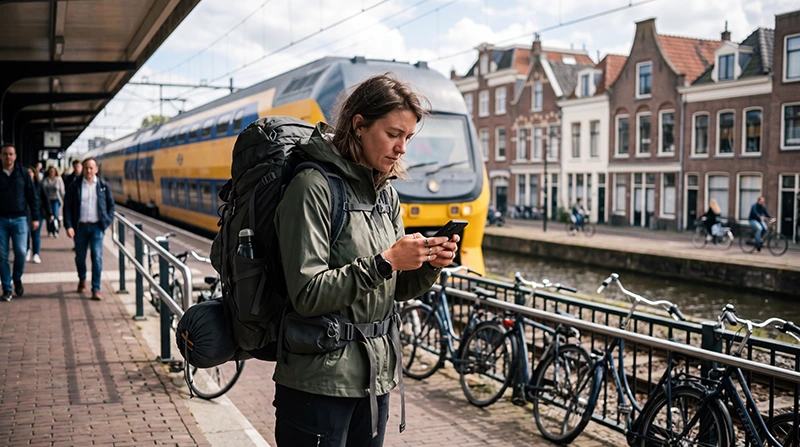

Backpacking through the Netherlands often means moving between hostels, railway stations, city centres and smaller destinations. Reliable mobile internet makes it easier to manage transport, accommodation, navigation and communication without depending entirely on public WiFi.
You may need data to check train delays, find your hostel, open digital bookings, use maps and contact other travellers. This becomes especially important when arriving late, changing cities frequently or visiting rural attractions.
Quick answer: a Netherlands travel eSIM is usually the most convenient option for backpackers with an unlocked eSIM-compatible phone. Install it before departure, activate it after arrival and save essential tickets and maps offline.
Top Netherlands eSIMs

Netherlands eSIM
Fixed
1 GB, 7 days2.50$2 GB, 15 days4.00$3 GB, 30 days5.00$Unlimited
Unlimited, 1 day2.50$Unlimited, 3 days6.00$Unlimited, 5 days9.00$
Europe Extra eSIM
Fixed
1 GB, 7 days2.50$2 GB, 15 days4.00$3 GB, 30 days5.00$Unlimited
Unlimited, 1 day3.00$Unlimited, 3 days6.00$Unlimited, 5 days10.00$Europe+ eSIM
Fixed
1 GB, 7 days3.00$2 GB, 15 days4.50$3 GB, 30 days6.00$Unlimited
Unlimited, 1 day3.00$Unlimited, 3 days7.00$Unlimited, 5 days11.50$Europe Lite eSIM
Fixed
1 GB, 7 days2.50$2 GB, 15 days4.00$3 GB, 30 days5.00$Unlimited
Unlimited, 1 day3.00$Unlimited, 3 days6.00$Unlimited, 5 days10.00$Best Internet Options for Backpackers
| Option | Best For | Main Limitation |
|---|---|---|
| Netherlands travel eSIM | Fast setup and continuous mobile data | Requires a compatible unlocked phone |
| Regional Europe eSIM | Backpackers visiting several European countries | Coverage depends on the selected plan |
| Local prepaid SIM | Longer stays or travellers needing a Dutch number | Requires physical purchase and activation |
| Home SIM roaming | Travellers with roaming already included | Charges and limits vary by operator |
| Hostel and public WiFi | Large downloads and evening use | No continuous connection while travelling |
Why Backpackers Need Mobile Data
A backpacking itinerary can change quickly. You may decide to stay longer in one city, book a last-minute hostel or take an earlier train to another destination.
Mobile data can help you:
- Check trains, buses and local transport.
- Navigate from stations to hostels.
- Open accommodation confirmations.
- Book last-minute rooms or activities.
- Use WhatsApp and internet-based calls.
- Find supermarkets, laundromats and cafés.
- Check weather forecasts.
- Manage online banking and travel accounts.
Using a Netherlands Travel eSIM
A travel eSIM provides mobile data without requiring a physical SIM card. You can install it before travelling and keep your regular SIM in the phone for calls, SMS and verification codes.
It is particularly useful for backpackers because there is no need to visit a mobile shop after arrival or carry a small physical SIM card between destinations.
Browse Netherlands eSIM plans.
Netherlands eSIM or Europe eSIM?
| Backpacking Route | Recommended Option |
|---|---|
| Amsterdam and other Dutch cities | Netherlands eSIM |
| Netherlands countryside and islands | Netherlands eSIM |
| Netherlands and Belgium | Regional Europe eSIM |
| Amsterdam, Berlin and Prague | Regional Europe eSIM |
| Extended European backpacking trip | Regional Europe eSIM |
Review the included countries before buying a regional plan. A Netherlands-only plan is usually enough when your complete trip remains within the country.
How to Install and Activate the eSIM
- Confirm that your phone supports eSIM.
- Check that the device is carrier-unlocked.
- Choose a Netherlands or regional Europe plan.
- Install the eSIM before departure using reliable WiFi.
- Enable it after arriving in the Netherlands.
- Select the travel eSIM for Mobile Data.
- Turn on Data Roaming for the travel eSIM.
- Keep Network Selection on Automatic.
Turn off WiFi briefly and open a webpage to confirm that mobile data is working before leaving the airport, station or accommodation.
Recommended eSIM Settings
| Setting | Recommended Value |
|---|---|
| Travel eSIM | Enabled |
| Mobile Data | Travel eSIM |
| Data Roaming on travel eSIM | On |
| Data Roaming on primary SIM | Off |
| Automatic Data Switching | Off |
| Network Selection | Automatic |
| APN | data.esim when required |
Internet in Dutch Hostels
Many hostels provide WiFi in rooms or shared areas, but speed and coverage can vary. A busy network may become slower in the evening when many guests are streaming, calling or uploading photos.
Hostel WiFi is useful for:
- Downloading maps and entertainment.
- Backing up photos.
- Making longer video calls.
- Updating apps.
- Planning the next part of your trip.
Use mobile data as a backup when hostel WiFi is unavailable or does not reach your room.
Using Public WiFi Safely
Backpackers commonly use WiFi in hostels, cafés, libraries and railway stations. Public networks can be convenient, but they should be used carefully.
- Connect only to an official network.
- Avoid unknown networks with similar names.
- Use websites protected by HTTPS.
- Do not enter banking details on an unfamiliar network.
- Disable automatic file sharing.
- Forget the network after leaving.
- Use mobile data for payments and sensitive accounts.
Internet on Dutch Trains
Backpackers often use trains to travel between Amsterdam, Utrecht, Rotterdam, The Hague, Haarlem and other destinations.
WiFi may be available on selected trains, but it should not be your only connection. Mobile data is more useful because it can also work at stations, during transfers and after you arrive.
Download your ticket and save important journey information before boarding.
Read the internet guide for Dutch trains.
Save Important Information Offline
Offline preparation can prevent problems when a connection becomes weak or your battery is low.
- Download city maps.
- Save hostel addresses and check-in instructions.
- Download train and attraction tickets.
- Screenshot booking references.
- Save emergency contacts.
- Keep a copy of travel insurance details.
- Record the location of your next accommodation.
Will WhatsApp Keep Your Existing Number?
Yes. WhatsApp normally continues using the number already registered to your account while the travel eSIM provides mobile data.
Most travel eSIM plans are data-only. You can still use WhatsApp, Viber and similar services for messages and internet-based calls.
Learn how WhatsApp works in the Netherlands.
Can You Keep Your Primary SIM Active?
Yes. On a compatible Dual-SIM phone, you can use the travel eSIM for mobile data while keeping your primary SIM active for incoming calls, SMS and verification codes.
Keep Data Roaming disabled on the primary SIM and turn off Automatic Data Switching to reduce the risk of accidental roaming charges.
How Much Data Does a Backpacker Need?
| Activity | Typical Data Use |
|---|---|
| Maps and transport searches | Low |
| Messaging and booking checks | Low |
| Social media browsing | Moderate |
| Photo uploads | Moderate |
| Video calls | High |
| Streaming and hotspot use | Very high |
A light user relying on WiFi for large downloads may need only a modest data allowance. Backpackers who stream, upload videos or use a hotspot regularly will need more.
NoveSIM unlimited plans include 1 GB of high-speed data per 24-hour period. Speed may be reduced after the daily high-speed allowance is used and restored at the next reset.
How to Save Data and Battery
- Download offline maps through hostel WiFi.
- Save music, films and podcasts offline.
- Pause automatic photo backups.
- Disable automatic app updates.
- Upload large videos through trusted WiFi.
- Use Low Power Mode during travel days.
- Carry a charged power bank.
Can You Use the eSIM as a Hotspot?
Hotspot sharing may be available depending on the plan and device. It can be useful for connecting a laptop or helping a travel companion with an urgent task.
Hotspot use can consume data and battery quickly. Avoid using it continuously for streaming or large downloads when your plan has a limited high-speed allowance.
What If the eSIM Has No Internet?
- Confirm that the travel eSIM is selected for Mobile Data.
- Turn on Data Roaming for the travel eSIM.
- Keep Data Roaming off on the primary SIM.
- Disable Automatic Data Switching.
- Keep Network Selection on Automatic.
- Check that the APN is data.esim.
- Turn Airplane Mode on for 30 seconds and turn it off.
- Restart the phone if necessary.
Move outdoors or away from an underground station before changing advanced settings. The signal may be temporarily weaker inside older buildings, basements or trains.
Do not delete the eSIM during troubleshooting. The installation QR code may be valid for one installation only.
Read the Netherlands eSIM troubleshooting guide.
Backpacking Internet Checklist
- Install the eSIM before departure.
- Activate and test it after arrival.
- Select it for Mobile Data.
- Enable Data Roaming on the travel eSIM.
- Disable Automatic Data Switching.
- Download maps and tickets offline.
- Save hostel addresses and check-in details.
- Carry a power bank and charging cable.
- Do not delete the eSIM during the trip.
Related Netherlands Internet Guides
- Netherlands eSIM Plans
- Internet in Amsterdam for Tourists
- Internet on Dutch Trains
- Internet While Cycling in the Netherlands
- Internet on a Netherlands Road Trip
- How to Use an eSIM in the Netherlands
- No Internet on a Netherlands eSIM
FAQ
What is the easiest way to get internet while backpacking in the Netherlands?
A Netherlands travel eSIM is usually the easiest choice for backpackers with an unlocked eSIM-compatible phone.
Can I rely only on hostel WiFi?
Hostel WiFi is useful, but it does not provide internet while travelling between accommodations, stations and attractions.
Should I choose a Netherlands or Europe eSIM?
Choose a Netherlands plan for a trip within the country and a regional Europe plan when visiting several supported countries.
Will WhatsApp keep my current number?
Yes. WhatsApp normally keeps your registered number while the travel eSIM supplies mobile data.
Can I keep my primary SIM active?
Yes. Keep it active for calls and SMS, but turn off Data Roaming on the primary SIM.
What APN should I use for NoveSIM?
Use data.esim when manual APN configuration is required.
Should I delete the eSIM if it does not connect?
No. Check Mobile Data, Data Roaming, APN and network settings first because the QR code may be single-use.
Final Recommendation
A Netherlands travel eSIM is a practical solution for backpackers who need mobile data for trains, hostels, navigation, bookings and communication.
Install the eSIM before departure, select it for Mobile Data after arrival and enable Data Roaming. Keep roaming disabled on your primary SIM and turn off Automatic Data Switching.
Use trusted hostel WiFi for large downloads, but keep mobile data available for travel days. Save essential maps, tickets and accommodation details offline and carry a power bank.