


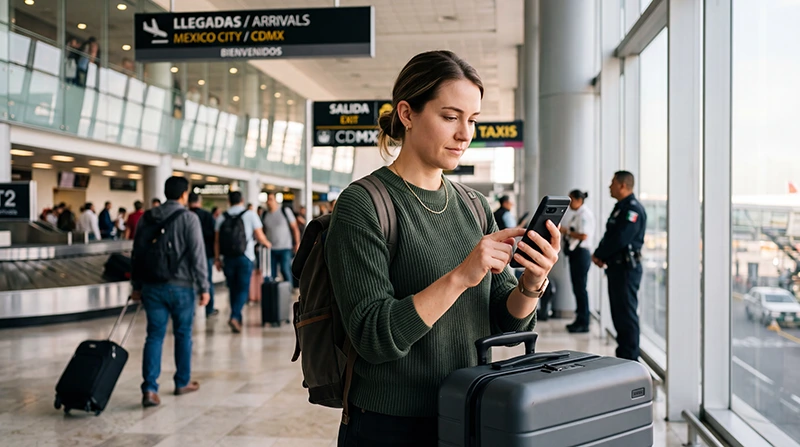

A travel eSIM can provide mobile data after arrival at Mexico City International Airport (MEX) when the purchased plan is usable, the device is configured correctly and an authorised partner network is available. Installation before a flight can reduce arrival tasks, but first check what starts validity.
Prepare the transfer even if you expect to connect in the terminal. Save the accommodation address, arrival terminal, meeting instructions and contact details offline so a registration delay does not leave you without the information needed to continue.
NoveSIM travel eSIMs are prepaid and data-only. They do not provide a Mexican number, conventional calls or carrier SMS. Existing internet messaging and calling apps can use the connection, subject to usable service and app access.
Quick answer: Check exact-device compatibility, Mexico inclusion and the purchased validity trigger before installation. Install over reliable internet when the instructions permit. After landing, select the travel line for data, apply the supplied settings and test a small webpage with Wi-Fi briefly off. Keep airport Wi-Fi and offline transfer details as alternatives; do not assume an immediate connection or continuous reception beyond MEX.
Top Mexico eSIMs

Mexico eSIM
Fixed
1 GB, 7 days€ 3.562 GB, 15 days€ 5.353 GB, 30 days€ 7.13Unlimited
Unlimited, 1 day€ 3.56Unlimited, 3 days€ 8.46Unlimited, 5 days€ 13.36
North America eSIM
Fixed
1 GB, 7 days€ 4.012 GB, 15 days€ 7.133 GB, 30 days€ 9.80Unlimited
Unlimited, 1 day€ 5.79Unlimited, 3 days€ 15.15Unlimited, 5 days€ 24.95Central America eSIM
Fixed
1 GB, 7 days€ 7.132 GB, 15 days€ 11.583 GB, 30 days€ 15.59Unlimited
Unlimited, 1 day€ 6.68Unlimited, 3 days€ 16.48Unlimited, 5 days€ 26.28Choose the Arrival Path That Fits Your Device
| Your situation | Next step | What still needs checking |
|---|---|---|
| The purchased profile is already installed | Follow the arrival instructions, select the travel-data line and test it. | Mexico inclusion, usable period, remaining data and authorised network access. |
| You will purchase or install after arrival | Use suitable internet to complete the purchase and profile download. | Compatibility, payment access, delivery details and validity before installation; allow time for setup. |
| The device does not support the intended eSIM | Compare suitable home roaming, an appropriate local service or another compatible device. | Included services, device unlocking, registration where applicable and total cost. |
These are preparation paths, not guarantees about airport shop availability or activation time. Check the current Mexico eSIM offers before buying. For a local-number requirement, a data-only travel eSIM is not equivalent to a service that includes Mexican calls and SMS.
Before the Flight: Check the Exact Device and Plan
- Confirm the model number and regional version, eSIM support and carrier-unlocked status.
- Check that the device supports the active-SIM combination you intend to use.
- Confirm Mexico is included in the exact purchased offer and that its allowance and duration cover the visit.
- Read what starts validity and any deadline for installing the profile.
- Keep the order and installation instructions accessible, with QR codes and activation credentials private.
- Install over reliable internet at the time permitted by the purchased instructions.
Do not rely on a list saying that all recent iPhones, Galaxy phones or Pixels support the same features. Use the Mexico device-compatibility checks for the exact handset. A profile download is not a useful compatibility experiment if you have not checked its timing and purchase conditions.
Buying, installing and beginning usable service are separate steps. Do not assume the validity countdown always waits until arrival, that keeping the profile off pauses expiry or that advance installation is appropriate for every plan.
After Landing: Select the Intended Data Connection
- When permitted after landing, leave Airplane Mode and allow the device to reconnect.
- Enable the purchased travel profile and select it as the mobile-data line.
- Apply that line’s Data Roaming setting according to the supplied instructions.
- Keep unwanted home-line data roaming off and review automatic data switching separately.
- Start with automatic network selection and allow registration on an authorised partner.
- Briefly turn Wi-Fi off and load a small webpage to check mobile data.
- Send a message or check the transfer information you intend to use before leaving the terminal.
The Mexico installation guide provides detailed device instructions. A webpage loaded over airport Wi-Fi does not establish that the eSIM is supplying mobile data.
A visible operator in a manual search may not authorise the purchased profile. Use manual selection only when the plan instructions or NoveSIM Support specify a permitted partner. Do not keep trying every network listed by the device.
Airport Wi-Fi as an Installation Alternative
AICM’s official Wi-Fi announcement identifies #AICM_FREE_WIFI as a free network serving both terminals. It states that users must accept the conditions again after two hours to continue. Confirm current signage or ask airport staff before selecting a network.
Use the connection if it is available and suitable for the purchase or profile download you need. Read the displayed connection instructions and test a small webpage first. Do not assume the network name alone proves authenticity, or that a working Wi-Fi icon establishes internet access.
If you cannot get online, keep the saved arrival information accessible and seek assistance at an official information point. Avoid making the entire transfer dependent on buying, receiving and installing a new service through an untested connection.
Prepare the Transfer from MEX
- Check the airport code and terminal shown in the current flight and transfer instructions.
- Save the complete accommodation address and relevant check-in instructions.
- Keep the booked provider’s meeting point, contact method and booking reference available offline.
- Download a suitable map area and confirm essential information opens without internet.
- When connected, recheck current pickup or onward-travel instructions before moving to the meeting point.
Internet access does not establish that an app-based vehicle can collect you at a particular terminal door. Follow the booked provider’s current instructions and airport signage rather than relying on a generic pickup suggestion.
If a connection involves changing terminals, verify the applicable transfer arrangements with the airport or airline. A saved itinerary is useful, but gates, terminals and meeting instructions may change.
Coverage Beyond the Terminal
Reception can vary within buildings and around transport areas. Airport registration does not guarantee uninterrupted data along the route to your accommodation, and a country-wide operator list does not establish access to every network for every plan.
Check permitted partner coverage for the addresses and routes that matter. The Mexico network guide explains how to compare coverage information without treating it as a reception guarantee.
Availability of 4G or 5G depends on the plan, device and local conditions. More data does not fix a coverage gap. Keep navigation and the final accommodation approach available offline even after a successful terminal test.
Keep the Home Number and WhatsApp Separate from Data
A compatible dual-SIM device may let you retain the home line while using travel data, subject to its supported SIM combination. Using a physical local SIM does not automatically mean the home line must be removed or disabled; the exact device arrangement determines that.
Check home-provider availability and charges for calls, SMS and voicemail. Selecting travel data does not make those services free. If you need verification sent to the home number, retain access to that number’s service without assuming the travel eSIM can receive it.
Adding a data line does not by itself change an existing WhatsApp number. Do not use Change Number merely to use travel data. The Mexico WhatsApp guide covers registration access and internet calls.
Choose Data for the Whole Trip
Include arrival and departure days, maps, messaging, uploads and any intended hotspot use. Check hotspot permission before sharing the connection with another device. Avoid treating a fixed allowance as suitable for every one- or two-week visit.
Use the Mexico data-estimation guide to build an estimate from your own usage. Compare the selected offer’s total allowance, any high-speed restriction and full usable duration before payment.
If Mobile Data Does Not Load
Check the selected line, Mexico inclusion, validity, remaining allowance and supplied settings first. If registration appears stuck, a brief Airplane Mode toggle or a restart can refresh the connection; repeated resets do not resolve an expired plan or exhausted allowance.
Leave working automatic APN configuration alone. If manual entry is required for your NoveSIM profile, use data.esim with username and password blank, preserving unrelated automatic fields. This is not a universal APN for other providers.
Preserve the installed profile and use the Mexico connection troubleshooting guide. Delete a NoveSIM eSIM only if NoveSIM Support specifically instructs you to do so. Send order details privately and keep QR codes out of public screenshots.
Related Articles
- Compare Mexico eSIM offers
- Install and configure your travel profile
- Use WhatsApp with Mexico travel data
- Investigate a Mexico connection problem
FAQ
Will my eSIM connect immediately after landing at MEX?
It can connect when the plan is usable, the device is configured correctly and an authorised partner network is available. Registration time and reception vary, so keep essential transfer information offline.
Should I install before flying to Mexico City?
First read the purchased plan’s validity trigger and installation deadline. Install over reliable internet at the time permitted by its instructions rather than assuming every plan starts only on arrival.
Can I install using Mexico City Airport Wi-Fi?
A suitable working connection can support the purchase and profile download. AICM publishes the network name #AICM_FREE_WIFI for both terminals; confirm current signage, follow the displayed instructions and test access before relying on it.
Can I keep my home SIM active?
That depends on the device’s supported SIM combination and provider availability. Review data switching and home-line charges separately; using travel data does not make calls, SMS or voicemail free.
What should I check before leaving the terminal?
Test the intended mobile-data line with Wi-Fi briefly off, confirm the current transfer instructions and keep the address, meeting details and essential map accessible offline.
Final Recommendation
Prepare an eSIM for Mexico City Airport by checking the exact device, purchased plan and installation timing before travel.
After landing, select the intended data line, follow its settings and test it before relying on the connection for the transfer. Preserve the installed profile if troubleshooting is needed.
Keep official airport Wi-Fi as an alternative and essential arrival information offline. A successful connection helps with the journey, while preparation covers the possibility of a delay.