


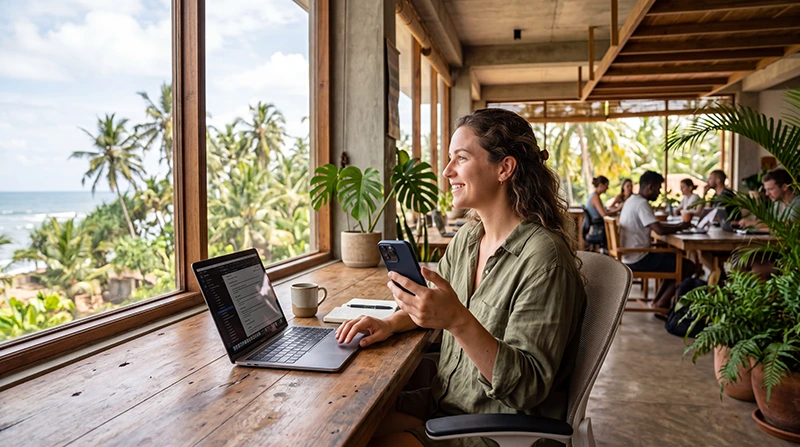

Coworking in Sri Lanka works best when you choose a workspace for the task—not only for the view. Before paying for a pass, confirm the current opening hours, call policy, internet backup, power arrangements and whether the workspace offers a quiet area for meetings.
Colombo offers the broadest choice for business-focused workdays. Coastal towns can suit a work-and-travel stay, while hill-country locations may be comfortable for focused work but require more careful planning for transport and connection backup.
A NoveSIM travel eSIM provides data backup but no Sri Lankan number or conventional calls and SMS. Messaging, cloud tools and meeting apps work through data, subject to plan allowance and local coverage.
Quick answer: Shortlist coworking spaces by location, then contact each one directly to confirm a day pass, current hours, video-call rules, power backup and a second internet connection. Test your own mobile hotspot before the first important meeting.
Top Sri Lanka eSIMs

Sri Lanka eSIM
Fixed
1 GB, 7 days€ 4.452 GB, 15 days€ 7.133 GB, 30 days€ 9.35Unlimited
Unlimited, 1 day€ 4.90Unlimited, 3 days€ 11.14Unlimited, 5 days€ 17.37
Which Sri Lanka Location Fits Your Workday?
| Area | Useful for | What to verify |
|---|---|---|
| Colombo | Meetings, full workdays and airport access | Commute time and call-room availability |
| Galle and south coast | Work combined with a coastal stay | Seasonal opening hours and backup internet |
| Weligama or Mirissa area | Surf-and-work routines | Quiet space during busy periods |
| Kandy and hill country | Focused stays away from the coast | Mobile backup at the exact property |
This page helps you evaluate a workspace. For choosing an overall base and data plan, use the separate Sri Lanka digital-nomad internet guide.
What to Ask Before Booking a Coworking Pass
- Is a day pass available, and must it be reserved?
- Are calls allowed at the desk, or is a booth required?
- Is there a backup connection if the main line fails?
- Does the building have a plan for power interruptions?
- Are external monitors, lockers or meeting rooms available?
- What are the current opening hours on weekends and holidays?
Details can change, so confirm them with the venue shortly before visiting rather than relying on an old directory entry.
Test the Workspace Before an Important Call
- Run a normal browsing test on the workspace Wi-Fi.
- Check upload as well as download performance.
- Make a short test call using the same meeting app.
- Check whether the chosen desk has stable Wi-Fi and mobile reception.
- Connect the laptop to your phone hotspot once, then disconnect it.
- Keep the meeting link and telephone fallback details offline.
A speed-test result is only a snapshot. Stability, latency, congestion and the venue’s call policy matter more than one headline number.
Use an eSIM as Backup, Not as a Claim of Guaranteed Speed
A travel eSIM can keep messaging and light work available when venue Wi-Fi fails. Hotspot support, 4G or 5G and network access depend on the plan, device and local coverage. Check the current Sri Lanka eSIM plans and test the connection at the actual desk.
If the eSIM shows signal but pages do not load, use the Sri Lanka no-internet checks. Do not delete the installed profile.
Plan Data for a Coworking Stay
Messaging and documents need relatively little data. Video meetings, cloud sync and large uploads use much more. A mobile plan intended only as backup can be smaller than one used as the primary laptop connection.
Estimate the allowance with the Sri Lanka data-use guide. Pause operating-system updates and cloud backups before tethering.
Transport and Time-Zone Practicalities
Choose a workspace that remains accessible after an evening call. A scenic location can become impractical if the return route is limited or the venue closes before your working day ends. Save the address offline and arrange late transport in advance.
For live navigation and saved map preparation, see Google Maps in Sri Lanka.
Related Articles
- Internet for Digital Nomads in Sri Lanka
- Remote Work Connectivity in Sri Lanka
- Sri Lanka eSIM Plans
- How Much Data Do You Need?
FAQ
Where is the best coworking in Sri Lanka?
The best choice depends on your route and work. Colombo suits business-focused days; coastal and hill-country spaces can suit longer stays if their current hours, call policy and backup connectivity fit your needs.
Can I rely on coworking Wi-Fi for video calls?
Do not assume so without testing. Confirm upload performance, call rules and backup internet at the exact workspace.
Do Sri Lanka coworking spaces offer day passes?
Some do, but availability and prices change. Contact the workspace directly before travelling there.
Should I carry a mobile-data backup?
Yes, especially for client calls or deadlines. Test the hotspot at the workspace because indoor mobile reception varies.
Final Recommendation
Choose coworking in Sri Lanka by the reliability of the complete workday: desk, calls, power, internet backup, transport and opening hours.
Confirm current details directly with the venue and test both Wi-Fi and your mobile fallback before an important session.
Use an eSIM as a practical backup connection, while keeping large uploads and updates for a stable fixed network.