


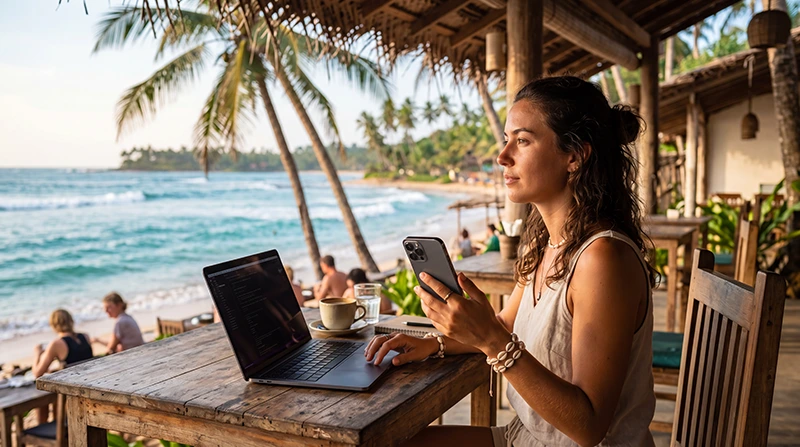

Internet for digital nomads in Sri Lanka should be planned as a two-connection system: a primary fixed connection at the accommodation or workspace and mobile data for arrival, travel days and outages. A single speed-test screenshot is not enough evidence that a property will support weeks of work.
Long stays add questions that short holidays do not: changing bases, laptop tethering, power continuity, time-zone calls and data consumption over several weeks. Confirm these before committing to a non-refundable booking.
NoveSIM travel eSIMs are data-only. We do not provide a local number or conventional calls and SMS, but online meetings, messaging and cloud services work through data when the connection is adequate.
Quick answer: Ask the accommodation for a recent test from the exact room, verify upload and call stability, and keep an eSIM as a tested backup. For a multi-week stay, monitor hotspot use and move large transfers to reliable Wi-Fi.
Top Sri Lanka eSIMs

Sri Lanka eSIM
Fixed
1 GB, 7 days€ 4.452 GB, 15 days€ 7.133 GB, 30 days€ 9.35Unlimited
Unlimited, 1 day€ 4.90Unlimited, 3 days€ 11.14Unlimited, 5 days€ 17.37
Choose a Base Around Work Requirements
Colombo is practical for business access and frequent transport. The south coast can suit a longer work-and-leisure stay, while Kandy and hill-country bases require more attention to the exact property’s connection and travel time. The best base is the one that supports your schedule, not simply the one with the most attractive photographs.
- Confirm the exact room has reliable Wi-Fi.
- Ask whether the router and workspace are on the same floor.
- Check late-arrival transport and evening food options.
- Verify a desk, chair and quiet call environment.
- Locate a realistic backup workspace nearby.
Request Useful Internet Evidence from Accommodation
Ask for a recent result showing download, upload and latency from the room or work area—not from reception. Also ask whether multiple guests share the same connection and what happens during an outage.
For day passes, call booths and workspace checks, use the dedicated Sri Lanka coworking guide.
Build a Mobile Backup Before the First Workday
- Confirm that the phone is unlocked and supports eSIM.
- Install the plan over reliable Wi-Fi before travel.
- After arrival, select the eSIM for mobile data and enable roaming on that line.
- Disable automatic data switching to protect the home SIM.
- Test the phone connection and hotspot at the accommodation.
- Keep meeting links and essential documents available offline.
Current plans are listed on the Sri Lanka eSIM page. Hotspot support and network availability depend on the plan, device and local coverage.
Budget Data for Several Weeks
Documents, messaging and ordinary browsing are light compared with video calls, cloud backups and media uploads. A laptop can also download updates without an obvious warning once connected to a hotspot.
Use the Sri Lanka data-planning guide to estimate an allowance, then review actual consumption after the first working day.
Prepare for Base Changes and Travel Days
A connection that works in Colombo says nothing about a later room in Ella or a coastal guesthouse. Test each new location before a deadline. On trains and hill-country roads, plan for interruptions and keep the workday light.
The Sri Lanka train internet guide explains why offline preparation matters on rail routes.
Separate Long-Stay Planning from Daily Remote Work
This page covers choosing bases, accommodation and data for a multi-week stay. For the mechanics of protecting an individual workday—video meetings, hotspot tests and outage response—see remote work connectivity in Sri Lanka.
Protect Accounts on Shared Networks
- Keep devices and browsers updated before departure.
- Use multi-factor authentication.
- Avoid sensitive work on an unknown open network.
- Use your organisation’s approved security tools.
- Forget shared networks after leaving the property.
Related Articles
FAQ
Is Sri Lanka internet suitable for digital nomads?
It can be, but suitability depends on the exact accommodation, workspace and backup options. Verify the connection rather than assuming every tourist area offers the same reliability.
Is an eSIM enough for a month of remote work?
It can be a useful backup, but heavy video calls and laptop traffic may require a large allowance. A stable fixed connection is preferable as the primary service.
Should I book accommodation before checking the Wi-Fi?
Ask for a recent test from the exact work area and clarify the refund terms before making a long non-refundable booking.
Can I work while travelling by train?
Do not schedule critical live work around a train journey. Terrain and tunnels can interrupt both mobile and hotspot connections.
Final Recommendation
Plan internet for a Sri Lanka digital-nomad stay around two independent connections and a realistic backup workspace.
Verify the exact accommodation, test hotspot use and monitor data from the first workday rather than relying on a general destination claim.
Keep travel days flexible and save essential files offline so that a temporary outage does not become a missed deadline.