
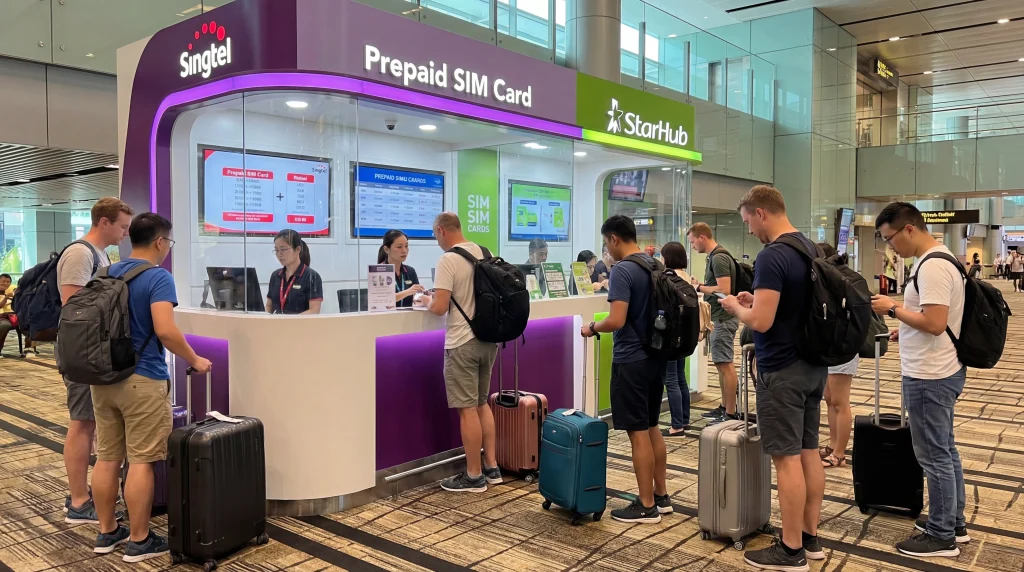

If you are arriving in Singapore and need mobile internet immediately, you may be searching for a SIM card at Singapore Airport.
For most travelers, “Singapore Airport” means Singapore Changi Airport, the main international airport serving Singapore and one of the busiest arrival points in Southeast Asia.
After landing, mobile internet is useful for Grab rides, Google Maps, MRT routes, WhatsApp, hotel directions, booking confirmations, airport pickup messages, business communication, shopping, attractions, and short stopovers.
Quick answer: You may be able to buy a physical SIM card at Singapore Airport, but for many travelers with an eSIM-compatible unlocked phone, a Singapore eSIM is usually easier because it can be installed before travel and used after arrival without visiting a SIM card counter.
Top Singapore eSIMs
Can You Buy a SIM Card at Singapore Airport?
Yes. Tourists may be able to buy a physical SIM card at Singapore Airport from airport counters, telecom retail points, convenience stores, electronics shops, travel service desks, or other airport retail locations.
However, availability, opening hours, registration requirements, plan options, data allowances, and prices can vary.
If you need internet immediately after landing, it is safer to prepare your mobile data before travel instead of relying only on finding a SIM card after arrival.
Why Travelers Search for SIM Cards at Singapore Airport
Most travelers need internet right after landing because the first hour after arrival usually involves transport, directions, messages, check-in details, and route planning.
- Booking Grab from the airport
- Opening Google Maps
- Checking MRT routes into the city
- Messaging airport pickup drivers
- Contacting hotels or apartment hosts
- Using WhatsApp after landing
- Opening booking confirmations
- Checking flight updates or onward connections
- Finding airport exits and pickup points
- Using business apps and travel tools
Singapore Airport SIM Card vs Singapore eSIM
| Feature | Singapore eSIM | Singapore Airport SIM Card |
|---|---|---|
| Can prepare before travel | Yes | No |
| Needs physical SIM card | No | Yes |
| Requires airport counter or shop | No | Usually yes |
| Requires SIM tray tool | No | Often yes |
| Can keep home SIM active | Often yes | Depends on phone setup |
| Best for older phones | No, if no eSIM support | Yes |
| Good for fast arrival setup | Yes, if installed correctly | Only after purchase and activation |
Why eSIM Is Often Easier Than Buying a SIM Card at Singapore Airport
A Singapore eSIM gives your phone mobile data without needing a physical SIM card.
You can install it before departure while connected to WiFi. After arriving in Singapore, select the eSIM for mobile data, enable data roaming on the eSIM line, and wait for network connection.
- No airport SIM card queue
- No physical SIM card swap
- No need to remove your regular SIM
- No risk of losing your home SIM
- No need to search for a counter after landing
- Useful immediately after arrival
- Works beyond the airport
- Good for Grab, Google Maps, MRT, WhatsApp, hotels, restaurants, and attractions
When an Airport SIM Card May Still Be Better
A physical SIM card at Singapore Airport can still be useful if your phone does not support eSIM.
It may also be suitable if you prefer a traditional SIM card setup or if you are using an older phone that only accepts physical SIM cards.
- Your phone does not support eSIM
- Your phone is older
- You prefer a physical SIM card
- You are using a device without eSIM support
- You are comfortable buying and activating a SIM after arrival
- You do not need internet immediately after landing
What to Check Before Buying a SIM Card at Singapore Airport
Before buying a physical SIM card at the airport, check the plan details carefully.
- Data allowance
- Plan validity period
- Activation process
- Hotspot availability
- Registration requirements
- Supported network
- Speed limits or fair usage rules
- Whether calls or SMS are included
- Whether the SIM works with your phone
- Whether your phone is carrier unlocked
Do You Need an Unlocked Phone?
Yes. Your phone should be carrier unlocked to use either a Singapore eSIM or a physical SIM card from another provider.
If your phone is locked to your home carrier, it may not work correctly with a travel eSIM or a local airport SIM card.
SIM Card at Singapore Airport for Grab
Grab is one of the most important apps for travelers arriving in Singapore.
Mobile internet helps you book airport transfers, find pickup points, message drivers, follow the route, and manage payments inside the app.
If you use an airport SIM card, you need to buy and activate it before using Grab with mobile data.
If you use a Singapore eSIM, you can usually connect faster after landing if the eSIM is already installed before travel.
SIM Card at Singapore Airport for Google Maps
Google Maps is useful immediately after arrival.
Travelers use it for airport navigation, MRT routes, walking directions, hotel addresses, restaurants, shopping malls, attractions, and travel time estimates.
Both a physical SIM card and a Singapore eSIM can support Google Maps when mobile data is active.
SIM Card at Singapore Airport for MRT Routes
Singapore’s MRT system is one of the easiest ways to travel from the airport into the city.
Mobile internet helps with route planning, station transfers, exits, walking directions, and hotel navigation.
This is useful if you are going to Marina Bay, Orchard Road, Chinatown, Little India, Bugis, Clarke Quay, Sentosa, or a business district.
SIM Card at Singapore Airport for WhatsApp
WhatsApp works in Singapore with WiFi or mobile data.
Most travelers can keep using WhatsApp with their existing number even when using a Singapore eSIM or a local SIM card for mobile data.
Using mobile data after landing helps with airport pickup coordination, family updates, business messages, group travel, and hotel communication.
SIM Card at Singapore Airport for Hotel Check-In
Before reaching your hotel or apartment, you may need internet to open your address, contact reception, message your host, confirm check-in time, or find the entrance.
This is especially useful for hotels around Marina Bay, Orchard Road, Chinatown, Little India, Bugis, Clarke Quay, Sentosa, and airport-area hotels.
SIM Card at Singapore Airport for Stopovers
Singapore is one of the strongest stopover destinations in Asia.
If you leave the airport during a stopover, mobile internet helps with luggage storage, Grab rides, MRT routes, Marina Bay, Gardens by the Bay, food courts, shopping, attraction tickets, and returning to the airport on time.
For short stopovers, eSIM can be more convenient than buying a physical SIM card because it saves time after landing.
SIM Card at Singapore Airport for Business Travelers
Singapore is a major business travel hub.
Business travelers often need mobile internet immediately for emails, calendar updates, hotel communication, conference apps, Grab, maps, documents, and messaging.
A Singapore eSIM is practical for business travelers because it can be prepared before departure and used right after arrival.
Singapore Airport WiFi vs SIM Card
Airport WiFi can help while you are inside the terminal, but it is not a complete mobile internet solution.
| Travel Need | Airport WiFi | SIM Card or eSIM |
|---|---|---|
| Use inside terminal | Yes | Yes |
| Use after leaving airport | No | Yes |
| Grab pickup coordination | Limited | Yes |
| MRT route changes | Limited | Yes |
| Google Maps while moving | No | Yes |
| Full Singapore trip | No | Yes |
Singapore Airport SIM Card vs Roaming
International roaming may work after landing if your home provider includes Singapore and roaming is enabled.
However, roaming costs, daily passes, speed limits, hotspot rules, and fair usage conditions depend on your provider.
A Singapore eSIM or airport SIM card can give you a separate travel data option instead of relying on your home provider.
| Feature | Airport SIM Card | International Roaming |
|---|---|---|
| Separate travel data plan | Yes | No |
| Works after landing | After purchase and activation | Yes, if active |
| Needs airport purchase | Usually yes | No |
| Can keep home SIM active | Depends on phone setup | Yes |
| Cost predictability | Depends on local plan | Depends on home provider |
Singapore Airport SIM Card vs Pocket WiFi
Pocket WiFi can be useful for groups or travelers with several devices, but it adds another device to manage.
You may need to collect it, charge it, carry it, keep it nearby, and sometimes return it after the trip.
A SIM card or eSIM works directly on your phone, which is usually easier for solo travelers, couples, business travelers, and short-stay tourists.
| Feature | SIM Card or eSIM | Pocket WiFi |
|---|---|---|
| Extra device needed | No | Yes |
| Needs charging | Phone only | Phone and WiFi device |
| Works directly on phone | Yes | Requires WiFi connection |
| Good for groups | Hotspot if supported | Yes |
| Needs return | No | Often yes |
How Much Data Do You Need After Arriving in Singapore?
| Trip Type | Recommended Data |
|---|---|
| Short stopover | 1GB – 3GB |
| Weekend Singapore trip | 5GB – 10GB |
| One-week Singapore trip | 10GB – 20GB |
| Business trip or active social media | 15GB – 30GB |
| Hotspot, video calls, remote work | 30GB+ or unlimited recommended |
What Uses the Most Mobile Data in Singapore?
- Video streaming
- YouTube
- TikTok and Instagram Reels
- Video calls
- Cloud photo backups
- Hotspot sharing
- Large downloads
- Uploading travel videos
- Laptop updates on hotspot
Google Maps, Grab, WhatsApp text messages, MRT searches, email, hotel communication, and restaurant searches usually use much less data.
How to Reduce Mobile Data Usage After Landing
- Download offline Google Maps before travel
- Use WiFi for app updates and large uploads
- Turn off automatic cloud photo backup on mobile data
- Disable autoplay video in social apps
- Use WhatsApp text instead of video calls when possible
- Limit hotspot sharing
- Save hotel and attraction tickets offline
- Pause laptop updates when using hotspot
Can You Keep Your Home SIM Active?
With eSIM, many modern smartphones allow you to keep your regular SIM active while using the Singapore eSIM for mobile data.
This is useful for calls, SMS verification codes, banking messages, work authentication codes, and WhatsApp on your existing number.
With a physical airport SIM card, keeping your home SIM active depends on your phone’s dual SIM setup and whether you remove your regular SIM card.
Should You Turn Off Roaming on Your Home SIM?
If you want to avoid unwanted roaming charges, keep data roaming disabled on your home SIM and use your Singapore eSIM or local data option for mobile internet.
This allows your travel data connection to handle internet while your home SIM can remain available for important SMS or calls, depending on your provider and phone settings.
Do You Need Data Roaming Enabled for Singapore eSIM?
Yes. Most travel eSIM plans require data roaming to be enabled on the eSIM line.
This does not mean you need to enable data roaming on your home SIM. Enable data roaming only on the Singapore eSIM line if you are using it for mobile data.
APN Settings for NoveSIM eSIM
| Setting | Value |
|---|---|
| APN | data.esim |
| Username | Leave blank |
| Password | Leave blank |
How to Use Singapore eSIM Instead of Airport SIM Card
- Choose your Singapore eSIM plan before your trip.
- Install the eSIM while connected to WiFi.
- Arrive at Singapore Airport.
- Turn off airplane mode.
- Select the Singapore eSIM for mobile data.
- Enable data roaming on the eSIM line.
- Wait for network connection.
- Open Google Maps, Grab, WhatsApp, Safari, Chrome, or another app to test mobile internet.
What If Mobile Internet Does Not Work After Landing?
- Make sure the Singapore eSIM or SIM card is installed correctly.
- Make sure the correct SIM or eSIM is selected for mobile data.
- Enable data roaming if using a travel eSIM.
- Turn airplane mode on for 30 seconds and then off.
- Restart your phone.
- Check APN settings if needed.
- Disable VPN temporarily.
- Move to a more open area if signal is weak.
- Try manual network selection if available.
Do Not Delete Your eSIM First
If your eSIM does not connect immediately, do not delete it first.
Some eSIM profiles cannot be installed again after removal. Check mobile data selection, data roaming, airplane mode, APN settings, restart, VPN, and network selection before deleting anything.
Before Flying to Singapore
- Check if your phone supports eSIM
- Make sure your phone is carrier unlocked
- Install your Singapore eSIM before departure if possible
- Download offline maps
- Save hotel and booking confirmations
- Save airport transfer details
- Estimate your data usage
- Keep your QR code and installation instructions accessible
- Carry a power bank for long travel days
Where to Find Your NoveSIM eSIM Details
Your NoveSIM QR code, installation instructions, and eSIM details are available:
- In your confirmation email
- Under My Account → Orders → View → eSIM details
More Singapore Airport and eSIM Guides
- Singapore eSIM
- eSIM Changi Airport
- Best eSIM for Changi Airport
- Mobile Internet Changi Airport
- SIM Card Changi Airport
- WiFi Changi Airport
- Internet Changi Airport
- Internet Singapore Airport
- WiFi Singapore Airport
More Singapore Travel Internet Guides
- Mobile Internet Singapore
- Internet Singapore Tourists
- How to Get Internet in Singapore
- Best Way to Get Mobile Internet in Singapore
- Local SIM vs eSIM Singapore
- Singapore Roaming Charges
- eSIM vs SIM Card Singapore
- Best Mobile Data Singapore
- Unlimited Data eSIM Singapore
FAQ: SIM Card at Singapore Airport
Can I buy a SIM card at Singapore Airport?
Yes. Tourists may be able to buy physical SIM cards at Singapore Airport from airport counters, telecom retail points, convenience stores, or other airport shops. Availability and conditions can vary.
Is eSIM better than buying a SIM card at Singapore Airport?
For many travelers with compatible unlocked phones, eSIM is more convenient because it can be installed before travel and avoids physical SIM card replacement after landing.
Do I need mobile internet immediately after landing?
Mobile internet is very useful after landing for Grab, Google Maps, MRT routes, WhatsApp, hotel directions, booking confirmations, and airport pickup coordination.
Can I use Grab with a Singapore eSIM or airport SIM card?
Yes. Grab works with mobile data and is useful for airport transfers, pickup coordination, driver messages, and route tracking.
Can I use Google Maps after landing at Singapore Airport?
Yes. Google Maps works with mobile data and helps with MRT routes, hotel directions, walking navigation, restaurants, and attractions.
Can I keep my home SIM active while using Singapore eSIM?
Many modern phones support dual SIM, allowing you to keep your home SIM active while using a Singapore eSIM for mobile data.
Do I need an unlocked phone?
Yes. Your phone should be carrier unlocked to use a Singapore eSIM or physical SIM card from another provider.
Do I need data roaming enabled for Singapore eSIM?
Yes. Most travel eSIM plans require data roaming to be enabled on the Singapore eSIM line.
Should I enable roaming on my home SIM?
No, not if you want to avoid home-provider roaming charges. Enable data roaming only on the Singapore eSIM line if you are using it for mobile data.
What APN should I use for NoveSIM eSIM?
If manual APN editing is available, use data.esim and leave username and password blank.
Final Recommendation
A SIM card at Singapore Airport can work, especially if your phone does not support eSIM.
However, for most travelers with compatible unlocked phones, a Singapore eSIM is usually easier because it can be installed before travel and used after landing for Grab, Google Maps, MRT routes, WhatsApp, hotel communication, shopping, attractions, business travel, and stopovers.


