


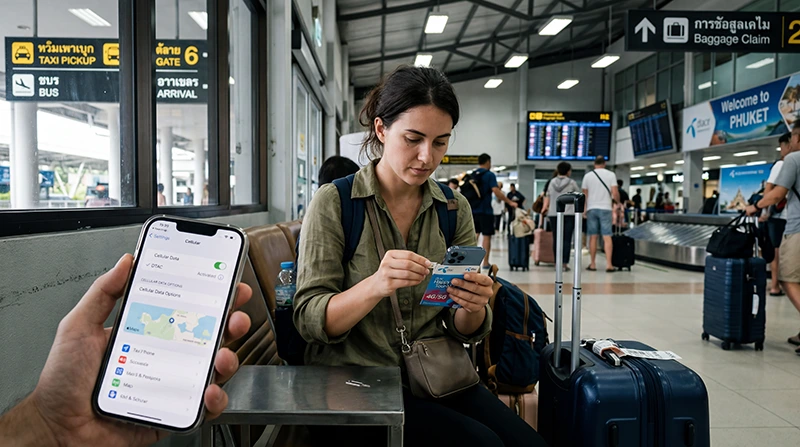

Buying mobile service at Phuket Airport may involve an arrivals queue, identity checks and a limited choice of bundles, especially after a late flight.
Travellers using Phuket Airport should compare desk opening hours and total plan validity with the option of installing an eSIM before departure.
Preparing NoveSIM before reaching Phuket Airport keeps the physical SIM in place and makes mobile data available without depending on an airport shop.
Quick answer: Buying a SIM at the airport can work when a suitable retailer is open and stock is available. A travel eSIM installed before departure avoids the queue when mobile data, rather than a local number, is the priority.
Top Thailand eSIMs


Check the live Phuket, Thailand eSIM options, verify the phone on the compatible-device list and review how our service works before purchase.
Airport Purchase Considerations
Retailers, hours, identification rules and packages can change. Verify current airport information for airport counters, retailer hours, registration, resort transfers, beaches and island trips and keep an alternative.
Test the connection with the apps and tasks you will actually use rather than relying only on a speed icon or signal bars. Record what works before changing another setting so our support team has useful details if you need help.
Local SIM versus Travel eSIM
A local SIM may include a domestic number. Our travel eSIMs are data-only and keep the physical slot available on a compatible unlocked phone.
Do not treat one successful connection as a guarantee for the complete trip. The result can vary with buildings, terrain, congestion, transport movement and temporary network conditions. Recheck the exact requirement behind buying a SIM card at Phuket Airport at the place and time it is needed.
Compare the Complete Cost
Check registration, taxes, allowance, validity, hotspot policy, activation and route coverage rather than one displayed price.
Apply this point to the real route behind buying a SIM card at Phuket Airport. Conditions in Phuket, Thailand can change between a transport hub, an indoor room and an onward journey, so save the relevant plan term or setting before departure instead of relying on a broad destination assumption.
Connect the Travel Line after Landing
Leave Airplane Mode, enable the travel eSIM, choose it for Mobile Data and enable Data Roaming on that line. Disable automatic switching and wait for Automatic Network Selection to register before changing advanced settings.
Test the connection with the apps and tasks you will actually use rather than relying only on a speed icon or signal bars. Record what works before changing another setting so our support team has useful details if you need help.
Plan for the Journey beyond the Terminal
Airport Wi-Fi ends outside the terminal. Save the transfer route, accommodation address and booking reference offline, then test a map and ordinary website before starting the onward journey.
Do not treat one successful connection as a guarantee for the complete trip. The result can vary with buildings, terrain, congestion, transport movement and temporary network conditions. Recheck the exact requirement behind buying a SIM card at Phuket Airport at the place and time it is needed.
If Mobile Data Does Not Start
Confirm plan validity and destination coverage, refresh registration with Airplane Mode and use APN data.esim only if manual entry is required. Preserve the installed profile and contact Support if reversible checks fail.
Apply this point to the real route behind buying a SIM card at Phuket Airport. Conditions in Phuket, Thailand can change between a transport hub, an indoor room and an onward journey, so save the relevant plan term or setting before departure instead of relying on a broad destination assumption.
What Can Be Confirmed before Arrival?
Airport retailers, Wi-Fi names, opening hours and login methods can change. Verify the latest airport signage or official information for airport counters, retailer hours, registration, resort transfers, beaches and island trips; do not treat an older traveller report as a guarantee of stock or service.
Test the connection with the apps and tasks you will actually use rather than relying only on a speed icon or signal bars. Record what works before changing another setting so our support team has useful details if you need help.
Related Articles
- Browse Our Destinations
- Check whether a phone supports eSIM
- Install an eSIM on iPhone
- Install an eSIM on Android
- Use Data Roaming with a travel eSIM
- Keep a primary number with a data eSIM
- Use an eSIM without Wi-Fi
- Understand roaming settings for eSIMs
- Estimate a practical travel-data allowance
- Our Frequently Asked Questions
- Contact Our Support Team
FAQ
Buying a sim card at phuket airport?
Buying a SIM at the airport can work when a suitable retailer is open and stock is available. A travel eSIM installed before departure avoids the queue when mobile data, rather than a local number, is the priority.
Can I keep my primary SIM enabled for Phuket, Thailand?
Usually yes on a compatible dual-SIM phone. For buying a SIM card at Phuket Airport, select the travel eSIM for data, keep Data Roaming off on the primary line and check the home carrier’s charges for calls, SMS and voicemail.
Which roaming setting applies to buying a SIM card at Phuket Airport?
Enable Data Roaming on the our travel eSIM line when partner-network access in Phuket, Thailand requires it. Keep roaming off on the primary line unless its cost is understood, and disable automatic data switching.
Should I delete the eSIM while checking buying a SIM card at Phuket Airport?
Do not delete the installed eSIM. If you have a connection problem in Phuket, Thailand, check the plan status, the active data line, Data Roaming, network registration and APN first. Remove it only when our support team specifically instructs you to do so.
Final Recommendation
Use this page to answer buying a SIM card at Phuket Airport with the requirements of the actual trip or device, not a generic plan label.
For Phuket, Thailand, confirm compatibility and live product terms, prepare the phone on dependable Wi-Fi and keep information for airport counters, retailer hours, registration, resort transfers, beaches and island trips available offline.
For a reliable connection, select our travel eSIM for Mobile Data, enable Data Roaming on that line and preserve the installed profile. If manual our APN entry is required, use data.esim with blank username and password.