


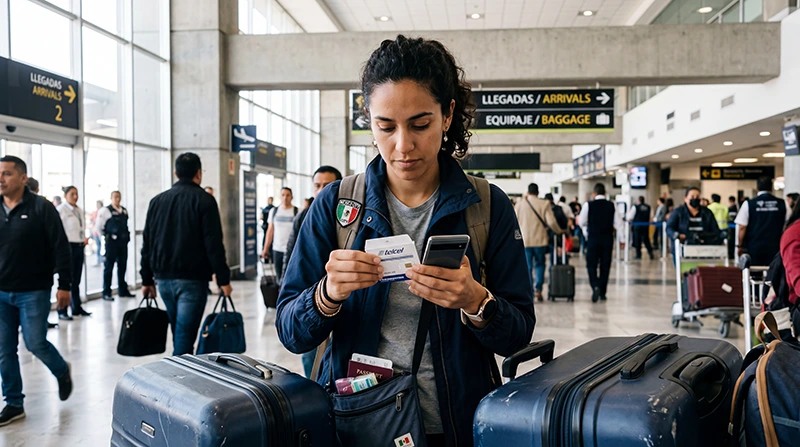

When buying a SIM card at Mexico City International Airport (MEX), ask the seller to identify the operator and plan, explain the complete price and help you finish registration. Test the purchased line with Wi-Fi off before relying on it for the journey into the city.
Check your arrival airport code and terminal before looking for a shop: this guide concerns MEX, not another airport serving the region. Keep your accommodation address and booked transfer instructions offline in case finding and activating a suitable SIM takes longer than expected.
We provide NoveSIM prepaid travel eSIMs for mobile data. They do not include a Mexican number, conventional calls or carrier SMS. A domestic service that explicitly includes those features may be a better fit if you need them.
Quick answer: Buy only after you understand the plan, required identification and total charge. Complete registration, select the new SIM for data, turn Wi-Fi off and load a small webpage. If you prefer to arrange a travel eSIM, check compatibility and what starts its validity before installing it according to the purchased instructions.
Top Mexico eSIMs

Mexico eSIM
Fixed
1 GB, 7 days4.00$2 GB, 15 days6.00$3 GB, 30 days8.00$Unlimited
Unlimited, 1 day4.00$Unlimited, 3 days9.50$Unlimited, 5 days15.00$
North America eSIM
Fixed
1 GB, 7 days4.50$2 GB, 15 days8.00$3 GB, 30 days11.00$Unlimited
Unlimited, 1 day6.50$Unlimited, 3 days17.00$Unlimited, 5 days28.00$Central America eSIM
Fixed
1 GB, 7 days8.00$2 GB, 15 days13.00$3 GB, 30 days17.50$Unlimited
Unlimited, 1 day7.50$Unlimited, 3 days18.50$Unlimited, 5 days29.50$Find a Seller in the Right Terminal
Ask an official airport information point where a mobile-service seller is available in your terminal. Confirm whether it is accessible from your current arrivals area and whether it can activate a new tourist line, rather than only sell a recharge or accessories.
The airport publishes a shopping directory, but we have not verified a particular SIM outlet’s current stock, registration service or opening hours. Do not plan a late arrival around an unconfirmed shop listing.
At the counter, ask whether you are buying directly from the operator or through a reseller. Get the operator name, exact prepaid offer and a receipt showing what you paid for. Keep the SIM packaging and the seller’s support details until you have checked the service.
Check Registration Before Paying for a Usable Line
Ask which documents the selected operator accepts and whether the seller can help you complete its official registration process. For example, AT&T’s published guidance says a foreign tourist needs a valid passport from their home country and must complete registration to use the service.
AT&T describes activation followed by registration through its official process and an SMS confirming completion. Ask how you will recognise the confirmation for your purchase. The fact that the phone recognises a SIM or displays signal bars does not establish that registration has finished.
Follow your chosen operator’s own procedure. If you need data before leaving MEX, ask for a working demonstration instead of accepting an assurance that the line will become usable later.
Ask What the Price Actually Includes
Have the seller show the conditions for the exact offer. A price on a sign may describe a recharge or allowance rather than the complete cost of the SIM and activation.
| Question | Why it matters |
|---|---|
| What is the final amount and currency? | Include the SIM, selected allowance, taxes and any setup or service fee before comparing offers. |
| How much general-purpose data is included? | Separate ordinary browsing data from app-specific benefits. Check any daily high-speed limit and what happens after it. |
| Are a Mexican number, calls and SMS included? | Confirm which services and destinations are covered rather than assuming every local offer includes the calls you need. |
| When does the allowance start and expire? | Ask for the usable expiry date and time. The plan’s validity may differ from the lifetime of the SIM or telephone line. |
| Can I use hotspot? | Check permission and any separate limit if you intend to connect a laptop or another device. |
| How do I buy more data? | Confirm the method and cost, and whether a recharge extends the current allowance or purchases a different offer. |
If you mainly need internet for messages, maps and bookings, compare the final local-SIM price with the current Mexico eSIM plans and any Mexico roaming already included in your home tariff. For the service differences, use the local SIM and travel eSIM comparison.
Test the Purchased SIM at the Counter
- Check that the device is carrier-unlocked and accepts the intended SIM format. If inserting a physical card, store any removed home SIM safely.
- Complete the operator’s activation and registration process, including the required confirmation.
- Select the new line for mobile data and review automatic data switching so the test cannot silently use your home line.
- Turn Wi-Fi off briefly and load a small webpage. Then send the message or open the booking information you need for the transfer.
- If conventional calls or SMS are part of the purchase and essential to you, ask the seller to demonstrate those services too.
- Check how to view the remaining allowance and expiry, and save the support contact before leaving.
If the webpage does not load, let the seller investigate the purchased line while you are still there. Ask them to explain any settings they change. Use the domestic operator’s instructions for its SIM; a travel provider’s APN is not a universal setting for Mexican mobile service.
Preparing a Travel eSIM Instead
An eSIM is an alternative for a compatible, unlocked device when mobile data meets your needs. Before downloading the profile, read what starts the purchased plan’s validity and any installation deadline. Install over reliable internet at the time its instructions permit.
On arrival at an included destination, select the travel profile for data, apply its supplied roaming settings and test a webpage with Wi-Fi briefly off. The Mexico City Airport eSIM guide covers preparation and arrival settings in detail.
If you still need internet to download the profile, the MEX Wi-Fi guide explains access and login checks. Keep the installed eSIM if a problem occurs and use the Mexico troubleshooting guide; delete the profile only if NoveSIM Support instructs you to do so.
Keep the City Transfer Independent of Setup
Save the complete accommodation address, booking reference, arrival terminal and your provider’s current meeting instructions before travelling. Keep a contact method available outside a single app, and download a suitable map area.
Once connected, recheck the pickup information before moving to the meeting point. Internet access does not establish that an app-based vehicle can collect you at a particular terminal door. Follow the airport signage and your booked provider’s instructions.
A successful terminal test tells you that the line works there. Reception can still change inside buildings or along the onward route. Keep the final approach to your accommodation accessible offline even after the purchase is complete.
Related Articles
FAQ
Is a SIM shop guaranteed to be open when I arrive at MEX?
We have not verified a specific counter’s current hours, stock or registration service. Ask the airport information point about your terminal and keep transfer details offline if a suitable purchase is unavailable.
What identification will a foreign visitor need?
AT&T lists a valid passport from the visitor’s home country for its registration process. Confirm the requirements with the operator you choose and check that registration is complete before depending on the line.
Should I install a travel eSIM before the flight?
Check what starts its validity first. Install on reliable internet at the time permitted by the purchased instructions; do not assume every plan waits until arrival to start its countdown.
Final Recommendation
For a local SIM at Mexico City Airport, get clear terms, finish registration and test the purchased service before leaving the seller.
Choose a travel eSIM if a data-only service suits your device and trip, following its installation and validity instructions.
Keep the address and meeting details offline so the transfer can continue even if buying or configuring a connection takes longer than planned.