


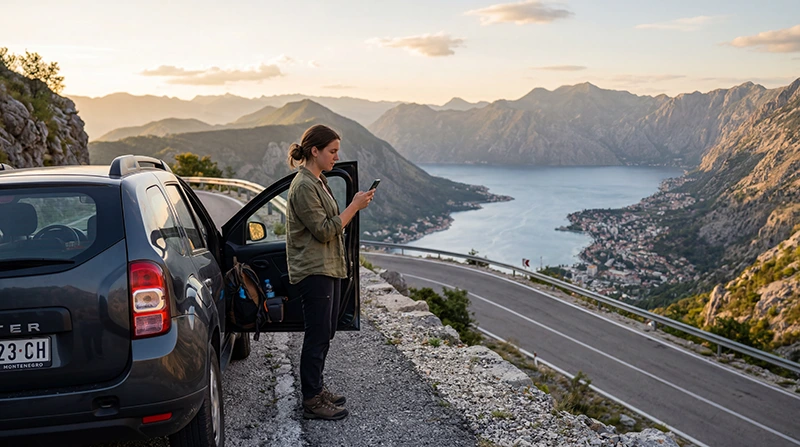

Montenegro road trip internet is most dependable when mobile data and offline preparation work together. A phone can help with navigation, accommodation messages, parking research and changed plans, but mountains, valleys, tunnels and border areas make continuous reception an unsafe assumption.
The itinerary matters more than the country’s compact size. Driving around the Bay of Kotor or between Podgorica and the coast creates different connection conditions from crossing the Durmitor region, following a panoramic mountain route or continuing into a neighbouring country.
A NoveSIM travel eSIM provides data only. We do not provide a Montenegrin number, conventional calls or SMS. Internet calling and messaging apps can use mobile data where coverage and app conditions allow, while ordinary carrier services remain with another line.
Quick answer: Install and test a Montenegro eSIM before starting the drive, but download the route, accommodation addresses and essential documents offline. Check current road conditions and closures before mountain sections, verify every country in the plan for a cross-border journey and change phone settings only after stopping safely.
Top Montenegro eSIMs

Montenegro eSIM
Fixed
1 GB, 7 days€ 3.552 GB, 15 days€ 5.323 GB, 30 days€ 7.10Unlimited
Unlimited, 1 day€ 3.99Unlimited, 3 days€ 8.43Unlimited, 5 days€ 12.87
Balkans eSIM
Fixed
1 GB, 7 days€ 4.442 GB, 15 days€ 7.103 GB, 30 days€ 9.32Unlimited
Unlimited, 1 day€ 4.88Unlimited, 3 days€ 11.09Unlimited, 5 days€ 17.30Plan Montenegro road trip internet by route type
| Route type | Useful online tasks | Offline preparation |
|---|---|---|
| Bay of Kotor and coast | Parking research, ferry checks, accommodation messages and live directions | Town maps, exact parking destination and first approach |
| Podgorica, Cetinje and the coast | Route comparison, weather and arrival updates | Complete route and a sensible alternative |
| Lake Skadar and rural detours | Business details, meeting points and changed plans | Village address, return route and booking contacts |
| Durmitor and northern mountains | Current road and weather checks before departure | Official route material, maps and all essential documents |
| Cross-border journey | Border updates and onward accommodation communication | Documents, next-country map and connection plan |
This table is a planning framework, not a coverage guarantee. Reception changes with the partner network, location, terrain, congestion, device and the vehicle around it.
Bay of Kotor and the Adriatic coast
A coastal itinerary can include Herceg Novi, Kotor, Tivat, Budva, Bar or Ulcinj. Mobile data is useful before entering a busy town because the driver can choose the intended car park, save the walking route and send an arrival message before traffic becomes demanding.
A map pin placed only on the old-town centre may lead towards a restricted or impractical final approach. Confirm the accommodation’s vehicle instructions and parking location in advance. Save them as text or a screenshot instead of relying on a message thread that must reload.
A ferry or coastal shortcut should be checked on the day of travel through its current official source. Timetables, queues, operating conditions and prices can change, so this guide does not reproduce a fixed schedule. Keep a road alternative available offline.
Podgorica, Cetinje and the coast
Routes between the capital, Cetinje and the Adriatic can involve elevation changes and several plausible map options. Decide which route suits the vehicle, weather and driving confidence before departure rather than accepting a last-minute reroute without review.
Download the full corridor, not only the destination town. Keep the accommodation address, check-in window and host contact available offline. If live navigation proposes a diversion, stop at a safe place before comparing it with the planned route.
Mobile data can improve flexibility, but it does not confirm that a narrow local road is appropriate for every rental car. Follow signs, official restrictions and the rental company’s conditions.
Lake Skadar and rural stops
A Lake Skadar day can combine a main-road journey with smaller roads, village stops or a pre-arranged boat meeting point. Save the exact operator or accommodation pin and written directions before leaving a stronger connection.
Do not rely on a business listing alone for departure time or location. Confirm the meeting point directly and keep its phone or messaging contact offline. If a booking requires an ordinary call, remember that a NoveSIM eSIM is data-only.
Plan the return while it is still light and while the route can be reviewed calmly. A phone signal should not be the only way to identify the main road back.
Durmitor, Tara and mountain roads
Montenegro’s official tourism material identifies panoramic routes around Durmitor and across the country’s coastal and mountain regions. These journeys are precisely where offline preparation matters most: high terrain, deep valleys and seasonal conditions can affect both roads and reception.
Check current road status and weather before leaving the last practical town. A saved route does not prove that a road is open or suitable today. Mountain conditions, maintenance and temporary restrictions can change after an offline map was downloaded.
For the Durmitor Ring or another scenic detour, obtain the current official route information and verify passability. Carry sufficient fuel, water and appropriate equipment for the planned conditions. Mobile data is a useful update channel, not a substitute for route judgement or roadside preparation.
Download more than one navigation layer
Download the required map area in the navigation app and test it in offline mode. Also save the important addresses, route overview and booking references outside the app. That second layer helps if the account logs out, the app fails or the wrong map area was selected.
- Airport or rental-car collection point.
- First accommodation and parking instructions.
- Every overnight stop.
- Fuel stops for longer mountain sections.
- Border crossing and next-country destination.
- Rental company and roadside-assistance contacts.
Offline consumer maps remain navigation aids, not proof that a road is open. Compare them with current official traffic information before departure and follow signs or instructions on the ground.
Use the phone only after stopping safely
Montenegro’s police have specifically highlighted the danger of improper mobile-phone use while driving. Set the route before moving, mount the device where permitted and let a passenger handle searches or messages.
If the connection drops, continue according to the downloaded route until a safe stopping place is available. Do not hold the phone, reopen settings or attempt manual network selection while the vehicle is moving.
Prepare audio prompts, screen brightness and charging before departure. A connection problem is inconvenient; distracted driving creates a much greater risk.
Choose a Montenegro-only or regional plan
A Montenegro country plan is suitable when the entire drive stays inside the country. For a route into Croatia, Albania, Bosnia and Herzegovina, Serbia or another destination, verify whether a regional plan lists every country explicitly.
Do not assume that a plan labelled “Europe” includes Montenegro or every Western Balkan market. Open the current destination list before purchase. The guides for Montenegro and Croatia, Montenegro and Albania, Montenegro and Bosnia and Montenegro and Serbia cover the main two-country decisions.
At a border, the phone may remain attached to the previous network for a period or connect to a stronger signal from across the frontier. Keep automatic selection enabled unless the plan instructions or support require otherwise, and verify that the displayed network and data line are appropriate after stopping.
Prepare the eSIM before collecting the car
- Confirm that the exact phone model supports eSIM and is unlocked.
- Choose a plan that covers the complete route and duration.
- Install it on dependable private Wi-Fi.
- Label the eSIM clearly.
- After arrival, select it for Mobile Data.
- Enable Data Roaming on the travel line when required.
- Keep Data Roaming disabled on the primary SIM.
- Turn off automatic mobile-data switching.
- Test a web page and the navigation app before driving away.
If manual NoveSIM APN entry is required, use data.esim and leave username and password blank. Do not delete the installed eSIM unless NoveSIM Support specifically instructs you to do so. See how to use an eSIM in Montenegro for the complete setup sequence.
Estimate data for the whole drive
Turn-by-turn navigation and messaging usually require less data than streaming, video uploads or laptop tethering. Automatic photo backup can consume a substantial allowance after a scenic day even when the driver has barely browsed.
Download music, podcasts, maps and app updates on Wi-Fi. Pause non-essential cloud synchronisation on mobile data. Review how much data a Montenegro trip needs and leave a margin for route changes or delays.
If several passengers share a hotspot, confirm that tethering is allowed and decide which devices may connect. Check the remaining allowance before a mountain or cross-border day.
Coverage planning without false guarantees
An eSIM uses a local partner network; it does not create coverage beyond that network’s reach. A national coverage map is a planning tool, while real performance also depends on terrain, network load, device bands and whether the phone is inside a vehicle or building.
Use the Montenegro network guide to understand route-level factors. In a weak area, wait until safely parked before moving the phone, toggling flight mode or checking settings.
For a planned remote stop, send arrival details before leaving a dependable signal. Agree on a meeting point and time that do not require continuous tracking.
Rental-car documents and roadside contacts
Save the rental agreement, insurance details, permitted-country list and roadside-assistance procedure locally. Cross-border travel may require advance permission or documents from the rental company, regardless of whether the eSIM works in the next country.
Photograph the relevant paperwork and keep the rental company’s contact accessible to another passenger. A data-only eSIM supports internet messages and calls through apps, but it does not provide ordinary carrier calling or SMS.
Ask the rental company which action to take after a breakdown or incident. Do not rely on a generic web search when a contract specifies its own assistance channel.
Control home-SIM roaming
Montenegro should not be assumed to fall within an EU roaming allowance. Check whether the home carrier includes it and what data, call, SMS and voicemail charges apply.
Keep the travel eSIM selected for data and disable automatic switching. The primary line may remain active for its number, but its carrier services retain their own tariff. The Montenegro roaming guide explains the settings and cost checks.
Road-trip connectivity checklist
- Current road and weather information checked.
- Full route and alternative saved offline.
- Accommodation, parking and meeting points stored.
- eSIM installed and tested before driving.
- All countries listed in the selected plan.
- Primary-SIM data switching disabled.
- Phone mount, charging cable and power bank ready.
- Rental and roadside-assistance documents available offline.
Related Articles
- Montenegro eSIM Plans
- Best eSIM for Montenegro
- Best Network in Montenegro
- How Much Data Do You Need for Montenegro?
- Google Maps in Montenegro
- Roaming Charges in Montenegro
FAQ
Will mobile data work throughout a Montenegro road trip?
No provider can guarantee every section. Reception depends on the partner network, terrain, location, device and congestion. Use mobile data with downloaded maps and offline documents.
Do I need offline maps for driving in Montenegro?
Yes, particularly for mountain, rural and cross-border routes. Download the complete area and save important addresses separately, then check current road conditions before departure.
Will a Montenegro eSIM work after crossing the border?
A country-only plan may not. Choose a regional plan or another country plan that explicitly lists every destination, and verify the coverage before the journey.
Can I change eSIM settings while driving?
No. Configure and test the phone before moving. If troubleshooting is required, stop in a safe and permitted place or let a passenger handle the device.
Final Recommendation
Use Montenegro road trip internet as one layer of the journey plan. Install the eSIM before collecting the car, confirm coverage for every country and save the full route, accommodation details and assistance contacts offline.
Prepare differently for the coast, Lake Skadar and the northern mountains. Check current road and weather information before remote sections, and never interpret an offline route or a coverage map as proof of present conditions.
Set navigation before departure and change settings only after stopping safely. Reliable road-trip connectivity comes from mobile data, offline preparation, controlled roaming and disciplined phone use—not from assuming the signal will follow every road.