


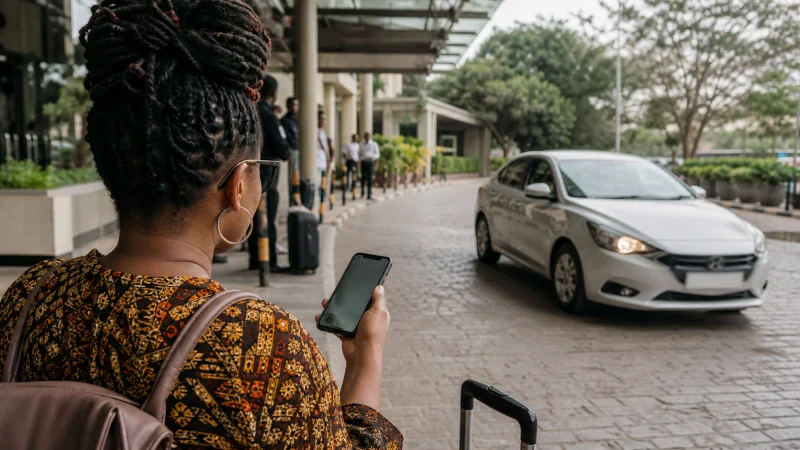

Ride-hailing in Kenya starts with checking whether the app serves both ends of the planned journey. An app available in a city is not a promise of a car at every terminal, hotel or time of day.
For an airport arrival, prepare the account before the flight and decide how you will pay. You also need a way to read driver messages after leaving terminal Wi-Fi. If the arrival is time-sensitive, keep a separately agreed transfer option.
Our Kenya eSIM plans provide travel data on compatible, unlocked phones. We do not supply a Kenyan number, ordinary calls or SMS. Mobile internet can support an app, but it does not complete its phone verification or payment setup for you.
Quick answer: Before using ride-hailing in Kenya, verify your account and payment method, check the exact location in the app and choose a pickup point you can identify. After matching, compare the driver and vehicle with the current booking. Keep data available for contact, and do not board a different vehicle simply because someone knows where you are going.
Top Kenya eSIMs

Kenya eSIM
Fixed
1 GB, 7 days€ 9.332 GB, 15 days€ 15.553 GB, 30 days€ 21.33Unlimited
Unlimited, 1 day€ 10.22Unlimited, 3 days€ 26.22Unlimited, 5 days€ 42.66
Where to check ride-hailing availability in Kenya
Uber’s official Kenya directory lists Nairobi, Mombasa and Uasin Gishu. Use the app to check service for the actual journey. The directory does not establish a live driver supply, waiting time or fare.
For any other service you are considering, verify its official location information and then test the pickup in the app. Do not infer that a food-delivery service in a city means passenger rides are also offered there.
Ask your accommodation about a booked transfer if you cannot confirm service at the arrival point. A city directory is not a reason to depend on an app for a safari camp or an unfamiliar onward route.
Complete account checks before the travel day
Install the official app, sign in and resolve any verification request while you still have reliable access to your usual number or email. Do not postpone an account recovery problem until you are waiting outside arrivals.
If the app requests an SMS code, a data-only eSIM cannot receive it as a Kenyan carrier number. Check which number your account uses and how you will access it during the trip. Keeping a home line enabled is a separate choice, subject to your home operator’s charges.
Driver contact also needs checking. Use the messaging or calling feature available in the app; do not assume every contact option is an internet call. If the app opens the phone dialler, any conventional call uses the selected voice line and its tariff.
Our Kenya roaming guide helps you distinguish home-line charges from travel data. A working eSIM does not make ordinary phone calls free.
Look at the payment method before requesting
Check the payment options displayed for your account and journey. Do not assume cash, a particular card or mobile money is accepted merely because another traveller used it on a different trip.
Read the estimate and any conditions shown before confirming. We do not publish a fixed airport fare here: the live app is the relevant place to assess that request. Keep enough funds in the selected method and understand how any verification or payment prompt will be completed.
If you intend to use M-PESA, first establish that you have a registered account and that the app offers it for your booking. A NoveSIM data plan does not open a wallet. Never share a financial PIN or verification code with a driver.
Make the pickup location unambiguous
- Enter the destination and check that it matches your booking address.
- Review the proposed pickup point, including any terminal or meeting-area instructions.
- Request the journey only when you are ready to reach that point.
- After matching, read the driver details and any message about the meeting location.
- If you need to clarify the pickup, communicate through the app and remain in a suitable public waiting area.
Do not invent a gate or move into a restricted area to follow a pin. Ask airport staff where passengers may meet an app-booked vehicle. Save your accommodation’s address separately so you can check an unexpected destination suggestion.
For arrival connectivity, consult the Nairobi airport Wi-Fi guide or Mombasa airport Wi-Fi guide as appropriate. Neither connection should be assumed to extend to the vehicle meeting area.
Verify the car and driver before boarding
Uber’s vehicle identification guidance explains where to see the driver’s photo, vehicle make and model, and licence plate. Compare those details with the actual vehicle and person before getting in.
If they do not match, do not board while someone explains that the app is wrong. Stay somewhere suitable and use the platform’s help or reporting channel to resolve the mismatch.
Use the current booking rather than an earlier screenshot if the app changes the matched driver. A screenshot can preserve a reference, but it cannot confirm that an old match is still your assigned ride.
If the connection fails after a match
Keep mobile data and battery available through pickup. Before leaving Wi-Fi, test a new page on the travel data line rather than assuming the app will update outside the terminal.
If the app stops responding, do not immediately request another car: first check whether the original booking is still active. When you regain access, review its status and messages. If you cannot resolve it, use the agreed transfer fallback rather than accumulating bookings you cannot monitor.
If all online services fail, use the Kenya eSIM troubleshooting guide. Retain the installed profile. If other pages load but the ride app does not, check the app’s account, payment and service status rather than resetting the whole phone’s network configuration.
Related Articles
FAQ
Can I rely on a ride app anywhere in Kenya?
No. Check the specific pickup and destination in the official app. A listed city does not guarantee drivers at every location. Arrange an alternative for a journey where availability is uncertain.
Do I need a Kenyan number to use a ride app?
Check the chosen platform’s account requirements. A NoveSIM travel eSIM provides data, not a Kenyan number or carrier SMS. Complete verification on the number your account uses before departure.
Can I pay with cash or a foreign card?
Use the options shown for your account and booking. Do not assume either is accepted for every service. Confirm the selected method and resolve payment verification before requesting the journey.
What if the arriving vehicle differs from the app?
Do not board. Compare the current driver and vehicle details, remain in a suitable public place and use the platform’s support or reporting channel to resolve the mismatch.
Final Recommendation
Prepare ride-hailing in Kenya as a booking task: confirmed service, a working account and an accepted payment method. Data is necessary for many app functions, but it cannot replace those checks.
Agree an identifiable pickup point and verify the current driver and vehicle before boarding. Do not let a lost Wi-Fi connection or an unexpected car rush the decision.
Keep a transfer fallback for uncertain locations and time-sensitive arrivals. That gives you a way to continue the journey without relying on nationwide availability or an unverified fare promise.