


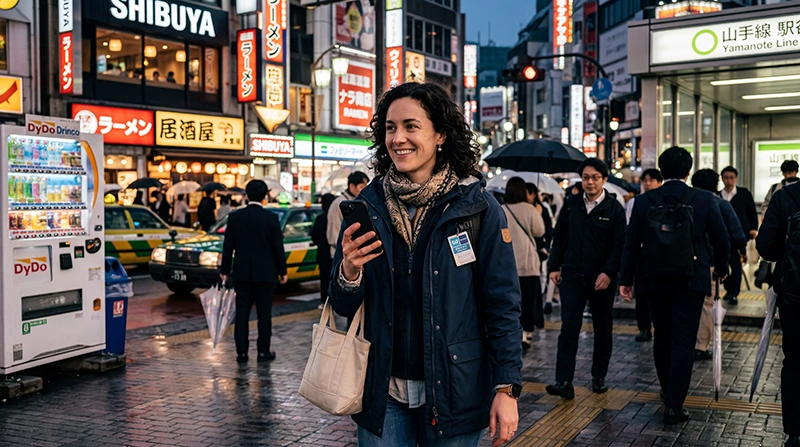

Travellers can get mobile internet in Japan through a travel eSIM, prepaid SIM card, pocket WiFi or international roaming. The right option depends on whether your phone supports eSIM, how many devices need access and how long you will stay.
Do not rely entirely on free Wi-Fi for a trip involving rail connections, digital tickets and navigation. A personal mobile connection is more useful when plans change between stations or while you are away from hotels and major venues.
NoveSIM travel eSIMs provide mobile data without a Japanese telephone number. Traditional calls and SMS are not included, while internet messaging and calling apps work through data.
Quick answer: An eSIM is usually the simplest mobile-internet choice for one traveller with an unlocked compatible phone. Use a physical prepaid SIM when eSIM is unavailable, and consider pocket WiFi when several people will stay together and share one connection.
Top Japan eSIMs


How can travellers get mobile internet in Japan?
| Option | Best suited to | Main limitation |
|---|---|---|
| Travel eSIM | One unlocked eSIM-compatible phone | Usually data-only |
| Prepaid SIM | A compatible phone without eSIM | Requires SIM handling and purchase or delivery |
| Pocket WiFi | A group travelling together | Separate device to charge and return |
| Home-network roaming | Short use where cost is already understood | Charges and allowances vary by operator |
| Free Wi-Fi | Backup access at selected locations | Availability and reliability are inconsistent |
How should you choose for a city and rail itinerary?
Tokyo, Kyoto and Osaka itineraries involve frequent map checks, platform changes and online reservations. A phone-based connection avoids keeping a group close to a shared router and continues working when travellers separate.
Download essential booking references and offline map areas before long travel days. Mobile coverage can vary with the local network, building, train route and congestion, so offline copies remain useful even with an active plan.
Check the networks available to a selected plan with the Japan mobile-network guide. Access to 4G or 5G depends on the plan, device and local coverage.
How much data should you arrange?
Maps, messaging, translation and occasional browsing are relatively light activities. Streaming, video calls, hotspot use and automatic photo backups consume data much faster.
Estimate by activity and add a sensible margin rather than purchasing solely by trip length. The Japan data-use guide provides practical scenarios for light, regular and heavy users.
What should you set up before departure?
- Confirm that the phone is unlocked and supports the selected connectivity method.
- Compare total price, data, validity, activation timing and hotspot rules.
- If using an eSIM, install it before departure on reliable Wi-Fi.
- Download tickets, hotel details, offline maps and translation language packs.
- Disable data roaming on the primary SIM unless you intentionally plan to use it.
- Keep support and setup details available offline.
What changes at the airport?
An installed eSIM can connect after landing without waiting for a shop to open. Travellers who want to buy locally should allow time to find a counter, check compatibility and complete setup.
Airport-specific facilities differ, so use the relevant arrival guide for Narita, Haneda or Kansai Airport.
How do you avoid roaming charges?
Select the travel line for mobile data and turn off data roaming for the home SIM. You can keep the primary line enabled for incoming calls or verification messages if your operator’s charges are acceptable, but do not assume that receiving a call or SMS is free.
If a NoveSIM eSIM needs a manual APN, enter data.esim. During troubleshooting, keep the installed eSIM profile and do not delete it unless NoveSIM support instructs you to do so.
Review the Japan roaming guide before departure if the primary line will remain active.
Related Articles
- Best eSIM for Japan
- SIM Card Options for Japan
- Pocket WiFi vs eSIM in Japan
- Useful Apps for Japan Travel
FAQ
Can tourists get mobile internet immediately after landing?
Yes. A correctly installed travel eSIM can connect after arrival, while physical SIM cards and pocket WiFi may require collection or purchase.
Is free Wi-Fi enough for a Japan trip?
It is useful as a backup but is not dependable for continuous navigation, bookings and communication throughout a multi-city itinerary.
Can several people share one connection?
Yes, through a supported phone hotspot or pocket WiFi. Check tethering terms and expected battery use before relying on it.
Will a travel eSIM work outside major cities?
Service depends on the plan’s network access, the device and local coverage. Keep important information offline when visiting less connected areas.
Final Recommendation
For mobile internet in Japan, one traveller with a compatible unlocked phone will normally find that an eSIM provides the simplest balance of immediate access and flexibility. A prepaid SIM remains useful for non-eSIM devices, while pocket WiFi can suit a group that stays together.
Set up the connection and offline backups before departure, then confirm the mobile-data line and roaming settings after landing.
Choose according to the actual itinerary and devices rather than assuming that one connectivity method is best for every Japan trip.