


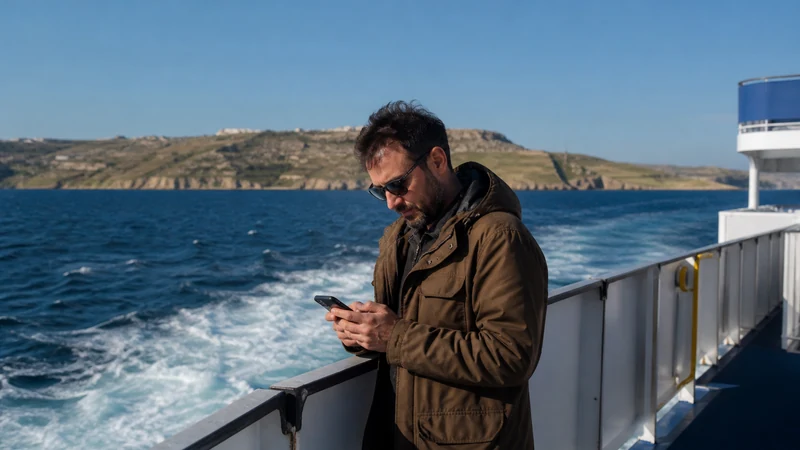

Mobile internet on the ferry between Malta and Gozo is useful for checking onward transport, but it should not be the only place you keep your journey details. Test your connection before boarding and prepare for interruptions during the crossing.
The departure terminal matters. A journey from Ċirkewwa is not the same transfer as one from Valletta, even when both take you to Gozo. Save the operator’s instructions and the route from your arrival point to your accommodation before leaving.
NoveSIM’s Malta eSIM is a data-only option for an unlocked, compatible phone. It does not provide a Maltese number, conventional voice minutes or carrier SMS. Internet messaging needs a working data connection; ordinary calls on your home line remain subject to that operator’s charges.
Quick answer: Before a Malta–Gozo ferry trip, test mobile data with Wi-Fi off, save the correct terminal and any required travel documents offline, and download your onward route. Do not assume that cellular reception or onboard Wi-Fi will remain available throughout the crossing.
Top eSIMs

Know which ferry terminal you need
Gozo Channel connects Ċirkewwa on Malta with Mġarr on Gozo. The Valletta–Gozo high-speed service is a different departure option. Follow the instructions for your chosen service rather than searching for a generic “Malta ferry terminal” at the last minute.
Consult Gozo Channel or Gozo High Speed for current service information. Check again before travelling: an offline timetable is a useful fallback, not confirmation that a sailing is operating.
Ticket requirements also differ. Gozo Channel’s official ticketing FAQ explains its boarding and ticket-validation rules. Keep the actual ticket in the required format when applicable; a screenshot of a booking summary is not necessarily a valid boarding document.
Prepare the phone before joining the queue
- Confirm your ferry operator, departure terminal and arrival point, including the return journey if you are using a different service.
- Save the relevant ticket or booking documents according to the operator’s instructions, then open the saved files without an internet connection.
- Download directions from Mġarr to your next stop and save the accommodation address and one useful contact.
- With Wi-Fi switched off, load a new page using the intended mobile-data line. Test before boarding rather than while the vessel is departing.
- Charge the phone and bring enough battery power for the crossing, onward transport and return.
If the eSIM still needs installing, complete that on a stable connection using the Malta installation instructions. Check when your selected plan’s validity starts before enabling it; installation and the start of usable service are not interchangeable for every package.
What to expect from cellular data at sea
A working connection at the terminal does not establish continuous reception across the water. Movement, the phone’s position on the vessel and available network coverage can change the result. Messages may be delayed even though the same phone worked normally before departure.
There is no need to force 5G or change the APN simply because reception drops during the crossing. Use the Malta eSIM coverage guide for the distinction between country coverage and reception at a specific location.
Do not base a time-critical video meeting, payment or ticket retrieval on an uninterrupted connection onboard. Complete those tasks before sailing or after arrival when you have tested the connection again.
Onboard Wi-Fi is a separate service
This guide does not confirm Wi-Fi availability on your sailing. Ask the operator whether it is offered, how to identify the network and whether there are charges or login requirements. The presence of an unfamiliar Wi-Fi name is not proof that it belongs to the ferry.
Onboard Wi-Fi and the eSIM use different connections. A failed Wi-Fi login does not show that the eSIM has failed. Disconnect Wi-Fi before testing mobile data, and avoid repeatedly submitting a payment if the connection disappears before confirmation.
Reconnect before arranging onward travel
After arrival, give the phone time to register and test a fresh page before requesting transport or sending a pickup message. Keep the saved address available if registration takes longer than expected.
If data still fails ashore, check that the Malta eSIM is enabled and selected for mobile data, with Data Roaming enabled as instructed for that travel line. Keep home-line data roaming and automatic data switching off to avoid an unintended fallback.
For further checks, follow Malta eSIM troubleshooting. If manual APN entry is required, use data.esim. Do not delete the installed eSIM unless NoveSIM support instructs you to do so.
Related Articles
FAQ
Will mobile internet work throughout the Malta–Gozo ferry crossing?
Continuous reception is not guaranteed. Test the connection at the terminal, but keep tickets, the arrival address and onward directions offline in case mobile data drops during the crossing.
Can I rely on Wi-Fi on the ferry?
Not without checking your operator and sailing. Availability, login requirements and charges are not confirmed here. Keep essential information accessible without either Wi-Fi or cellular data.
What should I save before boarding for Gozo?
Save the correct departure terminal, required ticket documents, return information, accommodation contact and route from the arrival point. Check that the saved documents open offline and meet the operator’s ticket rules.
Should I reinstall the eSIM if data disappears onboard?
No. Wait until you can test reception ashore, then check the enabled profile, data line and roaming setting. Do not remove the installed eSIM unless support specifically asks you to.
Final Recommendation
For mobile internet on a Malta–Gozo ferry, prepare the terminal and onward journey first. A tested travel-data line is useful, but offline documents protect the parts of the trip that cannot wait for reception.
Choose your Malta eSIM from its current allowance, validity and supported-network terms, not a promise of uninterrupted service at sea.
After reaching Gozo, test the connection again before relying on live transport updates or pickup messages.