


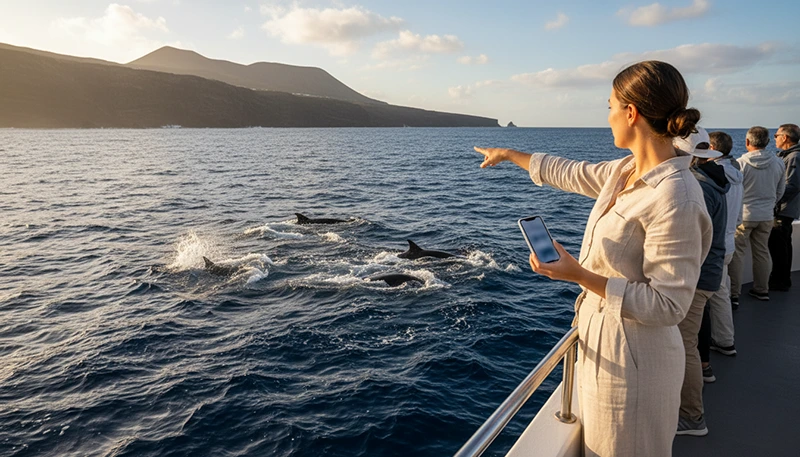

The Canary Islands are one of Europe’s best-known destinations for whale and dolphin watching. Organised boat excursions depart from several coastal resorts, particularly around Tenerife, where travellers can observe marine wildlife in the Atlantic Ocean throughout much of the year.
Mobile internet is useful before and after a whale-watching trip for opening digital tickets, finding the harbour, checking transport, contacting the tour operator and sharing photos. However, mobile coverage may become weaker as the boat travels farther from the coast.
A travel eSIM gives you mobile data directly on your phone without replacing your main SIM card. It can keep you connected around ports and coastal areas, but you should download important information before boarding and prepare for periods without signal at sea.
Quick answer: The best internet setup for whale watching in the Canary Islands combines a travel eSIM with downloaded tickets, saved meeting-point details and offline information. Mobile coverage is usually strongest near ports and coastlines but may weaken or disappear farther offshore.
Top Canary Islands eSIMs

Canary Islands eSIM
Fixed
1 GB, 7 days€ 1.792 GB, 15 days€ 3.583 GB, 30 days€ 4.47Unlimited
Unlimited, 1 day€ 2.24Unlimited, 3 days€ 4.92Unlimited, 5 days€ 8.05
Europe Extra eSIM
Fixed
1 GB, 7 days€ 2.242 GB, 15 days€ 3.583 GB, 30 days€ 4.47Unlimited
Unlimited, 1 day€ 2.68Unlimited, 3 days€ 5.37Unlimited, 5 days€ 8.95Europe+ eSIM
Fixed
1 GB, 7 days€ 2.682 GB, 15 days€ 4.033 GB, 30 days€ 5.37Unlimited
Unlimited, 1 day€ 2.68Unlimited, 3 days€ 6.26Unlimited, 5 days€ 10.29Why You Need Mobile Internet for a Whale-Watching Tour
A whale-watching excursion involves more than the time spent on the boat. You may need connectivity for transport, check-in, booking updates and communication with the tour operator.
Mobile data can help with:
- Opening digital booking confirmations.
- Finding the correct harbour or marina.
- Checking departure times.
- Contacting the tour company.
- Reviewing weather updates.
- Using taxi or transport applications.
- Finding nearby parking.
- Sharing your location with other travellers.
- Uploading photos after the tour.
Because signal may be limited offshore, save all essential details before the boat leaves the harbour.
Best Internet Options for Whale Watching
| Internet Option | Best Use | Main Advantage | Possible Limitation |
|---|---|---|---|
| Travel eSIM | Tickets, maps and communication | Mobile data without changing the main SIM | Signal may weaken offshore |
| Accommodation WiFi | Downloading tickets and uploading media | Suitable for high-data activity | Unavailable during the excursion |
| Harbour WiFi | Last-minute browsing | May be available before boarding | Not guaranteed |
| Boat WiFi | Limited onboard connectivity | May work farther from shore | Only available on selected vessels |
| Offline documents | Tickets and meeting-point information | Works without mobile signal | Must be saved in advance |
Will Mobile Data Work on a Whale-Watching Boat?
Mobile coverage may work while the boat remains close to the coast. As the vessel moves farther into the Atlantic, the signal can become weaker, slower or completely unavailable.
Connection quality depends on:
- The distance from the coastline.
- The route followed by the boat.
- The supported local mobile network.
- The island and departure port.
- Weather and sea conditions.
- The position of the phone on the vessel.
A strong signal at the harbour does not guarantee continuous connectivity throughout the excursion.
Why an eSIM Is Useful for Whale-Watching Trips
A travel eSIM can be installed before departure and used immediately after arrival in the Canary Islands. It provides convenient mobile internet while allowing you to keep your primary SIM card installed.
An eSIM is useful when:
- You need directions to the harbour.
- The meeting point changes.
- You need to contact the tour operator.
- You arrive by rental car or public transport.
- You travel between several Canary Islands.
- You need data before hotel check-in.
- You want to use WhatsApp during the trip.
- You need transport after returning to port.
It is most valuable around the coast, towns, marinas and transport routes connected to the excursion.
Internet for Whale Watching in Tenerife
Tenerife is the main whale-watching destination in the Canary Islands. Many tours depart from southern coastal areas with easy access to tourist infrastructure, accommodation and transport.
Mobile coverage is generally reliable around established resorts, ports and main coastal roads. It may become less consistent once the boat travels into open water.
Before leaving your accommodation:
- Download the booking confirmation.
- Save the departure harbour.
- Check the exact meeting time.
- Save the operator’s contact number.
- Download transport directions.
- Check whether hotel pickup is included.
- Take screenshots of important instructions.
After the boat returns, mobile data can help you arrange transport, find restaurants and share photos from the trip.
Internet for Whale Watching Near La Gomera
Some whale-watching routes operate in waters between Tenerife and La Gomera. These excursions may travel farther from densely populated coastal areas.
Mobile data may be available during parts of the journey, but travellers should expect interruptions. Save tickets, emergency details and return transport information before departure.
If your itinerary includes visiting La Gomera separately, a compatible Canary Islands or Spain eSIM can generally continue working after arrival on the island.
Internet for Whale Watching in Gran Canaria
Gran Canaria also offers marine excursions from established tourist areas and coastal harbours. Mobile coverage is usually strongest around towns, resorts and port facilities.
Connectivity may become weaker after leaving the coast. Download booking information and transport details before boarding.
A travel eSIM remains useful during the rest of the day for navigation, restaurant searches, accommodation communication and island travel.
Internet for Marine Tours in Lanzarote and Fuerteventura
Lanzarote and Fuerteventura offer different types of boat excursions, including dolphin trips, coastal cruises and visits to smaller islands or remote beaches.
Mobile signal may work near populated coastlines but become inconsistent in open water. Boat routes near isolated volcanic coastlines may have fewer opportunities to reconnect until the vessel returns closer to shore.
Save:
- The departure point.
- The return time.
- The operator’s contact details.
- Transport information.
- Accommodation address.
- Any required boarding documents.
Can One eSIM Work Across Several Canary Islands?
Yes. A compatible Canary Islands or Spain eSIM can generally work across the islands included in its coverage.
This is practical for travellers combining whale watching with:
- Tenerife and La Gomera.
- Gran Canaria and Tenerife.
- Lanzarote and Fuerteventura.
- A multi-island holiday.
- Ferry travel between islands.
You normally do not need to install a different eSIM for each island. The original validity period and data allowance continue to apply.
How Much Mobile Data Do You Need?
A whale-watching tour itself usually requires little data. Most consumption happens before or after the excursion through maps, social media and photo uploads.
| Trip Style | Suggested Data | Typical Use |
|---|---|---|
| Single whale-watching excursion | 1GB–2GB | Tickets, maps and messages |
| Weekend coastal trip | 2GB–3GB | Navigation and regular browsing |
| One-week holiday | 3GB–5GB | Daily maps, bookings and communication |
| Two-week island trip | 5GB–10GB | Travel planning and social media |
| Whale watching and remote work | 10GB–20GB or more | Work apps, meetings and hotspot use |
Uploading high-resolution photos and videos can use much more data than opening tickets or checking maps. Use accommodation WiFi for large uploads whenever possible.
Download Tickets Before Boarding
Do not depend on opening your email or booking platform at the harbour. Mobile networks can become busy around popular departure times, and some boarding areas may have weaker indoor reception.
Before leaving accommodation:
- Download the booking confirmation.
- Save the QR code or ticket as an image.
- Take a screenshot of the meeting point.
- Save the departure time.
- Store the operator’s contact details.
- Download the return transport route.
- Check that everything opens in Airplane Mode.
Boat WiFi vs Mobile Data
| Feature | Boat WiFi | Travel eSIM |
|---|---|---|
| Availability | Only on selected boats | Available where mobile coverage exists |
| Coverage offshore | Depends on onboard system | Usually weaker farther from shore |
| Speed | May be limited when shared | Depends on the local mobile network |
| Security | Shared network | Personal mobile connection |
| Best use | Basic onboard browsing | Before departure and near the coast |
Do not assume that WiFi is included with the excursion. Ask the operator in advance when onboard connectivity is important.
Using Mobile Data for Weather Updates
Sea conditions can affect departure times, route length and passenger comfort. Mobile data allows you to check updates before travelling to the harbour.
Review:
- Wind conditions.
- Wave height.
- Rain forecasts.
- Official weather warnings.
- Tour cancellation messages.
- Changes to the departure port.
- Recommended clothing.
The tour operator makes the final decision about whether conditions are suitable for sailing.
Battery Management During the Boat Tour
Photography, video recording, bright sunlight and searching for a weak network can drain your phone battery quickly.
To preserve battery:
- Charge the phone fully before departure.
- Carry a compact power bank.
- Reduce screen brightness.
- Close unnecessary applications.
- Use battery-saving mode.
- Switch to Airplane Mode when no signal is available.
- Avoid continuous video recording.
- Protect the phone from water and direct sunlight.
Protecting Your Phone at Sea
Sea spray, waves and slippery surfaces can damage a phone or cause it to fall overboard.
- Use a waterproof case or dry bag.
- Attach a secure wrist strap when appropriate.
- Avoid holding the phone over the edge of the boat.
- Keep the charging port dry.
- Store the phone safely during rough movement.
- Clean salt spray carefully after the trip.
- Do not leave the device in direct sunlight.
Can You Use an eSIM Hotspot on the Boat?
Many smartphones can share an eSIM connection through Personal Hotspot or tethering. However, hotspot use is usually unnecessary during a whale-watching trip and may drain both battery and data.
The hotspot will only work while the phone has a usable mobile connection. It cannot create service in areas where there is no signal.
Check whether tethering is supported by the selected plan before relying on it during the rest of your holiday.
Responsible Whale-Watching Tips
Mobile connectivity should not distract from the wildlife experience or interfere with instructions from the crew.
- Choose a responsible and authorised tour operator.
- Follow all crew instructions.
- Do not attempt to touch or feed wildlife.
- Avoid loud behaviour around animals.
- Keep equipment secure.
- Do not block walkways while taking photos.
- Watch the animals directly instead of only through a screen.
- Respect distance and viewing rules.
How to Install a Canary Islands Travel eSIM
Install your eSIM before departure while connected to stable WiFi.
- Confirm that your phone supports eSIM.
- Choose a suitable Canary Islands data plan.
- Open the QR code or installation details.
- Go to your phone mobile network settings.
- Select the option to add an eSIM.
- Scan the QR code.
- Label the new line as NoveSIM or Travel.
- Keep the eSIM installed until arrival.
After landing, select the travel eSIM for mobile data and enable Data Roaming on that line.
Recommended eSIM Settings for Whale Watching
| Setting | Recommended Configuration |
|---|---|
| Travel eSIM | Enabled |
| Mobile Data | Select the travel eSIM |
| Data Roaming | Enabled on the travel eSIM |
| Main SIM roaming | Disabled unless intentionally used |
| Automatic Data Switching | Disabled |
| APN | data.esim |
Disabling Automatic Data Switching helps prevent the phone from unexpectedly using roaming data through the primary SIM.
Can You Keep Your Main SIM Active?
Yes. Most dual-SIM phones allow you to keep your primary SIM active while the travel eSIM provides mobile data.
This can allow you to:
- Keep your usual phone number.
- Receive SMS verification codes.
- Continue using WhatsApp with the same account.
- Use the eSIM for maps and booking information.
- Avoid removing your physical SIM card.
Your home operator may charge for calls, SMS or roaming services. Keep mobile data roaming disabled on the main SIM unless you intentionally want to use it.
What to Do If the eSIM Does Not Connect
- Confirm that the eSIM is enabled.
- Select it as the preferred Mobile Data line.
- Enable Data Roaming on the eSIM.
- Disable Automatic Data Switching.
- Check that the APN is set to data.esim.
- Activate Airplane Mode for approximately 30 seconds.
- Turn Airplane Mode off and wait for the network.
- Restart the phone.
- Move closer to the coast, harbour or a populated area.
If you are already offshore, the lack of connection may be caused by distance from coastal mobile networks rather than a problem with the eSIM.
Do not delete the eSIM while troubleshooting unless support specifically advises you to do so. Some QR codes can only be installed once.
How to Reduce Mobile Data Usage
- Download tickets through WiFi.
- Save meeting-point details offline.
- Disable automatic photo and video uploads.
- Upload large files after returning to accommodation.
- Pause application and system updates.
- Download music before boarding.
- Turn off background data for unnecessary apps.
- Monitor usage through your phone settings.
Whale-Watching Connectivity Checklist
- Confirm that your phone supports eSIM.
- Install the eSIM before departure.
- Download your ticket or QR code.
- Save the departure harbour.
- Check the meeting time.
- Save the operator’s contact details.
- Charge your phone fully.
- Carry a waterproof case and power bank.
- Prepare for weaker signal offshore.
- Download return transport information.
Related Articles
- Canary Islands Travel Internet Guide
- Best eSIM for Canary Islands
- Mobile Data for Island Hopping Canary Islands
- Internet for Canary Islands Vacation
- Internet for Surfing in Canary Islands
FAQ
Will mobile data work during whale watching in the Canary Islands?
Mobile data may work while the boat remains near the coast, but the signal can weaken or disappear as the vessel travels farther offshore.
Do I need an eSIM for a whale-watching tour?
An eSIM is useful for tickets, maps, transport and contacting the tour operator. Download essential information before boarding because offshore coverage is not guaranteed.
Will there be WiFi on the whale-watching boat?
Some boats may offer WiFi, but it is not standard on every excursion. Check directly with the operator before booking.
How much data do I need for whale watching?
Approximately 1GB–2GB is generally enough for tickets, maps, messages and basic browsing related to one excursion.
Can one eSIM work in Tenerife, La Gomera and Gran Canaria?
Yes. A compatible Canary Islands or Spain eSIM can generally work across the islands included in the plan coverage.
Should I download my ticket before boarding?
Yes. Save the ticket, QR code, meeting point and operator contact details so they remain available without internet.
Can I use WhatsApp during the tour?
WhatsApp will work while a usable mobile or WiFi connection is available. It normally keeps your original registered number when using a travel eSIM.
Why does my signal disappear offshore?
Mobile networks are designed mainly to cover land and coastal areas. Signal strength usually decreases as the boat moves farther from mobile towers on shore.
Final Recommendation
The best internet setup for whale watching in the Canary Islands combines a travel eSIM with downloaded tickets, saved meeting-point details and a fully charged phone. Use mobile data for transport, maps and communication around the harbour, but prepare for weaker or unavailable signal offshore.
A NoveSIM travel eSIM lets you arrange your mobile connection before departure and stay connected across supported Canary Islands without replacing your main SIM card. Install it before travelling, download all essential tour information and protect your phone from sea spray, sunlight and accidental drops during the excursion.