


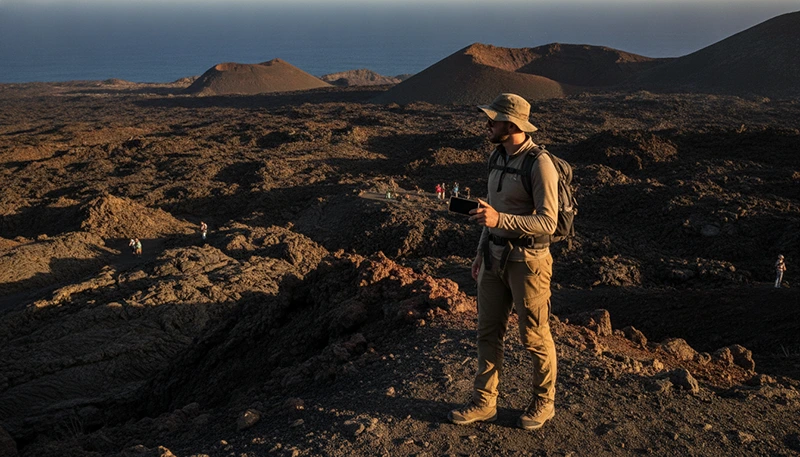

The Canary Islands are famous for dramatic volcanic landscapes shaped by lava flows, craters, calderas and mountain peaks. Visitors can explore Mount Teide in Tenerife, Timanfaya National Park in Lanzarote, volcanic routes in La Palma and many smaller lava fields across the archipelago.
Mobile internet is useful during a volcano tour for navigation, weather updates, digital tickets, transport information, communication and access to tour details. However, coverage can become weaker in high-altitude areas, remote lava fields, valleys and locations surrounded by volcanic terrain.
A travel eSIM provides mobile data directly on your phone and allows you to keep your main SIM installed. It can help before and after the tour, but it should be combined with offline maps, downloaded booking details and proper safety preparation.
Quick answer: The best internet setup for volcano tours in the Canary Islands combines a travel eSIM with offline maps and saved tour information. Mobile coverage is usually available near towns, main roads and visitor centres, but it may be weaker in remote volcanic areas and high-altitude locations.
Top Canary Islands eSIMs

Canary Islands eSIM
Fixed
1 GB, 7 days2.00$2 GB, 15 days4.00$3 GB, 30 days5.00$Unlimited
Unlimited, 1 day2.50$Unlimited, 3 days5.50$Unlimited, 5 days9.00$
Europe Extra eSIM
Fixed
1 GB, 7 days2.50$2 GB, 15 days4.00$3 GB, 30 days5.00$Unlimited
Unlimited, 1 day3.00$Unlimited, 3 days6.00$Unlimited, 5 days10.00$Europe+ eSIM
Fixed
1 GB, 7 days3.00$2 GB, 15 days4.50$3 GB, 30 days6.00$Unlimited
Unlimited, 1 day3.00$Unlimited, 3 days7.00$Unlimited, 5 days11.50$Europe Lite eSIM
Fixed
1 GB, 7 days2.50$2 GB, 15 days4.00$3 GB, 30 days5.00$Unlimited
Unlimited, 1 day3.00$Unlimited, 3 days6.00$Unlimited, 5 days10.00$Why You Need Mobile Internet During a Volcano Tour
Volcano tours often involve travel through unfamiliar terrain, changes in altitude and areas with limited services. Mobile data helps travellers manage practical details before and during the experience.
You may use mobile internet for:
- Opening digital tour tickets.
- Finding meeting points.
- Checking transport schedules.
- Reviewing weather conditions.
- Using maps and navigation.
- Contacting a tour operator.
- Checking road restrictions.
- Sharing your location.
- Finding nearby restaurants or services after the tour.
Because signal strength may vary, download essential information before leaving your accommodation.
Best Internet Options for Volcano Tours
| Internet Option | Best Use | Main Advantage | Possible Limitation |
|---|---|---|---|
| Travel eSIM | Maps, messages and tour coordination | Mobile data without replacing the main SIM | Depends on local coverage |
| Accommodation WiFi | Downloading maps and tickets | Useful for preparation | Unavailable during the tour |
| Offline maps | Navigation without signal | Works in low-coverage areas | Must be downloaded in advance |
| Local SIM card | Longer stays | May include local calling services | Usually purchased after arrival |
| Visitor centre WiFi | Basic information and browsing | May be available at selected sites | Not guaranteed and limited to one location |
Why an eSIM Is Useful for Volcanic Areas
A travel eSIM can be installed before your trip and activated for mobile data after arrival. This avoids the need to remove your physical SIM card or search for a mobile shop.
An eSIM is particularly helpful when:
- You need directions from the airport or hotel.
- Your tour meeting point changes.
- You travel independently by rental car.
- You move between several Canary Islands.
- You want to contact your guide.
- You need weather or road information.
- You want backup internet during a longer excursion.
The connection still depends on the local network and the terrain around your location.
Mobile Coverage in Volcanic Landscapes
Volcanic terrain can affect mobile coverage. Crater walls, mountain ridges, deep valleys and remote lava fields may block or weaken the signal.
| Location Type | Expected Coverage |
|---|---|
| Towns and resort areas | Usually strong |
| Main roads to volcanic attractions | Often available |
| Visitor centres | Usually better than remote areas |
| High-altitude viewpoints | Variable |
| Inside calderas or deep valleys | May be weak or unavailable |
| Remote lava fields | Potentially inconsistent |
| Mountain hiking routes | Can change throughout the route |
Do not assume that a strong signal at the entrance to a park will continue throughout the tour.
Internet for Mount Teide Tours in Tenerife
Mount Teide is one of the most visited volcanic destinations in the Canary Islands. Tours may include bus transfers, scenic viewpoints, cable car access and hiking at high altitude.
Mobile coverage can be available along main roads and around major visitor areas, but it may become less reliable in remote parts of Teide National Park and behind volcanic ridges.
Before travelling to Mount Teide:
- Download your tour confirmation.
- Save the meeting point offline.
- Check whether a permit is required.
- Download the route map.
- Review the mountain weather forecast.
- Check cable car or road updates.
- Carry a fully charged phone.
Weather at high altitude can differ significantly from conditions at the coast. Check temperature, wind and visibility before departure.
Internet for Timanfaya Tours in Lanzarote
Timanfaya National Park is known for extensive lava fields, volcanic cones and dramatic landscapes. Many visitors explore the area through an organised bus route, coach excursion or guided tour.
Connectivity is generally more reliable near main roads and visitor facilities than in isolated parts of the volcanic landscape.
Mobile data is useful for:
- Opening digital tickets.
- Finding the park entrance.
- Checking tour schedules.
- Navigating back to accommodation.
- Contacting the tour company.
- Finding nearby attractions after the visit.
Download all essential information before entering areas where signal may be limited.
Internet for Volcano Tours in La Palma
La Palma offers some of the most impressive volcanic routes in the Canary Islands. Visitors can explore crater landscapes, lava fields, forest trails and viewpoints connected to the island’s volcanic history.
Some routes pass through mountainous and remote terrain where signal strength may change frequently.
For La Palma volcano tours:
- Use an official guided tour when required.
- Download detailed offline maps.
- Save emergency contact information.
- Check official trail notices.
- Carry water and suitable clothing.
- Share your itinerary with another person.
A mobile connection can support your planning, but it should not replace official guidance or local safety rules.
Internet for Volcanic Routes in Gran Canaria
Gran Canaria also has volcanic calderas, mountain viewpoints and inland routes. Many attractions are reached through winding roads and mountainous terrain.
Coverage is usually strongest near towns and main roads but may become less reliable inside deep valleys or behind mountain ridges.
Download driving directions and save parking locations before leaving a populated area.
Internet for Volcanic Landscapes in Fuerteventura
Fuerteventura has older volcanic landscapes, dry terrain and wide open areas. Some routes are relatively close to roads, while others pass through remote inland zones.
Mobile data can help with navigation and weather updates, but travellers should prepare for heat, wind and limited shade.
Before exploring volcanic routes in Fuerteventura:
- Download offline directions.
- Carry enough water.
- Check wind and temperature.
- Protect the phone from heat and dust.
- Confirm the return route.
How Much Mobile Data Do You Need?
Volcano tours do not normally require a large data allowance unless you upload videos, stream content or use your phone as a hotspot.
| Trip Type | Suggested Data | Typical Use |
|---|---|---|
| Single volcano tour | 1GB–2GB | Maps, tickets and messaging |
| Weekend volcanic trip | 2GB–3GB | Navigation and regular browsing |
| One-week holiday | 3GB–5GB | Daily maps, communication and bookings |
| Two-week island trip | 5GB–10GB | Multiple tours and social media |
| Volcano tours and remote work | 10GB–20GB or more | Work apps, hotspot and video meetings |
Use accommodation WiFi for uploading long videos, cloud backups and downloading large files.
Offline Maps and Downloaded Tickets
Offline preparation is essential because mobile coverage may disappear during part of a volcanic route.
Before leaving your accommodation:
- Download the complete area map.
- Save the tour meeting point.
- Download digital tickets.
- Save the tour operator’s contact details.
- Take screenshots of important instructions.
- Save the return route.
- Test the map in Airplane Mode.
Do not depend on loading a booking email at the entrance if the signal is weak.
Can One eSIM Work Across Several Canary Islands?
Yes. A compatible Canary Islands or Spain eSIM can generally work across the islands included in its coverage.
This is practical for travellers visiting:
- Mount Teide in Tenerife.
- Timanfaya in Lanzarote.
- Volcanic routes in La Palma.
- Mountain areas in Gran Canaria.
- Volcanic landscapes in Fuerteventura.
You normally do not need to install a new eSIM every time you take a ferry or domestic flight between islands.
Guided Volcano Tour vs Independent Visit
| Feature | Guided Tour | Independent Visit |
|---|---|---|
| Navigation | Handled by the guide | Requires personal planning |
| Transport | Often included | Rental car or public transport needed |
| Safety information | Provided by the guide | Must be researched independently |
| Mobile data need | Mainly tickets and communication | Maps, routes and live updates |
| Flexibility | Fixed schedule | More control over timing |
Independent visitors usually depend more heavily on mobile data and offline navigation than travellers on an organised tour.
Using Mobile Data for Weather and Road Updates
Weather and road access can affect volcano tours, especially at higher elevations.
Check:
- Temperature at the attraction altitude.
- Wind speed and gusts.
- Visibility.
- Rain or storm warnings.
- Road closures.
- Tour cancellations.
- Cable car or visitor centre updates.
Conditions can change quickly. Follow official instructions even when your map or original booking shows the route as open.
Battery Management During Volcano Tours
GPS, photography, video recording and weak signal can reduce phone battery life quickly.
To preserve battery:
- Start with a fully charged phone.
- Carry a power bank and cable.
- Reduce screen brightness.
- Close unnecessary applications.
- Use battery-saving mode.
- Download maps before departure.
- Switch to Airplane Mode when no signal is available.
- Protect the phone from heat and direct sunlight.
Can You Use an eSIM Hotspot During a Volcano Tour?
Many phones can share an eSIM connection through Personal Hotspot or tethering. This may be useful during transfers, at accommodation or while waiting for a tour to begin.
Hotspot use is usually unnecessary during the actual excursion and can drain both battery and data. Confirm that tethering is supported by your selected plan.
Volcano Tour Safety and Mobile Coverage
Mobile data is helpful, but it cannot guarantee communication in every volcanic area.
- Follow official paths and barriers.
- Do not enter restricted volcanic zones.
- Respect instructions from guides and park staff.
- Carry water and suitable clothing.
- Prepare for altitude and changing temperatures.
- Download maps and tickets in advance.
- Do not rely only on live navigation.
- Tell someone your plans when travelling independently.
A smartphone should support your safety plan, not replace it.
How to Install a Canary Islands Travel eSIM
Install your eSIM before departure while connected to stable WiFi.
- Confirm that your phone supports eSIM.
- Choose a suitable Canary Islands data plan.
- Open the QR code or installation details.
- Go to your phone mobile network settings.
- Select the option to add an eSIM.
- Scan the QR code.
- Label the new line as NoveSIM or Travel.
- Keep it installed until arrival.
After landing, select the travel eSIM for mobile data and enable Data Roaming on that line.
Recommended eSIM Settings for Volcano Tours
| Setting | Recommended Configuration |
|---|---|
| Travel eSIM | Enabled |
| Mobile Data | Select the travel eSIM |
| Data Roaming | Enabled on the travel eSIM |
| Main SIM roaming | Disabled unless intentionally used |
| Automatic Data Switching | Disabled |
| APN | data.esim |
Disabling Automatic Data Switching helps prevent the phone from unexpectedly using roaming data through the primary SIM.
Can You Keep Your Main SIM Active?
Yes. Most dual-SIM phones allow you to keep your primary SIM active while the travel eSIM provides mobile data.
This can allow you to:
- Keep your usual phone number.
- Receive SMS verification codes.
- Continue using WhatsApp with the same account.
- Use the eSIM for maps and tour information.
- Avoid removing your physical SIM card.
Your home operator may charge for calls, SMS or roaming services. Keep mobile data roaming disabled on the main SIM unless you intentionally want to use it.
What to Do If the eSIM Does Not Connect
- Confirm that the eSIM is enabled.
- Select it as the preferred Mobile Data line.
- Enable Data Roaming on the eSIM.
- Disable Automatic Data Switching.
- Check that the APN is set to data.esim.
- Activate Airplane Mode for approximately 30 seconds.
- Turn Airplane Mode off and wait for the network.
- Restart the phone.
- Move toward a visitor centre, main road or open area.
Do not delete the eSIM while troubleshooting unless support specifically advises you to do so. Some QR codes can only be installed once.
How to Reduce Mobile Data Usage
- Download maps through WiFi.
- Save tickets and confirmations offline.
- Take screenshots of tour instructions.
- Disable automatic photo and video uploads.
- Pause application and system updates.
- Use WiFi for uploading long videos.
- Turn off background data for unnecessary apps.
- Monitor usage through your phone settings.
Volcano Tour Connectivity Checklist
- Confirm that your phone supports eSIM.
- Install the eSIM before departure.
- Download maps and tickets.
- Save the tour meeting point.
- Check weather and road conditions.
- Charge your phone fully.
- Carry a power bank.
- Save the tour operator’s contact details.
- Follow official park instructions.
- Prepare for areas without mobile coverage.
Related Articles
- Mobile Data for Hiking in Canary Islands
- Internet for Canary Islands Road Trip
- Canary Islands Travel Internet Guide
- Best eSIM for Canary Islands
- Mobile Data for Island Hopping Canary Islands
FAQ
Will mobile data work during volcano tours in the Canary Islands?
Coverage is often available near towns, main roads and visitor centres, but it may become weaker in remote lava fields, high-altitude areas and volcanic valleys.
Do I need an eSIM for a volcano tour?
An eSIM is useful for tickets, maps, weather updates and communication, but you should also download essential information before the tour.
Will mobile data work on Mount Teide?
Coverage may be available around main visitor areas and roads, but it can vary across remote and high-altitude sections of Teide National Park.
Will mobile data work in Timanfaya National Park?
Signal is more likely near main roads and visitor facilities, while coverage may be less reliable in isolated volcanic areas.
How much data do I need for a volcano tour?
Approximately 1GB–3GB is usually enough for tickets, navigation, messages and occasional browsing during a short volcanic excursion.
Can one eSIM work across several Canary Islands?
Yes. A compatible Canary Islands or Spain eSIM can generally work across the islands included in the plan coverage.
Should I download offline maps?
Yes. Offline maps are recommended because volcanic terrain can cause weak or unavailable mobile coverage.
Will WhatsApp keep my original number?
Yes. WhatsApp normally remains linked to your existing registered number while using mobile data from a travel eSIM.
Final Recommendation
The best internet setup for volcano tours in the Canary Islands combines a travel eSIM with offline maps, downloaded tickets and a fully charged phone. Use mobile data for navigation, weather updates and communication where coverage is available.
A NoveSIM travel eSIM lets you prepare your connection before departure and stay online across supported Canary Islands without replacing your main SIM card. Install it before travelling, download essential tour information in advance and prepare for periods without signal in remote volcanic terrain.