


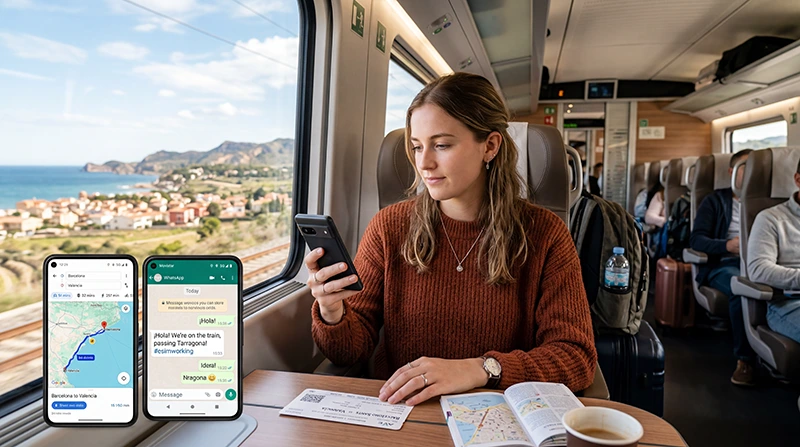

Internet access on a train in Spain depends on the route, train, onboard service and the mobile networks passed along the way. A WiFi symbol on a booking page is useful, but it should not be treated as a guarantee of uninterrupted bandwidth for the whole journey.
A travel eSIM can keep the phone connected through terrestrial mobile networks while the train moves. It is independent of the onboard WiFi, yet it remains subject to tunnels, cuttings, rural coverage, carriage materials, speed and busy cells near cities.
NoveSIM travel eSIMs are data-only. We do not provide a Spanish number, conventional calls or SMS, and no mobile plan can guarantee a continuous signal along every railway.
Quick answer: Use mobile data as the primary connection on Spanish trains and treat onboard WiFi as a useful extra. Download the ticket, route, accommodation address and any work files before boarding because both connections can pause in tunnels or sparse sections.
Top Spain eSIMs

Spain eSIM
Fixed
1 GB, 7 days2.00$2 GB, 15 days4.00$3 GB, 30 days5.00$Unlimited
Unlimited, 1 day2.50$Unlimited, 3 days5.50$Unlimited, 5 days9.00$
Europe Extra eSIM
Fixed
1 GB, 7 days2.50$2 GB, 15 days4.00$3 GB, 30 days5.00$Unlimited
Unlimited, 1 day3.00$Unlimited, 3 days6.00$Unlimited, 5 days10.00$Europe+ eSIM
Fixed
1 GB, 7 days3.00$2 GB, 15 days4.50$3 GB, 30 days6.00$Unlimited
Unlimited, 1 day3.00$Unlimited, 3 days7.00$Unlimited, 5 days11.50$Europe Lite eSIM
Fixed
1 GB, 7 days2.50$2 GB, 15 days4.00$3 GB, 30 days5.00$Unlimited
Unlimited, 1 day3.00$Unlimited, 3 days6.00$Unlimited, 5 days10.00$Does Spain Have WiFi on Trains?
Some Spanish rail services offer passenger WiFi or an onboard entertainment portal, while other trains do not. Availability can differ by operator, service type and individual train, so check the official information attached to the exact booking rather than relying on a general statement about Spanish rail.
Onboard WiFi typically shares a backhaul connection among passengers. It may be sufficient for messages, light browsing or an entertainment portal but less reliable for video meetings, large uploads or time-sensitive work when the train is busy.
How Mobile Data Behaves at High Speed
The phone repeatedly hands over between mobile cells as the train moves. Near Madrid, Barcelona, Valencia, Seville and other urban areas, these changes may pass unnoticed. Across rural ground, mountain approaches or long tunnels, the signal can weaken or disappear temporarily.
A brief interruption does not mean the eSIM has failed. Leave Network Selection on Automatic so the phone can remain on an authorised partner. Airplane Mode can refresh registration after a prolonged gap, but changing APN or deleting the profile during an ordinary tunnel outage will not improve route coverage.
Before Boarding a Spanish Train
- Save the ticket or QR code somewhere that opens offline.
- Download the station map and the walking route at the destination.
- Store the train number, carriage and seat separately from email.
- Download documents, playlists or video before leaving dependable WiFi.
- Charge the phone and carry a cable or power bank for a long journey.
Large stations may have public WiFi, but use the network name shown by official signage or staff. A mobile connection is often quicker than completing a portal when there is little time before departure.
Working from a Train
Plan train time for tasks that tolerate a short disconnection: drafting offline, reading downloaded documents or handling email that can queue. Avoid making the journey the only opportunity for a critical video meeting or a large cloud transfer.
If hotspot sharing is permitted by the live plan, a laptop can use the phone’s connection. Tethering increases data and battery consumption, and carriage power sockets should not be assumed on every service. Keep a local copy of the file being edited.
Set Up the eSIM for Rail Travel
Install the profile on stable private WiFi and follow its activation instructions. In Spain, turn on the travel eSIM, select it for Mobile Data and enable Data Roaming on that line. Keep automatic data switching off and Data Roaming off on the home SIM.
If mobile data remains unavailable after the train returns to a populated area, confirm plan validity and line selection, then toggle Airplane Mode. When manual NoveSIM APN entry is required, use data.esim with blank username and password. Do not delete the eSIM unless NoveSIM Support specifically instructs you to do so.
Choose Data for a Rail Itinerary
Timetables, tickets, messaging and maps consume comparatively little. Streaming, live video, photo backup and laptop use are heavier. Estimate by activity and travel days, then add a margin for delays or changes of plan.
For journeys that continue into Portugal, France or another country, verify every destination in the plan coverage list. Crossing a border by train does not extend a Spain-only plan.
Related Articles
- Spain eSIM plans
- Best eSIM for Spain travel
- Mobile networks in Spain
- How much data for Spain
- Using Google Maps in Spain
- Install an eSIM for Spain
FAQ
Is there WiFi on trains in Spain?
Some services offer it, but availability varies by operator, service and train. Check the official details for the exact departure and retain an offline backup.
Does an eSIM work on high-speed trains in Spain?
It can use available mobile networks along the route, but tunnels, terrain, carriage construction and cell handovers can cause temporary gaps.
Can I work online during a Spanish train journey?
Light, interruption-tolerant work is realistic. A critical video call or large upload should have a backup because neither onboard WiFi nor mobile coverage is continuous.
Will a Spain eSIM work on a train into another country?
Only if the plan explicitly covers the next country. Verify the destination list before an international rail journey.
Final Recommendation
For train travel in Spain, combine mobile data with any onboard WiFi offered on the exact service instead of depending entirely on either connection.
Prepare for predictable gaps: keep tickets, maps and essential files offline, and schedule critical online work outside the journey. Automatic Network Selection is the appropriate starting setting while moving.
Choose an allowance that reflects streaming and tethering, verify extra countries on cross-border routes and preserve the installed eSIM if a temporary loss of signal occurs.