


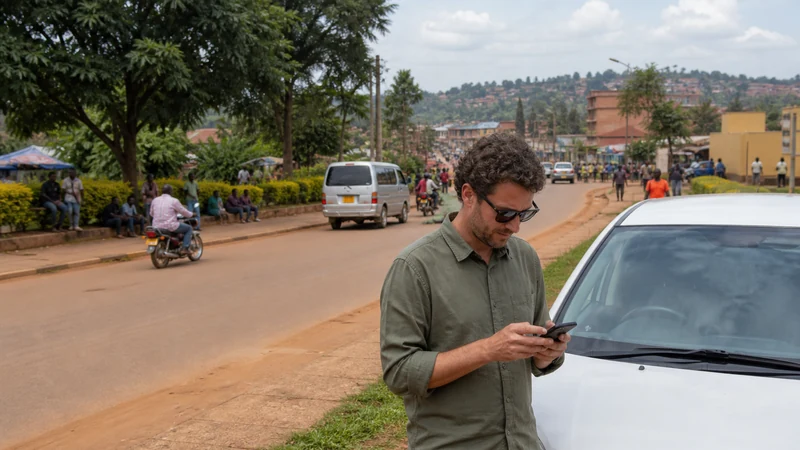

Tourists in Masaka can use mobile data for navigation, accommodation messages, transport coordination and changes to an onward itinerary wherever suitable local coverage is available. Hotel or café Wi-Fi can supplement that connection, but it should not be the only way to retrieve an address or contact a driver.
Masaka may be a destination, an overnight stop or the practical point where a traveller reorganises the next part of a Uganda journey. The useful internet plan therefore covers both time in town and the moment the route continues beyond dependable venue Wi-Fi.
A NoveSIM Uganda eSIM supplies data on a compatible unlocked phone without replacing the existing physical SIM. NoveSIM plans are data-only: WhatsApp, email, maps and internet calls work through data, but the eSIM does not provide a Ugandan number, traditional voice minutes or carrier SMS.
Quick answer: Install NoveSIM before travelling, select it for mobile data in Masaka and keep Data Roaming enabled for the eSIM. Use trusted accommodation Wi-Fi for optional large downloads, while reserving mobile data for maps, booking messages and movement around town. Before an excursion or onward transfer, download the route and save every essential contact offline because a good connection in central Masaka does not guarantee the same result on every road or rural stop.
Top Uganda eSIMs

Uganda eSIM
Fixed
1 GB, 7 days€ 11.112 GB, 15 days€ 21.333 GB, 30 days€ 29.33Unlimited
Unlimited, 1 day€ 10.22Unlimited, 3 days€ 29.33Unlimited, 5 days€ 47.99
What internet options do tourists have in Masaka?
The practical choices are a travel eSIM, a registered local SIM, roaming from the home provider and Wi-Fi supplied by accommodation or other venues. None is automatically best for every visitor.
| Option | Best use in Masaka | Main limitation |
|---|---|---|
| NoveSIM Uganda eSIM | Pre-arranged data for maps, apps and messages | Requires a compatible unlocked phone; no local number |
| Ugandan physical SIM | Travellers who specifically need a local number | Purchase and registration take place after arrival |
| Home-provider roaming | Occasional use when the price is already acceptable | Charges and fair-use terms may be expensive or restrictive |
| Hotel or café Wi-Fi | Large optional downloads at a trusted venue | Ends when the traveller leaves and performance can vary |
Compare the broader trade-offs in the best way to get internet in Uganda. If a local number is important, use the Uganda SIM card guide before deciding between a physical SIM and a travel eSIM.
Why is mobile data useful around Masaka?
Venue Wi-Fi helps only while the phone remains within that network. Mobile data continues supporting the small tasks that occur between check-in, meals, transport and the next departure: opening the saved route, receiving a changed pickup point, checking a booking message or contacting the accommodation.
The value is not constant streaming. It is having the right information at the moment a plan changes. Keep the accommodation name, address and telephone number outside the booking app as well, so a temporary connection problem does not turn a simple arrival into a search for Wi-Fi.
For activity-by-activity planning, the Uganda mobile-data guide explains which uses consume little data and which can exhaust an allowance quickly.
How should you prepare NoveSIM before reaching Masaka?
Preparation is easier on stable private Wi-Fi than during a roadside stop or a busy hotel check-in. First confirm that the handset supports eSIM and is not locked to another provider. The Uganda eSIM compatibility guide covers both checks.
- Choose a current NoveSIM Uganda eSIM plan for the full trip length and expected use.
- Open the installation details on a second device or keep the QR code available securely.
- Install the profile while connected to reliable private Wi-Fi.
- Label the new line clearly as NoveSIM or Uganda Travel Data.
- Keep the profile installed and follow the order’s current activation timing.
- Download the Masaka area and the first accommodation address for offline use.
- Save the NoveSIM instructions, booking reference and transport contact locally.
The complete screen sequence appears in How to Install an eSIM for Uganda. Installation and activation are separate ideas, so do not assume that scanning the profile necessarily begins the plan’s validity; use the terms supplied with the selected plan.
Which phone settings should be used in Masaka?
After reaching Uganda, switch the NoveSIM line on, select it for mobile data and enable Data Roaming for that eSIM. Leave Automatic network selection enabled initially so the phone can attempt to register on an available permitted partner network.
- Open the phone’s mobile or cellular settings.
- Confirm that the NoveSIM profile is switched on.
- Select NoveSIM as the mobile-data line.
- Enable Data Roaming for NoveSIM.
- Prevent the home SIM from using cellular data unintentionally.
- Turn Wi-Fi off for the test.
- Wait for network registration, then open a lightweight webpage.
- Load the next route and send a test message.
Use the Uganda eSIM activation guide for platform-specific detail. A signal symbol alone is not the final test; confirm that an actual webpage and the app needed for the journey can transfer data.
Can you rely on hotel Wi-Fi in Masaka?
Accommodation Wi-Fi may be perfectly adequate for an evening update, but quality depends on the venue, room position, shared capacity and its underlying connection. Ask for the current network name and password at reception rather than joining the first similarly named hotspot.
Use a trusted network for optional large transfers such as photo backups, app updates or downloaded entertainment. Keep sensitive account recovery and urgent transport coordination on mobile data or another connection you trust. Disable automatic photo backup if it begins consuming bandwidth unexpectedly.
Wi-Fi should reduce mobile-data use, not become a single point of failure. Save tomorrow’s route and contacts while both connections are available.
How should Google Maps be prepared for Masaka?
Download the Masaka area and the next meaningful section of the route before setting out. An offline map preserves the road layout when data is weak, but live traffic, newly changed details and some search functions may still need a connection.
Save the accommodation as a labelled place and keep the written address in notes. If a driver sends a meeting point through a messaging app, open it while connected and take a screenshot that includes surrounding landmarks. The Google Maps in Uganda guide covers offline areas and sensible data-saving settings.
What should be saved before leaving Masaka?
A town connection should be used to prepare for the next stretch, not to assume that service will remain identical. Before a rural visit, longer transfer or early departure, save:
- The next accommodation’s name, address and telephone number.
- The driver’s name, meeting point and backup contact method.
- The route and an offline map covering the relevant area.
- Booking references, payment status and arrival instructions.
- Any operator message describing where connectivity may be limited.
- A copy of essential travel documents stored securely offline.
- The return plan and a trusted emergency contact.
Coverage depends on the plan, permitted partner network, device, terrain, buildings and local conditions. Review Uganda eSIM coverage without treating a coverage map as a promise for a particular room, road or remote property.
How much data is enough for a Masaka stay?
A visitor using maps, text messages, email and light browsing needs far less data than someone making video calls, tethering a laptop or uploading every photo. Estimate the whole Uganda itinerary rather than buying only for the number of nights in Masaka.
| Activity | Planning approach |
|---|---|
| Messages and booking confirmations | Usually light; restrict automatic media downloads |
| Navigation | Download offline areas, then use data for live changes |
| Photo backup | Move to trusted Wi-Fi or postpone |
| Video calls and streaming | Use deliberately and monitor the allowance |
| Laptop hotspot | Disable background updates and cloud synchronisation |
Unlimited-labelled plans can still have current usage conditions, speed management or hotspot rules. Read the live product terms instead of assuming that the word “unlimited” removes every restriction. The Uganda unlimited-data guide explains what to verify.
Can you keep the home SIM active?
Yes, on a phone that supports the required dual-SIM combination. Keep the home line active if it receives banking codes or important calls, but set NoveSIM as the mobile-data line and disable automatic cellular-data switching where that feature could return traffic to the home provider.
Incoming calls and SMS on the home line remain subject to that provider’s roaming charges. Internet calls and app messages use NoveSIM data. Check how to avoid roaming charges in Uganda before leaving both lines enabled.
Apple and Android menus differ. Use the Uganda eSIM guide for iPhone or Uganda eSIM guide for Android for the exact controls.
Can NoveSIM be used as a hotspot in Masaka?
Hotspot use depends on the selected plan, phone and current network conditions. When permitted, it can connect a laptop or another traveller’s device, but computers may use data quickly through updates, cloud drives and high-resolution video.
Set the hotspot password, connect only the required device and choose a metered connection on the laptop when available. The Uganda eSIM hotspot guide provides a controlled test sequence and data-saving checklist.
What if mobile data is slow or does not work?
First separate lack of coverage from a phone-setting problem. Move to an open safe location, wait briefly and test a small webpage rather than repeatedly changing several settings at once.
- Confirm that NoveSIM is switched on and selected for mobile data.
- Confirm that Data Roaming is enabled for the NoveSIM line.
- Toggle Airplane Mode once, then wait for registration.
- Restart the phone if the connection remains absent.
- Keep Automatic network selection enabled before trying a permitted network manually.
- Check the APN only when the order instructions or troubleshooting flow requires it; NoveSIM uses data.esim.
- Contact support with the location, device model and screenshots if the problem continues.
Do not delete the installed eSIM during routine troubleshooting. Use the Uganda eSIM troubleshooting guide for no-data problems or the slow-data guide for Uganda when the connection works but performance is poor.
Masaka connectivity checklist
- Install NoveSIM before travel on reliable private Wi-Fi.
- Save the accommodation address and transport contact offline.
- Select NoveSIM for mobile data and enable Data Roaming.
- Test mobile data with Wi-Fi switched off.
- Use trusted venue Wi-Fi for optional large downloads.
- Download the next route before leaving town.
- Prevent the home SIM from using unintended roaming data.
- Keep battery power for maps and changes to the transfer.
- Do not interpret one strong town-centre test as universal coverage.
Related Articles
- Uganda eSIM Plans
- Internet in Kampala for Tourists
- Internet in Mbarara for Tourists
- Best Way to Get Internet in Uganda
- Mobile Data in Uganda
- Uganda eSIM Coverage
- Using Google Maps in Uganda
- Mobile Internet on a Uganda Road Trip
- Rural Mobile Coverage in Uganda
- How NoveSIM Works
FAQ
What is the best way for tourists to get internet in Masaka?
A pre-installed travel eSIM is convenient for visitors who need data for maps and apps without buying a physical card after arrival. A local SIM may suit someone who specifically needs a Ugandan number, while trusted Wi-Fi is useful for optional large downloads.
Does NoveSIM provide a local Ugandan number in Masaka?
No. NoveSIM plans are data-only. WhatsApp and other internet-based calls and messages work through data, but traditional voice and SMS require another line.
Should I rely only on hotel Wi-Fi in Masaka?
No. Venue Wi-Fi ends when you leave and performance can vary. Keep the accommodation address offline and use mobile data for maps, pickup changes and messages while moving around.
When should I install my Uganda eSIM?
Install it before travel on stable private Wi-Fi. Follow the selected plan’s activation timing and keep the profile installed.
Will mobile data work everywhere outside Masaka?
No connection is guaranteed everywhere. Performance depends on the plan, permitted partner network, phone, terrain, buildings and local conditions. Download the next route before leaving town.
Can I use Google Maps offline around Masaka?
Yes. Download the relevant map area while connected. Offline maps preserve basic navigation, although live traffic, new searches and changed details may still need data.
Can I keep my regular SIM active with NoveSIM?
Yes, when the phone supports the required dual-SIM arrangement. Set NoveSIM for mobile data and check the home provider’s roaming charges for calls and SMS.
What should I do if the eSIM has signal but no internet?
Confirm the data line and Data Roaming settings, toggle Airplane Mode once and restart the phone. Follow the ordered troubleshooting guide without deleting the eSIM; the NoveSIM APN is data.esim when manual entry is required.
Final Recommendation
For internet in Masaka, prepare NoveSIM before the journey and use it for the tasks that happen away from venue Wi-Fi: navigation, booking messages, transport coordination and live changes.
Use trusted accommodation Wi-Fi for optional heavy downloads, keep NoveSIM selected for mobile data and prevent the home SIM from using unintended roaming data. Test the connection with Wi-Fi off before depending on it.
Before leaving Masaka, download the onward route and save the next address, driver contact and booking instructions offline. The best connection plan supports the journey when data is available and remains workable when it is not.