


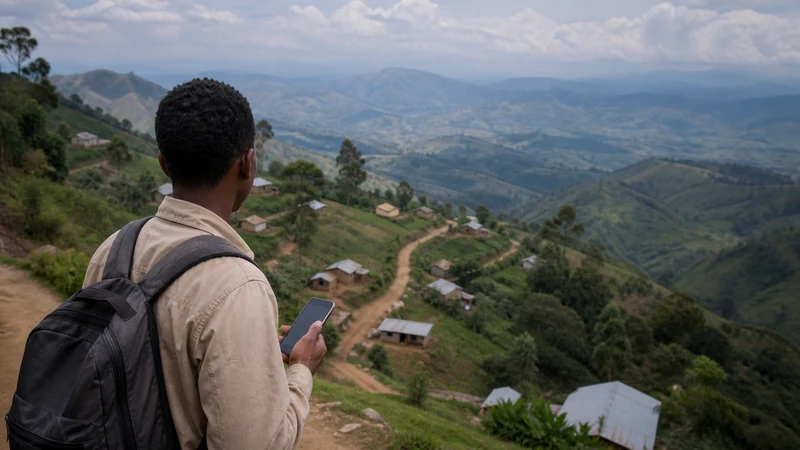

A Uganda travel eSIM is most useful in connected cities, towns and populated parts of a travel route. Reception can become less predictable on rural roads, inside national parks and around remote lodges.
NoveSIM makes it possible to prepare the mobile-data profile before departure, but it does not create new network infrastructure. The eSIM works only where its permitted partner access and the phone can establish a usable connection.
A NoveSIM Uganda eSIM is data-only. It does not include a Ugandan telephone number, traditional calls or carrier SMS, but internet-based messaging and calling apps can work wherever suitable partner coverage is available.
Quick answer: Use NoveSIM as the primary data connection for the connected parts of the itinerary, but do not expect uninterrupted nationwide coverage. Download maps, save lodge contacts and complete important messages before leaving a connected town or safari gateway.
Top Uganda eSIMs

Uganda eSIM
Fixed
1 GB, 7 days€ 11.172 GB, 15 days€ 21.443 GB, 30 days€ 29.48Unlimited
Unlimited, 1 day€ 10.27Unlimited, 3 days€ 29.48Unlimited, 5 days€ 48.24
What does Uganda eSIM coverage actually mean?
Coverage means more than seeing signal bars. For mobile data to work, several conditions need to be satisfied at the same time:
- the phone must detect a suitable network signal;
- the selected NoveSIM plan must permit registration through that partner access;
- the phone must support the relevant network technology;
- the eSIM line and data settings must be correct;
- the local network must be able to provide a usable data session.
A network can appear in a manual scan without being authorised for the eSIM. The phone can also register successfully while local demand or indoor conditions reduce performance.
The guide to mobile networks in Uganda explains the difference between network detection, registration and usable service.
Where is a Uganda eSIM most useful?
NoveSIM is most useful wherever the itinerary passes through suitable partner coverage. In practice, tourists often receive the greatest value during arrivals, urban stays, connected transfers and visits to populated regional centres.
| Travel environment | Practical expectation | Preparation |
|---|---|---|
| Airport arrival | Mobile data may support driver contact, maps and the first address where partner coverage is available | Save pickup details before the flight |
| Kampala and other cities | Useful for maps, messages, bookings and movement between Wi-Fi locations | Test the connection at the actual accommodation |
| Regional towns | Useful for updating routes and contacting onward accommodation | Download information for the next stage |
| Intercity roads | Service may continue on covered sections and disappear on others | Use offline navigation |
| Rural roads | Reception can become intermittent or unavailable | Save the full route and contacts |
| Safari gateways | Useful for completing messages and downloads before remote activities | Confirm the operator’s meeting instructions |
| Park interiors and remote lodges | Mobile service should not be assumed | Follow lodge and tour-operator communication procedures |
This table provides a planning framework rather than a location guarantee. Reception can change within the same town, road or property.
Coverage in Kampala and other connected towns
In Kampala, mobile data can support street navigation, accommodation communication, transport information and live booking changes. Trusted hotel or workspace Wi-Fi can handle large downloads, while NoveSIM keeps the phone connected between venues wherever permitted partner coverage is available.
A good result in central Kampala does not establish what the phone will receive:
- inside another building;
- in an underground or enclosed area;
- on the outskirts of the city;
- along an intercity road;
- at a rural property;
- inside a national park.
Use a connected city stay to prepare for the next stage. The guide to internet in Kampala for tourists covers the capital-specific situation.
Coverage after landing at Entebbe
After arriving at Entebbe, tourists commonly need to contact a driver, retrieve an address or check the route towards Kampala. A pre-installed eSIM removes the need to begin the trip by handling a physical SIM card.
Before leaving the terminal or pickup area:
- Turn on the NoveSIM line when the plan is ready.
- Select NoveSIM for mobile data.
- Enable Data Roaming on NoveSIM.
- Turn Wi-Fi off temporarily.
- Load a new webpage to test mobile data.
- Open the saved pickup and accommodation details.
Airport Wi-Fi may help with initial setup, but it does not travel with you. Review Wi-Fi at Entebbe Airport and the guide to internet in Entebbe for tourists.
What should you expect on intercity roads?
Coverage along an intercity journey can change as the phone moves between populated areas, terrain and mobile sites. A connection may be usable near towns, weaken on a quieter section and return later.
Do not treat every signal loss as an eSIM failure. Consider:
- whether the connection disappeared after leaving a populated area;
- whether the phone was working earlier with the same settings;
- whether the route passes through difficult terrain;
- whether service returns near the next town;
- whether another device has a comparable gap.
The installed NoveSIM profile can reconnect when suitable permitted coverage returns. Avoid repeatedly changing working settings during a likely geographic gap.
Self-driving visitors should read the Uganda road-trip mobile internet guide before depending on live navigation.
Why is rural coverage less predictable?
Rural mobile reception may vary because of distance from infrastructure, terrain, lower population density, local network design and the precise position of the traveller.
Common factors include:
- hills, valleys and forested terrain;
- long distances between populated locations;
- buildings with heavy walls or metal roofs;
- indoor rooms facing away from the available signal;
- local congestion around a limited serving site;
- temporary faults or maintenance;
- the phone’s supported network bands.
A larger data allowance cannot improve radio coverage. Review the guide to rural mobile coverage in Uganda for route preparation and realistic recovery steps.
Coverage inside national parks and safari areas
A phone may connect in a gateway town, around some accommodation or on a covered approach road, then lose service inside a park, forest or remote activity area.
Before beginning a safari stage, save:
- the complete itinerary;
- lodge and tour-operator contacts;
- pickup points and departure times;
- permits and booking references;
- the return arrangement;
- insurance and medical information;
- the operator’s emergency procedure;
- offline maps for relevant public roads.
Ordinary mobile data is not a satellite emergency system. Follow the communication arrangements supplied by the guide, lodge or tour operator.
The Uganda safari mobile-internet guide explains how NoveSIM supports connected stages without being presented as continuous park coverage.
Can you rely on coverage at a remote lodge?
Do not assume that a lodge has mobile coverage because the nearest town does. Properties can be located behind terrain, inside protected areas or far from the infrastructure serving a gateway settlement.
Ask the property:
- whether mobile service is normally available at the lodge;
- whether reception is limited to particular areas;
- whether guest Wi-Fi is provided;
- whether Wi-Fi depends on satellite or another constrained connection;
- when the best time is to complete large downloads;
- what communication procedure applies during an outage;
- which information should be saved before arrival.
The guide to internet beyond lodge Wi-Fi in Uganda covers the difference between property Wi-Fi and mobile reception.
Does NoveSIM use every network available in Uganda?
No. NoveSIM can register only through the partner access permitted by the selected plan. A network visible in a manual scan may not be authorised for that eSIM.
| Phone observation | Correct interpretation |
|---|---|
| Several network names appear | The phone detects several signals; not all are necessarily permitted |
| One network rejects registration | The network may be unauthorised or temporarily unavailable |
| Automatic selection succeeds | The phone found permitted access at that location |
| Manual selection works | The selected network worked at that time and position |
| No network registers | Check location and settings before concluding that the eSIM is faulty |
Keep selection on Automatic during normal use. The network-choice guide for Uganda tourists explains why one operator name cannot be treated as a nationwide winner.
How do 4G and 5G affect coverage?
Network technology depends on the plan, partner access, device, location and local conditions. A phone may use 5G in one area, 4G elsewhere and a more limited connection in another location.
A stable 4G connection is normally sufficient for:
- maps and navigation;
- WhatsApp messages;
- email;
- booking applications;
- ordinary browsing;
- internet voice calls.
Do not force 5G when a stable 4G connection is performing the required travel tasks. The guide to 4G and 5G in Uganda for tourists explains the relevant limitations.
Check the phone before relying on coverage
Coverage information is useful only when the phone can use the eSIM and relevant network technology. Confirm compatibility before purchasing.
- Find the exact model number in the phone settings.
- Check that the phone supports eSIM.
- Confirm that it is not locked to the home carrier.
- Check the regional model variant.
- Confirm the required physical SIM and eSIM combination.
- Review the current NoveSIM compatibility information.
Use the guide explaining whether your phone supports an eSIM for Uganda.
Install the eSIM before travelling
Install NoveSIM at home using stable private Wi-Fi. This separates installation problems from live coverage questions after arrival.
- Open the installation information supplied with the order.
- Add the eSIM using the provided method.
- Confirm that the profile appears in the mobile settings.
- Label it “NoveSIM” or “Uganda”.
- Keep the eSIM installed.
- Follow the activation timing specified for the plan.
- Save the instructions somewhere available offline.
Follow the Uganda eSIM installation guide and the separate instructions to activate a Uganda eSIM.
Use the correct settings before judging coverage
A settings problem can look like missing coverage. Confirm the data-line configuration before comparing locations or networks.
- Turn on the NoveSIM line.
- Select NoveSIM as the mobile-data line.
- Enable Data Roaming for NoveSIM.
- Disable automatic mobile-data switching.
- Keep Data Roaming disabled on the primary SIM.
- Leave network selection on Automatic.
- Turn Wi-Fi off temporarily.
- Load a new webpage to test mobile data.
Testing with Wi-Fi disabled confirms that mobile data is actually working. The Uganda mobile-data guide explains usage monitoring and background-data control.
Coverage gap or setup problem?
The context of the failure helps distinguish the two.
| Observation | More likely explanation | Next step |
|---|---|---|
| Data worked in town and stopped on a remote road | Possible coverage gap | Continue offline and test near the next populated location |
| The eSIM has never connected after arrival | Possible configuration or activation issue | Check line, data and roaming settings |
| Signal bars appear but no page loads | Registration, data-session or local performance issue | Test a new page and restart the connection |
| Data works outdoors but not inside a building | Indoor signal loss | Move near a window or outdoors where practical |
| Service returns without changing settings | Location or temporary network condition | Keep Automatic selection and continue monitoring |
If the line does not work in a location where service should be available, follow the guide for a Uganda eSIM that is not working. Do not delete the eSIM unless NoveSIM support instructs you to do so.
What should you do when coverage disappears?
Avoid changing several settings at once in a likely remote gap. Continue with the saved route and test again after the environment changes.
- Check whether other travellers also lost service.
- Move outdoors or away from dense walls where safe.
- Leave network selection on Automatic.
- Turn Airplane Mode on briefly and then off.
- Restart the phone if appropriate.
- Test again near the next town or connected stop.
- Contact NoveSIM support when the problem continues in an expected service area.
Manual network selection should be used only for a specific permitted-partner test. Follow the Uganda manual network selection guide rather than trying every visible operator.
Use coverage where it helps and Wi-Fi where it fits
Trusted accommodation or workspace Wi-Fi can preserve mobile data for movement between locations. It is useful for large downloads, cloud backup and software updates.
Wi-Fi does not replace mobile coverage during:
- airport and hotel transfers;
- street navigation;
- intercity road journeys;
- changed pickup points;
- movement between properties.
A practical plan uses NoveSIM for mobile tasks where partner coverage exists, trusted Wi-Fi for optional heavy use and offline information for remote gaps.
Build a route-level coverage plan
| Route stage | Live-data task | Offline backup |
|---|---|---|
| Arrival | Driver contact and first navigation | Saved pickup details and address |
| City stay | Maps, bookings and transport changes | Downloaded city map and accommodation contact |
| Intercity transfer | Current route or arrival updates where service exists | Full offline route and destination directions |
| Safari gateway | Final messages and downloads | Permits, operator contacts and meeting points |
| Park or remote lodge | Optional connectivity where available | Operator communication procedure and complete itinerary |
| Return journey | Changed bookings and airport information | Saved departure details and transfer plan |
Related Articles
- Uganda eSIM Plans
- Mobile Networks in Uganda
- Best Network for Uganda Tourists
- 4G and 5G in Uganda for Tourists
- Rural Mobile Coverage in Uganda
- Mobile Internet on Safari in Uganda
- Mobile Internet on a Uganda Road Trip
- Internet Beyond Lodge Wi-Fi in Uganda
- Manual Network Selection in Uganda
- Uganda eSIM Not Working
FAQ
Does a Uganda eSIM have coverage everywhere?
No. NoveSIM works where suitable permitted partner coverage is available. Reception can vary between cities, roads, buildings, parks and remote accommodation.
Where is a Uganda eSIM most useful?
It is most useful during arrivals, connected city stays, populated travel corridors and other locations where the selected plan can access a suitable partner network.
Will NoveSIM work inside national parks?
Service may be available in some gateways, approach areas or properties, but it should not be assumed throughout a park or remote safari area.
Does NoveSIM connect to every network visible on the phone?
No. A network can be visible in a scan without being authorised for the selected NoveSIM plan.
Should I select a network manually during a coverage gap?
Leave selection on Automatic for normal use. Choose a network manually only for a specific permitted-partner test or when NoveSIM support requests it.
Does a larger data plan improve coverage?
No. A larger allowance provides more data but cannot extend network infrastructure or create a signal in an uncovered area.
What should I download before a remote journey?
Save the route, lodge contacts, meeting points, permits, booking references and operator instructions before leaving a connected town or gateway.
Final Recommendation
Use NoveSIM as the primary travel-data line for the connected parts of a Uganda itinerary, but evaluate coverage route by route. A successful test proves service at that location and time, not at every later stop.
Keep network selection on Automatic, enable Data Roaming on the NoveSIM line and verify the connection with Wi-Fi disabled. Treat manual network selection as a diagnostic step rather than a permanent operator choice.
Before rural roads, safari activities and remote lodge stays, save maps, contacts and booking information offline. This makes the eSIM valuable wherever partner coverage exists without making the journey dependent on continuous mobile service.