


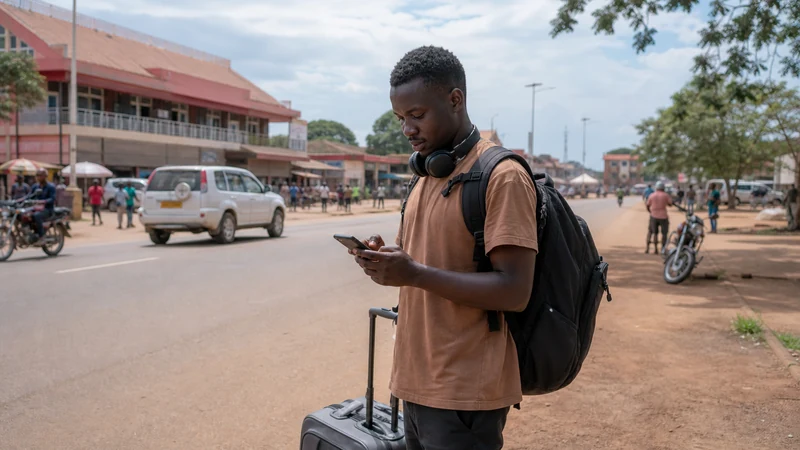

Tourists in Gulu can use mobile data for maps, accommodation messages, transport coordination and itinerary changes wherever suitable local coverage is available. Hotel and café Wi-Fi can supplement that connection, but it should not be the only way to retrieve an address or contact a driver.
Gulu often functions as a practical base for time in northern Uganda or an overnight stop before a longer transfer. The internet plan should therefore support daily movement in the city and preserve the essential details needed after the route leaves dependable venue Wi-Fi.
A NoveSIM Uganda eSIM supplies data on a compatible unlocked phone without replacing the existing physical SIM. NoveSIM plans are data-only: WhatsApp, email, maps and internet calls work through data, but the eSIM does not provide a Ugandan number, traditional voice minutes or carrier SMS.
Quick answer: Install NoveSIM before travelling, select it for mobile data in Gulu and enable Data Roaming for the eSIM. Use trusted accommodation Wi-Fi for optional large downloads and NoveSIM for maps, messages and movement around the city. Before an onward journey, download the route and save the driver, destination and backup procedure offline because a strong result in Gulu does not guarantee identical reception on every northern road.
Top Uganda eSIMs


Which internet option suits a Gulu visit?
| Option | Best use | Main limitation |
|---|---|---|
| NoveSIM Uganda eSIM | Pre-arranged data for maps, apps and messages | Compatible unlocked phone required; no local number |
| Ugandan physical SIM | Visitors who specifically need a local number | Purchase and registration after arrival |
| Home-provider roaming | Light use when the rate is acceptable | Charges and fair-use terms can be restrictive |
| Venue Wi-Fi | Optional large downloads at a trusted property | Ends when the traveller leaves and quality varies |
Compare the broader choices in the Uganda internet-options guide. If a Ugandan number is essential, read the Uganda SIM card guide before deciding between a local SIM and travel eSIM.
Why is mobile data useful away from accommodation?
Wi-Fi helps inside a hotel or café, but it does not follow the traveller to a pickup point, restaurant or bus departure. Mobile data keeps live messages and navigation on the same phone between those places.
Store the accommodation name, written address and telephone number outside the booking app. A temporary connection problem should not make the destination impossible to explain. The Uganda mobile-data guide helps estimate common activities without buying only for the number of hotel nights.
How should NoveSIM be installed before the trip?
First confirm that the handset supports eSIM and is unlocked using the Uganda compatibility guide. Install the profile on stable private Wi-Fi before travelling.
- Choose a current NoveSIM Uganda eSIM plan for the complete itinerary.
- Keep the QR code or installation details securely available on another screen.
- Install the profile over reliable private Wi-Fi.
- Label the new line NoveSIM or Uganda Travel Data.
- Follow the activation timing supplied with the order.
- Download the Gulu area and the first important route.
- Save accommodation, driver and support contacts offline.
The exact screens appear in How to Install an eSIM for Uganda. Keep the profile installed; installation and activation are not necessarily the same event.
Which settings should be checked in Gulu?
- Switch the NoveSIM line on.
- Select NoveSIM for mobile data.
- Enable Data Roaming for NoveSIM.
- Leave Automatic network selection enabled initially.
- Prevent the home SIM from using mobile data automatically.
- Turn Wi-Fi off for the test.
- Open a lightweight webpage and load the next route.
- Send a test message to the day’s essential contact.
Use the Uganda eSIM activation guide for platform-specific detail. A signal icon is not enough; confirm that an app can actually transfer data.
Can hotel Wi-Fi cover the entire stay?
It may support evening browsing, app updates or photo backup, but performance depends on the property, room and number of guests. Confirm the current network name with staff rather than joining a similarly named hotspot.
Use trusted Wi-Fi for optional heavy traffic and keep NoveSIM available for transport and booking messages outside the property. Download tomorrow’s route the evening before an early departure.
How should Google Maps be prepared?
Download the Gulu area and the next confirmed section of the journey. Offline maps preserve basic navigation if data weakens, although live traffic, changed listings and new searches can still require a connection.
Save the accommodation and meeting point as labelled places, then take a screenshot showing nearby landmarks. The Google Maps guide for Uganda covers offline areas and data-saving controls.
What should be saved before leaving Gulu?
- The next accommodation’s name, address and telephone number.
- The driver’s name, meeting point and backup contact.
- The route and an offline map of the relevant area.
- Booking references and arrival instructions.
- Any operator warning about limited coverage.
- The return plan and a trusted emergency contact.
- Enough battery for the expected transfer.
Coverage depends on the plan, permitted partner, device, terrain and local conditions. Review Uganda eSIM coverage and rural mobile coverage in Uganda without treating a map as a guarantee for a particular road or property.
How much data is appropriate?
| Activity | Planning approach |
|---|---|
| Messages and booking confirmations | Restrict automatic media downloads |
| Navigation | Download maps, then use data for live changes |
| Photo backup | Move to trusted Wi-Fi or postpone |
| Video calls and streaming | Use deliberately and monitor the allowance |
| Laptop hotspot | Disable background updates and cloud synchronisation |
Unlimited-labelled plans can still have current fair-use, speed or hotspot conditions. Check the live terms and use the Uganda unlimited-data guide for the questions worth verifying.
Can the home SIM remain active?
Yes, when the phone supports the required dual-SIM combination. Keep the home line available for banking codes or important calls, but select NoveSIM for mobile data and disable automatic data switching.
Calls and SMS on the home line remain subject to its provider’s roaming charges. Check how to avoid Uganda roaming charges, plus the relevant iPhone guide or Android guide.
Can NoveSIM provide a hotspot?
Hotspot use depends on the selected plan, phone and current network conditions. When permitted, tethering can connect a laptop, but computers may consume data quickly through updates, cloud drives and video.
Use a strong password, connect only the required device and mark the connection as metered where possible. Follow the Uganda hotspot guide before relying on tethering for work.
What if data is slow or unavailable?
- Confirm that NoveSIM is switched on and selected for mobile data.
- Confirm that Data Roaming is enabled for NoveSIM.
- Toggle Airplane Mode once and wait for registration.
- Restart the phone if the connection remains absent.
- Keep Automatic network selection enabled before trying a permitted network manually.
- Check the APN only when required; NoveSIM uses data.esim.
- Contact support with the location, device model and screenshots if the issue continues.
Do not delete the installed eSIM during routine troubleshooting. Use Uganda eSIM troubleshooting for no-data problems or the Uganda slow-data guide for poor performance.
How should an onward northern journey be prepared?
Use Gulu to finish tasks that still depend on live communication: confirm the pickup, destination, fuel or rest stops, and the procedure if the vehicle is delayed. Save every answer locally before departure.
The Uganda road-trip internet guide helps separate connected towns from longer rural stretches. A successful test in Gulu is useful evidence that the phone is configured, not a promise of continuous reception.
Related Articles
- Uganda eSIM Plans
- Internet in Kampala for Tourists
- Internet in Mbale for Tourists
- Internet in Masaka for Tourists
- Mobile Data in Uganda
- Uganda eSIM Coverage
- Using Google Maps in Uganda
- Uganda Road Trip Mobile Internet
- Rural Mobile Coverage in Uganda
- How NoveSIM Works
FAQ
What is the best internet option for tourists in Gulu?
A pre-installed travel eSIM is convenient for visitors needing data for maps, apps and messages. A local SIM may suit someone needing a Ugandan number, while trusted Wi-Fi is useful for optional large downloads.
Does NoveSIM provide a Ugandan number?
No. NoveSIM is data-only. Internet calls and app messages use data, while traditional voice and SMS require another line.
Can I rely only on hotel Wi-Fi?
No. Venue Wi-Fi ends when you leave and quality varies. Keep mobile data available for transport and booking messages.
When should I install the Uganda eSIM?
Install it before travel on stable private Wi-Fi, follow the plan’s activation timing and keep the profile installed.
Will mobile data work on every road beyond Gulu?
No. Coverage depends on the plan, partner network, device, terrain and local conditions. Download the route and save contacts before departure.
Can Google Maps work offline?
Yes. Download the relevant area beforehand. Basic navigation can continue offline, while live traffic and new searches may require data.
Can I keep my regular SIM active?
Yes, on a compatible dual-SIM phone. Select NoveSIM for data and check the home provider’s roaming charges for calls and SMS.
What if the eSIM has signal but no internet?
Confirm the data line and Data Roaming, toggle Airplane Mode once and restart the phone. Follow the troubleshooting guide without deleting the eSIM; NoveSIM uses data.esim when manual APN entry is required.
Final Recommendation
For internet in Gulu, prepare NoveSIM before travelling and use it for maps, accommodation messages, transport coordination and live changes away from venue Wi-Fi.
Use trusted Wi-Fi for optional heavy downloads, keep NoveSIM selected for data and test it with Wi-Fi switched off. Prevent the home SIM from using unintended roaming data.
Before leaving Gulu, download the onward route and save the destination, driver contact and backup procedure offline. The city connection supports preparation; the offline plan protects the longer journey.