
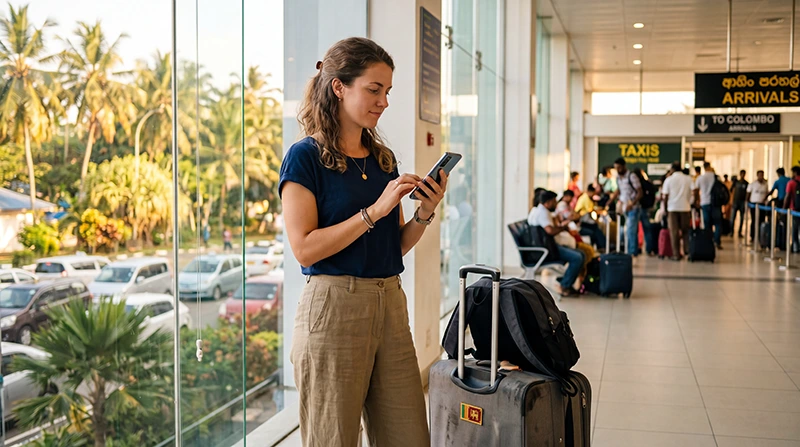

Traveler using mobile internet after arriving at Colombo Airport in Sri Lanka

Internet at Colombo Airport: WiFi, SIM Cards and eSIM Options

Getting internet at Colombo Airport is one of the first priorities for many travellers arriving in Sri Lanka. A working connection helps you contact your hotel, message an airport transfer driver, check a route, open booking confirmations and arrange transportation before leaving the terminal.

Bandaranaike International Airport is Sri Lanka’s main international airport. Although it is commonly called Colombo Airport, it is located near Katunayake and Negombo, north of central Colombo. Depending on traffic, the journey to Colombo can take a significant amount of time, so having mobile internet before leaving the airport is useful.

Travellers can connect through airport WiFi, purchase a local tourist SIM card or use a Sri Lanka travel eSIM installed before departure. Each option can work, but they differ in convenience, coverage, setup and whether the connection continues after you leave the terminal.

Quick answer: airport WiFi is useful for a temporary connection inside the terminal, a local SIM may suit travellers who need a Sri Lankan phone number, and a travel eSIM is usually the easiest option for getting mobile data shortly after landing.

Top Sri Lanka eSIMs

What Are the Internet Options at Colombo Airport?

Internet Option Best For Main Advantage
Airport WiFi Short-term use inside the terminal No SIM installation required
Sri Lanka travel eSIM Most international tourists Install before departure
Local tourist SIM card Longer stays and local calls Usually includes a local number
Home-carrier roaming Emergency or very short use No additional setup

The best choice depends on how quickly you need to connect, whether your phone supports eSIM and whether you require a local Sri Lankan telephone number.

Is There WiFi at Colombo Airport?

WiFi is generally available for passengers inside Bandaranaike International Airport. It can be useful while you are waiting in the arrivals area, collecting luggage or arranging onward transport.

You may be able to use airport WiFi for:

  • Sending WhatsApp messages.
  • Contacting a hotel or driver.
  • Opening a booking confirmation.
  • Checking flight information.
  • Looking up transport options.
  • Finding your accommodation on Google Maps.

Airport WiFi should be treated as a temporary connection. Speed, login requirements and performance may vary depending on passenger numbers and your location inside the terminal.

How to Connect to Colombo Airport WiFi

  1. Open the WiFi settings on your smartphone, tablet or laptop.
  2. Select the official airport WiFi network.
  3. Wait for the login page to appear.
  4. Open your browser manually if the page does not open automatically.
  5. Accept the displayed terms and conditions.
  6. Complete any requested login or verification step.
  7. Open a lightweight website to test the connection.

When several networks with similar names appear, ask airport staff which one is official. Avoid connecting to unknown open networks that imitate the airport name.

What If the Airport WiFi Login Page Does Not Open?

Airport WiFi usually uses a captive portal, which is a browser page that must be completed before internet access begins.

If the page does not appear:

  1. Disconnect from the WiFi network.
  2. Turn WiFi off for approximately 10 seconds.
  3. Turn WiFi on again.
  4. Reconnect to the official network.
  5. Open a browser manually.
  6. Visit a simple webpage.
  7. Temporarily disable a VPN if it blocks the login page.
  8. Forget the network and reconnect if necessary.

Some phones continue using mobile data while the WiFi login remains incomplete. Check the WiFi status carefully before assuming that the airport connection is working.

Is Airport WiFi Enough for Your Arrival?

Airport WiFi may be enough when you only need to send a message or open a booking confirmation. It becomes less practical when you leave the terminal and need continuous communication.

You may lose the WiFi connection while:

  • Walking toward the pickup area.
  • Waiting in an outdoor taxi zone.
  • Moving through the airport car park.
  • Travelling to Colombo or Negombo.
  • Trying to contact a driver outside the building.

For transport, navigation and communication after leaving the airport, mobile data is more reliable than terminal WiFi.

Using a Sri Lanka eSIM at Colombo Airport

A travel eSIM can be installed before departure and used after landing. This allows you to avoid replacing your physical SIM card or waiting at a telecom counter.

A Sri Lanka eSIM is particularly useful when you want to:

  • Connect shortly after arrival.
  • Keep your regular SIM active.
  • Use Google Maps outside the airport.
  • Message your hotel or driver.
  • Avoid airport SIM queues.
  • Use mobile data during your entire trip.

Your phone must support eSIM technology and be unlocked. The selected plan must also include Sri Lanka.

How to Prepare the eSIM Before Flying

  1. Check that your phone supports eSIM.
  2. Confirm that the device is unlocked.
  3. Purchase a Sri Lanka eSIM plan.
  4. Connect the phone to reliable WiFi.
  5. Install the eSIM using the supplied QR code or installation link.
  6. Label the new line Sri Lanka or NoveSIM.
  7. Keep the profile installed until arrival.
  8. Save the installation details offline.

Your NoveSIM QR code and instructions are sent by email after purchase. You can also find the eSIM details in your NoveSIM account by opening the relevant order.

Do not delete the eSIM after installation. Many travel eSIM QR codes can only be installed once.

How to Activate the eSIM After Landing

  1. Turn off Airplane Mode.
  2. Open your SIM or Mobile Network settings.
  3. Enable the Sri Lanka eSIM.
  4. Select it as the preferred line for Mobile Data.
  5. Turn on Data Roaming for the eSIM.
  6. Turn off automatic mobile data switching.
  7. Keep Network Selection on Automatic.
  8. Wait several minutes for registration.

The phone should connect to a supported local partner network. Registration may take a few minutes after leaving Airplane Mode.

Read our guide to using an eSIM at Colombo Airport for a more detailed setup walkthrough.

Recommended eSIM Settings at the Airport

Setting Recommended Value
Sri Lanka eSIM Enabled
Mobile Data Sri Lanka eSIM
Calls Primary SIM
SMS Primary SIM
Data Roaming on travel eSIM On
Data Roaming on primary SIM Off
Automatic Data Switching Off
Network Selection Automatic
Preferred Network Type 5G Auto or 4G/LTE
APN data.esim if required

Buying a Local SIM Card at Colombo Airport

Tourists can usually purchase local prepaid SIM cards from telecom counters in the arrivals area. Staff generally complete registration and activation during the purchase.

You may need:

  • Your passport.
  • An unlocked smartphone.
  • Payment for the selected tourist package.
  • A few minutes for registration and setup.

A local SIM may be suitable when you need a Sri Lankan phone number or plan to stay for a longer period.

The main disadvantage is that you may need to queue, present identification and replace your current physical SIM unless your phone supports two SIMs.

Read our guide to buying a SIM card at Colombo Airport.

Travel eSIM vs Airport SIM Card

Feature Travel eSIM Airport SIM Card
Purchase before travel Yes No
Installation Digital Physical SIM or local eSIM setup
Airport queue No Possible
Passport registration at airport Usually not required Normally required
Keep primary SIM active Yes on compatible phones Depends on device
Local telephone number Usually no Usually yes
Ready after landing Usually within minutes After purchase and activation
Best for Convenience and mobile data Local calls and longer stays

Can You Use International Roaming?

Your home SIM may connect automatically in Sri Lanka if international roaming is enabled. This can be convenient, but it may also be expensive.

Before using home-carrier roaming, check:

  • The daily roaming charge.
  • The included mobile data allowance.
  • The price after the allowance is used.
  • Whether Sri Lanka is included in a travel pass.
  • Voice and SMS charges.

European roaming rules do not automatically apply in Sri Lanka. Travellers from Europe should not assume that their domestic data allowance will work without additional fees.

Read our guide to Sri Lanka roaming charges.

Can You Keep Your Home SIM Active?

Yes. Most modern Dual SIM smartphones allow the primary SIM and travel eSIM to remain active together.

A recommended configuration is:

Function SIM to Use
Mobile Data Sri Lanka eSIM
Calls Primary SIM
SMS Primary SIM
WhatsApp Internet Sri Lanka eSIM
Data Roaming Travel eSIM only

Your home operator may still charge for answering or making traditional calls in Sri Lanka. Check its roaming conditions before travelling.

Does WhatsApp Work at Colombo Airport?

Yes. WhatsApp can work through airport WiFi, a local SIM card or a travel eSIM.

You can use it to:

  • Contact your airport transfer driver.
  • Message your hotel.
  • Send an arrival update.
  • Share your location.
  • Make voice or video calls.

Your existing WhatsApp number remains unchanged when the travel eSIM provides mobile data.

Read our guide to using WhatsApp in Sri Lanka.

Can You Use Google Maps at the Airport?

Google Maps can work through airport WiFi or mobile data. It is useful for checking the route to Colombo, Negombo or your first accommodation.

Before leaving the terminal:

  • Search for your hotel.
  • Save the address.
  • Download the route if possible.
  • Take a screenshot of the destination.
  • Confirm that mobile data works without WiFi.

Offline maps can also help if the mobile signal becomes weak during the journey.

Can You Book a Taxi or Ride?

A working internet connection can help you contact a driver, check transport services or arrange a pickup.

Airport WiFi may be sufficient to begin the process, but you may lose the connection after walking outside.

Mobile data is more practical when:

  • The driver changes the pickup location.
  • You need to send your live position.
  • The vehicle is delayed.
  • You need to contact the driver again.
  • You want to follow the route after departure.

How to Test Mobile Data Before Leaving

  1. Turn airport WiFi off.
  2. Confirm that the Sri Lanka eSIM or local SIM is selected for Mobile Data.
  3. Open a lightweight website.
  4. Search for your accommodation in Google Maps.
  5. Send a WhatsApp message.
  6. Check that 4G, LTE or 5G appears.

If these services work, your mobile connection is ready for use outside the airport.

Sri Lanka eSIM APN Settings

The APN is normally configured automatically. If the eSIM shows signal but mobile internet does not work, enter the APN manually.

APN Field Value
Name NoveSIM
APN data.esim
Username Leave blank
Password Leave blank
Authentication None or automatic

Save the APN and make sure it is selected. Turn Airplane Mode on for approximately 30 seconds, then turn it off and restart the phone.

Read our complete guide to Sri Lanka eSIM APN settings.

What If the eSIM Shows No Service?

No Service means the phone has not registered with a supported mobile network.

  1. Confirm that Sri Lanka is included in the plan.
  2. Make sure the eSIM line is enabled.
  3. Turn on Data Roaming.
  4. Keep Network Selection on Automatic.
  5. Turn Airplane Mode on for 30 seconds.
  6. Turn Airplane Mode off.
  7. Restart the phone.
  8. Move closer to a window or open area.

Do not delete the eSIM while troubleshooting.

What If There Is Signal but No Internet?

If the phone shows signal bars, 4G, LTE or 5G but nothing loads, check:

  • The travel eSIM is selected for Mobile Data.
  • Data Roaming is enabled.
  • Automatic Data Switching is off.
  • The APN is data.esim.
  • The plan is active.
  • WiFi is off during testing.

After correcting the settings, use Airplane Mode for 30 seconds and restart the device.

See our guide to fixing no internet on a Sri Lanka eSIM.

What If the Connection Is Slow?

Mobile or WiFi performance may be slower when the arrivals area is crowded or the phone has weak indoor reception.

Try:

  • Moving closer to a window.
  • Turning Airplane Mode on for 30 seconds.
  • Restarting the phone.
  • Switching from unstable 5G to 4G.
  • Pausing cloud backups.
  • Closing application updates.
  • Testing another supported mobile network.

Read our guide to fixing a slow Sri Lanka eSIM.

Is Public Airport WiFi Safe?

Public WiFi should be used carefully because many passengers share the same network.

Avoid using airport WiFi for:

  • Online banking.
  • Payment card transactions.
  • Confidential company systems.
  • Changing important passwords.
  • Sending highly sensitive documents.

Use your mobile data connection for sensitive tasks whenever possible. Connect only to the official airport network and avoid unknown open hotspots.

What to Download Before Your Flight

  • Your airline booking confirmation.
  • Your hotel address.
  • Your airport transfer instructions.
  • Offline maps of Colombo and Negombo.
  • Your travel insurance information.
  • Your eSIM installation instructions.
  • Emergency contact details.
  • Copies of important documents.

Offline copies remain available even if airport WiFi or mobile data is temporarily unavailable.

What to Check Before Leaving the Airport

  • Your mobile data connection works.
  • Your hotel address is saved.
  • Your driver has your contact details.
  • Your pickup location is clear.
  • Your primary SIM has Data Roaming turned off.
  • Automatic Data Switching is disabled.
  • Google Maps works without airport WiFi.
  • Your phone has enough battery for the journey.

Related Sri Lanka Guides

FAQ

How can I get internet at Colombo Airport?

You can use airport WiFi, activate a pre-installed Sri Lanka eSIM, buy a local tourist SIM card or use international roaming.

Is WiFi available at Colombo Airport?

WiFi is generally available for passengers inside the terminal, although performance and login conditions may vary.

Will airport WiFi work outside the terminal?

Do not rely on it outside the building. The signal may disappear in pickup areas, car parks and on the road.

Can I use an eSIM at Colombo Airport?

Yes. Install it before departure, then enable it for Mobile Data and turn on Data Roaming after landing.

Can I buy a SIM card after landing?

Tourist SIM cards are generally available from telecom counters in the arrivals area.

Is an eSIM better than airport WiFi?

An eSIM is more practical after leaving the airport because it continues providing mobile data throughout your journey.

Is an eSIM better than an airport SIM card?

An eSIM is usually more convenient, while a local SIM may be better when you need a Sri Lankan phone number.

Can I keep my regular SIM active?

Yes. Use the Sri Lanka eSIM for Mobile Data and keep the primary SIM active for calls and SMS on a compatible Dual SIM phone.

Will WhatsApp keep my existing number?

Yes. WhatsApp continues using your existing number while the travel eSIM supplies mobile data.

Do I need Data Roaming enabled?

Yes. Enable Data Roaming on the travel eSIM and keep it disabled on your primary SIM.

What APN should I use with NoveSIM?

If manual configuration is required, use data.esim and leave the username and password blank.

What should I do if mobile internet does not work?

Select the travel eSIM for Mobile Data, enable Data Roaming, check the APN and use Airplane Mode for 30 seconds.

Final Recommendation

Airport WiFi can provide a useful temporary connection after landing at Colombo Airport, but it may become unavailable as soon as you leave the terminal.

A local tourist SIM card is suitable when you need a Sri Lankan number or plan to stay for a longer period. For most tourists who mainly need mobile data, a travel eSIM is the easiest option.

Install your Sri Lanka eSIM before departure. After landing, select it for Mobile Data, enable Data Roaming and disable Automatic Data Switching.

If the eSIM shows signal but has no internet, enter data.esim as the APN, use Airplane Mode for approximately 30 seconds and restart the phone.

Browse Sri Lanka eSIM plans here.

Scroll to Top