


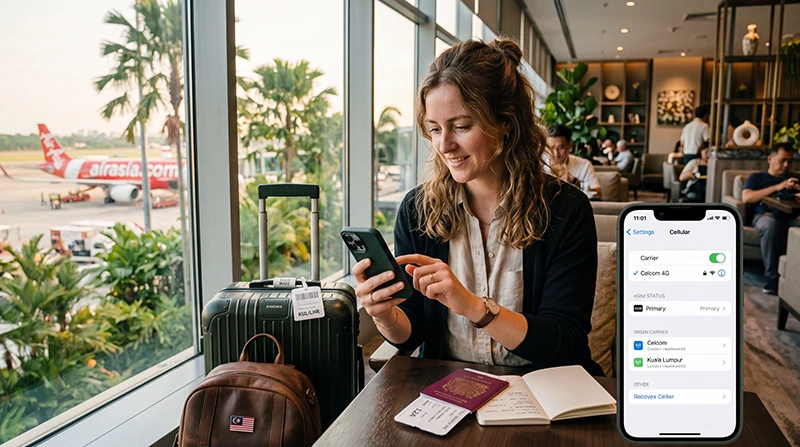

If you purchased a Malaysia eSIM, activation is usually a quick process that takes only a few minutes.
Most travelers install their eSIM before departure and activate it after arriving in Malaysia. This allows mobile internet to start working as soon as the phone connects to a supported network.
Quick answer: Install your eSIM before traveling, enable it after arrival, turn on Data Roaming, select it for mobile data and wait for the phone to connect to a Malaysian network.
Top Malaysia eSIMs


Before You Activate Your Malaysia eSIM
Before activation, make sure:
- Your phone supports eSIM
- Your phone is carrier unlocked
- Your eSIM has been successfully installed
- You have received your QR code or activation details
- You are traveling to Malaysia
Most activation problems occur because the eSIM was not installed correctly or Data Roaming was not enabled.
When Does a Malaysia eSIM Activate?
Most travel eSIMs do not start immediately after installation.
In most cases, activation occurs when the eSIM connects to a supported mobile network in Malaysia for the first time.
This means you can usually install the eSIM several days before your trip without using any of the plan’s validity period.
Step 1: Install Your Malaysia eSIM
Installation should ideally be completed before departure while connected to reliable WiFi.
The process usually involves:
- Opening your phone settings
- Selecting Add eSIM
- Scanning the QR code
- Downloading the eSIM profile
- Saving the installation
Most devices complete installation within a few minutes.
Step 2: Arrive in Malaysia
After arriving in Malaysia, your phone should be able to detect supported local networks.
At this point, the eSIM can be activated for use.
Step 3: Enable the eSIM
Open your phone settings and make sure the Malaysia eSIM is turned on.
If multiple SIM profiles are installed, verify that the correct eSIM is enabled.
Step 4: Select the eSIM for Mobile Data
Many phones support multiple SIMs.
You should manually choose the Malaysia eSIM as your preferred mobile data line.
This ensures the device uses the travel eSIM instead of your home SIM for internet access.
Step 5: Enable Data Roaming
This is one of the most important steps.
Most travel eSIMs require Data Roaming to be enabled on the eSIM profile.
Recommended settings:
- Malaysia eSIM Data Roaming → ON
- Primary SIM Data Roaming → OFF
This helps avoid unexpected roaming charges from your home carrier.
How to Activate a Malaysia eSIM on iPhone
- Open Settings
- Select Cellular
- Choose your Malaysia eSIM
- Enable Turn On This Line
- Turn on Data Roaming
- Go back and select the eSIM as your Cellular Data line
Apple recommends ensuring the eSIM line is enabled before use.
How to Activate a Malaysia eSIM on Android
- Open Settings
- Select Connections or Network & Internet
- Open SIM Manager
- Enable the Malaysia eSIM
- Select it as the preferred data SIM
- Enable Data Roaming
The exact menu names may vary depending on the Android manufacturer.
APN Settings for Malaysia eSIM
Most devices configure APN settings automatically.
If mobile data does not work, manually check the APN.
| Setting | Value |
|---|---|
| APN | data.esim |
| Username | Leave blank |
| Password | Leave blank |
Can You Keep Your Home SIM Active?
Yes.
Most modern smartphones support dual-SIM functionality.
You can:
- Use the Malaysia eSIM for mobile data
- Keep your regular SIM active
- Receive SMS verification codes
- Receive banking notifications
- Receive calls on your normal number
Does WhatsApp Work After Activation?
Yes.
WhatsApp usually continues working with your existing phone number.
The eSIM simply provides mobile internet connectivity.
You do not normally need to create a new WhatsApp account.
How Long Does Activation Take?
In most cases, activation takes only a few minutes after connecting to a supported network.
Sometimes network registration may take slightly longer, especially after landing at the airport.
Waiting a few minutes is often enough for the connection to establish.
What If the eSIM Does Not Activate?
If the eSIM does not connect immediately, do not delete it.
Try the following:
- Verify the eSIM is enabled
- Select it as your mobile data SIM
- Enable Data Roaming
- Check APN settings
- Use APN data.esim
- Turn Airplane Mode on for 30 seconds
- Restart the phone
- Wait several minutes
Common Activation Mistakes
- Forgetting to enable Data Roaming
- Using the wrong SIM for mobile data
- Leaving automatic data switching enabled
- Incorrect APN settings
- Installing the eSIM without WiFi
- Deleting the eSIM too quickly
Most activation issues are caused by settings rather than network problems.
Can You Activate the eSIM Before Traveling?
Yes.
You can usually install the eSIM before departure.
However, most travelers only enable and start using the eSIM after arriving in Malaysia.
This ensures the plan activates at the correct time.
Related Malaysia eSIM Guides
- Install Malaysia eSIM
- Malaysia eSIM iPhone
- Malaysia eSIM Android
- Does My eSIM Work in Malaysia
- eSIM Not Working Malaysia
- No Internet Malaysia eSIM
- APN Settings Malaysia eSIM
FAQ: How to Activate Malaysia eSIM
When does a Malaysia eSIM activate?
Most travel eSIMs activate when they first connect to a supported network in Malaysia.
Should I install my eSIM before traveling?
Yes. Most travelers install the eSIM before departure while connected to WiFi.
Do I need Data Roaming enabled?
Yes. Most travel eSIMs require Data Roaming to be enabled on the eSIM profile.
Can I keep my regular SIM active?
Yes. Most dual-SIM phones allow you to use an eSIM for mobile data while keeping your home SIM active.
Will WhatsApp still work?
Yes. WhatsApp usually remains linked to your existing phone number.
What APN should I use?
If manual setup is needed, use data.esim and leave username and password blank.
What should I do if the eSIM does not activate?
Check Data Roaming, mobile data selection, APN settings and restart your phone before attempting further troubleshooting.
Should I delete the eSIM if it does not work?
No. Most activation issues can be resolved through settings changes without deleting the eSIM.
Final Recommendation
Activating a Malaysia eSIM is usually a simple process. Install the eSIM before departure, enable it after arriving in Malaysia, turn on Data Roaming and select it for mobile data.
For most travelers, these steps are enough to establish a connection within minutes and provide reliable internet access throughout the trip.