
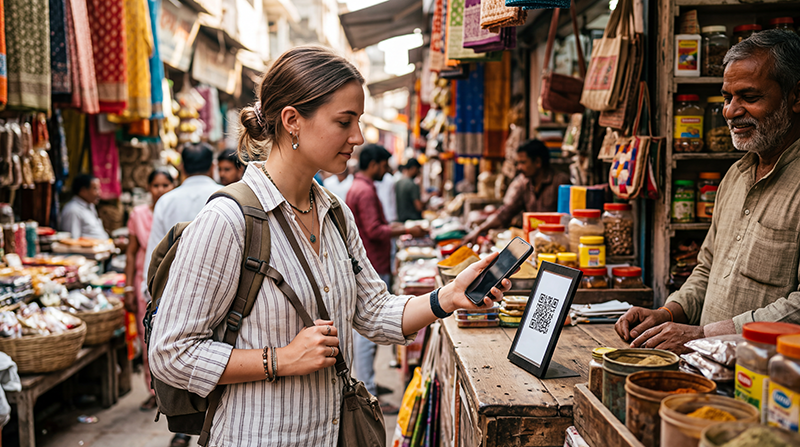

International tourist preparing to make a digital payment while travelling in India

Google Pay in India for Tourists: UPI, Foreign Cards and Payment Guide

Google Pay is widely recognised throughout India, but international visitors often misunderstand how the service works. Seeing Google Pay signs and UPI QR codes at hotels, restaurants, taxis and small shops can create the impression that any traveller with the Google Pay or Google Wallet app can scan the code and pay immediately.

In practice, Google Pay India is closely connected to India’s Unified Payments Interface, commonly known as UPI. Standard UPI payments usually depend on an eligible Indian banking relationship, a supported mobile number and a UPI PIN. A foreign Google Pay account or a bank card stored in Google Wallet does not automatically provide access to this local payment system.

This does not mean that tourists cannot make digital payments in India. International cards are accepted by many hotels, restaurants, shopping centres, airlines and larger businesses. Cash remains useful, and eligible foreign visitors may also be able to use a tourist-focused UPI wallet such as UPI One World through an approved provider.

Reliable mobile internet is essential for digital payments, banking notifications, currency conversion, hotel communication and receiving transaction confirmations. An India eSIM can provide the required data connection while allowing you to keep your normal SIM active for banking codes and account verification.

Quick answer: most tourists cannot simply use the standard Indian version of Google Pay with only a foreign bank card. Carry international cards and cash, and investigate an approved UPI One World provider if you want to pay at merchants that primarily accept UPI QR payments.

Top India eSIMs

Can Tourists Use Google Pay in India?

The answer depends on what you mean by Google Pay.

A visitor may already use Google Pay or Google Wallet in another country for contactless card payments. That service is not identical to Google Pay India’s UPI functionality.

Payment Function Typical Tourist Access
Foreign card stored in Google Wallet May work at compatible contactless card terminals
Scanning a standard Indian UPI QR code Usually not available with only a foreign card
Google Pay India linked to an Indian bank account Normally requires eligible local banking setup
UPI One World tourist wallet May be available through an approved provider
Paying online with an international card Depends on the merchant and card issuer

The most important distinction is between a card payment and a UPI payment. Both may appear digital, but they use different infrastructure and registration requirements.

What Is Google Pay India?

Google Pay India is a payment application that participates in the Indian UPI system. It allows eligible users to connect supported bank accounts, create UPI identifiers and make transfers or merchant payments.

Common uses include:

  • Paying a merchant by scanning a UPI QR code.
  • Sending money to another UPI user.
  • Receiving money through a UPI identifier.
  • Paying bills.
  • Making supported online purchases.
  • Using eligible linked bank or payment products.

The service is different from simply storing a Visa or Mastercard in a digital wallet.

What Is UPI?

UPI stands for Unified Payments Interface. It is India’s instant bank payment system and is used for transfers between bank accounts and for merchant payments.

UPI is widely used because customers can often pay by scanning a QR code rather than inserting a card or handling cash.

You may see UPI QR codes at:

  • Hotels and guesthouses.
  • Restaurants and cafés.
  • Street-food stalls.
  • Small shops.
  • Taxi providers.
  • Tour operators.
  • Pharmacies.
  • Market stalls.
  • Ticket counters.

The presence of a UPI QR code does not necessarily mean that a foreign card or international version of Google Pay can use it.

Google Pay vs Google Wallet

Google Pay and Google Wallet can perform different roles depending on the country.

Feature Google Wallet or International Card Setup Google Pay India
Stores supported payment cards Yes May support eligible cards and accounts
Contactless terminal payments Where supported Depends on device, card and merchant
UPI bank transfers No Yes for eligible users
Scan standard UPI merchant QR codes Not automatically Yes with valid UPI setup
Requires Indian banking setup No for ordinary foreign cards Normally required for standard UPI use

A phone showing your foreign payment card inside Google Wallet does not mean that the card can pay every Indian UPI QR code.

Can You Link a Foreign Bank Card to Google Pay India?

Foreign-issued cards are not a direct replacement for an Indian UPI-linked bank account. Even when your card works for normal merchant payments, it may not be accepted for setting up standard UPI transactions through Google Pay India.

Payment acceptance depends on:

  • The country where the card was issued.
  • The card network.
  • The merchant terminal.
  • The merchant’s payment processor.
  • Your bank’s international transaction settings.
  • Online or in-person authentication requirements.
  • The currency and type of transaction.

Do not rely on a single foreign card. Carry at least one backup card and some Indian rupees.

Can You Scan an Indian QR Code with Google Pay?

You can scan and pay a standard UPI QR code only when you have a compatible UPI payment setup. A foreign card saved in Google Wallet does not automatically create that setup.

There are several types of QR codes in India:

  • UPI merchant QR codes.
  • Card-network QR payments.
  • Merchant-specific payment links.
  • Wallet QR codes.
  • Static codes linked to a payment account.
  • Dynamic codes generated for a specific bill.

Ask the merchant whether international cards are accepted when your payment app cannot process the QR code.

What Is UPI One World?

UPI One World is a tourist-oriented prepaid payment option designed to give eligible foreign visitors access to UPI merchant payments without requiring a conventional Indian bank account.

The exact registration and availability depend on the approved provider.

A typical process may include:

  1. Selecting an authorised UPI One World provider.
  2. Completing identity verification.
  3. Providing passport and visa information where required.
  4. Creating or activating the wallet.
  5. Loading Indian rupees into the wallet.
  6. Using the app to scan supported merchant UPI QR codes.
  7. Requesting redemption of an eligible unused balance according to the provider’s rules.

UPI One World is separate from registering for the normal Indian Google Pay service.

Does UPI One World Work Through Google Pay?

Do not assume that a UPI One World wallet can be added directly to Google Pay India. Tourist wallets are generally accessed through the approved provider’s own onboarding process and application.

Check the provider’s current instructions for:

  • Supported nationalities.
  • Required travel documents.
  • Registration locations.
  • Digital or in-person verification.
  • Wallet loading methods.
  • Transaction limits.
  • Refund or redemption rules.
  • Fees.
  • Supported merchant payments.

Who Can Use UPI One World?

Eligibility can depend on nationality, passport, visa status, entry documentation and the provider’s current onboarding policy.

Before travelling, confirm:

  • Whether your nationality is supported.
  • Whether registration can be completed online.
  • Whether you must visit an airport or service location.
  • Which identification documents are required.
  • How money can be added.
  • Whether your foreign card is accepted for wallet funding.
  • How unused funds are returned.

What Can You Pay for with a Tourist UPI Wallet?

A tourist UPI wallet may help with merchant payments at supported UPI QR codes.

Possible uses include:

  • Restaurant bills.
  • Café purchases.
  • Shops and supermarkets.
  • Pharmacies.
  • Hotel payments.
  • Tourist activities.
  • Taxi or driver payments.
  • Small merchant purchases.

Functionality may be limited to merchant payments and may not include every person-to-person transfer or banking function available to a local UPI user.

Google Pay India vs UPI One World

Feature Google Pay India UPI One World
Main audience Eligible Indian banking customers Eligible foreign visitors and NRIs
Indian bank account Normally needed for standard UPI use Not normally required in the same way
Prepaid balance Not the main standard UPI structure Common tourist-wallet structure
Merchant QR payments Yes Yes where supported
Registration Bank and mobile verification Provider onboarding and identity verification
Best for short-term tourists Usually difficult without local setup Designed for eligible visitors

Can You Use Your Home-Country Google Pay in India?

Your home-country Google Pay or Google Wallet may continue to work for ordinary card payments when all of the following are true:

  • The merchant has a compatible card terminal.
  • The terminal supports contactless payments.
  • Your card is supported by your digital wallet.
  • Your bank allows international transactions.
  • The merchant accepts the card network.
  • The transaction passes the required security checks.

This is a card transaction, not an Indian UPI payment.

Does Contactless Google Pay Work in India?

Contactless card payments may work at compatible terminals in hotels, shopping centres, airports, larger restaurants and established retailers.

Acceptance is less predictable at:

  • Street-food stalls.
  • Small market shops.
  • Local taxis.
  • Remote guesthouses.
  • Rural businesses.
  • Small cafés.
  • Independent tour providers.

Many small merchants display only a UPI QR code and may not have a contactless card terminal.

Can You Use Apple Pay in India Instead?

A foreign card stored in Apple Wallet may work at a compatible contactless card terminal if the card issuer and payment network permit the transaction. It does not automatically provide access to UPI QR payments.

The same principle applies to other international digital wallets: card-wallet acceptance and UPI acceptance are different.

Best Payment Methods for Tourists in India

Payment Method Best For Main Limitation
International credit or debit card Hotels, flights, malls and larger businesses Not accepted by every small merchant
Cash in Indian rupees Markets, small shops and backup Requires safe storage and change
UPI One World Eligible visitors paying UPI merchants Onboarding and provider rules apply
Contactless digital wallet Compatible card terminals Does not work with every UPI QR code
Hotel-arranged payment Transfers, tours and accommodation May cost more than local alternatives

Should Tourists Carry Cash in India?

Yes. Even when you plan to use cards or a tourist UPI wallet, cash remains a useful backup.

Cash may be needed for:

  • Small local purchases.
  • Markets.
  • Tips.
  • Remote destinations.
  • Small restaurants.
  • Local transport.
  • Merchants experiencing network problems.
  • Places where foreign cards are declined.

Carry smaller notes rather than relying only on large denominations.

Do International Credit Cards Work in India?

International Visa and Mastercard cards are widely accepted by larger businesses, but acceptance is not universal.

Cards are more likely to work at:

  • International hotels.
  • Major domestic and international airlines.
  • Shopping centres.
  • Established restaurants.
  • Large supermarkets.
  • Tourist attractions with modern ticket systems.
  • Online booking platforms.

A merchant may accept domestic cards but decline some foreign cards because of processing restrictions or authentication requirements.

Why a Foreign Card May Be Declined

Possible reasons include:

  • International transactions are disabled.
  • The bank identifies the payment as unusual.
  • The merchant does not accept foreign-issued cards.
  • The terminal has a communication problem.
  • Additional authentication cannot be completed.
  • The card has reached a limit.
  • The merchant accepts only UPI or cash.
  • The billing information does not match.

Contact your bank through its official app or phone number if repeated legitimate transactions are declined.

Should You Inform Your Bank Before Travelling?

Check your bank’s current travel and security policy before departure. Some issuers no longer require travel notifications, while others may offer controls inside the banking app.

Before travelling:

  • Enable international payments.
  • Check foreign transaction fees.
  • Review daily limits.
  • Save the bank’s official contact number.
  • Enable transaction notifications.
  • Confirm that you can receive authentication codes.
  • Carry a backup card from another bank.

Can You Use Revolut or Wise in India?

A Revolut or Wise card may work wherever its card network is accepted and the account supports the transaction. These services do not automatically provide access to local UPI QR payments.

Review:

  • Current card availability in your country.
  • Foreign exchange fees.
  • ATM withdrawal limits.
  • Weekend or out-of-hours exchange adjustments.
  • Merchant acceptance.
  • Account security settings.

Can Tourists Use Paytm or PhonePe?

Standard registration for Indian payment apps may require a supported Indian mobile number, eligible bank account or local verification. A foreign visitor should not assume that downloading Paytm, PhonePe or another local app will immediately enable UPI payments.

Use a tourist-specific UPI service where eligible rather than trying to bypass normal banking requirements.

Can Tourists Use Google Pay for Uber or Ola?

Google Pay may appear as a payment method for some local accounts and rides, but international visitors should not depend on it unless their setup is fully supported.

For Uber or Ola, keep alternatives available:

  • A saved international card.
  • Another payment card.
  • Cash where offered.
  • A hotel-arranged transfer.
  • An official prepaid airport taxi.

Can You Use Google Pay for Food Delivery?

Food-delivery applications may display UPI, cards, wallets or cash depending on the service and location.

A tourist should check whether:

  • The app accepts a foreign phone number.
  • The restaurant delivers to the hotel.
  • A foreign card is accepted.
  • Cash payment is offered.
  • The hotel reception accepts deliveries.

Hotel staff can often suggest a practical payment method when the app rejects an international card.

Can You Use Google Pay for Indian Trains?

Train-booking platforms may offer UPI and other local payment options, but tourists should also check for international card support.

Before beginning a reservation:

  • Create the required account in advance.
  • Confirm the accepted payment methods.
  • Keep a second card available.
  • Do not refresh repeatedly during payment.
  • Save the confirmation after purchase.

Read the complete guide to internet on Indian trains.

Can You Use Google Pay at Indian Airports?

Airport restaurants, shops and service desks may accept cards, contactless payments or UPI. Acceptance differs by merchant.

At an airport, you may be able to pay with:

  • An international bank card.
  • A compatible contactless digital wallet.
  • Cash in Indian rupees.
  • A tourist UPI wallet where supported.

Do not wait until leaving the terminal to obtain your only payment method.

Can You Use Google Pay in Delhi?

UPI payments are widespread throughout Delhi. Larger hotels, restaurants and shopping centres often accept international cards, while smaller merchants may prefer UPI or cash.

A tourist UPI wallet can be useful for:

  • Small cafés.
  • Local shops.
  • Taxi or driver payments.
  • Market purchases.
  • Restaurants displaying UPI QR codes.

Read the Delhi internet guide.

Can You Use Google Pay in Mumbai?

Mumbai has extensive digital payment acceptance. International cards are commonly accepted in business districts, hotels and shopping centres, while UPI is frequently used by smaller merchants.

Keep mobile data active so you can receive payment notifications and contact your bank if a transaction is blocked.

Read the Mumbai internet guide.

Can You Use Google Pay in Bangalore?

Bangalore has widespread card and UPI payment infrastructure. Technology offices, coworking spaces, restaurants and hotels commonly support digital payments.

International business travellers should still carry a backup card and cash for smaller merchants or temporary payment-system outages.

Read the Bangalore internet guide.

Can You Use Google Pay in Goa?

Digital payments are common in developed parts of Goa, but acceptance varies between luxury resorts, beach shacks, taxi providers and small businesses.

Carry cash when visiting:

  • Secluded beaches.
  • Small markets.
  • Remote accommodation.
  • Independent drivers.
  • Seasonal beach businesses.

Can You Use Google Pay in Kerala?

UPI and card payments are common in Kochi and other urban areas. Rural backwaters, hill stations and small coastal businesses may have more limited card acceptance.

Mobile coverage can also affect QR payments. Keep cash available before travelling to a remote property or boarding a houseboat.

Can You Use Digital Payments in Rajasthan?

Jaipur, Udaipur and other Rajasthan cities have extensive UPI and card acceptance. Remote desert camps, rural roads and small shops may require cash.

Before leaving a city:

  • Withdraw enough cash.
  • Confirm the hotel’s payment method.
  • Save transaction receipts.
  • Check mobile coverage.
  • Keep your bank’s contact details offline.

Read the Rajasthan internet guide.

Can You Use Digital Payments in the Himalayas?

UPI may be accepted in connected Himalayan towns, but mobile payment reliability can fall when coverage or electricity is interrupted.

Carry cash for:

  • Remote villages.
  • Mountain taxis.
  • Trekking routes.
  • Small guesthouses.
  • Roadside food stops.
  • High-altitude destinations.

Why Mobile Internet Is Essential for Digital Payments

Most mobile payment methods require an active internet connection for initiating or confirming the transaction.

Mobile data is also useful for:

  • Receiving banking notifications.
  • Opening authentication messages.
  • Checking the amount charged.
  • Converting Indian rupees into your home currency.
  • Contacting your bank.
  • Opening a digital receipt.
  • Reporting a suspicious payment.
  • Checking whether a duplicate payment occurred.

Why Use an India eSIM for Payments?

An India eSIM provides mobile data while allowing your primary SIM to remain available for banking SMS and account verification.

A practical Dual SIM setup is:

Phone Function Recommended SIM
Mobile Data India eSIM
Calls Primary SIM
Banking SMS Primary SIM
Payment Apps Internet through India eSIM
WhatsApp Internet through India eSIM

Browse India eSIM plans.

Can You Receive Banking Verification Codes?

Your primary SIM may continue receiving verification codes if it remains enabled and your home operator supports SMS roaming.

Before departure:

  • Check that your phone supports Dual SIM.
  • Keep the primary SIM enabled.
  • Disable mobile data roaming on the primary SIM.
  • Confirm SMS roaming availability.
  • Review possible SMS charges.
  • Update your bank’s contact information.
  • Test the bank’s authentication app.

Recommended Mobile Settings

Setting Recommended Value
India eSIM Enabled
Mobile Data India eSIM
Calls and SMS Primary SIM
Data Roaming on India eSIM On
Data Roaming on primary SIM Off
Automatic Data Switching Off
Network Selection Automatic
Payment App Mobile Data Enabled
Bank Notifications Enabled
APN data.esim if required

India eSIM APN Settings

Most compatible phones configure the APN automatically. If payment, banking and travel apps do not connect despite showing mobile signal, check the following settings.

Field Value
Name NoveSIM
APN data.esim
Username Leave blank
Password Leave blank
Authentication None

Payment Safety Tips for Tourists

  • Verify the merchant name before confirming a QR payment.
  • Check the amount carefully.
  • Never share your UPI PIN.
  • Do not reveal banking verification codes.
  • Use only official payment applications.
  • Avoid payment links from unknown senders.
  • Keep transaction notifications enabled.
  • Review receipts immediately.
  • Do not allow a stranger to control your phone.
  • Use a secure screen lock.
  • Report a lost card immediately.
  • Keep a backup payment method separate from your wallet.

UPI QR Code Safety

A QR code can direct a payment to a particular merchant or account. Always confirm the displayed recipient before approving the transaction.

Do not proceed when:

  • The merchant name is unexpected.
  • The amount is incorrect.
  • The QR sticker appears to cover another code.
  • A stranger asks you to enter a PIN to receive money.
  • The app requests unusual permissions.
  • The payment page opens outside the official application.

Do You Enter a UPI PIN to Receive Money?

A genuine incoming payment should not require you to reveal your UPI PIN to another person. Be cautious when anyone claims that you must approve a collect request or share a code to receive a refund.

Confirm refunds through the original merchant and payment application.

What to Do If a Payment Is Pending

  1. Do not pay a second time immediately.
  2. Check the transaction status in the official app.
  3. Review your bank notifications.
  4. Ask the merchant whether payment was received.
  5. Save a screenshot or reference number.
  6. Wait for the payment system to update.
  7. Use official support if the status remains unresolved.

What to Do If You Are Charged Twice

  1. Check whether both transactions are completed.
  2. Save both payment references.
  3. Ask the merchant to verify its records.
  4. Request a refund through the correct transaction.
  5. Contact the payment provider or bank through official channels.
  6. Avoid sending sensitive card information through chat.

What to Do If Google Pay Is Not Working

If you are attempting to use Google Pay India, determine whether the problem is technical or whether your account is simply not eligible for local UPI payments.

  1. Confirm that your account has a valid UPI payment setup.
  2. Check the internet connection.
  3. Confirm that mobile data is enabled for the app.
  4. Check that the registered SIM is active.
  5. Verify that the bank account is supported.
  6. Confirm that the UPI PIN is active.
  7. Update the official Google Pay app.
  8. Restart the phone.
  9. Use official in-app support when required.

A foreign Google Wallet account without an Indian UPI setup will not become compatible merely by changing the APN or mobile network.

What to Do If a Foreign Card Is Declined

  1. Confirm the amount and currency.
  2. Try chip and PIN instead of contactless payment.
  3. Check the banking app for a security alert.
  4. Confirm that international transactions are enabled.
  5. Try a second card.
  6. Ask whether the merchant accepts foreign-issued cards.
  7. Use cash or another supported payment method.
  8. Contact your bank through an official channel.

How Much Cash Should You Carry?

The appropriate amount depends on your itinerary, accommodation and access to ATMs. Do not carry all of your travel money in one place.

A practical approach is to carry enough cash for:

  • One transport journey.
  • Several small meals.
  • Tips.
  • Emergency purchases.
  • A day in a remote location.

Use hotel safes or secure storage where appropriate and keep backup cards separately.

ATM Tips for Tourists in India

  • Use ATMs attached to established banks.
  • Protect your PIN.
  • Inspect the card slot.
  • Avoid accepting help from strangers.
  • Check withdrawal fees.
  • Keep the receipt when useful.
  • Count cash discreetly.
  • Store the card immediately.
  • Notify the bank if the machine retains the card.

Payment Checklist Before Travelling to India

  1. Take at least two payment cards.
  2. Check international transaction settings.
  3. Review card fees.
  4. Save your bank’s official contact number.
  5. Enable transaction notifications.
  6. Confirm access to verification codes.
  7. Install your official banking app.
  8. Investigate UPI One World eligibility.
  9. Install your India eSIM.
  10. Keep your primary SIM active.
  11. Carry some Indian cash.
  12. Download a currency-conversion app.
  13. Use a secure phone lock.
  14. Store backup cards separately.
  15. Never share a UPI PIN or verification code.

Related India Guides

FAQ

Can tourists use Google Pay in India?

Most tourists cannot use the standard Indian UPI version of Google Pay with only a foreign bank card. A compatible local setup or eligible tourist UPI wallet is required for UPI QR payments.

Can I use my normal Google Pay account in India?

Your foreign cards may work at compatible contactless terminals, but this does not automatically allow you to scan and pay standard Indian UPI QR codes.

Can I add a foreign card to Google Pay India?

A foreign card does not normally replace the eligible Indian banking setup required for standard UPI payments. Card-payment acceptance and UPI access are different.

Can I scan a UPI QR code with a foreign Google Pay account?

Usually not. You need a compatible UPI payment setup, such as an eligible Indian account or approved tourist UPI service.

What is UPI One World?

UPI One World is a prepaid UPI payment option designed for eligible foreign visitors and NRIs. Registration, limits and funding methods depend on the approved provider.

Does UPI One World require an Indian bank account?

It is designed to let eligible visitors make merchant UPI payments without setting up a conventional Indian bank account in the same way as a resident user.

Is UPI One World the same as Google Pay?

No. Tourist UPI wallets are provided through approved services and are separate from normal Google Pay India registration.

Do foreign credit cards work in India?

They are commonly accepted by hotels, airlines, shopping centres and larger businesses, but some merchants and online platforms may decline foreign-issued cards.

Does contactless Google Pay work in India?

It may work at compatible card terminals if your card and issuing bank support the transaction. It does not work automatically at every UPI QR code.

Should tourists carry cash?

Yes. Cash is an important backup for small shops, markets, local transport and remote destinations.

Can I use Wise or Revolut in India?

Their cards may work where the relevant card network is accepted. They do not automatically provide access to Indian UPI QR payments.

Can tourists use Paytm or PhonePe?

Standard account setup may require local banking, a supported mobile number or other verification. Eligible visitors should investigate an approved tourist UPI option.

Do digital payments require mobile internet?

Most payment apps need mobile data or WiFi to initiate, authenticate and confirm transactions.

Can I keep my home SIM active for banking codes?

Yes. Most Dual SIM phones allow the primary SIM to remain active while an India eSIM provides mobile data.

Do I need Data Roaming enabled?

Enable Data Roaming on the India eSIM. Keep it disabled on the primary SIM to reduce the risk of roaming data charges.

What APN should I use?

If manual configuration is required for a NoveSIM India eSIM, use data.esim.

Final Recommendation

Google Pay is extremely common in India, but international visitors should understand that the Indian service is built primarily around UPI. A foreign Google Pay or Google Wallet account does not automatically let you pay every UPI QR code displayed by an Indian merchant.

For most tourists, the safest payment setup combines at least two international cards, some Indian cash and, where eligible, an approved UPI One World tourist wallet. This provides flexibility across hotels, airports, restaurants, markets, taxis and smaller businesses.

Set up all payment methods before you need them, keep transaction notifications enabled and never share a UPI PIN or banking verification code. Confirm the recipient and amount before approving any QR payment.

Reliable mobile data is essential for payment apps, banking alerts and account security. Install your India eSIM while connected to WiFi, select it for Mobile Data after arriving, enable Data Roaming on the eSIM and keep your primary SIM active for SMS verification when required.

Browse India eSIM plans here.

Scroll to Top