


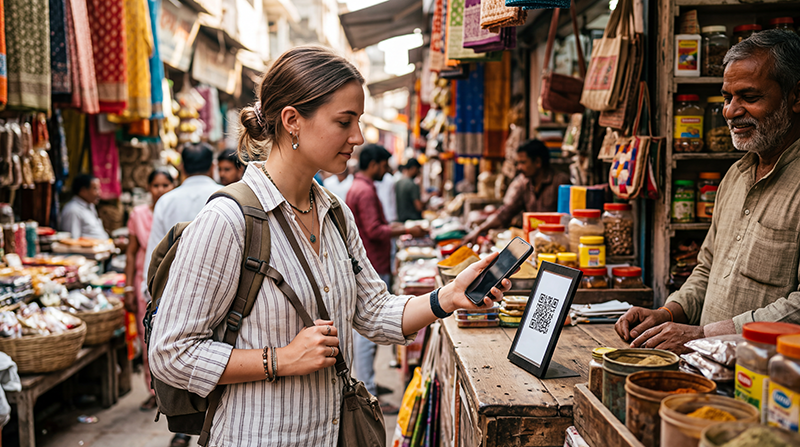

Google Pay in India is centred on UPI, and its normal person-to-person and QR-payment setup is not simply a foreign-card wallet. Tourists should not expect to download the app, add any overseas card and pay every UPI QR code.
A visitor may still use an existing phone wallet for supported contactless card payments where the merchant terminal and card issuer allow it. That is different from paying a UPI-only QR code.
Both methods need a working data connection. A NoveSIM eSIM provides data only; it does not supply an Indian telephone number, bank account, conventional calls or SMS.
Quick answer: Bring a physical international card and some cash even if Google Pay works on your phone. Treat UPI QR payments and contactless card payments as separate systems, and confirm eligibility with your bank before relying on either.
Top India eSIMs


Why Google Pay Works Differently in India
Many Indian merchants display UPI QR codes. Standard Google Pay UPI features normally depend on an eligible bank account and mobile-number verification, so an overseas card alone does not reproduce the local setup.
Contactless card acceptance is a separate question. If your issuer supports mobile-wallet payments abroad, a tokenised card may work at compatible NFC terminals. The merchant, card network, bank security rules and international-payment setting all affect the result.
What to Check Before Departure
- Ask the card issuer whether the card supports contactless mobile-wallet payments in India.
- Enable international transactions if the bank requires it.
- Carry the physical card and know its PIN.
- Keep a second card from another network and a modest amount of cash.
- Save bank contact details outside the wallet app.
Arrange connectivity before arrival with an India eSIM plan, and confirm the handset on the compatible-device list. Plan and device support can change, so check the live product details.
Paying When a Merchant Shows Only a UPI QR Code
Do not assume that scanning the code with a foreign banking or camera app will create a valid payment. Ask whether the merchant accepts an international card or cash. Hotels, larger shops and organised transport providers are more likely to have card terminals than small stalls or local services.
Never let a stranger enrol your device, handle a verification message or enter banking credentials. A payment request, collect request and completed payment are different screens; read the amount and recipient before approving anything.
Mobile Data for Payments and Verification
Keep the travel eSIM selected for Mobile Data and Data Roaming enabled on that line when required. Keep Data Roaming off on the primary SIM to avoid accidental charges, but remember that bank verification SMS may still arrive through the number-owning line.
If mobile data stops, follow the connected-without-internet checks. The NoveSIM APN is data.esim when manual entry is required. Do not delete the profile unless Support instructs you.
Related Articles
- India eSIM plans
- eSIM-compatible devices
- Keep your number with a data eSIM
- Internet on Indian trains
FAQ
Can a tourist use Google Pay in India?
Some wallet and card functions may work, but standard UPI use has eligibility requirements. Do not rely on a foreign card to pay every UPI QR code.
Will my foreign card work through Google Wallet?
It may work at compatible contactless terminals if the issuer, card, device and merchant support it. Confirm with your bank.
Do I need an Indian phone number for Google Pay?
Local UPI setup commonly involves eligible banking and mobile-number verification. A travel data eSIM does not provide an Indian number.
What payment backup should I carry?
Carry a physical international card, a second payment method and some cash for merchants that accept neither your wallet nor your card.
Final Recommendation
Use Google Pay in India only after distinguishing UPI payments from ordinary contactless card payments.
Verify your card and international settings with the issuer, then keep reliable mobile data for maps, banking alerts and payment apps.
Carry physical payment backups because acceptance varies sharply between merchants and locations.