


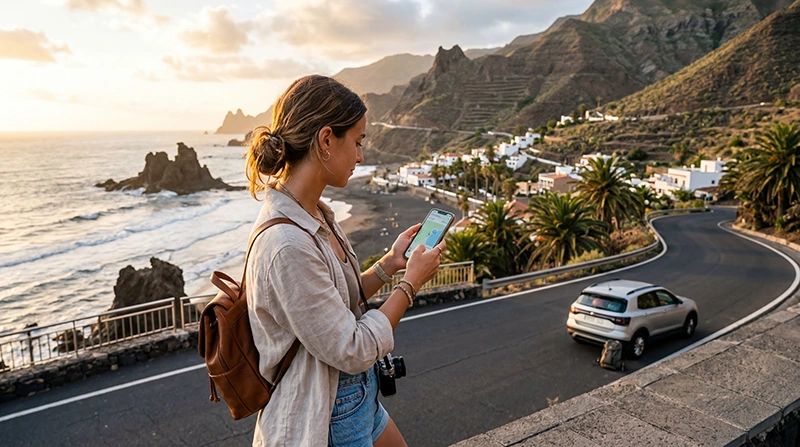

The Canary Islands are part of Spain, but travellers still need to verify that a plan sold for Spain explicitly covers the islands. The product’s live destination list and network information are more reliable than assumptions based on geography or a broad European label.
For Tenerife, Gran Canaria, Lanzarote, Fuerteventura and the smaller islands, the best eSIM is the one whose allowance and validity match the whole itinerary. Island hopping does not normally require a new plan when the selected Spain product covers the archipelago, but terrain can change the signal from one location to the next.
NoveSIM travel eSIMs are data-only. We do not provide a Spanish telephone number, conventional calls or SMS; internet apps can use the mobile-data connection.
Quick answer: Select a Spain eSIM only after confirming that its current coverage includes the Canary Islands. Use the same plan across covered islands, leave Network Selection on Automatic and keep offline maps for mountain roads, ferry days and remote beaches where reception may be less consistent.
Top Canary Islands eSIMs

Canary Islands eSIM
Fixed
1 GB, 7 days€ 1.782 GB, 15 days€ 3.563 GB, 30 days€ 4.45Unlimited
Unlimited, 1 day€ 2.23Unlimited, 3 days€ 4.90Unlimited, 5 days€ 8.02
Spain eSIM
Fixed
1 GB, 7 days€ 1.782 GB, 15 days€ 3.563 GB, 30 days€ 4.45Unlimited
Unlimited, 1 day€ 2.23Unlimited, 3 days€ 4.90Unlimited, 5 days€ 8.02
Europe Extra eSIM
Fixed
1 GB, 7 days€ 2.232 GB, 15 days€ 3.563 GB, 30 days€ 4.45Unlimited
Unlimited, 1 day€ 2.67Unlimited, 3 days€ 5.35Unlimited, 5 days€ 8.91Europe+ eSIM
Fixed
1 GB, 7 days€ 2.672 GB, 15 days€ 4.013 GB, 30 days€ 5.35Unlimited
Unlimited, 1 day€ 2.67Unlimited, 3 days€ 6.24Unlimited, 5 days€ 10.25Does a Spain eSIM Work in the Canary Islands?
It can, provided the plan’s live coverage includes the archipelago. Do not infer coverage from “Spain” or “Europe” in a title alone: open the product details, confirm the destination and review the listed partner networks, activation rule, validity and fair-use terms.
If the itinerary also includes mainland Spain, a single qualifying plan can avoid a profile change. Trips continuing to Morocco, Cape Verde or another nearby country require a separate destination check; physical proximity does not make those countries part of Spanish coverage.
Choosing for Tenerife, Gran Canaria, Lanzarote or Fuerteventura
The island name does not determine the required data package as much as the way the phone will be used. Tenerife and Gran Canaria city stays may involve frequent transport and restaurant searches. Driving itineraries on Lanzarote or Fuerteventura make offline navigation and a charged phone particularly important.
Visitors combining several islands should choose validity through the final departure day. Ferry and airport days often use extra data for schedules, boarding information and last-minute accommodation messages.
Coverage Changes with Island Terrain
Population centres and resorts are different radio environments from volcanic interiors, mountain roads, ravines and isolated coastlines. Even when a coverage map shows service in an area, buildings, elevation, weather, congestion and the phone’s supported bands influence the connection at a precise spot.
Download an offline map before hiking or driving away from towns. Mobile data is useful for preparation and live updates, but it should not be treated as an emergency-communications guarantee on a remote trail or at sea.
How Much Data to Buy
| Use pattern | Main data drivers |
|---|---|
| Resort break | Messages, restaurant search, occasional maps |
| Road trip | Navigation, parking, attraction and ferry searches |
| Island hopping | Tickets, transfers, maps and accommodation contact |
| Remote work | Video meetings, cloud files and hotspot sharing |
Check recent phone statistics, multiply realistic daily use by the number of days and add a margin. Pause automatic photo backup and app updates. If considering an unlimited plan, read the current high-speed and fair-use terms rather than assuming constant full speed.
Installation and Arrival Settings
Confirm that the handset is eSIM-compatible and carrier-unlocked. Install the profile on dependable private WiFi, keep the QR code confidential and follow the stated activation timing.
On arrival, enable the travel line, select it for Mobile Data and turn on Data Roaming for that eSIM. Keep the home SIM’s Data Roaming off and disable automatic data switching. Network Selection should begin on Automatic, including after a ferry arrival on another island.
If the eSIM Does Not Connect
Check that the plan remains valid, the Canary Islands are included, the correct data line is active and Data Roaming is enabled on it. Toggle Airplane Mode and wait for the phone to register. Moving outdoors can help distinguish an indoor coverage issue from a settings problem.
If manual APN entry is required for NoveSIM, use data.esim and leave username and password blank. Do not delete the profile unless NoveSIM Support specifically tells you to do so.
Related Articles
- Spain eSIM plans
- Best eSIM for Spain travel
- Mobile networks in Spain
- How much data for Spain
- Using Google Maps in Spain
- Check eSIM-compatible devices
FAQ
Does a Spain eSIM cover the Canary Islands?
It does only when the specific plan lists the Canary Islands or confirms Spanish coverage that includes them. Verify the live product details before purchase.
Do I need a different eSIM for each Canary Island?
Normally no when all visited islands are covered by the same valid Spain plan. Keep the same profile and allow automatic network registration after moving between islands.
Which eSIM should I use for Tenerife and Gran Canaria?
Choose a plan that explicitly covers the Canary Islands and has enough validity and data for both stays. The live coverage and product terms matter more than the island name in the plan title.
Will an eSIM work in remote parts of the islands?
Coverage varies with terrain, location and network conditions. Save offline maps and do not depend on ordinary mobile service as the only safety method in remote areas.
Final Recommendation
For the Canary Islands, verify explicit destination coverage first, then match the allowance to the activities and the validity to the final island and departure day.
One suitable Spain eSIM can simplify a Tenerife, Gran Canaria, Lanzarote or Fuerteventura itinerary. Prepare offline maps and tickets because volcanic terrain and ferry journeys can create temporary gaps.
Install before travel, use the eSIM as the selected data line and preserve the profile during troubleshooting. Check the live NoveSIM product terms whenever coverage, hotspot use or fair-use limits affect the decision.