


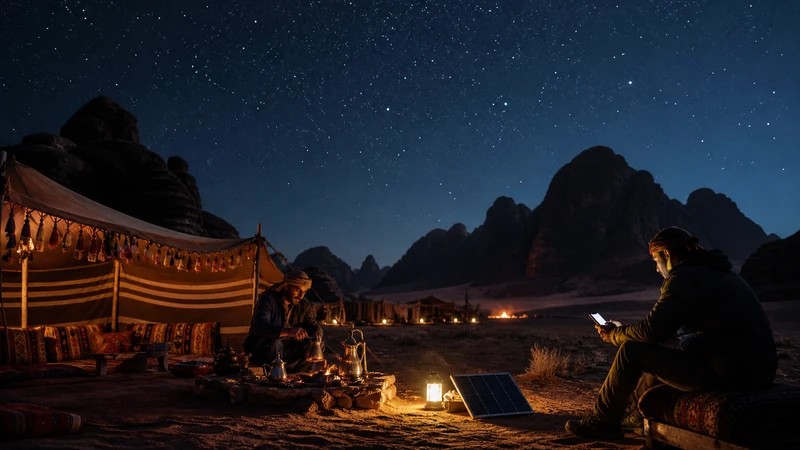

Mobile internet in Wadi Rum can vary between the village, visitor areas, individual camps and desert routes, so a phone signal should not be the only source of directions or tour information.
Save the camp coordinates, operator contact, meeting point and return arrangements before entering the protected area. Distance and terrain can change reception over a short route.
NoveSIM Jordan plans are data-only and do not include a local number, traditional calls or SMS.
Quick answer: Use a Jordan eSIM where a supported partner has coverage, but prepare Wadi Rum maps, camp details and tour instructions offline and do not treat mobile data as a safety system.
Top Jordan eSIMs

Jordan eSIM
Fixed
1 GB, 7 days€ 2.662 GB, 15 days€ 3.993 GB, 30 days€ 5.32Unlimited
Unlimited, 1 day€ 4.44Unlimited, 3 days€ 11.54Unlimited, 5 days€ 18.64
Mobile Internet in Wadi Rum Varies by Route
Reception at a village or roadside stop cannot predict every camp, valley or excursion. Rock formations, distance from infrastructure, weather and the phone’s position can affect the usable signal.
The Jordan coverage guide provides country context, but the camp or licensed tour operator is the better source for current local arrangements.
Prepare the Desert Visit Offline
- Save the camp’s exact coordinates and written directions.
- Record the tour operator and driver contact.
- Download the route to and from Wadi Rum.
- Take screenshots of the booking and meeting time.
- Agree what to do if companions become separated.
- Carry adequate battery and follow local safety guidance.
Do not navigate away from an agreed route merely to search for signal. Mobile data is a convenience, not an emergency service.
Configure a Jordan eSIM before Wadi Rum
- Confirm the plan includes Jordan and remains valid.
- Install the profile on dependable Wi-Fi before travel.
- Select Jordan Travel for Mobile Data.
- Enable Data Roaming on the travel eSIM.
- Keep home-line roaming and automatic data switching off.
- Leave Network Selection on Automatic.
The current NoveSIM listing shows potential access through Zain with 5G and Umniah with 4G. It does not guarantee either operator, 5G or continuous service at a particular camp.
Ask the Camp about Wi-Fi
Some accommodation may offer Wi-Fi, but availability, coverage within the property, backhaul and power can vary. Ask the actual camp before travel and avoid planning an urgent meeting or large upload around an unverified promise.
Download work, entertainment and maps on trusted Wi-Fi before the transfer. The Jordan internet guide compares Wi-Fi with local SIM and travel eSIM options.
If the eSIM Loses Service
- Stay with the planned group or route.
- Check that Jordan Travel remains the data line.
- Move to an open permitted area only when safe.
- Toggle Airplane Mode for 30 seconds and wait for Automatic registration.
- Restart once after returning to a suitable location.
- If signal returns without data, use data.esim only if manual APN entry is required.
Do not delete the installed eSIM unless NoveSIM Support specifically instructs you to do so. A coverage gap will not be fixed by profile removal. Follow Jordan troubleshooting once a safe connection is available.
Control Battery and Data Use
Repeated network searching, navigation and camera use can drain the battery. Use low-power mode when appropriate, carry a charged power bank and pause photo backup until dependable Wi-Fi is available.
Review Jordan data planning before uploading video or sharing a hotspot from camp.
Related Articles
- Mobile internet around Petra
- Choose a Jordan eSIM
- Jordan eSIM hotspot use
- Diagnose slow Jordan data
- NoveSIM Support
FAQ
Is there mobile internet in Wadi Rum?
It may be available in some villages, camps and routes, but service varies with exact location and terrain.
Do Wadi Rum camps have Wi-Fi?
Some may, but availability and quality vary. Confirm directly with the booked camp.
Should I rely on online maps in the desert?
No. Download maps, coordinates and tour instructions before entering Wadi Rum.
Will 5G work in Wadi Rum?
It is not guaranteed. The plan, partner, device, camp, route and local coverage determine the network generation.
Final Recommendation
Use mobile internet in Wadi Rum when available, but organise the visit so a temporary loss of service does not affect navigation or meeting arrangements.
Prepare the eSIM and verify the data line before leaving a reliable connection.
Carry camp coordinates, route maps, contacts and return instructions offline.