


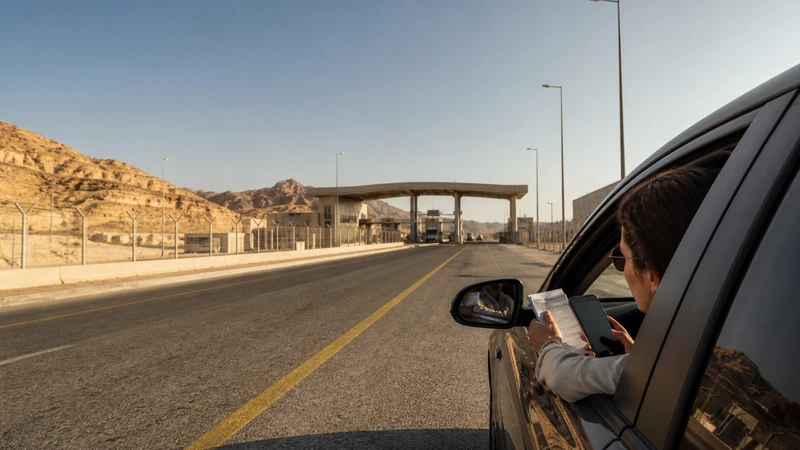

Jordan–Saudi Arabia border mobile internet can change at the frontier because a country-only plan, partner registration and data settings may stop when the phone enters the other country.
Confirm the exact crossing and current official entry requirements separately. A working mobile signal does not prove that a border is open or that the traveller is permitted to cross.
NoveSIM country travel plans are data-only and do not provide a local number, traditional calls or SMS.
Quick answer: For Jordan Saudi Arabia border mobile internet, check whether one plan explicitly includes both countries or prepare separate plans, save all documents offline, keep network selection automatic and verify the active data line after crossing.
Top Jordan eSIMs

Jordan eSIM
Fixed
1 GB, 7 days€ 2.672 GB, 15 days€ 4.013 GB, 30 days€ 5.35Unlimited
Unlimited, 1 day€ 4.45Unlimited, 3 days€ 11.58Unlimited, 5 days€ 18.71
Plan Jordan Saudi Arabia Border Mobile Internet
A Jordan-only eSIM must not be assumed to work in Saudi Arabia. Likewise, a Saudi plan may not include Jordan. Read the destination list, validity and activation rules for the exact products.
If one regional plan covers both countries, confirm that both are named rather than inferring coverage from “Middle East”. If separate eSIMs are used, label them clearly before the journey.
Save Border Information Offline
- Passport, visa and travel-authorisation copies where lawful.
- Transport booking and driver details.
- Accommodation addresses in both countries.
- Exact crossing name and current official instructions.
- Offline maps for the approach and onward route.
- Order details for both data plans.
Border status, permitted traveller categories and procedures can change. Use current government and border-operator guidance; this connectivity page is not immigration or security advice.
Prepare Two eSIM Profiles
- Confirm that the phone supports the required number of stored and active eSIMs.
- Install each profile on reliable Wi-Fi according to its order rules.
- Label the lines Jordan Travel and Saudi Travel.
- Keep activation details private and stored separately.
- Before the crossing, note which line currently supplies Mobile Data.
- After entry, select the destination-country line and enable Data Roaming on it.
- Keep the previous and home lines from using roaming data.
The Jordan dual-SIM guide explains data-line selection and the risk of automatic fallback.
Expect Registration Changes near the Frontier
A phone near an international border can see networks from both countries. Keep Network Selection on Automatic for normal use. Do not manually select a visible operator unless the plan supports it or NoveSIM Support instructs the test.
Coverage on remote approach roads can vary with terrain and distance. Review Jordan route coverage and do not rely on mobile data as an emergency system.
Troubleshoot after Crossing
- Confirm that the destination plan includes the country you have entered.
- Select the correct eSIM for Mobile Data.
- Enable roaming on that travel line and disable automatic data switching.
- Toggle Airplane Mode for 30 seconds and wait for Automatic registration.
- Restart once if needed.
- If signal appears without data on a NoveSIM profile, use data.esim only when manual APN entry is required.
Do not delete either installed eSIM unless NoveSIM Support specifically instructs you to do so. Contact support with the order, exact side of the border, handset and safe screenshots.
Related Articles
- Mobile internet in Jordan
- Choose a Jordan eSIM
- Manual network selection in Jordan
- Saudi Arabia eSIM plans
- How NoveSIM works
FAQ
Will a Jordan eSIM work in Saudi Arabia?
Only if the exact plan explicitly includes Saudi Arabia. Do not infer cross-border coverage.
Can one regional eSIM cover both countries?
Yes when both Jordan and Saudi Arabia are explicitly listed for that plan.
Should I manually select a border network?
Start with Automatic. A visible network may not be authorised by the plan.
Should I delete the old country eSIM?
No. Keep it installed unless NoveSIM Support directs removal.
Final Recommendation
Prepare Jordan Saudi Arabia border mobile internet from explicit country coverage rather than a regional assumption.
Save documents and routes offline, label each plan and switch the active data line only after confirming the destination.
Keep automatic registration and reversible troubleshooting on both sides of the frontier.