


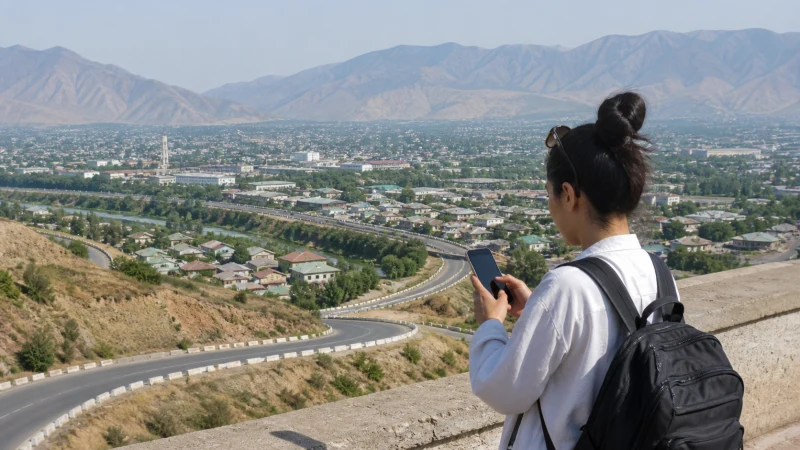

Uzbekistan eSIM coverage needs to be checked against the journey you are making, not just the city where your flight lands. A stay in Tashkent, a rail itinerary through Samarkand and Bukhara, and a western trip to Nukus or beyond are different coverage questions.
Check the supported operator’s map at each accommodation and along the transfers. These maps are planning aids, not measurements of reception in a particular carriage, hotel room or remote stop.
Our travel eSIMs provide mobile data without a local telephone number, conventional calls or SMS. They do not replace offline directions or the communication arrangements agreed with your driver or host.
Quick answer: Verify the partners in your Uzbekistan package, inspect coverage along the complete route and save maps, tickets and pickup details offline. Do not treat a covered arrival city, a 5G label or two covered endpoints as evidence of uninterrupted service between them.
Top Uzbekistan eSIMs

Uzbekistan eSIM
Fixed
1 GB, 7 days€ 3.172 GB, 15 days€ 4.073 GB, 30 days€ 4.98Unlimited
Unlimited, 1 day€ 2.71Unlimited, 3 days€ 5.43Unlimited, 5 days€ 8.14
Check Coverage for the Network Your Plan Includes
The NoveSIM Uzbekistan page, checked on 11 October 2026, lists Ucell 5G and Unitel LLC 4G. Recheck your selected package before departure rather than assuming that every Uzbekistan or regional product has the same network access.
Use the relevant operator’s coverage tool, including Ucell’s map and Beeline’s coverage page. Select the network generation you intend to assess where the map provides that control. Ucell warns that the displayed coverage is indicative, with actual service affected by the device, terrain and radio conditions.
A domestic coverage map does not establish roaming entitlement. For choosing between network options, use the operator-choice guide.
Tashkent and Samarkand: Check the Exact Address
For a city stay, enter the accommodation address and check the surrounding streets rather than reading the entire city as one coverage result. Reception inside a lift, basement or thick-walled room can differ from reception outside.
If data is needed for work, ask the property about its Wi-Fi and recent mobile reception before committing to a room. Do not schedule a critical call on the assumption that an operator map guarantees indoor performance.
At arrival, the Tashkent Airport guide and Samarkand Airport guide explain how to test mobile data before you depend on it for a transfer.
Tashkent, Samarkand and Bukhara by Road or Rail
Inspect the actual transport corridor when travelling between these cities. A railway may not follow the road shown in a driving itinerary, so a road-coverage result cannot stand in for the whole train journey.
Save tickets, station names, accommodation details and any documents needed at the next stop as files. A browser tab that has not been downloaded may be unusable when signal drops. Let non-urgent messages wait until reception returns rather than changing operator settings repeatedly in a moving vehicle.
The train-connectivity guide covers preparation for rail travel separately.
Khiva, Nukus and Western Excursions
Assess Khiva and Nukus as western destinations in their own right, not as examples of a day trip in the Tashkent region. If your itinerary continues towards more remote sites, check the full excursion and ask the organiser where communication is normally possible.
A covered town does not establish service on every approach road or at the final stop. Arrange meeting points and a missed-message fallback before leaving. Keep the itinerary and essential contacts accessible without mobile data.
For Muynak or an Aral Sea excursion, ask for the named stops and any overnight location before checking coverage. A Muynak visit does not establish reception on a longer itinerary to other Aral Sea sites. Inspect the actual roads and stops against your package’s supported networks, and ask the organiser how communication is handled where mobile service cannot be relied on.
Termez in the south and Namangan in the Fergana Valley also require their own location checks; they should not be grouped into a single western coverage claim.
Mountain Trips and Other Remote Stops
For an excursion from Tashkent towards mountain areas such as Chimgan, inspect the destination and approach route separately. Do not extend a city result across terrain that the map has not shown as covered.
Download the relevant map area while connected and confirm pickup arrangements in advance. Mobile data should not be the sole means of locating your driver or handling an emergency in a remote area.
Kyzylkum and Ustyurt: Check the Excursion, Not Just the Nearest Town
For a journey into the Kyzylkum Desert or an excursion on the Ustyurt Plateau, inspect the exact planned route and stops against the networks your package includes. Ask the organiser where communication is normally possible and how the group manages sections without it. Reception at the departure town does not establish service at a desert stop, and a registered network may still be too weak to load a map or make an internet call.
Agree What Happens If a Message Cannot Be Delivered
Before a remote excursion, make the communication arrangements usable without a live app:
- Save the itinerary, meeting points and organiser’s contact details as offline files or readable notes.
- Agree when a trusted contact should expect an update and what they should do if it is missed. Do not assume that pressing send confirms delivery.
- Ask the organiser what communication and emergency arrangements are appropriate for the particular route; a consumer eSIM is not a substitute for those arrangements.
- Carry sufficient phone power and keep essential route information accessible if mobile data is unavailable.
Is the Problem Coverage or the Data Settings?
If the travel line has no service at one location, try a safer open position and check whether registration returns. Signal on your home SIM does not show that the travel eSIM has connected.
If the travel line shows a network but websites will not load, do not immediately classify the location as uncovered. Check the selected data line, roaming, validity and allowance first. Follow the troubleshooting guide; retain the installed profile unless support explicitly instructs removal.
Related Articles
- Preparing mobile data for a road trip
- What 5G access does and does not imply
- Report a location-specific connection problem
FAQ
Does a coverage map guarantee reception in my hotel room?
No. It is a planning indication, not an indoor test. Ask the accommodation about recent reception and keep Wi-Fi as a separate option if the connection is important.
Will data work continuously between Tashkent and Samarkand?
This guide does not guarantee uninterrupted service. Check the actual road or rail corridor and download tickets and directions before travelling.
Can I infer coverage at a remote site from reception in Nukus?
No. Check the excursion route and site separately, and agree on offline meeting arrangements with the organiser.
Does seeing 5G mean the rest of my route is covered?
No. The indicator relates to the current connection, not future locations. Check each leg independently and retain offline resources.
Final Recommendation
Plan Uzbekistan eSIM coverage as a series of addresses, corridors and stops rather than one country-wide promise.
Download what you need for the next leg before leaving a working connection, particularly for rail journeys and western or mountain excursions.
When a problem occurs, identify the affected line and location first. This helps distinguish a coverage gap from a settings issue without removing the eSIM.