
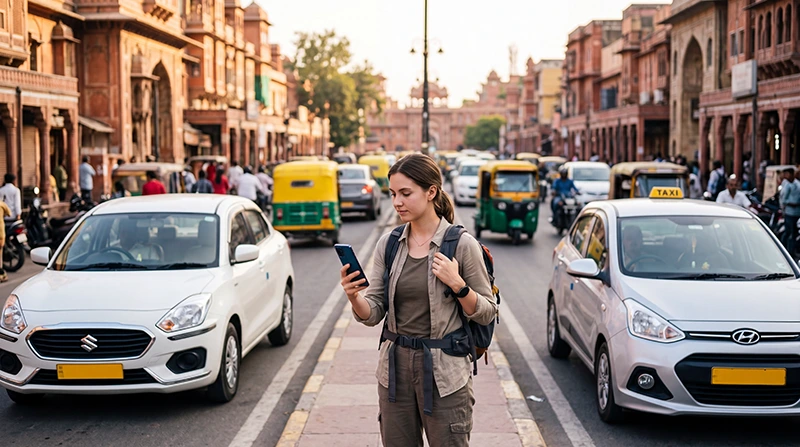

Ola and Uber are two of the most useful ride-hailing apps for travelling around India. Both can help international visitors arrange airport transfers, reach hotels, travel between attractions and avoid negotiating every taxi or auto-rickshaw fare on the street.
The two services work in a similar way. You enter a pickup point, choose a destination, compare the available ride categories and confirm a booking through the app. Driver and vehicle details are then displayed before the ride begins.
However, neither app is automatically the best choice for every journey. Prices, waiting times, available vehicles, payment methods and pickup arrangements can vary by city, neighbourhood and time of day. Uber may offer the better option for one journey, while Ola may have a faster or more suitable vehicle for the next.
For most tourists, the best strategy is simple: install both Ola and Uber before travelling, compare the live options for every important journey and keep an alternative transport method available in smaller or remote destinations.
Both apps require mobile internet for requesting a ride, following the driver and receiving messages. An India eSIM allows you to use them immediately after landing without depending entirely on airport, station or hotel WiFi.
Quick answer: Uber is often easier for international visitors who already have an account, while Ola can provide useful local categories such as cars, autos, bikes and outstation rides where available. Install both apps and compare the actual fare, pickup time and vehicle category before each journey.
Top India eSIMs
Ola vs Uber in India at a Glance
| Feature | Uber | Ola |
|---|---|---|
| Useful for international tourists | Yes | Yes |
| Existing international account | Often usable | A separate Ola account may be required |
| Standard car rides | Available in supported cities | Available in supported cities |
| Auto-rickshaw booking | Uber Auto where available | Ola Auto where available |
| Bike taxi | Uber Moto in supported locations | Ola Bike in supported locations |
| Hourly rentals | Uber Rentals | Rental options may appear in supported areas |
| Intercity travel | Uber Intercity | Ola Outstation |
| Airport transfers | Available at many major airports | Available at supported airports and cities |
| Live driver tracking | Yes | Yes |
| Estimated fare before booking | Normally displayed | Normally displayed |
| Foreign card support | May work depending on account | May vary by account and transaction |
| Cash option | May be available | May be available |
| Best overall strategy | Compare both apps | Compare both apps |
What Is Ola?
Ola is an Indian ride-hailing platform offering different types of urban and intercity transport. Depending on the city, the app may display cars, auto-rickshaws, bike taxis, rental packages and outstation services.
Ola can be especially useful for visitors who want to compare local transport categories in one application. In some areas, an Ola Auto or Bike ride may arrive faster than a car, while an Ola Outstation booking may be useful for longer travel between cities.
The exact options shown in the app depend on:
- Your current city.
- Your pickup location.
- Your destination.
- The time of day.
- Current driver availability.
- Local transport regulations.
- The type of journey requested.
What Is Uber?
Uber is an international ride-hailing platform that operates across numerous Indian cities. Tourists who already use Uber at home can often continue using the same account while travelling in India.
Depending on the location, Uber may offer standard cars, Auto, Moto, premium vehicles, larger cars, hourly Rentals and Intercity rides.
Uber can be convenient for international travellers because the app interface and booking process are already familiar. However, local availability, pricing and payment acceptance should still be checked for each journey.
Is Ola or Uber Better in India?
There is no single winner for every city or route. The better app is normally the one that provides the right vehicle, acceptable fare and realistic pickup time for your current location.
Uber may be more convenient when:
- You already have an active Uber account.
- Your payment card is already stored.
- You are familiar with the app interface.
- Uber has more nearby drivers.
- You need Uber Rentals or Intercity.
- You prefer the available Uber vehicle category.
Ola may be more convenient when:
- Ola shows a shorter pickup time.
- An Ola Auto is available nearby.
- You want to compare local car categories.
- You need an Ola Outstation option.
- Ola displays a more suitable fare.
- Uber has no available vehicles.
For airport transfers, railway stations and time-sensitive journeys, do not choose only by price. A slightly more expensive ride with a shorter and more reliable pickup may be the better option.
Which Is Cheaper: Ola or Uber?
Neither Ola nor Uber is consistently cheaper for every journey. The displayed price can change according to distance, estimated duration, traffic, demand, available drivers, vehicle category and additional fees.
Before booking:
- Enter the same pickup point in both apps.
- Enter the same destination.
- Compare similar vehicle categories.
- Check the estimated pickup time.
- Review tolls or airport charges.
- Check the selected payment method.
- Confirm whether the fare is estimated or fixed under the booking conditions.
Do not compare an auto-rickshaw in one app with a premium car in the other. Compare similar vehicle types to make the result meaningful.
Why Ride Prices Change
Ride-hailing prices can change within a short period. A fare displayed five minutes ago may no longer be available when demand increases or nearby drivers accept other bookings.
Factors that can affect the fare include:
- Peak-hour demand.
- Heavy rain.
- Festivals and public events.
- Airport or railway traffic.
- Driver availability.
- Road congestion.
- Long waiting time.
- Tolls and parking.
- Additional stops.
- Vehicle category.
- Intercity charges.
- Rental duration and distance.
Which App Has Better Availability?
Availability depends more on the exact location than on the brand. One platform may have many drivers in a business district but very few vehicles near a secluded hotel or beach.
Both services are generally most useful in:
- Major metropolitan areas.
- State capitals.
- Technology and business districts.
- Large railway stations.
- Major airports.
- Popular urban tourist destinations.
Availability may be less dependable in:
- Remote villages.
- Mountain regions.
- Desert camps.
- Wildlife areas.
- Small beach settlements.
- Remote resorts.
- Very early morning or late-night locations.
Ola vs Uber by Popular Indian Destination
| Destination | Recommended Strategy | Important Note |
|---|---|---|
| Delhi | Compare both apps | Confirm airport terminal and railway station |
| Mumbai | Compare both apps | Allow extra time for traffic |
| Bangalore | Compare price and pickup time | Airport transfers can be long |
| Hyderabad | Both can be useful | Check long airport journey time |
| Chennai | Compare both services | Confirm the correct entrance or terminal |
| Kolkata | Compare both services | Verify the exact railway station |
| Jaipur | Use either app where available | Cars may not reach every old-city lane |
| Agra | Check both and local alternatives | Hotel taxis and autos are also useful |
| Goa | Check exact local availability | Pre-arranged transfers may be better |
| Kochi | Compare both in urban areas | Remote backwater routes need planning |
| Rishikesh | Check apps and local autos | Mountain routes may require local taxis |
| Manali | Do not rely only on ride apps | Local drivers are often more practical |
| Leh and Ladakh | Arrange local transport | Ride-hailing should not be your main plan |
Ola vs Uber in Delhi
Both Ola and Uber are useful in Delhi and the surrounding National Capital Region. Visitors can compare them for journeys between Delhi Airport, Connaught Place, Gurgaon, Noida, railway stations, hotels and attractions.
Delhi has several large railway stations and an enormous metropolitan area. Always verify the exact destination before confirming a ride.
For example, New Delhi Railway Station, Old Delhi Railway Station, Hazrat Nizamuddin and Anand Vihar are different locations. Entering the wrong station may result in a missed train.
During peak traffic, compare the estimated journey time as carefully as the fare.
Read the internet guide for Delhi tourists.
Ola vs Uber at Delhi Airport
Both services may provide airport rides, but the pickup process can involve designated zones. Follow the directions inside the selected app and the signs in the terminal.
After landing:
- Collect your baggage.
- Turn off Airplane Mode.
- Wait for your India eSIM to connect.
- Confirm the arrival terminal.
- Compare Ola and Uber.
- Choose the appropriate vehicle size.
- Walk to the designated pickup area.
- Check the driver and registration details.
Do not request a ride too early while you are still waiting for baggage or immigration. Airport waiting and access rules can make it difficult for the driver to remain at the pickup point.
Ola vs Uber in Mumbai
Both apps can be useful throughout Mumbai. The main challenge is usually traffic rather than the availability of a booking platform.
When comparing rides, consider:
- Estimated pickup time.
- Estimated journey duration.
- Vehicle size.
- Airport terminal.
- Luggage capacity.
- Final payment method.
A cheaper ride that takes considerably longer to arrive may not be worthwhile when travelling to the airport or an important reservation.
Read the internet guide for Mumbai tourists.
Ola vs Uber in Bangalore
Bangalore has heavy traffic and long transfers between its airport, technology districts and central neighbourhoods. Both apps are useful, but availability and prices can change quickly during morning and evening peak periods.
For travel between Bangalore Airport and Whitefield, Electronic City, Koramangala, Indiranagar or HSR Layout, compare the estimated duration and vehicle comfort rather than only the lowest price.
Read the internet guide for Bangalore tourists.
Ola vs Uber in Hyderabad
Both services can be useful in Hyderabad, particularly around the airport, HITEC City, Gachibowli and the Financial District.
The airport is located outside the main central areas, so a reliable mobile connection is important for driver communication and route tracking.
Read the Hyderabad internet guide.
Ola vs Uber in Chennai
Ola and Uber can both help visitors travel between Chennai Airport, business districts, hotels, beaches and railway stations.
Confirm the exact destination because Chennai covers a large area and similarly named properties or neighbourhoods can be far apart.
Read the Chennai internet guide.
Ola vs Uber in Kolkata
Both services are useful in Kolkata and surrounding business districts. Travellers should be especially careful when entering railway station names.
Howrah, Sealdah, Kolkata and other stations are not interchangeable. Check the station code on your ticket before requesting the ride.
Read the Kolkata internet guide.
Ola vs Uber in Jaipur
Both apps may be useful for airport transfers, hotels and travel around Jaipur. However, sections of the historic centre contain crowded or narrow roads where cars may not reach the exact map pin.
For attractions such as Hawa Mahal and City Palace, select a safe vehicle-accessible pickup point rather than placing the pin inside a pedestrian or market area.
Read the Jaipur internet guide.
Ola vs Uber in Agra
Check both applications for your exact location in Agra. Local auto-rickshaws, hotel cars and private drivers are also common alternatives.
For the Taj Mahal, confirm the appropriate entrance and agree on a precise return pickup point. Some vehicle restrictions may apply close to protected areas.
Ola vs Uber in Goa
Visitors should not assume that either app will work equally well across every part of Goa. Availability can differ between airports, Panjim, busy resorts and quieter beach villages.
For a hotel in a remote area:
- Check both apps before the travel day.
- Ask the hotel whether app-based taxis reach the property.
- Request an airport transfer quote.
- Save a local taxi number.
- Download offline maps.
- Keep sufficient cash available.
A pre-arranged hotel transfer may be safer than waiting until late at night to discover that neither app has nearby drivers.
Ola vs Uber in Kerala
Ola and Uber may both be useful in larger Kerala cities, particularly around Kochi and other populated urban areas. Availability is less predictable near remote backwaters, hill stations, wildlife areas and smaller beaches.
For houseboats or rural resorts, ask the property to arrange a transfer and send the exact meeting point through WhatsApp.
- Internet in Kerala for Tourists
- Internet in Kochi for Tourists
- Internet in Varkala
- Internet in Kovalam
Ola vs Uber in the Himalayas
Neither Ola nor Uber should be your only transport plan for remote Himalayan travel. An app may work in or near a gateway town but show no vehicles on mountain roads or in isolated valleys.
Use local taxis or pre-arranged drivers for:
- Long mountain journeys.
- High-altitude passes.
- Trekking trailheads.
- Remote hotels.
- Spiti Valley.
- Pangong Lake.
- Nubra Valley.
- Remote parts of Ladakh.
Uber Auto vs Ola Auto
Uber Auto and Ola Auto allow travellers to request an auto-rickshaw through an app in supported locations.
| Consideration | Uber Auto | Ola Auto |
|---|---|---|
| Availability | Depends on city and nearby drivers | Depends on city and nearby drivers |
| Fare estimate | Displayed before booking | Displayed before booking |
| Driver tracking | Available in the app | Available in the app |
| Best choice | Compare current pickup and fare | Compare current pickup and fare |
Auto-rickshaws are useful for short city journeys and busy areas. They are less suitable for passengers with several suitcases, large families or travellers who require air conditioning.
Ola Bike vs Uber Moto
Bike taxis may appear in selected cities. They can be useful for solo travellers with little or no luggage who need a short urban ride.
Before selecting a bike taxi, consider:
- Local traffic conditions.
- Weather.
- Luggage.
- Personal comfort.
- Helmet availability and fit.
- Travel insurance conditions.
- Local regulations.
A bike ride is generally not appropriate for an airport transfer, a family journey or travel with a large backpack.
Uber Rentals vs Ola Rentals
Hourly rental options can be useful when you need a vehicle for several stops rather than one direct journey.
They may be suitable for:
- Half-day sightseeing.
- Business meetings.
- Shopping trips.
- Several hotel or office visits.
- Travelling with elderly family members.
- Waiting during appointments.
| Feature to Compare | What to Check |
|---|---|
| Included time | Number of hours in the package |
| Included distance | Kilometres included in the price |
| Extra time | Charge per additional minute or hour |
| Extra distance | Charge per additional kilometre |
| Multiple stops | Whether stops can be added |
| Tolls and parking | Whether they are included |
| Vehicle category | Passenger and luggage capacity |
Uber Intercity vs Ola Outstation
Uber Intercity and Ola Outstation are designed for longer journeys between supported cities or destinations.
They may be useful for routes such as:
- Delhi to Agra.
- Delhi to Jaipur.
- Jaipur to Udaipur.
- Mumbai to Pune.
- Bangalore to Mysore.
- Kochi to another Kerala destination.
Before confirming an intercity booking, compare:
- Total estimated fare.
- One-way or round-trip conditions.
- Tolls.
- Parking.
- State taxes where applicable.
- Waiting time.
- Luggage capacity.
- Cancellation rules.
- Driver return arrangements.
For multi-day tours or remote regions, a trusted local tour operator or hotel-arranged driver may offer a more suitable service.
Which App Is Better for Airport Transfers?
Both can be useful. The better airport option is the one that provides an appropriate vehicle, reasonable waiting time and clear pickup instructions at the moment you need it.
Choose based on:
- The airport terminal.
- Pickup-zone instructions.
- Estimated arrival time.
- Vehicle size.
- Number of passengers.
- Amount of luggage.
- Payment method.
- Expected total cost.
After a late-night arrival, reliability may matter more than saving a small amount.
Which App Is Better for Railway Stations?
Either service can work, but railway stations create pickup challenges because they may have multiple exits, access roads and crowded taxi areas.
Before requesting a ride:
- Leave the platform area.
- Identify the exit.
- Check whether there is a dedicated pickup point.
- Place the map pin at an accessible road.
- Compare Ola and Uber.
- Confirm the vehicle registration.
Read the guide to internet on Indian trains.
Which App Is Easier for International Tourists?
Uber may feel easier to visitors who already have an account and understand the interface. Ola may require creating a separate account but provides an important local alternative.
Before departure:
- Install both apps.
- Confirm that you can log in.
- Keep access to your registered phone number.
- Add supported payment methods.
- Enable notifications.
- Allow location access.
- Save your first hotel.
- Install an India eSIM.
Can You Use Ola and Uber with a Foreign Phone Number?
An existing Uber account linked to a foreign number may continue working in India. Ola account registration and verification requirements may differ.
Keep your primary SIM enabled if you may need to receive an SMS verification code. Your India eSIM can provide mobile data while the primary SIM remains available for calls or messages.
Can You Pay with a Foreign Card?
Foreign-card acceptance may vary between users, cards and transactions. Do not depend on one payment method for your entire trip.
A practical setup includes:
- One primary international card.
- A second card from another issuer.
- Some Indian cash.
- Confirmation that international transactions are enabled.
- Reviewing the payment method before every ride.
Some Indian digital payment options require local banking or verification and may not be accessible to every tourist.
Can You Pay Cash?
Cash may be offered as a payment method for some rides and accounts. Check the options displayed before confirming the booking.
When paying cash:
- Carry smaller denominations.
- Check the app fare.
- Ask whether tolls are included.
- Do not pay twice if a card was charged.
- Keep the app receipt.
Which App Has Better Safety Features?
Both platforms provide app-based driver and journey information. The exact safety tools available can change by service and location.
Regardless of the app:
- Check the driver name.
- Verify the vehicle registration.
- Do not enter a different car.
- Follow the route on your phone.
- Share trip information with someone you trust.
- Use a well-lit pickup point.
- Sit in the rear seat when travelling alone.
- Keep valuables with you.
- Use in-app help tools when necessary.
- Contact emergency services in an emergency.
How to Choose the Correct Vehicle
| Travel Situation | Recommended Type |
|---|---|
| Solo traveller without luggage | Small car, Auto or Bike where appropriate |
| Couple with two suitcases | Standard sedan or larger |
| Family with luggage | Large car or XL category |
| Airport transfer | Car with sufficient luggage space |
| Short market journey | Auto or small car |
| Several business meetings | Hourly rental |
| Intercity trip | Intercity or Outstation vehicle |
Does Ola or Uber Work without Internet?
No. Both apps need an internet connection to display cars, request a ride, track the driver, receive messages and update the pickup location.
You may be able to request a car through airport WiFi, but the connection can disappear once you leave the terminal. This makes it difficult to contact the driver or follow the pickup instructions.
Why Use an India eSIM with Ola and Uber?
An India eSIM gives you mobile data from the moment you arrive in a supported coverage area.
It allows you to:
- Compare both apps after landing.
- Follow airport pickup directions.
- Track the driver.
- Receive app messages.
- Check Google Maps.
- Share your journey.
- Contact your hotel through WhatsApp.
- Book another ride after leaving WiFi.
How Much Mobile Data Do Ola and Uber Use?
Ride-hailing apps normally consume relatively little data. Most travellers use significantly more data through video, social media and cloud backups.
| Activity | Expected Data Use |
|---|---|
| Opening the app | Very Low |
| Comparing prices | Very Low |
| Requesting a ride | Very Low |
| Loading maps | Low |
| Tracking the driver | Low |
| Messaging the driver | Very Low |
| Sharing trip information | Low |
How to Set an Accurate Pickup Point
- Move to a safe vehicle-accessible location.
- Open the app.
- Check your GPS position.
- Move the pickup pin when necessary.
- Select a recognised gate or entrance.
- Avoid standing in a restricted stopping area.
- Send the driver a landmark if needed.
- Remain at the confirmed pickup point.
At airports, railway stations, shopping centres and large hotels, follow the official pickup-zone instructions.
What to Do If the Driver Cannot Find You
- Check the pickup pin.
- Move to the indicated gate.
- Send a short message.
- Share a clear landmark.
- Do not keep changing your position.
- Check whether the driver is on the opposite side of the road.
- Review any cancellation fee before cancelling.
What to Do If One App Has No Cars
- Check the other app.
- Try another vehicle category.
- Wait several minutes.
- Move to a more accessible pickup location.
- Check an official taxi rank.
- Ask your hotel to arrange transport.
- Use public transport where practical.
- Pre-book remote or early-morning transfers.
Common Ola and Uber Problems for Tourists
The Driver Asks You to Cancel
Review the reason and the app’s cancellation rules before taking action. Cancelling may create a fee or remove the journey record.
The Driver Requests a Different Payment Method
Check the selected payment method in the app. Do not make an additional payment without understanding whether the original method will still be charged.
The Pickup Pin Is Wrong
Move the pin to the correct entrance before confirming. GPS can be less accurate inside airports, stations and large buildings.
The Driver Is on the Opposite Side of the Road
Do not cross a dangerous road simply to reach the car. Send a message and identify a safe meeting point.
The Fare Is Higher Than Expected
Review the receipt for waiting time, tolls, parking, route changes or additional stops.
The App Does Not Show Your Location
Enable Location Services, move outdoors and wait for the GPS position to update.
Recommended Mobile Settings
| Setting | Recommended Value |
|---|---|
| India eSIM | Enabled |
| Mobile Data | India eSIM |
| Calls and SMS | Primary SIM |
| Data Roaming on India eSIM | On |
| Data Roaming on primary SIM | Off |
| Automatic Data Switching | Off |
| Network Selection | Automatic |
| Location Services | Enabled for both apps |
| Notifications | Enabled |
| APN | data.esim if required |
India eSIM APN Settings
Most compatible phones configure the APN automatically. If Ola, Uber and Google Maps do not load despite showing a mobile signal, check the following settings.
| Field | Value |
|---|---|
| Name | NoveSIM |
| APN | data.esim |
| Username | Leave blank |
| Password | Leave blank |
| Authentication | None |
What to Do If Ola or Uber Is Not Working
- Confirm that the India eSIM is enabled.
- Select it for Mobile Data.
- Enable Data Roaming on the eSIM.
- Check that Location Services are enabled.
- Allow the app to access your location.
- Close and reopen the application.
- Check for an app update.
- Verify that the APN is data.esim.
- Turn Airplane Mode on for 30 seconds.
- Turn it off and wait for the network to reconnect.
- Restart the phone.
- Check whether vehicles are available in the area.
Do not delete the eSIM while troubleshooting. A blank vehicle list may indicate low driver availability rather than a mobile-data problem.
Apps to Install Alongside Ola and Uber
- Google Maps for route checking.
- WhatsApp for hotel and driver communication.
- Your airline app.
- Railway apps.
- Booking.com or another accommodation app.
- Google Translate.
- An offline map application.
- A weather app.
See the best apps for India travel.
Ola vs Uber Checklist Before Your Trip
- Install Uber.
- Install Ola.
- Confirm that you can access both accounts.
- Keep access to your registered number.
- Add more than one payment option.
- Enable app notifications.
- Enable location access.
- Install Google Maps.
- Download offline maps.
- Install WhatsApp.
- Install your India eSIM.
- Save the eSIM instructions.
- Save your first hotel address.
- Confirm the airport terminal.
- Carry some cash.
- Charge your phone and power bank.
Related India Guides
- India eSIM
- Does Uber Work in India?
- Best Apps for India Travel
- Google Maps in India
- Internet for Domestic Flights in India
- Internet on Indian Trains
- Internet for Business Travel in India
- Internet for a Family Vacation in India
- Does WhatsApp Work in India?
- India eSIM APN Settings
FAQ
Which is better in India, Ola or Uber?
Neither app is always better. Compare current prices, pickup times, vehicle categories and payment options for every journey.
Which is cheaper, Ola or Uber?
The cheaper option changes according to city, demand, traffic, route and vehicle availability. Enter the same journey in both apps and compare similar categories.
Should tourists install both Ola and Uber?
Yes. Having both apps gives you more transport options when one service has fewer vehicles, a higher fare or a longer waiting time.
Is Uber easier for foreign tourists?
Uber can be easier for visitors who already have an active account and stored payment method. Ola remains a valuable local alternative.
Does Ola work with a foreign phone number?
Account and verification requirements can vary. Install the app before departure and confirm that you can complete registration and receive any required codes.
Can tourists pay Ola or Uber with cash?
Cash may appear as an option for some bookings. Check the available payment methods inside the app before confirming the ride.
Can I use a foreign bank card?
A foreign card may work, but acceptance can vary. Keep a second card and some cash available as backup.
Is Ola Auto better than Uber Auto?
Compare the live fare and pickup time. Availability depends on nearby drivers, so the better option can change from one journey to the next.
Which is better for intercity travel?
Compare Uber Intercity with Ola Outstation for the exact route. Review tolls, waiting charges, vehicle size and return conditions before booking.
Do Ola and Uber work at Indian airports?
Both may be available at major airports. Follow the terminal-specific pickup instructions provided in the selected app.
Do Ola and Uber work in Goa?
Availability varies by location. Check both apps and arrange a backup transfer when staying at a secluded beach or remote hotel.
Do Ola and Uber work in Ladakh?
Do not rely on ride-hailing for remote Ladakh travel. Local taxis and pre-arranged drivers are generally more practical.
Can I use Ola and Uber without mobile data?
No. You need an internet connection to compare rides, request a vehicle, track the driver and receive pickup messages.
Can I use both apps with an India eSIM?
Yes. An India eSIM provides the mobile data needed for Ola, Uber, Google Maps and WhatsApp.
Can I keep my regular SIM active?
Yes. Most Dual SIM smartphones allow your primary SIM to remain active while the India eSIM provides mobile data.
Do I need Data Roaming enabled?
Yes. Enable Data Roaming on the India eSIM and keep it disabled on your primary SIM.
What APN should I use?
If manual configuration is required for a NoveSIM India eSIM, use data.esim.
Final Recommendation
Ola and Uber are both valuable travel apps in India, and neither platform is the universal winner. Prices, pickup times and available vehicles change constantly, so the best option is to compare both for each important journey.
Uber may be easier when you already have an international account, while Ola can provide useful local alternatives such as Auto, Bike and Outstation services where available. Keep both installed, together with Google Maps and WhatsApp.
For airports, railway stations and time-sensitive travel, prioritise a suitable vehicle and reliable pickup over the lowest possible fare. For remote beach, desert and mountain destinations, arrange a backup transfer through your accommodation.
Both apps depend on mobile internet. Install an India eSIM before departure, select it for Mobile Data after arriving, enable Data Roaming and keep Network Selection on Automatic.


