


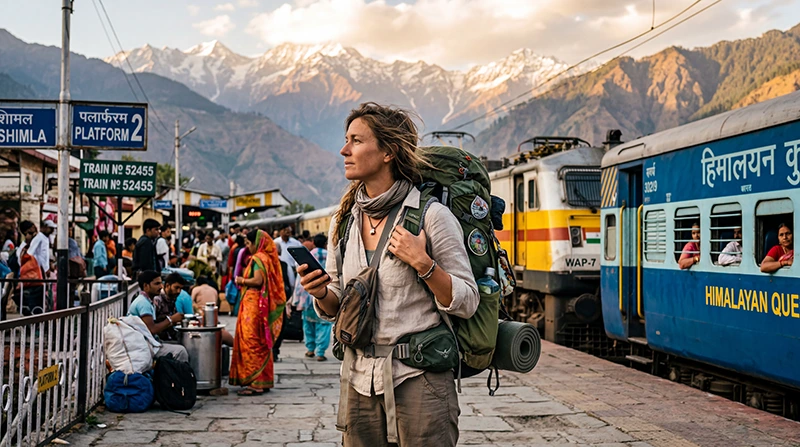

Backpacking across India can take you from the busy streets of Delhi and Mumbai to Rajasthan’s desert cities, Goa’s beaches, Kerala’s backwaters and the mountain roads of the Himalayas. Reliable mobile internet makes this journey much easier, especially when you regularly change accommodation, travel on overnight trains and depend on your phone for navigation.
You will probably use mobile data for Google Maps, WhatsApp, train information, bus bookings, hostel reservations, translation, weather forecasts and contacting drivers. Public WiFi is widely available in tourist areas, but it is not reliable enough to be your only connection.
For most international backpackers, an India eSIM is the simplest option. It can be installed before departure and used shortly after arrival without visiting a mobile shop or replacing your regular SIM card.
Quick answer: install your India eSIM before travelling, choose it for Mobile Data after landing, enable Data Roaming and download offline maps before long train, bus or mountain journeys.
Top India eSIMs


What Is the Best Internet Option for Backpacking in India?
| Option | Best For | Main Limitation |
|---|---|---|
| India eSIM | Most international backpackers | Requires an eSIM-compatible unlocked phone |
| Local prepaid SIM | Long stays and local calls | Registration and activation are required |
| International roaming | Emergency or brief use | Often expensive |
| Hostel and café WiFi | Large downloads and backups | Quality varies considerably |
An eSIM is usually the most practical choice for a trip of several weeks because you can prepare it before departure and continue using the same plan across multiple Indian states.
Why an India eSIM Works Well for Backpackers
- Install it before leaving home.
- Avoid airport and mobile-store queues.
- Keep your regular SIM card installed.
- Continue receiving calls and SMS on your primary number.
- Use WhatsApp with your existing account.
- Connect in multiple cities without buying new SIM cards.
- Use mobile data between hostels, stations and attractions.
- Avoid depending entirely on public WiFi.
India eSIM vs Local SIM Card for Backpackers
| Feature | India eSIM | Local SIM Card |
|---|---|---|
| Available before arrival | Yes | Usually no |
| Physical SIM required | No | Yes |
| Local identity verification | No additional store visit | Usually required |
| Keep home SIM installed | Yes | Depends on the phone |
| Indian phone number | Usually no | Usually yes |
| Best for short and medium trips | Excellent | Good |
| Best for long stays | Good | Excellent |
A local prepaid SIM may be useful when you are staying for several months or specifically need an Indian number. For most backpacking routes, convenience is more important than having a local number.
Mobile Coverage on Popular Backpacking Routes
| Destination or Route | Expected Coverage |
|---|---|
| Delhi, Agra and Jaipur | Excellent |
| Mumbai and Goa | Excellent |
| Kochi, Varkala and Kerala | Very Good to Excellent |
| Varanasi | Very Good to Excellent |
| Rishikesh and Shimla | Very Good to Excellent |
| Manali | Very Good |
| Ladakh and remote Himalayas | Variable |
| Long-distance trains | Good with temporary gaps |
| Rural bus routes | Good to Variable |
Internet in Delhi, Agra and Jaipur
The Golden Triangle is one of India’s easiest backpacking routes for mobile connectivity. Delhi, Agra and Jaipur generally have strong mobile coverage, including around major railway stations, hostels and tourist attractions.
Mobile data is useful for navigating Old Delhi, opening Taj Mahal tickets, finding your Jaipur accommodation and arranging transport between stations and hostels.
Read the Golden Triangle internet guide.
Internet in Rajasthan
Jaipur, Udaipur, Jodhpur and Jaisalmer generally have reliable mobile internet. Signal may become less consistent during desert safaris, on remote roads and near isolated camps.
Download offline maps before leaving populated areas and save your accommodation address in both English and a locally recognisable format.
Read the Rajasthan internet guide.
Internet in Goa
North Goa and South Goa both offer good mobile coverage in popular beach areas. Hostels, cafés and coworking spaces commonly provide WiFi, but speeds can decrease when many guests connect at the same time.
Mobile data is particularly useful when moving between beaches, because public transport information and local taxi arrangements can vary by area.
Internet in Kerala
Kochi, Varkala, Kovalam and Kerala’s main towns generally have strong coverage. Signal may become less reliable in mountain regions, remote backwaters and wildlife areas.
When travelling by houseboat or between smaller towns, keep important bookings and maps available offline.
Internet in Rishikesh, Manali and the Himalayas
Rishikesh, Shimla and central Manali generally provide dependable mobile internet. Coverage becomes less predictable on mountain roads, trekking routes and high-altitude passes.
In Ladakh and remote Himalayan areas, long periods without signal are possible. Mobile data is useful where coverage exists, but it should never replace offline preparation.
Internet on Indian Trains
Mobile data usually works during much of a long-distance train journey, particularly near cities and populated areas. Temporary interruptions are common in rural areas, tunnels and locations far from mobile towers.
Before boarding an overnight train:
- Download your ticket and booking reference.
- Save the train number and arrival station.
- Download offline maps around your destination.
- Save the hostel address.
- Download music, podcasts or films.
- Carry a charged power bank.
Internet on Buses and Road Trips
Coverage is generally available along major highways, but mountain roads and rural regions may have gaps. Keeping offline maps is essential when travelling to Ladakh, Spiti Valley, remote Rajasthan or wildlife destinations.
Do not assume you will be able to contact your accommodation during the final part of every journey. Save all arrival instructions before departure.
Hostel WiFi in India
Most backpacker hostels offer free WiFi. Quality depends on the property, the number of guests and the local fixed internet connection.
Hostel WiFi is usually suitable for:
- Messaging and browsing.
- Travel research.
- Backing up photos.
- Streaming at moderate quality.
- Occasional remote work.
Mobile data is still important because shared WiFi may become slow or stop working during power or network interruptions.
Is Public WiFi Safe?
Use public WiFi carefully, especially in stations, cafés and shared hostels.
- Confirm the official network name.
- Avoid unknown open networks.
- Use secure websites and trusted apps.
- Avoid sensitive banking activity when possible.
- Disable file sharing.
- Forget the network after leaving.
Your own mobile data connection is normally preferable for private accounts, payments and important communication.
Using Google Maps While Backpacking
Google Maps is useful in major cities, but it is not always perfect in narrow old-city lanes, mountain villages or newly developed areas. Download offline maps for each region and save important places before travelling.
Useful saved locations include:
- Your hostel.
- The railway or bus station.
- The nearest hospital or pharmacy.
- Your arrival meeting point.
- Major landmarks near your accommodation.
Does WhatsApp Work While Backpacking in India?
Yes. WhatsApp works normally through mobile data or WiFi. Your account remains connected to your existing phone number even when an India eSIM supplies the internet connection.
You can use WhatsApp for hotel communication, driver coordination, voice calls, video calls and live location sharing.
How Much Data Do Backpackers Need?
| Trip Length | Suggested Data |
|---|---|
| One week | 8–10 GB |
| Two weeks | 15–25 GB |
| Three weeks | 20–35 GB |
| One month | 30–50 GB |
| Remote work or frequent hotspot use | 50 GB or unlimited option |
Maps, messaging and transport apps use relatively little data. Video calls, streaming, social media uploads and cloud backups consume much more.
Recommended Mobile Settings
| Setting | Recommended Value |
|---|---|
| India eSIM | Enabled |
| Mobile Data | India eSIM |
| Calls and SMS | Primary SIM |
| Data Roaming on India eSIM | On |
| Data Roaming on primary SIM | Off |
| Automatic Data Switching | Off |
| Network Selection | Automatic |
| Preferred Network | 5G Auto or 4G/LTE |
| APN | data.esim if required |
India eSIM APN Settings
| Field | Value |
|---|---|
| Name | NoveSIM |
| APN | data.esim |
| Username | Leave blank |
| Password | Leave blank |
| Authentication | None |
What to Do If Mobile Internet Stops Working
- Confirm that the India eSIM is enabled.
- Select it for Mobile Data.
- Enable Data Roaming.
- Disable Automatic Data Switching.
- Keep Network Selection on Automatic.
- Verify that the APN is data.esim.
- Turn Airplane Mode on for 30 seconds.
- Turn it off and wait several minutes.
- Restart your phone.
Do not delete the eSIM while troubleshooting. In remote areas, the problem may simply be the absence of available network coverage.
How to Save Mobile Data
- Download offline maps.
- Use hostel WiFi for app updates.
- Disable automatic photo backups.
- Reduce video quality.
- Download entertainment before travel days.
- Turn off background data for unnecessary apps.
- Monitor usage in your phone settings.
Related India Guides
- India eSIM
- Best Mobile Data in India
- Unlimited Data in India
- Best Network in India for Tourists
- Local SIM vs eSIM in India
- How to Use an India eSIM
- Does WhatsApp Work in India?
- India eSIM APN Settings
FAQ
What is the best internet option for backpacking in India?
For most international backpackers, an India eSIM is the easiest option because it can be installed before departure and used across multiple destinations.
Will one India eSIM work across the country?
Yes. One India plan can work in supported coverage areas throughout the country. Remote mountain, desert and wildlife regions may have limited service.
Do hostels in India have WiFi?
Most backpacker hostels provide WiFi, but speed and reliability vary between properties.
Does mobile internet work on Indian trains?
Mobile data works during much of many train journeys, although temporary coverage gaps are common.
How much data do I need for one month?
Most backpackers need approximately 30–50 GB. Remote workers, heavy streamers and hotspot users may need more.
Can I keep my home SIM active?
Yes. Most Dual SIM phones allow you to keep your primary SIM active while using the India eSIM for mobile data.
Does WhatsApp keep my existing number?
Yes. WhatsApp continues using your existing registered number while the eSIM provides internet access.
What APN should I use?
If manual configuration is required for a NoveSIM India eSIM, use data.esim.
Final Recommendation
An India eSIM is one of the easiest ways to stay connected while backpacking across the country. It allows you to prepare before departure, avoid repeated SIM-card purchases and keep your regular phone number active.
Mobile coverage is generally strong across major backpacking destinations, but temporary gaps are normal on trains, rural roads and Himalayan routes. Download offline maps, tickets and accommodation details before every long journey.
Install your eSIM while connected to WiFi, select it for Mobile Data after arriving in India, enable Data Roaming and keep Network Selection on Automatic.