


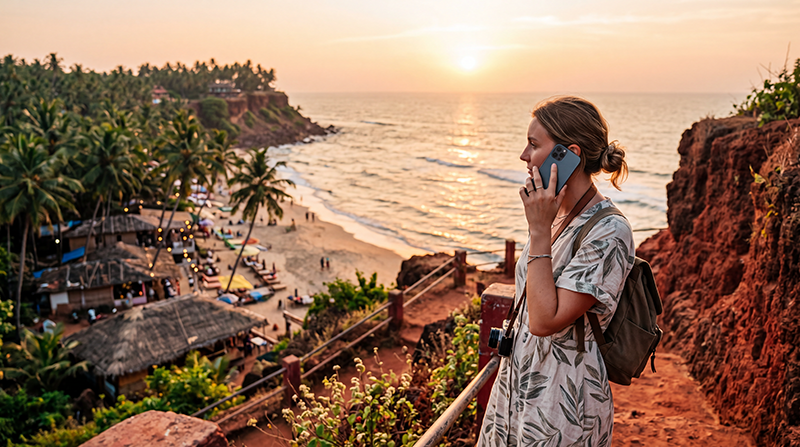

Varkala is one of Kerala’s most popular coastal destinations, known for its dramatic red cliffs, sandy beach, yoga retreats, Ayurvedic centres and relaxed cafés overlooking the Arabian Sea. Reliable internet makes it easier to navigate the area, communicate with accommodation providers, arrange transport and stay connected while exploring southern Kerala.
Most visitors use mobile data for Google Maps, WhatsApp, hotel bookings, restaurant searches, train information, weather forecasts and sharing photos. Mobile coverage is generally reliable throughout Varkala, while hotels, guesthouses and cafés commonly offer WiFi.
For most international visitors, an India eSIM is the easiest way to get online. It can be installed before departure, allowing you to use mobile data shortly after arriving in India without buying or replacing a physical SIM card.
Quick answer: mobile internet generally works well in Varkala. Install an India eSIM before travelling, select it for Mobile Data after arrival, enable Data Roaming and keep Network Selection on Automatic.
Top India eSIMs


Does Mobile Internet Work in Varkala?
Yes. Mobile coverage is generally strong around Varkala Beach, North Cliff, South Cliff, Varkala town and the railway station. You should normally be able to use maps, messaging, browsing, online bookings and social media without difficulty.
Signal may vary inside buildings with thick walls, secluded accommodation or quieter coastal areas outside the main tourist zone.
| Varkala Area | Expected Coverage |
|---|---|
| North Cliff | Excellent |
| Varkala Beach | Very Good to Excellent |
| South Cliff | Very Good |
| Varkala town | Excellent |
| Varkala Railway Station | Excellent |
| Kappil Beach | Good to Very Good |
| Quiet coastal roads | Good to Variable |
Best Ways to Get Internet in Varkala
| Internet Option | Best For | Main Limitation |
|---|---|---|
| India eSIM | Most international tourists | Requires an eSIM-compatible phone |
| Local prepaid SIM | Long stays and local calls | Identity verification is normally required |
| Hotel or café WiFi | Remote work and large downloads | Speed varies by property |
| International roaming | Emergency or very short use | May be expensive |
Why Use an India eSIM in Varkala?
An eSIM is a digital mobile plan installed directly on a compatible smartphone. You can keep your regular SIM card active while using the India eSIM for mobile data.
- Install it before departure.
- No physical SIM card replacement.
- Avoid airport and operator-store queues.
- Keep your existing phone number active.
- Use the same plan across Kerala and India.
- Continue using WhatsApp with your current number.
- Ideal for short holidays and multi-city trips.
- Useful as backup internet for remote work.
India eSIM vs Local SIM Card
| Feature | India eSIM | Local SIM Card |
|---|---|---|
| Buy before travelling | Yes | Usually no |
| Physical SIM required | No | Yes |
| Registration after arrival | No additional local registration | Usually required |
| Keep home SIM installed | Yes | Depends on the device |
| Indian phone number | Usually no | Usually yes |
| Best for short visits | Excellent | Good |
A local SIM may be useful for a long stay or when you specifically need an Indian phone number. For most tourists, an eSIM is simpler because it can be prepared before the journey.
WiFi in Varkala
WiFi is widely available in hotels, guesthouses, hostels, yoga centres, cafés and restaurants around North Cliff and the beach. Connection quality varies significantly between properties.
Permanent hotels and coworking-friendly cafés usually offer better internet than small guesthouses or seasonal beach accommodation. Shared networks may slow down during evenings when many guests are connected.
WiFi is particularly useful for:
- Video calls.
- Cloud backups.
- Software updates.
- Large photo and video uploads.
- Streaming.
- Laptop-based remote work.
Mobile data remains more convenient when moving between the beach, town, railway station and nearby destinations.
Can You Work Remotely from Varkala?
Yes. Varkala attracts digital nomads, yoga students and long-stay visitors. Many cafés and accommodation providers advertise WiFi, but speeds and stability are not identical everywhere.
Before booking a longer stay, ask the property for a recent internet speed test and confirm whether WiFi reaches your room. For important meetings, keep your India eSIM available as a backup connection.
Internet for Trips Around Varkala
Mobile data is useful when visiting nearby destinations such as Kappil Beach, Anchuthengu Fort, Kollam and Thiruvananthapuram. Coverage is generally reliable in towns and along main roads, but may become weaker on quieter coastal routes.
Download offline maps before longer scooter, taxi or train journeys and save your accommodation address locally on your phone.
How to Install and Activate an India eSIM
- Choose an India eSIM plan for your trip.
- Complete the purchase online.
- Receive the QR code and installation instructions by email.
- Access the eSIM details in your NoveSIM account if needed.
- Install the eSIM while connected to reliable WiFi.
- Keep the profile installed until your trip.
- After arriving in India, enable the eSIM.
- Select it for Mobile Data.
- Enable Data Roaming on the eSIM.
- Keep Network Selection on Automatic.
Do not delete the eSIM after installation. Many QR codes are intended for one-time use and may not work again after the profile is removed.
Recommended Mobile Settings
| Setting | Recommended Value |
|---|---|
| India eSIM | Enabled |
| Mobile Data | India eSIM |
| Calls and SMS | Primary SIM |
| Data Roaming on India eSIM | On |
| Data Roaming on primary SIM | Off |
| Automatic Data Switching | Off |
| Network Selection | Automatic |
| Preferred Network | 5G Auto or 4G/LTE |
| APN | data.esim if required |
India eSIM APN Settings
Most compatible phones configure the APN automatically. If your phone shows signal but websites and apps do not load, use the following settings.
| Field | Value |
|---|---|
| Name | NoveSIM |
| APN | data.esim |
| Username | Leave blank |
| Password | Leave blank |
| Authentication | None |
How Much Data Do You Need in Varkala?
| Trip Length | Suggested Data |
|---|---|
| 2–3 days | 3–5 GB |
| One week | 8–10 GB |
| 10 days | 10–15 GB |
| Two weeks | 15–25 GB |
| Remote work or hotspot use | 30 GB or more |
Maps, WhatsApp and booking apps use relatively little data. Video calls, streaming, cloud backups and laptop hotspot use consume much more.
Can You Keep Your Home SIM Active?
Yes. Most modern Dual SIM smartphones allow you to keep your primary SIM active for calls, SMS and verification codes while using the India eSIM for mobile data.
Disable Data Roaming on your primary SIM and turn off Automatic Data Switching to reduce the risk of unexpected roaming charges.
Does WhatsApp Work in Varkala?
Yes. WhatsApp works normally through mobile data or WiFi. Your account remains connected to your existing registered phone number even when the India eSIM provides the internet connection.
You can continue sending messages, sharing your location and making voice or video calls without changing your WhatsApp number.
What to Do If Mobile Internet Is Not Working
- Confirm that the India eSIM is enabled.
- Select it for Mobile Data.
- Enable Data Roaming on the eSIM.
- Disable Automatic Data Switching.
- Keep Network Selection on Automatic.
- Verify that the APN is data.esim.
- Turn Airplane Mode on for 30 seconds.
- Turn it off and wait several minutes.
- Restart your phone.
Do not delete the eSIM while troubleshooting. Moving outdoors or closer to the main cliff area may improve reception if you are staying in secluded accommodation.
Related India Guides
- India eSIM
- Internet in Kerala for Tourists
- Internet in Kochi for Tourists
- Internet in South Goa
- Mobile Data in India
- Best Network in India for Tourists
- Local SIM vs eSIM in India
- India eSIM APN Settings
FAQ
Does mobile internet work in Varkala?
Yes. Mobile coverage is generally reliable around Varkala Beach, North Cliff, the town and the railway station.
Is WiFi available in Varkala?
Yes. Most hotels, guesthouses, cafés and yoga centres offer WiFi, although speed and stability vary.
Can I work remotely from Varkala?
Yes. Choose accommodation with verified WiFi and keep mobile data available as a backup for important meetings.
Can I keep my regular SIM active?
Yes. Most Dual SIM phones let you use your primary SIM for calls and SMS while the India eSIM provides mobile data.
Does WhatsApp work with an India eSIM?
Yes. WhatsApp continues using your existing number while the India eSIM supplies the internet connection.
Do I need Data Roaming enabled?
Yes. Enable Data Roaming on the India eSIM and keep it disabled on your primary SIM.
What APN should I use?
If manual configuration is required for a NoveSIM India eSIM, use data.esim.
Final Recommendation
Mobile internet generally works well throughout Varkala, while hotel and café WiFi provides a useful option for larger downloads and remote work. Because WiFi quality varies between properties, having your own mobile data connection is strongly recommended.
An India eSIM lets you prepare before departure, keep your regular SIM active and stay connected throughout Varkala and the rest of Kerala.
Install the eSIM while connected to WiFi, select it for Mobile Data after arriving in India, enable Data Roaming and keep Network Selection on Automatic.