


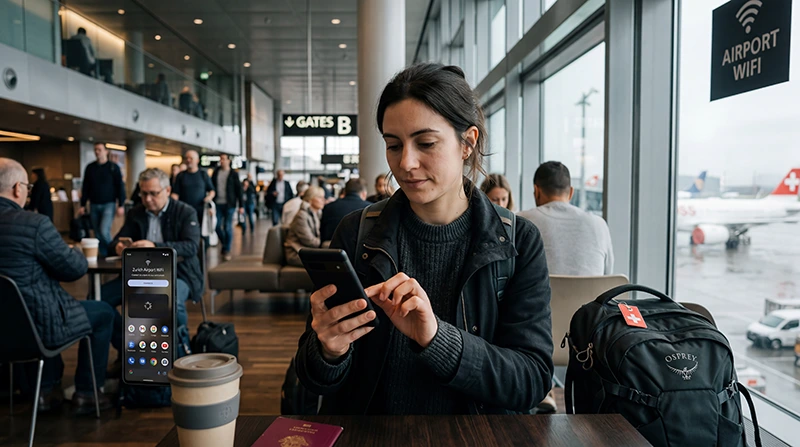

Zurich Airport Wi-Fi offers eight hours of free access to passengers and visitors. Join the network named Zurich Airport, then complete the registration page; connecting to the network alone does not finish the login.
The choice of registration method matters if you have just landed. The SMS route needs a mobile number that can receive a code. If your travel eSIM supplies data but no SMS, the airport also offers a boarding-pass and ID route through a Wi-Fi station or information desk.
NoveSIM travel eSIMs are data-only: they can provide mobile internet outside the airport Wi-Fi session, but they do not provide a Swiss telephone number or conventional calls and SMS.
Quick answer: Select Zurich Airport in your phone’s Wi-Fi settings. On the login page, register by SMS if your number can receive the code, or obtain a code with your boarding pass and ID at an airport Wi-Fi station or information desk. If the portal does not appear, reconnect and open a normal browser page before asking airport staff for help.
Top Switzerland eSIMs

Switzerland eSIM
Fixed
1 GB, 7 days2.50$2 GB, 15 days3.50$3 GB, 30 days5.00$Unlimited
Unlimited, 1 day3.00$Unlimited, 3 days6.50$Unlimited, 5 days10.50$
Europe Extra eSIM
Fixed
1 GB, 7 days2.50$2 GB, 15 days4.00$3 GB, 30 days5.00$Unlimited
Unlimited, 1 day3.00$Unlimited, 3 days6.00$Unlimited, 5 days10.00$Europe+ eSIM
Fixed
1 GB, 7 days3.00$2 GB, 15 days4.50$3 GB, 30 days6.00$Unlimited
Unlimited, 1 day3.00$Unlimited, 3 days7.00$Unlimited, 5 days11.50$Europe Lite eSIM
Fixed
1 GB, 7 days2.50$2 GB, 15 days4.00$3 GB, 30 days5.00$Unlimited
Unlimited, 1 day3.00$Unlimited, 3 days6.00$Unlimited, 5 days10.00$How Do You Log In to Zurich Airport Wi-Fi?
- Open Wi-Fi settings and select the network named Zurich Airport. Check the name against airport signage rather than choosing a lookalike network.
- Wait for the registration page. If it does not open automatically, launch a browser and load an ordinary webpage.
- Choose Register by SMS, enter a number able to receive a text, and submit the code sent to it; or choose Register by boarding pass and collect a code from a Wi-Fi station or information desk using your boarding pass and ID.
- Enter the code, accept the displayed terms and select Go to the Internet.
The airport’s current Wi-Fi instructions are the authority if the portal wording or procedure changes. Its published eight free hours run continuously from first login, so there is little reason to start the session long before you need it.
No SMS Code? Use the Boarding-Pass Route
A NoveSIM eSIM cannot receive an ordinary SMS verification code. A dual-SIM phone may still receive one on the home number if that line is active, but you should check the home carrier’s roaming terms before relying on it. Do not confuse mobile data on the travel eSIM with SMS service on the home SIM.
The airport lists Wi-Fi stations in both public and passenger areas, including Arrival 1 and Arrival 2, baggage-claim halls, the Airside Center and several gate areas. Ask at an information desk if the nearest station is unclear. The boarding-pass option is especially useful when your phone number is unavailable after landing.
What If the Login Page Does Not Open?
First confirm that the phone is connected to Zurich Airport, not merely showing the network in a scan list. Disconnect and rejoin once, then open a browser page to trigger the portal. If a saved connection keeps returning to an incomplete session, forget that Wi-Fi network and join it again.
Do not enter personal details into a similarly named hotspot or a page with an unexpected security warning. For registration or login problems that persist, the airport directs travellers to its Service & Information Desks. A mobile-data backup can keep essential arrival tasks moving; our Zurich Airport eSIM guide covers that separate decision without treating mobile data as a fix for the airport portal.
What Can You Do Before Leaving the Terminal?
Use the airport connection to retrieve a booking, message your accommodation or check an onward train. Save tickets and the destination address on the phone before heading to the railway platforms or a pickup point. Station and train connectivity are separate from airport Wi-Fi; see internet on Swiss trains if the journey continues by rail.
Public Wi-Fi is best treated as a temporary arrival service. For account recovery, payments or work that requires a consistent connection after departure, use a trusted mobile line and verify the exact plan’s Swiss coverage and validity. If that line has not been configured yet, follow the Switzerland eSIM activation steps while you still have a reliable connection.
Related Articles
FAQ
Is Wi-Fi free at Zurich Airport?
Yes. The airport currently offers passengers and visitors eight hours of free access, counted continuously from the first login. Check its current terms before travelling.
What is the official Zurich Airport Wi-Fi network name?
The airport instructs travellers to select the network named Zurich Airport. Confirm the name against airport signage or staff before entering a registration code.
Can I log in without receiving an SMS?
Yes. The airport offers a boarding-pass registration route: obtain a code at a Wi-Fi station or information desk with your boarding pass and ID, then enter it on the portal.
Who can help if Zurich Airport Wi-Fi registration fails?
After reconnecting and trying the browser portal once, ask at a Zurich Airport Service & Information Desk. The airport names these desks as the contact for Wi-Fi login and registration problems.
Final Recommendation
For Zurich Airport Wi-Fi, start with the official network and choose the login method you can actually complete.
If you cannot receive an SMS, use the boarding-pass and ID code route rather than repeatedly retrying a data-only eSIM number.
Save arrival details during the free session and prepare a separate mobile-data connection for the journey beyond the terminal.