Suriname flag
Suriname eSIM

Best Suriname eSIM for Travel in 2026

Set aside a mobile-data allowance for your Suriname stay before you travel. Choose a fixed total for the trip or compare an Unlimited option with a daily high-speed limit, then install the eSIM on a compatible, unlocked phone using the instructions we deliver.

We provide mobile data, not a Surinamese phone number, standard voice calls or carrier SMS. Use your internet apps for messages and calls, and check the supported-network panel below when planning where you will need the connection.

View Supported Networks for Suriname eSIM
Telesur3G
Digicel Suriname N.V.4G
★ 4.4/5 • Customer rating on Trustpilot
✔ Digital eSIM delivery✔ No physical SIM swap✔ Choose data and validity✔ Keep WhatsApp on your existing number
A total allowance or a daily limit

Choose Your Suriname eSIM Data Plan

Our current fixed options are 1 GB for 7 days, 2 GB for 15 days and 3–20 GB for 30 days. Start with how much mobile data you expect to use outside Wi-Fi, then check the selected plan’s duration against your dates.

Important! 1GB of full high-speed data where available per 24 hours. Thereafter your data speed will be reduced and will reset on the next 24h period.

Our Unlimited options provide 1 GB of high-speed data where available per 24-hour period, followed by reduced speeds until the next reset. Current durations are 1, 3, 5, 7, 10 and 15 days. Unlimited does not mean unlimited high-speed data.

If most of your use will happen on a few busy days, compare a fixed allowance with that daily limit. Large uploads, video calls and permitted laptop sharing can matter more than the number of days you will be away.

Check each destination separately

Suriname, Guyana and French Guiana Are Separate Stops

Do not assume a Suriname plan includes Guyana, French Guiana or Brazil. The products below are alternatives for other destinations. Compare our Caribbean eSIM for a route through its included destinations, checking every stop and the current plan conditions before purchase.

What we deliver

A Data Connection Without a New Local Number

Installation Details by Email

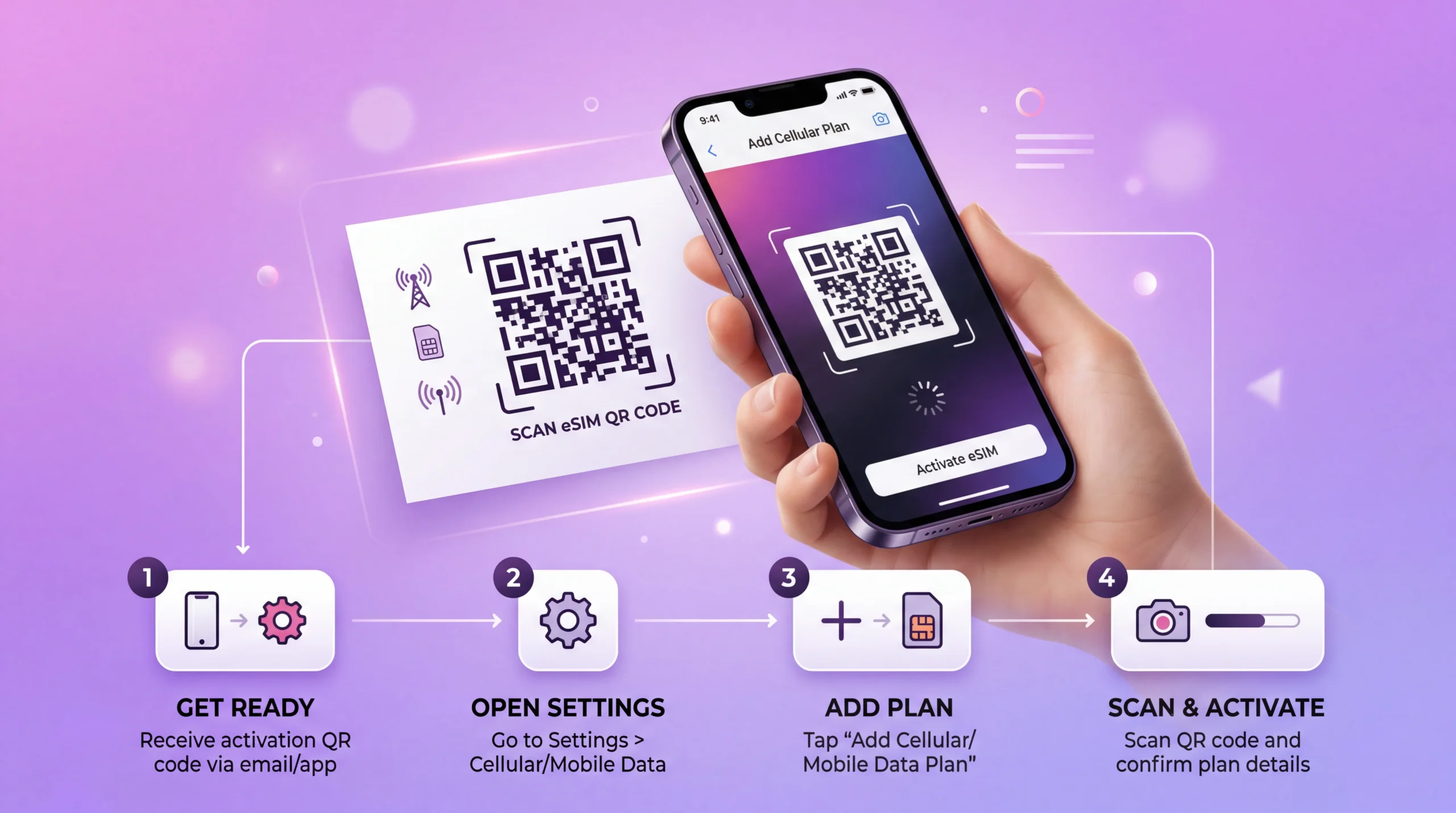
We send the QR code and setup instructions after purchase. Your eSIM details are also available in your NoveSIM account.

A Profile on Your Phone

Install the digital eSIM without removing a physical SIM. Label the new line so you can recognise it when assigning mobile data.

Your Existing Internet Apps

WhatsApp can retain your existing number while using the travel data line. Ordinary calls or SMS through your home SIM remain a separate service.

A Plan You Can Compare

Read the allowance, duration and price together. A larger fixed allowance does not extend validity, and Unlimited still has a daily high-speed limit.

Use the displayed network details

Plan Around the Listed 3G and 4G Options

Two Current Entries

The panel currently lists Telesur with 3G and Digicel Suriname N.V. with 4G. These are the technologies displayed for this product, not a promise that both will be available at every location.

No Fixed Speed Promise

Performance depends on the selected plan, device, signal and local network conditions. Do not treat the 4G entry as a guaranteed speed for calls, uploads or work meetings.

Check Remote Stays

If your itinerary takes you away from the places where you have confirmed reception, ask your accommodation or organiser about connectivity. More gigabytes cannot compensate for a missing signal.

Keep Essential Details Offline

Save addresses, booking confirmations and contact details before setting out. This gives you access to the information while moving between available connections.

eSIM installation process showing QR code scan and activation on smartphone
Prepare before departure

Install Your Suriname Data Line While Online

01

Check the Exact Phone Model

Confirm eSIM support and that your phone is unlocked. Review our compatible devices information before ordering if you are unsure.

02

Read the Validity Instructions

Check when the plan starts and expires. Purchase, installation and the first data connection are separate events; follow the rule supplied for your plan.

03

Use the Supplied Installation Method

Open your QR code or installation link on a reliable internet connection and follow the delivered steps before travelling.

04

Label the eSIM Clearly

A label such as Suriname data helps distinguish the profile from your home SIM. Keep your order instructions accessible for arrival.

Connect with the correct line

How to Activate Your Suriname eSIM

01

Find the Installed Profile

Open the phone’s SIM settings and identify your travel eSIM. Enable it according to the timing in your plan instructions.

02

Assign Mobile Data

Select the Suriname eSIM as your data line and enable its data roaming as instructed. Do not confuse this with switching on roaming for your home SIM.

03

Review the Home Line

Disable automatic data switching if you want to avoid fallback to your home SIM. Check your operator’s charges before keeping that line enabled for calls and SMS.

04

Test Mobile Internet

After the phone registers on a supported network, briefly turn Wi-Fi off and open a web page. A working Wi-Fi connection alone does not confirm that the eSIM data line works.

05

Keep the Profile for Troubleshooting

If there is no data, review the selected SIM and delivered instructions or contact support. Do not delete the installed eSIM unless support specifically tells you to.

Compare the service you need

Suriname Data Plan or Another Option?

OptionWhen to Consider ItCheck First
Our Suriname eSIMYou want a separate prepaid mobile-data allowance without a shop visitPhone eligibility, listed networks, data and validity
Caribbean eSIMYour route includes several destinations on its coverage listEvery stop, total allowance, price and duration
A Local SIMYou also need a local number or ordinary callsOffer contents, registration requirements and purchase availability
Home-Operator RoamingYour current tariff or an add-on may already cover your needsExplicit Suriname inclusion, usable allowance and extra charges

Compare the complete cost for the trip rather than assuming a country plan is always cheaper or roaming is only suitable for emergencies. If your existing allowance is sufficient at no extra cost, another purchase may be unnecessary.

Estimate the mobile part of your day

What Will Use Your Suriname Data?

  • Directions and address searches away from accommodation Wi-Fi
  • Messages to hosts, travel companions and organisers through internet apps
  • Bookings, transport updates and web searches during outings
  • Email and internet calls on working days
  • Photo or video uploads, which can quickly consume a small allowance
  • Traffic from another device if your selected plan permits hotspot sharing
Keep the limits in view

Before Relying on the Connection

  • Confirm hotspot permission before making a laptop or another person’s phone depend on your data.
  • Restrict automatic backups and large updates to Wi-Fi when conserving the allowance.
  • Match the validity to your dates even if you expect to leave gigabytes unused.
  • Keep home-SIM call and SMS charges separate from the cost of our data plan.
  • Save essential information offline for any part of the route where reception is uncertain.
  • Confirm destination coverage again if you add another country to the itinerary.
Choose for the actual journey

Three Different Data Decisions

Mostly Messages and Directions

Compare a small fixed allowance for the time you are outside Wi-Fi. Check the duration rather than buying a larger plan solely because the trip lasts longer.

Work Calls or Heavy Uploads

Compare a larger fixed total with the daily high-speed limit on Unlimited. Check reception where you intend to work; an allowance alone does not establish a reliable meeting connection.

A Wider Regional Route

Compare separate products with the Caribbean offer for the destinations it explicitly includes. Do not infer coverage in Brazil or elsewhere from a nearby-product card.

FAQ

Suriname eSIM FAQs

Does the Suriname eSIM include a local number?
We provide mobile data, not a Surinamese phone number, standard voice calls or carrier SMS. Internet calling and messaging apps can use the connection, including WhatsApp with your existing number.
Which networks and technologies are shown?
The current panel lists Telesur with 3G and Digicel Suriname N.V. with 4G. Availability and performance depend on your selected plan, phone, location and local network conditions. Neither entry guarantees reception everywhere.
What does Unlimited mean?
Our Unlimited options provide 1 GB of high-speed data where available per 24-hour period. Speeds are then reduced until the next reset. Current durations range from 1 to 15 days; Unlimited is not unlimited high-speed data.
When should I install and enable the eSIM?
Install on reliable internet before travel using your delivered QR code or installation link. Follow the specific instructions for when to enable the line and when validity begins. In Suriname, select the eSIM for mobile data and enable its data roaming as instructed.
Does a Suriname purchase cover Guyana or French Guiana?
Do not assume either is included with this country plan. Check each destination separately, or compare the supported-country list of our Caribbean eSIM for a multi-destination trip.
Can I keep my home SIM and use hotspot?
A compatible dual-SIM phone can retain your home line while using the travel eSIM for data, subject to your home operator’s call and SMS charges. Disable automatic data switching if you want to avoid fallback use. Confirm hotspot permission for your selected plan before sharing the connection.
Prepare the data line before departure

Choose the Suriname Allowance That Fits Your Stay

Check your phone, dates and intended locations, then compare the fixed total with the Unlimited daily high-speed limit. We supply the installation details so you can prepare before travelling and select the correct data line during your stay.

Buy Suriname eSIM
Traveler using smartphone with global eSIM connection while traveling abroad
Scroll to Top