



Mobile Internet in Slovak Paradise is easiest when mobile data and offline backups are prepared together. The guide below answers the destination-specific connectivity questions without promising a particular network, speed or signal at every location.
Visitors commonly need data for maps, bookings, transport updates and messaging. The amount required changes sharply if the trip includes video uploads, remote work or hotspot use, so preparation should reflect real activities rather than a generic allowance.
A NoveSIM travel eSIM is data-only and does not add a local phone number. Internet calling and messaging applications can use the data connection. Network, 4G, 5G and hotspot availability depend on the selected plan, device, location and local coverage.
Quick answer: For prepare mobile data and offline navigation for Slovak Paradise, install the eSIM over reliable WiFi when permitted, select it for mobile data, enable roaming on that line and keep maps and essential documents offline. Start with automatic network selection. The NoveSIM APN is data.esim, but it should not be changed unless necessary.
Top Slovakia eSIMs

Slovakia eSIM
Fixed
1 GB, 7 days€ 2.162 GB, 15 days€ 3.463 GB, 30 days€ 4.33Unlimited
Unlimited, 1 day€ 2.16Unlimited, 3 days€ 5.19Unlimited, 5 days€ 7.79
Europe Extra eSIM
Fixed
1 GB, 7 days€ 2.162 GB, 15 days€ 3.463 GB, 30 days€ 4.33Unlimited
Unlimited, 1 day€ 2.60Unlimited, 3 days€ 5.19Unlimited, 5 days€ 8.65Europe+ eSIM
Fixed
1 GB, 7 days€ 2.602 GB, 15 days€ 3.893 GB, 30 days€ 5.19Unlimited
Unlimited, 1 day€ 2.60Unlimited, 3 days€ 6.06Unlimited, 5 days€ 9.95Why the Landscape Affects Reception
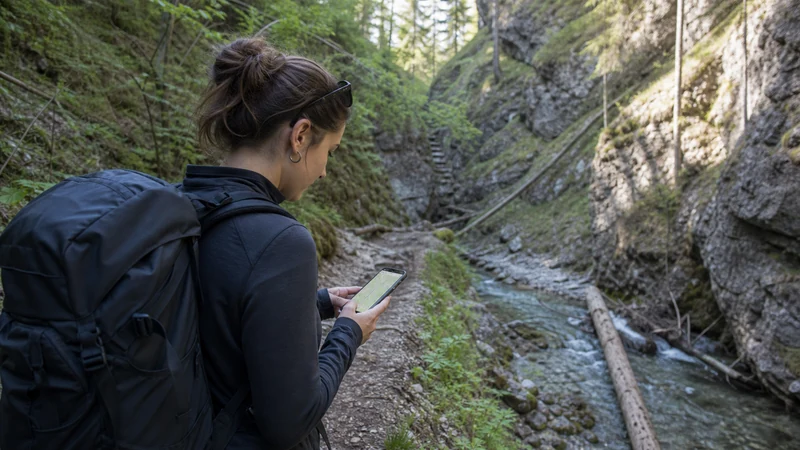
Slovak Paradise is known for forested gorges, ladders and narrow terrain. These features can obstruct radio signals, particularly below surrounding ground. Reception near a village or car park does not establish what will happen deeper on a route.
Download the Exact Route
Save a proper offline map and the planned trail description before entering the park. Check direction, difficulty and access information from appropriate current sources. Make sure the content remains available without WiFi or cellular service and store the return transport details.
Keep Both Hands and the Phone Safe
Technical trail features demand attention. Stop in a safe place before checking the screen, secure the phone against drops and protect it from water. Do not attempt to film or troubleshoot connectivity while using a ladder or exposed section.
Plan for Battery Drain
Weak signal encourages repeated network searches. Activate battery-saving mode, minimise background synchronisation and carry a charged power bank. Airplane mode can preserve power through a known gap, but remember to restore the required line when returning to a populated area.
Share the Plan before Starting
Tell a responsible person the selected route and expected finish. Live location sharing is helpful only while data and battery remain available. It should supplement, not replace, a communicated itinerary and suitable outdoor preparation.
Use Data Efficiently
Reserve cellular data for transport changes, weather checks from authoritative services and essential communication. Upload photos later over trusted WiFi. Background backup and video can consume both data and battery without helping the walk.
Connection Checks after the Hike
In a village or open area, turn on the eSIM, select it for data and enable roaming. Restart once if necessary and begin with automatic network selection. Use data.esim for the NoveSIM APN only if the field needs correction; do not delete the profile.
A Resilient Slovak Paradise Plan
The practical combination is an installed travel eSIM, verified offline navigation, protected battery capacity and an itinerary shared before departure. This keeps connectivity useful without making a remote data connection responsible for the success of the route.
Choosing Between eSIM, Roaming and WiFi
An eSIM gives a compatible unlocked phone a separate data profile without removing the home SIM. NoveSIM travel plans are data-only, so they do not provide a Slovak telephone number for conventional calls or SMS. Internet calling and messaging apps can work through data. Traditional roaming may be convenient but depends on the home operator’s terms, while public WiFi is useful only where a trustworthy network is available.
Compare the trip length and expected activities rather than assuming that the largest allowance is automatically best. Maps and messaging use much less data than video, cloud backup or laptop tethering. Availability of hotspot, 4G, 5G, networks and performance depends on the plan, device, area and local coverage.
Setup Before Visiting Slovak Paradise
- Confirm that the phone supports eSIM and is network-unlocked.
- Install over reliable WiFi when the purchased plan permits pre-travel installation.
- Label the travel line clearly and keep the QR code or manual details secure.
- Download maps, bookings and essential contacts for offline access.
- On arrival, turn on the eSIM and select it for mobile data.
- Enable data roaming for the travel line and disable data switching to the home SIM.
- Begin with automatic network selection and test with WiFi switched off.
- Keep primary-SIM roaming data off unless it is intentionally required.
For an outdoor destination, also check the battery, weather preparation and offline route before leaving a populated area.
Data Planning Table
| Activity | Preparation |
|---|---|
| Maps and transport | Download the area and save key routes |
| Tickets and bookings | Keep an offline copy |
| Photos and video | Delay backup until trusted WiFi |
| Calls and messages | Use data apps; check home-SIM charges |
| Hotspot or work | Confirm plan support and budget more data |
Responsible Connectivity
Keep attention on the surroundings and stop safely before changing settings or reading a detailed route. Shared WiFi should be verified with the venue, and sensitive activity should be postponed when a network appears suspicious. Carry a charged power bank for a long day.
A Daily Connectivity Routine
Begin the day on trusted accommodation WiFi. Check current transport or access information, download the required map area and make sure tickets open without a connection. Allow essential app updates to finish before leaving, then pause automatic software downloads and cloud-photo backup. This preserves cellular data and reduces unexpected battery drain while moving around Slovak Paradise.
After leaving WiFi, open a normal webpage and the mapping application to confirm that traffic is using the travel eSIM. A signal icon alone does not prove that a data session works. If the phone has two SIMs, inspect the mobile-data selector and switch off automatic data fallback. The home line may remain active for calls or verification messages, but its provider can charge for roaming calls and SMS.
During the day, distinguish a location problem from a configuration problem. If service works on one street or outside a building, the eSIM is already configured well enough to connect. Thick walls, underground areas, moving vehicles and terrain can create temporary gaps. Wait or change position before editing APN or network controls. Repeated changes make it harder to identify the real cause.
If service remains unavailable in an open populated area, confirm the travel line and data roaming, toggle airplane mode and restart once. Leave network choice on automatic initially. A manual scan can be tested afterwards, one entry at a time. The appearance of a network in the list does not guarantee that the plan authorises it. Preserve screenshots of the settings and exact error for support.
At the end of the day, use verified WiFi for photo backup and large downloads, review remaining data where account tools provide that information and recharge both the phone and power bank. Keep the next day’s address, route and booking locally available. This short routine makes a temporary network or WiFi failure inconvenient rather than disruptive.
Related Articles
- Slovakia eSIM plans and destination information
- Mobile Data in Slovakia for Tourists
- Slovakia eSIM coverage guide
FAQ
Will mobile data work everywhere around Slovak Paradise?
No service can be guaranteed at every indoor or outdoor point. Terrain, buildings, congestion, the phone and the networks available to the plan affect reception. Keep essential information offline.
Should data roaming be enabled on a travel eSIM?
Yes, roaming normally needs to be on for the travel eSIM. Keep roaming data off for the primary SIM unless you intentionally want to use the home operator abroad.
What APN should NoveSIM use in Slovakia?
The NoveSIM APN is data.esim. Do not replace it with a domestic operator APN, and do not edit a working automatic configuration.
Can hotel, airport or café WiFi replace mobile data?
WiFi can reduce data use, but access, speed and security vary. Verify the network name and keep an offline or cellular alternative for transport, navigation and booking changes.
Should I delete the eSIM if service disappears?
No. Confirm the active line, roaming and network selection, then restart once. Do not delete the eSIM unless NoveSIM support specifically instructs you to do so.
Final Recommendation
Prepare the phone, eSIM and offline materials before visiting Slovak Paradise. Use the compatible devices list to check the exact handset and the Slovakia eSIM page for current plan information.
Select the travel line for data, enable roaming, start with automatic network selection and test without WiFi. Keep the primary SIM from supplying data unexpectedly and preserve the installed eSIM during troubleshooting.
A balanced setup makes connectivity useful without making the trip dependent on continuous service: mobile data handles live changes, while downloaded maps, tickets and contacts remain available through temporary gaps.