
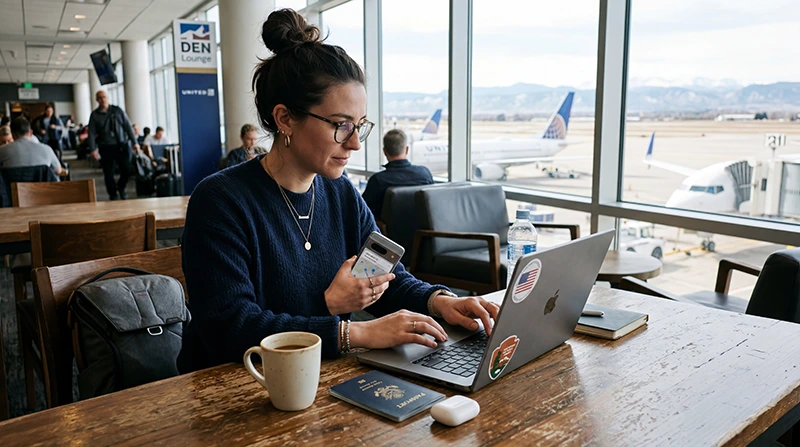

Remote worker using mobile internet, hotspot, and a USA eSIM while working during a trip in the United States.

Remote Work in the USA: Best Internet Options in 2026

Remote work in the United States requires reliable internet, especially if you need email, cloud tools, video calls, maps, hotel bookings, hotspot, and work apps while traveling.

Whether you are working from a hotel, café, airport lounge, co-working space, road trip stop, or business destination, your internet setup can directly affect your productivity.

Quick answer: for most remote workers traveling in the USA in 2026, the best setup is a USA eSIM with large or unlimited data, hotspot support, reliable hotel or co-working WiFi, and offline backups for travel routes.

Top United States eSIMs

Why Remote Workers Need Reliable Internet in the USA

Remote work often depends on stable internet throughout the day. Public WiFi may help, but it is not always reliable, secure, or available when you are moving between places.

Remote workers often need internet for:

  • Email and messaging apps
  • Video calls and online meetings
  • Cloud documents and file sharing
  • Project management tools
  • Calendar and scheduling apps
  • Maps and rideshare apps
  • Hotel and flight apps
  • Hotspot for laptops and tablets
  • Backup internet when WiFi is slow
  • Secure access to work tools

Best Internet Options for Remote Work in the USA

Option Best for Main advantage
USA eSIM with hotspot Most traveling remote workers Mobile data and laptop backup
Hotel WiFi Work from accommodation Convenient but quality varies
Co-working WiFi Focused work days Usually more stable than public WiFi
Public WiFi Light work in cafés or airports Available but less reliable
Pocket WiFi Groups or multiple devices Shared connection but extra device

Why a USA eSIM Is Useful for Remote Work

A USA eSIM gives your phone mobile data without needing a physical SIM card. For remote workers, this can be a valuable backup when hotel WiFi is slow, public WiFi is crowded, or you need to work while moving.

With a USA eSIM, remote workers can:

  • Install mobile data before departure
  • Use internet shortly after landing
  • Avoid airport SIM card queues
  • Keep their regular SIM active
  • Use maps, rideshare apps, email, and work tools
  • Use hotspot if supported by the plan
  • Work from hotels, cafés, airports, or road trip stops
  • Avoid relying only on public WiFi

Browse USA eSIM plans

Top United States eSIMs

How Much Data Do Remote Workers Need in the USA?

Remote work style Suggested data Best for
Light remote work 10GB to 20GB Email, chat, maps, basic cloud tools
Regular remote work 20GB to 50GB Daily laptop hotspot, files, browsing, meetings
Video-call heavy work Large or unlimited data Zoom, Teams, Meet, uploads, cloud sync
Long-stay remote work Large or unlimited data Extended travel, hotspot, backup internet

Remote work usually needs more data than normal tourist travel because laptops and work apps can use more data in the background.

Read more about how much data you need for USA travel

Hotspot for Remote Work in the USA

Hotspot is one of the most important features for remote workers. If your USA eSIM plan supports hotspot, you can share mobile data from your phone to your laptop or tablet.

Hotspot is useful for:

  • Working from airports
  • Backing up weak hotel WiFi
  • Joining urgent meetings
  • Using cloud documents
  • Sending files and presentations
  • Working from cafés or roadside stops
  • Connecting a tablet or second device

Before buying a plan, check whether hotspot is supported and whether there are hotspot limits.

USA eSIM vs Hotel WiFi for Remote Work

Feature USA eSIM Hotel WiFi
Works while moving Yes, where coverage is available No
Useful for laptop hotspot Yes, if supported Not always needed but quality varies
Reliability Depends on mobile coverage Depends on hotel network
Security More private than open WiFi Shared network
Best use Backup and mobile work Main work location if strong

The best setup is to use hotel WiFi when it is stable and keep your USA eSIM as a backup for mobile work and urgent tasks.

USA eSIM vs Public WiFi for Remote Work

Public WiFi in cafés, airports, restaurants, and public spaces can be useful, but it may be slow, crowded, unstable, or less secure.

A USA eSIM gives you a more flexible option when public WiFi is not available or not reliable enough for work.

USA eSIM vs Pocket WiFi for Remote Work

Feature USA eSIM Pocket WiFi
Extra device No Yes
Battery management No separate router battery Needs charging
Setup Digital installation Pickup, delivery, or return may be required
Laptop support Possible with hotspot if supported Usually built for sharing
Best for Solo remote workers and flexible travel Groups or many devices

For many remote workers, a USA eSIM with hotspot support is easier than carrying a separate pocket WiFi device.

Read more about pocket WiFi alternatives in the USA

Best Internet Setup for Remote Work by Situation

Situation Best setup Why
Hotel workday Hotel WiFi + USA eSIM backup Use WiFi for heavy tasks and eSIM if WiFi fails
Airport work USA eSIM hotspot Useful when airport WiFi is crowded or unstable
Café work Café WiFi + eSIM backup Flexible backup for calls and urgent work
Road trip work USA eSIM + offline maps Mobile data helps between destinations
Conference travel USA eSIM backup Conference WiFi can be overloaded
Video-call heavy day Stable WiFi + eSIM backup Video calls need strong connection and enough data

Remote Work During USA Road Trips

If you plan to work during a USA road trip, mobile data becomes especially important.

You may need internet for maps, hotel changes, calendar updates, urgent calls, email, file access, and hotspot between destinations.

Road trip coverage can vary in deserts, mountains, forests, national parks, and rural highways. Download offline maps and plan work calls around cities, hotels, and towns with better coverage.

Read more about internet for USA road trips

Remote Work in US National Parks

Remote work inside national parks can be difficult because mobile coverage is often limited. A USA eSIM can help around towns, entrances, visitor centers, lodges, hotels, and main roads, but it may not work in remote park areas.

If you need to work, schedule important calls before entering remote areas or use accommodation with confirmed WiFi.

Read more about eSIM for US national parks

Using Google Maps and Travel Apps While Working Remotely

Remote workers often need mobile data not only for work, but also for travel logistics.

A USA eSIM can support Google Maps, Uber, Lyft, airline apps, hotel apps, weather apps, restaurant searches, payment apps, and communication tools during the trip.

Read more about using Google Maps in the USA

Security Tips for Remote Work Internet

When working remotely, internet security matters. Public WiFi can be convenient, but you should avoid exposing sensitive work data on unsecured networks.

  • Use mobile data for sensitive work when possible
  • Use a trusted VPN if required by your company
  • Avoid unknown public WiFi networks
  • Do not leave devices unattended in cafés or airports
  • Use strong passwords and two-factor authentication
  • Turn off automatic file sharing on public networks
  • Keep your phone and laptop updated

When Should You Install Your USA eSIM?

Install your USA eSIM before departure or while connected to stable WiFi.

After purchase, your eSIM QR code and installation instructions are sent by email. You can also find your eSIM details in your NoveSIM account under your order details.

After arrival in the United States, select the eSIM for mobile data and enable data roaming if required.

How to Use a USA eSIM for Remote Work

  1. Choose a USA eSIM plan with enough data.
  2. Check that your phone supports eSIM.
  3. Install the eSIM while connected to stable WiFi.
  4. Keep your regular SIM active if you need your normal number.
  5. Arrive in the United States.
  6. Select the USA eSIM for mobile data.
  7. Enable data roaming for the eSIM if required.
  8. Turn on hotspot if your plan supports it.
  9. Use mobile data as backup or main internet when WiFi is weak.

Check if your phone supports eSIM

Common Remote Work Internet Mistakes

  • Relying only on hotel WiFi
  • Choosing too little data for laptop hotspot
  • Not checking hotspot support before buying
  • Scheduling video calls in remote areas without backup
  • Leaving cloud sync and software updates running on hotspot
  • Waiting until airport arrival to install mobile data
  • Not checking eSIM compatibility
  • Forgetting to enable data roaming if required
  • Not downloading offline maps for travel days

Related USA eSIM and Remote Work Guides

FAQ: Remote Work Internet in the USA

What is the best internet option for remote work in the USA?

The best setup is usually stable WiFi for heavy work plus a USA eSIM with hotspot support as backup mobile internet.

Is a USA eSIM good for remote work?

Yes. A USA eSIM is useful for remote work because it can provide mobile data for email, maps, messaging, cloud tools, and hotspot when WiFi is weak or unavailable.

Can I use hotspot with a USA eSIM for my laptop?

Hotspot depends on your eSIM plan and device. If supported, you can share your USA eSIM mobile data with your laptop or tablet.

How much data do I need for remote work in the USA?

For light work, 10GB to 20GB may be enough. For regular laptop hotspot, video calls, uploads, and cloud tools, 20GB to 50GB or large/unlimited data is usually safer.

Is hotel WiFi enough for remote work in the USA?

Sometimes, but hotel WiFi quality varies. It is safer to have a USA eSIM as backup if you need reliable work internet.

Can I work remotely during a USA road trip?

Yes, but coverage can vary. Plan important calls around towns, hotels, cities, or co-working spaces and download offline maps for travel days.

Is public WiFi safe for remote work?

Public WiFi can be less secure than mobile data. For sensitive work, use mobile data, trusted WiFi, and a VPN if required by your company.

When should I install my USA eSIM?

Install your USA eSIM before departure or while connected to stable WiFi. Then select it for mobile data after arriving in the United States.

Final Recommendation

For remote work in the USA in 2026, use a layered internet setup: stable WiFi when available, a USA eSIM with enough data and hotspot support as backup, and offline maps for travel days.

This setup gives you more flexibility for hotels, airports, cafés, road trips, co-working spaces, meetings, and work while moving across the United States.

Browse USA eSIM plans

Scroll to Top