


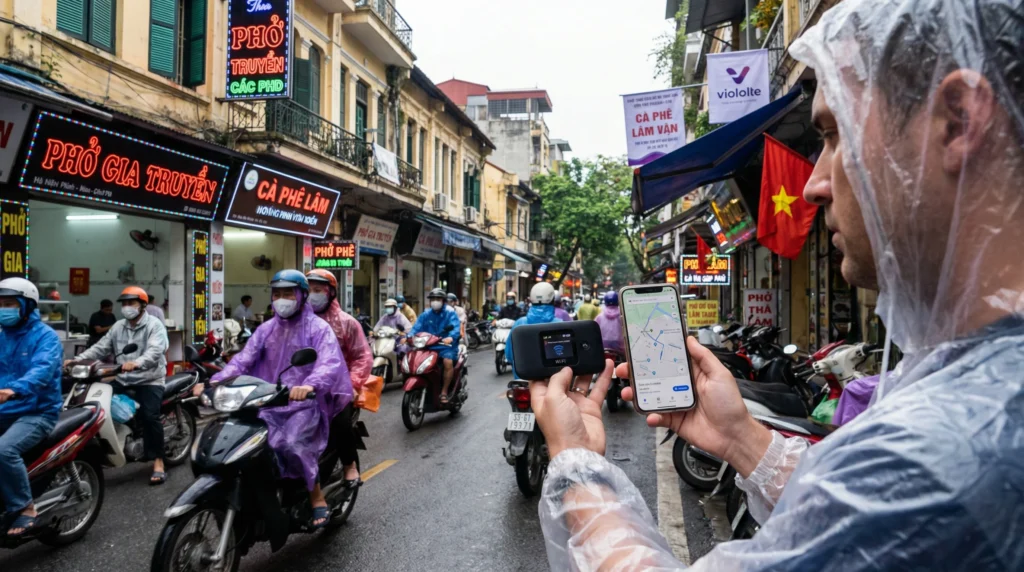

Choosing between Pocket WiFi and an eSIM in Vietnam starts with how your group will travel. A shared connection can suit people staying together, while travellers taking separate routes need to consider independent access.
Pocket WiFi is a separate mobile router that shares its connection with nearby devices. An eSIM is a profile installed on a compatible device; a phone can share its mobile data through hotspot when the plan and phone permit it.
Our NoveSIM travel eSIMs are data-only. They do not include a Vietnamese number, traditional calls or carrier SMS. Internet messaging and calling apps can use the data connection where supported coverage is available.
Quick answer: Compare Pocket WiFi, a phone hotspot and separate personal plans against the same dates, people and expected usage. Check sharing limits, usable data, battery needs and the full cost. Sharing an eSIM connection through hotspot is different from installing the same profile on several phones.
Top Vietnam eSIMs

Vietnam eSIM
Fixed
1 GB, 7 days€ 3.182 GB, 15 days€ 5.003 GB, 30 days€ 7.28Unlimited
Unlimited, 1 day€ 3.18Unlimited, 3 days€ 7.28Unlimited, 5 days€ 11.37
Asia eSIM
Fixed
1 GB, 7 days€ 4.552 GB, 15 days€ 8.193 GB, 30 days€ 10.92Unlimited
Unlimited, 1 day€ 5.91Unlimited, 3 days€ 15.92Unlimited, 5 days€ 25.93How the Two Options Provide Internet
A Pocket WiFi router connects to its service’s mobile network and provides a local Wi-Fi connection for other devices. Check the particular router and package for coverage, supported devices, allowance and setup requirements.
With an eSIM, the compatible, carrier-unlocked phone connects through the purchased plan. If hotspot is supported, other devices can use that phone’s mobile-data connection. Our explanation of how eSIM works covers the profile itself.
Neither format guarantees faster or more reliable service everywhere. Performance depends on the network, plan, device, location and local conditions, as well as the connection between the sharing device and its users.
Pocket WiFi and Travel eSIM: What to Compare
| Decision point | Pocket WiFi | Travel eSIM with permitted hotspot |
|---|---|---|
| Sharing | Subject to the router’s capacity and service conditions. | Subject to the phone and plan’s hotspot support and limits. |
| Equipment | A separate router must stay with the group using it. | The phone supplies the shared connection. |
| Battery | The router needs power or charging. | Sharing uses the phone’s battery; plan for charging alongside normal phone use. |
| When the group separates | People outside the router’s Wi-Fi range lose access to that shared connection. | People outside the sharing phone’s range lose access to that hotspot. |
| Preparation | Check collection or delivery, setup and any return arrangements. | Check exact phone compatibility, unlocking, installation and validity rules. |
| Restrictions | Check usable data, speed conditions and connected-device limits. | Check usable data, fair-use conditions and any separate hotspot restrictions. |
Do not compare a router’s advertised maximum device count with an assumption that an eSIM phone serves only itself. Check the actual products and expected simultaneous use.
Sharing Does Not Mean Independent Connections
One shared router or phone hotspot requires the people using it to remain within its working range. If the person carrying it leaves for another beach, shop or excursion, the others need their own alternative connection.
- Shared Pocket WiFi: agree who carries and charges the router and how it will be available to the group.
- Shared phone hotspot: agree who provides the connection and account for their phone battery and hotspot conditions.
- Separate plans: compare the cost of independent access for people who will split up, including whether every phone supports the chosen service.
Installing one travel profile on a phone does not establish that it can be installed again on another device. Follow the order instructions rather than scanning the same code across the group’s phones.
Check Hotspot Before Relying on It
Read the exact eSIM product’s hotspot terms and confirm that the phone supports the sharing method you intend to use. Apple notes that Personal Hotspot availability and the number of connected devices depend on the carrier and iPhone model; its official Personal Hotspot guide explains those conditions.
- Confirm hotspot is permitted and check any separate tethering allowance or restriction.
- Select the intended travel line for mobile data and disable automatic switching when you do not want home-SIM data supplying the connection.
- Enable hotspot using the phone’s controls, set a password and connect the second device.
- Test a normal webpage on the phone and the connected device before starting an essential task.
- Check how shared usage counts towards the applicable allowances and pause unwanted updates or backups on connected devices.
Shared use can include laptop downloads, photo uploads and other background traffic. Monitor the relevant allowance rather than assuming that ordinary Wi-Fi usage on a connected device is free of mobile-data limits.
Our Vietnam unlimited-data guide explains why an unlimited label does not by itself promise unrestricted high-speed hotspot use.
Compare the Total Trip Cost
Use the same travel dates, number of people and expected usage for both options. A router’s daily headline price and the price of one eSIM package are not enough for a fair comparison.
- Router rental: include all chargeable days, collection or delivery, return arrangements and applicable fees. Review responsibility for loss or damage.
- Deposit: separate a refundable deposit from the final cost, and check the conditions and timing for its return.
- eSIM: include every required plan, additional data or subsequent package needed to cover the full itinerary.
- Both options: compare usable high-speed data, validity, sharing limits and what happens after an allowance is reached.
- Independent access: include the extra connections needed when group members separate.
Check current Vietnam eSIM plans against the rental quote and its full terms. Use the Vietnam data-planning guide to estimate combined demand instead of dividing the headline price by the group size alone.
A larger allowance does not necessarily cover more days. Check when validity starts and whether unused data remains usable at expiry.
Choose Around How You Travel
- Travelling alone: compare a personal phone plan with the cost and practical need for a separate router.
- A group staying together: compare a shared router and permitted phone hotspot against total consumption, device limits and charging arrangements.
- A group splitting up: consider independent plans for the people who need maps or messages away from the shared device.
- Laptop work: test the shared connection, high-speed conditions and battery arrangements before an important session. Keep a backup plan for essential work.
- A phone without eSIM: compare Pocket WiFi with a compatible physical SIM service. Neither option removes the need to check the device and package conditions.
Choose for the actual itinerary rather than assuming all families need one router or every traveller needs the same eSIM package. Our guide to how to get internet in Vietnam as a tourist covers the wider alternatives.
Before You Buy or Rent
- List who needs internet, which devices will connect and when the group will separate.
- Check device compatibility and coverage for the actual route. A Wi-Fi connection to a router does not establish that the router has working mobile service.
- Compare validity, usable data, fair-use conditions and sharing limits for the complete dates.
- Calculate the full cost and confirm any collection, delivery and return commitments.
- Prepare the equipment or install the eSIM at the time permitted by its instructions. Our Vietnam eSIM installation guide covers setup and arrival checks.
- Test the intended connection with a second device when sharing, arrange charging and save the first transfer details offline.
Confirm rental availability and arrangements with the chosen supplier before arrival rather than assuming that a particular airport counter will have stock or be open. A prepared eSIM also needs an active plan, correct settings and supported local coverage before data works.
Related Articles
FAQ: Pocket WiFi vs eSIM in Vietnam
Can a Vietnam eSIM share data with other devices?
A phone can share its mobile-data connection through hotspot when the specific plan and device support it. Check sharing limits and how usage counts before relying on it.
Can I install the same eSIM on several phones?
Do not assume so. Follow the profile’s installation and transfer instructions. Sharing internet through hotspot is different from installing the same profile on another phone; do not repeatedly scan a code or delete a working profile to test this.
What happens when our group separates?
People outside the range of the shared router or phone hotspot lose that connection. Arrange independent access or an offline meeting plan before splitting up.
Is Pocket WiFi cheaper for a family?
Compare the full rental cost and conditions with all eSIM plans required for the same dates and usage. Collection, return, extra data and the need for separate connections can change the result.
Does hotspot use the same data allowance?
Check the exact product’s accounting and any separate tethering allowance. Connected devices use the mobile service supplying the hotspot; their downloads and background traffic must be included in the estimate.
Which device needs charging?
A portable router needs power. With a phone hotspot, sharing uses the phone’s battery alongside its other tasks. Prepare suitable charging for whichever device supplies the connection.
What should I check before renting Pocket WiFi?
Confirm availability, supported networks, usable data, speed and device limits, chargeable days, collection or delivery, return arrangements, deposit terms and responsibility for loss or damage.
What if my phone does not support eSIM?
Compare a suitable physical SIM with Pocket WiFi. Check phone compatibility and unlocking for a local SIM, or Wi-Fi compatibility and the router service’s conditions for Pocket WiFi.
Final Recommendation
Choose Pocket WiFi or an eSIM by how the group moves, which devices need access and what the complete service costs. Both a router and a permitted phone hotspot can provide shared access, but neither makes nearby users independent of the sharing device.
Check usable data, validity, hotspot limits and charging before paying. Confirm router collection and return or prepare the eSIM according to its installation instructions.
Test the intended connection before relying on it, retain essential details offline and arrange independent access for people who will separate from the group.