Pakistan flag
Pakistan eSIM

Best Pakistan eSIM for Travel in 2026

Choose a Pakistan travel eSIM for the days you need mobile data, whether you are staying in Lahore, arriving in Islamabad or visiting family in Karachi. Compare the current packages below and check their supported networks before ordering.

We provide mobile data, not a Pakistani phone number, standard voice calls or carrier SMS. Your internet apps can use the connection on an unlocked, eSIM-compatible phone.

View Supported Networks for Pakistan eSIM
Jazz3G
Telenor4G
Pakistan Mobile Company Limited (PMCL)4G
★ 4.4/5 • Customer rating on Trustpilot
Order online before travel Digital installation No physical SIM swap Use your existing internet apps
Choose your allowance

Pakistan eSIM Plans for Your Length of Stay

Compare validity and data together. An allowance that looks sufficient for a weekend may not cover a longer family visit, especially if you use video calls or upload photos over mobile data.

Important! 1GB of full high-speed data where available per 24 hours. Thereafter your data speed will be reduced and will reset on the next 24h period.

Start with the number of days you will be in Pakistan and your recent phone usage. Include calls made through internet apps, navigation and any laptop use. Confirm tethering permission in the selected package if you intend to share the connection.

For any Unlimited option, check the high-speed allowance and what happens after it is used, including any reset period. Choose on those conditions rather than the Unlimited label alone. Also check the package’s validity-start rule before installation.

Another destination on your ticket?

Check Each Country on a Multi-Stop Trip

A stop in the UAE or Turkey, or a later visit to another country, needs its own coverage check. Only use this package outside Pakistan if its included-country list explicitly allows it. The destinations below are separate options, not a promise of inclusion.

A separate line for data

What You Get With NoveSIM

An Online Purchase

Choose your travel data before departure instead of making the purchase decision while arranging your onward journey.

A Digital SIM Profile

Install the eSIM using the details supplied with your order. You do not need to remove a physical home SIM.

Data for Your Apps

Access bookings, email and internet messaging while connected. The package does not add local calling minutes or a Pakistani number.

Control Over Data Selection

Assign mobile data to the travel line and manage your home line separately, according to your phone’s dual-SIM capabilities.

Make the right purchase

Check These Details Before Choosing a Package

Exact Phone Compatibility

Check eSIM support for your model and regional version. The phone must also be unlocked for use with another provider.

Network Information

Open the supported-networks panel above. Do not assume that this travel package connects to every Pakistani operator.

Local Number Requirements

If a service requires a Pakistani number or carrier SMS, data-only access is not a replacement for that requirement.

Coverage Along Your Route

Signal and speed depend on local conditions, device and network availability. City use is not evidence of continuous reception on a longer drive.

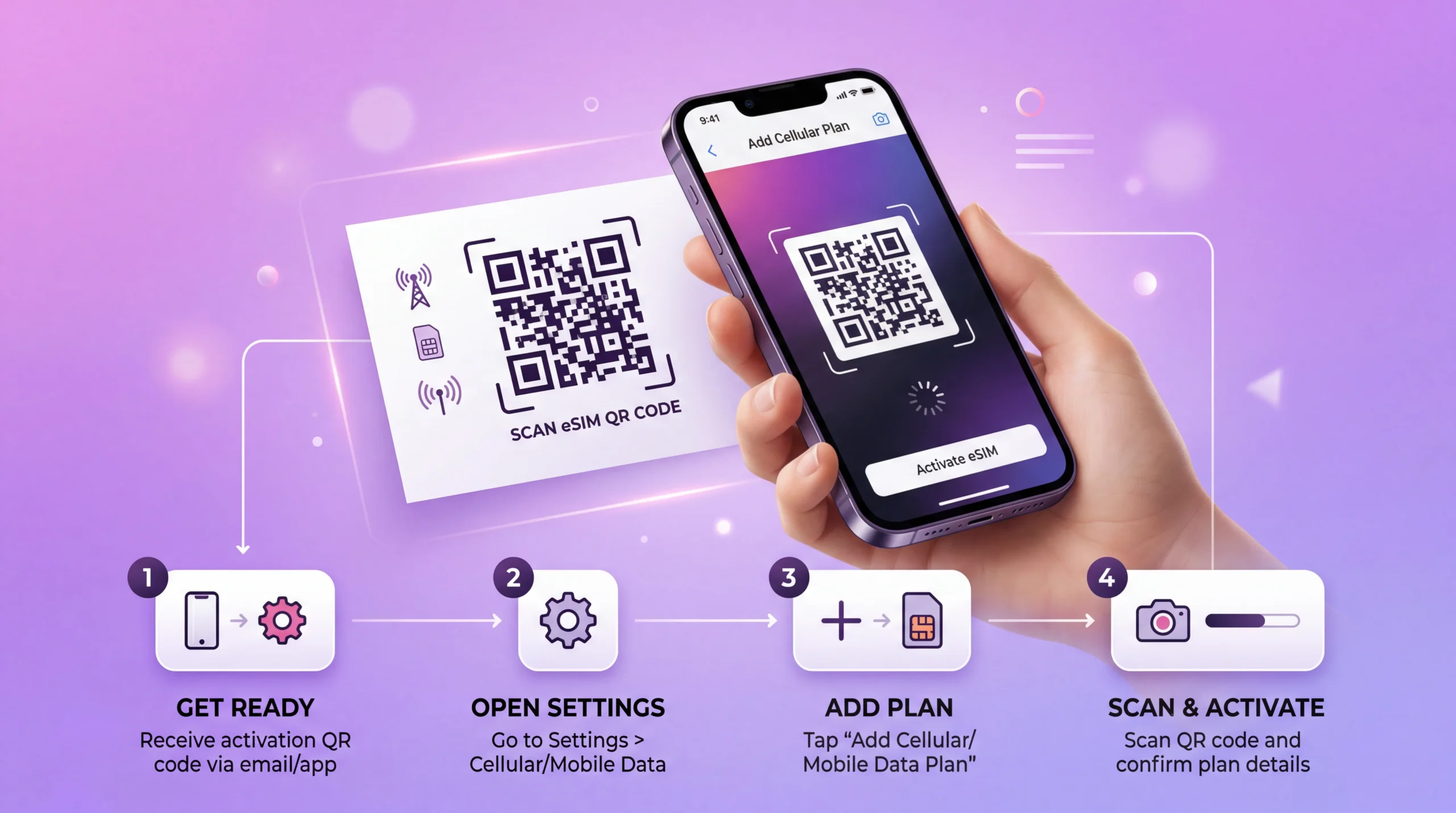
eSIM installation process showing QR code scan and activation on smartphone
Before departure

Buy and Install While You Have Time to Check

01

Review the Package

Confirm its allowance, validity and conditions against your dates, including when validity begins.

02

Keep Your Order Details

Make the supplied installation instructions accessible on the device you will use, or another screen if needed.

03

Install With Internet Access

Use a stable Wi-Fi connection and follow the installation method supplied for your eSIM.

04

Name the New Line

A clear label such as Pakistan travel helps you avoid confusing the eSIM with your home data line later.

When you reach Pakistan

Put Mobile Data on the Correct Line

01

Enable Your Travel eSIM

Turn on the installed line when you are ready to use it, following your package instructions.

02

Assign Mobile Data

Select that line for mobile data. Installing an eSIM alone does not necessarily change the phone’s existing data selection.

03

Check Roaming Settings

Enable data roaming for the travel eSIM as instructed. Leave home-SIM data roaming off if you do not want to use your home provider’s roaming.

04

Prevent Unwanted Fallback

Where your phone offers automatic mobile-data switching, turn it off if you want data use to remain on the travel line.

05

Run a Mobile-Data Test

Briefly turn Wi-Fi off and open a webpage. If it fails, review the supplied settings and contact support as needed; keep the eSIM installed.

Data or a local number?

Decide Which Type of Connection You Need

Your PriorityOption to ConsiderDecision to Make
Mobile data for an unlocked eSIM phoneNoveSIM Pakistan travel eSIMChoose allowance and validity from the current packages
A Pakistani number, ordinary calls or local SMSA suitable local mobile serviceCheck current eligibility, registration and bundle inclusions
Using your existing home service abroadYour provider’s Pakistan roaming optionCompare its actual data limits and charges with a travel package
Prepare for arrival

Have the Essentials Available Without a Signal

  • Save the address and contact details for your first stay in Islamabad, Lahore or Karachi.
  • Keep your pickup instructions and agreed meeting point accessible offline.
  • Download travel confirmations rather than relying on loading them from email.
  • Test mobile data before leaving the Wi-Fi connection you used for setup.
  • Keep your order reference available if you need help with the connection.
During your stay

Make Your Allowance Last for the Whole Visit

  • Use your phone’s per-app data figures to spot large background downloads.
  • Move photo backups and system updates to Wi-Fi when practical.
  • Include video calls when estimating data for a family visit.
  • Check laptop activity separately if your selected package permits hotspot use.
  • Keep essential directions offline for journeys beyond your city accommodation.
Different visits, different priorities

Plan Around the Way You Will Use Data

A Few Days in Lahore

Navigation, reservation checks and messaging can form the starting estimate. Add any social-video use rather than treating all phone activity as light browsing.

A Family Visit in Karachi

Match the validity to your full stay. Consider whether home Wi-Fi will handle backups and longer video calls or whether those will use your mobile allowance.

Islamabad and an Onward Journey

Prepare the next address and route before leaving. Check coverage information for the places you will visit; a data package is not a guarantee of uninterrupted reception between stops.

travel internet guides

Related Pakistan Travel Internet Guides

Before ordering

Pakistan eSIM FAQs

Is this a Pakistani mobile number or a data package?
It is a travel data package. We provide mobile data, not a Pakistani phone number, standard voice calls or carrier SMS. A service requiring a local number or SMS needs a separate suitable solution.
Can I order before my flight to Pakistan?
Yes. Check compatibility, buy your chosen package and use the supplied instructions to install with a stable internet connection. Read the validity-start conditions before installing or enabling the eSIM.
Which network will my Pakistan eSIM use?
Check the supported-networks panel on this page and the selected package information. Do not assume access to every local operator. Reception and available speeds depend on the network, location and device.
How much data should I choose for a longer visit?
Start with recent usage and the number of days you need. Account for video calls, uploads and any permitted hotspot use, then choose a package whose validity covers the stay. The calculator above can help you estimate an allowance.
Can my home SIM remain active?
If your phone supports the required dual-SIM combination, you can keep the home line enabled and assign mobile data to the travel eSIM. Check home-provider charges for calls and SMS, and disable automatic data switching if you do not want fallback to that line.
Does buying a plan guarantee coverage throughout Pakistan?
No. Coverage can vary between streets, buildings and routes, and network availability can change. Use the package’s supported-network information for planning and keep important arrival details and directions offline.
Select your package

Arrange Your Pakistan Mobile Data Before You Go

Choose the validity for your stay, estimate the allowance and check the supported networks. With those decisions made, follow your order instructions to install the eSIM and select it for mobile data when you need it.

Compare Pakistan eSIM Plans
Traveler using smartphone with global eSIM connection while traveling abroad
Scroll to Top