


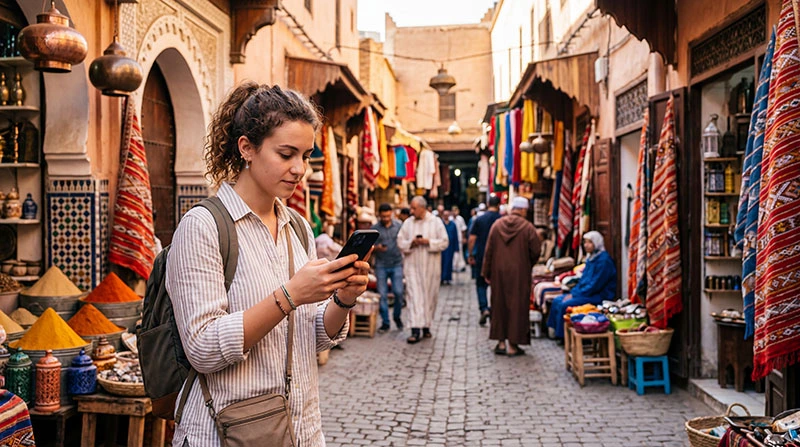

Tourists can get mobile internet in Marrakech through a travel eSIM, Moroccan prepaid SIM, home-carrier roaming or accommodation WiFi. The right choice depends on whether you need a local number and mobile data for the arrival journey.
Independent mobile data is useful for airport transfers and navigation near the medina, where street layouts can make repeated map checks helpful.
NoveSIM travel eSIMs are data-only. We do not provide a Moroccan number, conventional calls or SMS; internet messaging and calling use the data connection.
Quick answer: Choose an eSIM for data you can prepare before travel, a local SIM when a Moroccan number is essential, and roaming only when the full-trip charge is clear. Check the eSIM’s validity-start rule before installing early, test mobile data after arrival and save the riad address and meeting point offline.
Top Morocco eSIMs

Morocco eSIM
Fixed
1 GB, 7 days€ 3.642 GB, 15 days€ 5.913 GB, 30 days€ 8.19Unlimited
Unlimited, 1 day€ 4.55Unlimited, 3 days€ 11.83Unlimited, 5 days€ 19.11
Africa eSIM
Fixed
1 GB, 7 days€ 10.462 GB, 15 days€ 19.563 GB, 30 days€ 27.30Unlimited
Unlimited, 1 day€ 14.10Unlimited, 3 days€ 40.49Unlimited, 5 days€ 66.88Compare Marrakech Internet Options
| Option | Best for | Main check |
|---|---|---|
| Travel eSIM | Preparing a mobile-data plan before travel | Compatibility, validity and coverage |
| Local SIM | A Moroccan number | Registration and shop activation |
| Home roaming | Short use with known pricing | Daily fees and allowance |
| WiFi | Hotel use | Security and availability outside |
Plan for the Medina and Day Trips
Save the accommodation address in Arabic or French and a map pin before arrival. A driver may use a nearby meeting point when vehicle access to the riad is limited.
Coverage can change on Atlas Mountain routes and desert excursions. Download maps and operator details before leaving Marrakech.
Set Up a Travel eSIM
Review current Morocco eSIM plans and verify the handset on the compatible-device list.
- Read the selected package’s validity-start rule. Install the profile on a reliable connection before travel only if those conditions suit your dates.
- After arrival, select it for Mobile Data.
- Enable Data Roaming when instructed.
- Keep home-SIM data roaming off unless you deliberately intend to use that service.
- Disable automatic data switching where available if you want data to remain on the travel line.
Downloading the profile and starting package validity are not necessarily the same event. Keeping the line switched off does not guarantee that the validity clock pauses.
Test Mobile Data Before Your Airport Transfer
- Check that the travel profile is enabled, valid and selected for mobile data.
- Turn Wi-Fi off briefly so an airport connection cannot supply the test traffic.
- Load a small webpage, then check the accommodation address or pickup message you need.
- If the test fails, use an available working connection to confirm essential arrangements before leaving it.
An installed eSIM does not guarantee immediate registration at landing. Keep the agreed meeting point and riad contact details offline. The Marrakech Airport connectivity guide covers the wider arrival task.
If Mobile Data Does Not Work
First distinguish the connection that has failed. If riad Wi-Fi is slow, disconnect from it and test the selected mobile-data line. If mobile data works, investigate the accommodation connection rather than changing the eSIM. If neither works, check each independently.
For mobile-data failure, confirm the selected line, required roaming setting, remaining allowance and validity. Refresh registration with Airplane Mode if needed, leave Network Selection on Automatic and test a normal website. Use APN data.esim only when manual entry is required.
Follow the Morocco troubleshooting guide and do not delete the profile unless NoveSIM Support instructs you.
Check Hotspot Conditions Before Sharing
Confirm that the purchased package permits tethering and that your phone supports it under the carrier configuration. Test mobile data on the handset first, then try a small page on the connected laptop or tablet.
Pause laptop updates, photo backups and other unwanted background uploads before sharing. Connected devices consume the travel allowance too. Use suitable accommodation Wi-Fi for larger transfers when it works well, and check package fair-use conditions rather than assuming unlimited means unrestricted high-speed data.
Related Articles
FAQ
What is the easiest mobile internet option in Marrakech?
A travel eSIM can be convenient for a compatible unlocked phone when you want to prepare mobile data before travel. Check validity rules and test the connection after arrival; immediate service is not guaranteed.
Do I need a Moroccan number?
Not for maps and internet apps; choose a local SIM if conventional local calls are necessary.
Will hotel WiFi be enough?
It will not help during transfers, navigation or day trips outside the property.
Can I keep my normal number?
Usually yes on a dual-SIM phone, but review home-carrier charges for calls and messages.
Final Recommendation
For mobile internet in Marrakech, choose an eSIM for prepared data or a local SIM for a Moroccan number.
Keep the riad address, meeting point and maps offline. Check the plan’s start rule before installation and make a Wi-Fi-off test before relying on mobile data for the transfer.
Plan separately for mountain or desert excursions where city coverage is not a guarantee.