


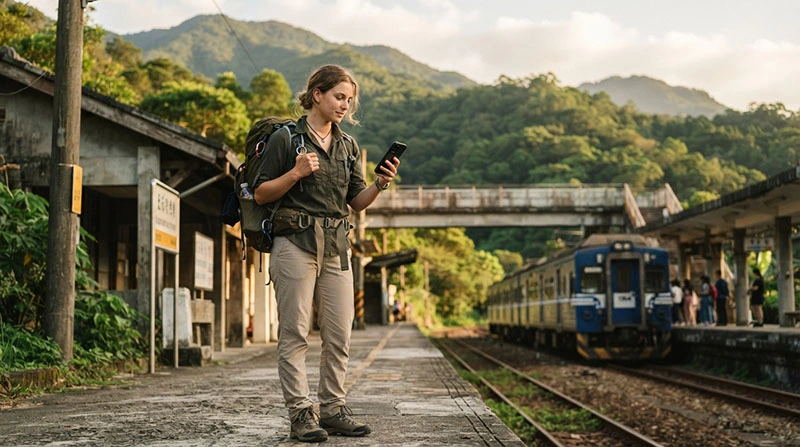

Mobile data is one of the most useful travel tools for backpackers exploring Taiwan. It helps with navigation, railway connections, hostel bookings, translation, weather updates and last-minute itinerary changes while moving between cities.
Unlike travellers staying in one hotel, backpackers often spend long periods away from dependable WiFi. A day may include a train journey, several bus connections, a hike and a late hostel check-in, making personal mobile data especially valuable.
The main challenge is choosing enough data without paying for far more than you will use. Most backpacking tasks consume relatively little data, but video, social media uploads, hotspot use and automatic phone backups can quickly reduce an allowance.
Quick answer: Most Taiwan backpackers need around 5GB–10GB for one week, 10GB–15GB for two weeks and 15GB–30GB for a month. Travellers using hostel WiFi regularly can stay near the lower end, while content creators and remote workers need more.
Top Taiwan eSIMs


What Backpackers Use Mobile Data for in Taiwan
Mobile data supports almost every stage of an independent journey. The most common uses include:
- Following walking and public transport directions.
- Checking train and bus departure times.
- Finding hostel entrances and self-check-in instructions.
- Booking accommodation for the next destination.
- Translating Chinese text, menus and signs.
- Checking weather before hiking or cycling.
- Contacting hosts and other travellers.
- Accessing digital tickets and reservations.
- Finding food, pharmacies and local services.
These everyday tasks do not usually require a huge data package. The largest consumption normally comes from streaming, video calls, cloud backups and frequent media uploads.
How Much Mobile Data Do Backpackers Need?
| Trip Length | Typical Data Allowance | Best For |
|---|---|---|
| 3–5 days | 3GB–5GB | Maps, messages and a short city itinerary |
| One week | 5GB–10GB | Daily navigation and moderate social media |
| Two weeks | 10GB–15GB | Multi-city backpacking route |
| Three to four weeks | 15GB–30GB | Longer island journey with frequent travel days |
| Backpacking with remote work | 30GB–50GB+ | Hotspot, meetings and laptop use |
These ranges assume that you use hostel or accommodation WiFi for streaming, large downloads and phone backups. Travellers relying almost entirely on mobile data should select a larger package.
Mobile Data Usage by Backpacking Activity
| Activity | Relative Data Use | Backpacker Tip |
|---|---|---|
| Text messaging | Very low | Suitable for regular mobile use |
| Maps and route searches | Low | Download offline areas before long journeys |
| Translation | Low | Download offline language packs when available |
| Browsing and bookings | Low to moderate | Close unnecessary image-heavy pages |
| Photo uploads | Moderate | Upload larger batches on hostel WiFi |
| Music streaming | Moderate | Download playlists before travel days |
| Video calls | High | Use WiFi for long conversations |
| Video streaming and uploads | Very high | Avoid frequent mobile use on a small plan |
Why Backpackers Often Use More Data Than Expected
Maps and messaging usually consume little data. Background activity is often the reason a travel allowance disappears faster than expected.
Common causes include:
- Automatic photo and video backups.
- Application updates.
- High-quality social media uploads.
- Video autoplay in social applications.
- Streaming during long train journeys.
- Connecting a laptop through hotspot.
- Automatic data switching to the travel line.
Review your device’s mobile data settings before departure. Restrict background usage for applications that are not essential during the trip.
Fixed Mobile Data or Unlimited-Style Data?
Fixed-data plans
A fixed package is usually the easiest option for backpackers who understand their approximate usage. You receive a defined allowance that can be monitored through your phone settings or provider account.
Fixed data works particularly well when you:
- Use hostel WiFi most evenings.
- Need data mainly for maps and bookings.
- Do not stream much video.
- Want a clear total allowance.
- Have a planned trip length.
Unlimited-style plans
Unlimited-style data may be attractive for travellers who use their phones heavily throughout the day. It is important to check the fair usage policy before purchasing.
NoveSIM unlimited-style plans include 1GB of high-speed data during each 24-hour period. After that daily high-speed allowance is consumed, the connection may continue at a reduced speed until the next 24-hour reset.
This can still support maps, messaging and ordinary browsing. Backpackers uploading large videos or using a laptop hotspot may find a large fixed-data plan more suitable.
Mobile Data Coverage on a Taiwan Backpacking Route
Backpackers often travel far beyond Taipei, so nationwide usability matters more than performance in one city.
Major cities
Mobile connectivity is generally most consistent in Taipei, Taichung, Tainan, Kaohsiung, Hsinchu and other populated areas. Data is useful for metro systems, buses, accommodation and urban navigation.
Railway routes
Mobile data can remain useful on many intercity journeys, although the signal may temporarily weaken in tunnels, mountain sections or less populated parts of the route.
East coast travel
Backpackers travelling through Hualien and the east coast should save essential information offline. Coverage may vary in valleys, tunnels and remote coastal areas.
Mountain destinations
Signal can be less predictable around Alishan, remote hiking routes and high-elevation areas. Mobile data should never be your only navigation or safety tool in isolated terrain.
Beaches and national parks
Popular areas around Kenting generally provide useful connectivity, but isolated beaches and trails may have weaker service.
How to Prepare for Areas With Weak Signal
A Taiwan eSIM or data plan can only connect where a supported local network is available. Before travelling into remote locations:
- Download offline map areas.
- Save hostel addresses and check-in instructions.
- Download train and bus tickets.
- Take screenshots of important schedules.
- Save emergency contact details.
- Tell someone your hiking route.
- Carry a charged power bank.
Offline preparation is especially important when hiking, cycling or travelling through mountain regions.
How to Save Mobile Data While Backpacking
Download maps before leaving WiFi
Save the relevant map areas at your hostel before each travel day. You can still use GPS positioning without continuously downloading the surrounding map.
Disable automatic backups
Set cloud photo and video backups to WiFi only. Travel photos can consume several gigabytes when uploaded in their original quality.
Download entertainment in advance
Save playlists, podcasts and videos before long train journeys rather than streaming them over mobile data.
Reduce video quality
Lower the quality used by video and social media applications when mobile data is active.
Monitor application usage
Both iPhone and Android devices show how much data each application consumes. Check these figures during a longer trip and restrict unnecessary background activity.
Use hostel WiFi strategically
Use fixed WiFi for:
- Application and software updates.
- Cloud backups.
- Large downloads.
- Long video calls.
- Uploading full-resolution travel videos.
Using Mobile Data for Transport in Taiwan
Taiwan’s transport network is convenient for backpackers, but routes may involve several systems. Mobile data helps when comparing connections in real time.
You may use it to check:
- High-speed and conventional railway schedules.
- Local bus arrival information.
- Metro routes in major cities.
- Connections to mountain and coastal destinations.
- Walking directions after leaving a station.
- Last departure times.
Save essential journeys before departure in case the connection temporarily drops inside a tunnel or remote station.
Using Mobile Data for Hostels and Accommodation
Backpackers often arrive at unfamiliar accommodation after dark or without a staffed reception. Mobile data makes these situations easier.
Keep access to:
- The exact property address.
- Self-check-in codes or instructions.
- Messages from the host.
- Booking confirmation.
- A map showing the entrance.
Take screenshots of important check-in details instead of relying exclusively on a live connection.
Can You Share Mobile Data With Other Backpackers?
A phone hotspot can provide temporary internet to a companion, tablet or laptop. This is useful when one traveller loses service or needs to complete a booking.
However, sharing can consume data and battery quickly. Before enabling hotspot:
- Check how much data remains.
- Disable automatic updates on connected devices.
- Avoid streaming and cloud synchronisation.
- Disconnect the hotspot after use.
- Keep your phone connected to a power bank when necessary.
Hotspot availability can depend on the selected plan, phone model and local network conditions.
Data-Only eSIM and Your Normal Phone Number
NoveSIM plans are data-only. They do not include a Taiwanese telephone number, standard voice minutes or SMS.
You can still use internet-based services such as:
- WhatsApp.
- Viber.
- Messenger.
- FaceTime.
- Other VoIP applications.
Your WhatsApp account normally stays linked to your existing number while the Taiwan eSIM provides internet access.
On a compatible Dual SIM phone, your home SIM can remain active for incoming messages and verification codes. Keep Data Roaming disabled on that line to reduce accidental roaming charges.
Can You Add More Data During the Trip?
NoveSIM plans cannot normally be topped up or extended using the same QR code. If you use all the data or the validity ends, purchase a new plan and install the new eSIM profile.
Do this while you still have access to hostel WiFi or another stable internet connection. Label each profile clearly so that you select the correct one for mobile data.
How to Check Your Phone Before Buying Data
- Dial *#06#.
- Check whether an EID number is displayed.
- Open the mobile or cellular settings.
- Look for Add eSIM or Add Mobile Plan.
- Confirm that the phone is carrier-unlocked.
Phone models can differ by sales region, so verify the exact device version rather than relying only on the model name.
How to Install a Taiwan Mobile Data eSIM
Complete the installation before departure while connected to reliable WiFi.
- Select a data allowance and validity matching your trip.
- Open the QR code on another device or use the manual installation details.
- Add the eSIM through your phone settings.
- Label it Taiwan, Travel or NoveSIM.
- Keep the profile turned off until needed if instructed.
- After arrival, select it as your mobile data line.
Do not delete an installed eSIM when troubleshooting. Some QR codes are single-use and may not install again.
Recommended Mobile Data Settings in Taiwan
| Setting | Recommended Configuration |
|---|---|
| Taiwan eSIM | Enabled |
| Mobile Data | Select the Taiwan eSIM |
| Data Roaming on Taiwan eSIM | Enabled |
| Data Roaming on home SIM | Disabled |
| Automatic data switching | Disabled |
| APN | data.esim |
What to Do If Mobile Data Does Not Work
- Confirm that the Taiwan eSIM is turned on.
- Select it as the active mobile data source.
- Enable Data Roaming on the travel eSIM.
- Temporarily disable WiFi and test the connection.
- Check that the APN is data.esim.
- Turn Airplane Mode on for 30 seconds and then off.
- Restart the phone if necessary.
- Move outdoors or to a less isolated location.
Do not remove the eSIM profile unless customer support specifically instructs you to do so.
Related Articles
- Internet for Backpacking Taiwan
- Best eSIM for Backpacking Taiwan
- How Much Data Do You Need for Taiwan?
- Best Data Plan for Taiwan
- Long-Term Travel Taiwan eSIM
FAQ
How much mobile data do backpackers need in Taiwan?
Most backpackers need 5GB–10GB for one week, 10GB–15GB for two weeks and 15GB–30GB for a month, depending on WiFi use and media habits.
Is 10GB enough for a two-week backpacking trip?
Ten gigabytes can be enough for maps, messaging, bookings and moderate social media when you use hostel WiFi for streaming and large uploads.
Does mobile data work throughout Taiwan?
Mobile data is available across many populated and tourist areas, but signal can vary in mountains, tunnels, valleys and isolated coastal locations.
Can I use mobile data for Taiwan trains and buses?
Yes. It is useful for checking routes, departure times, station information and walking directions after arrival.
Can I share my Taiwan data with another backpacker?
You may be able to use mobile hotspot, depending on the plan and device. Sharing can consume data and battery more quickly.
Does a Taiwan data eSIM include calls and SMS?
NoveSIM plans are data-only. Internet-based calls and messaging work, but a local phone number, standard calls and SMS are not included.
Can I top up my backpacking data plan?
NoveSIM plans cannot normally be topped up on the same QR code. Purchase and install a new eSIM if additional data is required.
Final Recommendation
Most backpackers do not need an extremely large mobile data plan in Taiwan. A carefully managed allowance of 5GB–10GB per week is usually enough for navigation, transport, translation, messages and accommodation bookings.
Use hostel WiFi for streaming, backups and large uploads, and save offline maps before travelling into mountain or coastal areas where the signal may vary. Backpackers staying several weeks should choose a plan with enough validity as well as enough gigabytes.
Install the eSIM before departure, select it for mobile data after arrival and keep roaming disabled on your primary SIM. With the right settings and sensible usage, mobile data can support an entire Taiwan backpacking route without unnecessary expense.