


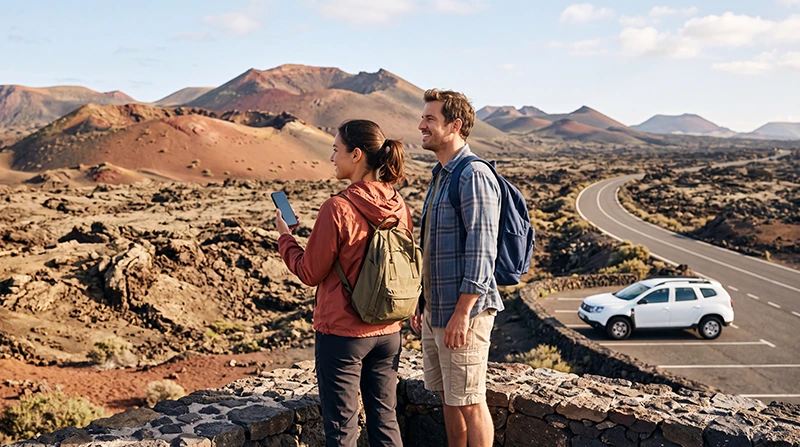

Timanfaya National Park is one of Lanzarote’s most spectacular attractions, famous for its volcanic landscapes, dramatic lava fields and unique geothermal activity. Many visitors explore the park by rental car, guided tour or organised excursion, making reliable mobile internet useful for planning the journey and staying connected before and after the visit.
Unlike towns and resorts, Timanfaya is a protected volcanic area with limited infrastructure. Visitors should not expect the same level of connectivity available in places such as Arrecife, Puerto del Carmen or Playa Blanca.
Quick answer: Mobile internet can be useful around Timanfaya National Park, especially before arrival for navigation, tickets and travel planning. Inside volcanic areas, coverage can vary depending on the exact location, network and terrain. Downloading offline maps before visiting is recommended.
Top Canary Islands eSIMs

Canary Islands eSIM
Fixed
1 GB, 7 days2.00$2 GB, 15 days4.00$3 GB, 30 days5.00$Unlimited
Unlimited, 1 day2.50$Unlimited, 3 days5.50$Unlimited, 5 days9.00$
Europe Extra eSIM
Fixed
1 GB, 7 days2.50$2 GB, 15 days4.00$3 GB, 30 days5.00$Unlimited
Unlimited, 1 day3.00$Unlimited, 3 days6.00$Unlimited, 5 days10.00$Europe+ eSIM
Fixed
1 GB, 7 days3.00$2 GB, 15 days4.50$3 GB, 30 days6.00$Unlimited
Unlimited, 1 day3.00$Unlimited, 3 days7.00$Unlimited, 5 days11.50$Europe Lite eSIM
Fixed
1 GB, 7 days2.50$2 GB, 15 days4.00$3 GB, 30 days5.00$Unlimited
Unlimited, 1 day3.00$Unlimited, 3 days6.00$Unlimited, 5 days10.00$Do You Have Internet at Timanfaya National Park?
Mobile connectivity around Timanfaya depends on your location, mobile operator, phone model and surrounding volcanic terrain.
Visitors should expect:
- Better coverage on main roads around the park.
- More variable signal in volcanic landscapes.
- Possible weaker reception in isolated areas.
- Limited public WiFi options.
- Better connectivity before entering remote areas.
Because Timanfaya is a protected natural area, the focus is on preserving the landscape rather than providing extensive visitor infrastructure.
Why Mobile Data Is Useful for Timanfaya Visitors
Although you may spend only a few hours inside the park, mobile internet is helpful before and after your visit.
You may need data to:
- Navigate from your hotel or resort.
- Check opening times.
- Confirm tour reservations.
- Find parking information.
- Contact travel companions.
- Check weather conditions.
- Find nearby restaurants and fuel stations.
- Continue your road trip afterwards.
Using an eSIM for Timanfaya National Park
A travel eSIM is a convenient way to have mobile data available during a Lanzarote road trip. It can be installed before departure and used throughout the island wherever the supported network provides coverage.
An eSIM is especially useful because:
- You can install it before flying.
- You do not need to find a SIM shop after arrival.
- You can keep your main SIM card active.
- You have internet immediately for navigation.
- You avoid relying only on public WiFi.
Many travel eSIM plans provide data only. They usually do not include a Spanish phone number or traditional calls.
Mobile Coverage Around Timanfaya
Coverage conditions around Timanfaya can change because volcanic terrain affects radio signals.
| Location | Expected Connectivity |
|---|---|
| Main roads near the park | Usually better coverage |
| Visitor areas | May have usable signal |
| Volcanic viewpoints | Can vary |
| Remote lava fields | Possible weak signal |
| Underground volcanic attractions | Limited reception |
Your experience can differ depending on the local network partner used by your SIM or eSIM provider.
Download Offline Maps Before Visiting Timanfaya
Because mobile coverage may not always be consistent, downloading maps before your visit is one of the best travel preparations.
Before leaving your accommodation:
- Download an offline map of Lanzarote.
- Save Timanfaya National Park location.
- Save your hotel address.
- Save nearby fuel stations.
- Download important booking confirmations.
- Charge your phone fully.
Offline maps allow basic navigation even when the signal is temporarily unavailable.
Internet for Driving to Timanfaya
Most visitors reach Timanfaya by rental car. Mobile data is particularly useful during the journey because road signs may not always provide enough information for first-time visitors.
Use mobile internet for:
- Turn-by-turn navigation.
- Traffic updates.
- Finding alternative routes.
- Locating parking areas.
- Checking nearby attractions.
Popular starting points include:
- Puerto del Carmen.
- Playa Blanca.
- Arrecife.
- Costa Teguise.
Can You Use Google Maps at Timanfaya?
Yes. Google Maps and similar navigation applications work with mobile data where coverage is available.
For the best experience:
- Download offline maps before the trip.
- Start navigation before entering areas with weaker signal.
- Save important locations.
- Keep your phone charged.
WiFi Near Timanfaya National Park
Free WiFi is not something visitors should rely on during a Timanfaya visit. Restaurants, hotels and cafés outside the park may offer internet access, but there is no guarantee while exploring the volcanic area.
WiFi is more useful before or after the visit:
- At your hotel.
- In nearby restaurants.
- At cafés in surrounding towns.
- At accommodation in Yaiza or nearby areas.
How Much Data Do You Need for Timanfaya?
| Usage | Recommended Data |
|---|---|
| Navigation only | Small amount of data |
| One-day excursion | 1GB is usually enough |
| Full Lanzarote holiday | 3–5GB recommended |
| Frequent social media | 5–10GB+ |
| Remote work | Large data plan |
Maps and travel searches consume much less data than video streaming, uploads or hotspot use.
Using WhatsApp at Timanfaya
WhatsApp works through any available internet connection, including a travel eSIM, local SIM or WiFi.
You can use it for:
- Messaging travel companions.
- Sharing your location.
- Sending arrival updates.
- Making internet calls.
Your WhatsApp account remains linked to your original phone number.
Recommended Mobile Settings in Lanzarote
| Setting | Recommended Configuration |
|---|---|
| Travel eSIM | Enabled |
| Mobile Data | Select travel eSIM |
| Data Roaming | Enabled on travel eSIM |
| Main SIM roaming | Disabled |
| Automatic Data Switching | Disabled |
| APN | data.esim when required |
What to Do If Your Internet Does Not Work
- Check that the eSIM is enabled.
- Select the correct SIM for Mobile Data.
- Enable Data Roaming on the travel eSIM.
- Disable roaming on your primary SIM.
- Turn off Automatic Data Switching.
- Restart the phone.
- Enable Airplane Mode for around 30 seconds.
- Check APN settings if required.
Do not delete the eSIM while troubleshooting because the QR code may only support one installation.
Tips for Staying Connected During a Lanzarote Road Trip
- Install your eSIM before departure.
- Download offline maps.
- Carry a car charger or power bank.
- Save important addresses.
- Do not depend only on public WiFi.
- Check your data usage regularly.
FAQ
Is there mobile internet inside Timanfaya National Park?
Mobile coverage can be available, but signal strength varies depending on location, terrain and network conditions.
Should I download maps before visiting Timanfaya?
Yes. Offline maps are recommended because volcanic terrain can affect mobile signal.
Does an eSIM work in Timanfaya?
A compatible eSIM works wherever its supported partner network provides coverage.
Can I rely on WiFi at Timanfaya?
No. Visitors should prepare mobile data or offline maps before visiting.
How much data do I need for a Lanzarote road trip?
Most tourists need 3GB–5GB for a week, depending on navigation and social media usage.
Final Recommendation
Timanfaya National Park is one of Lanzarote’s most impressive places to visit, but it is also an area where connectivity can be less predictable than in towns and resorts.
The best preparation is to install a travel eSIM before your trip, download offline maps and use mobile data for navigation and communication whenever coverage is available. Combine it with WiFi at your accommodation for a reliable internet setup throughout Lanzarote.