


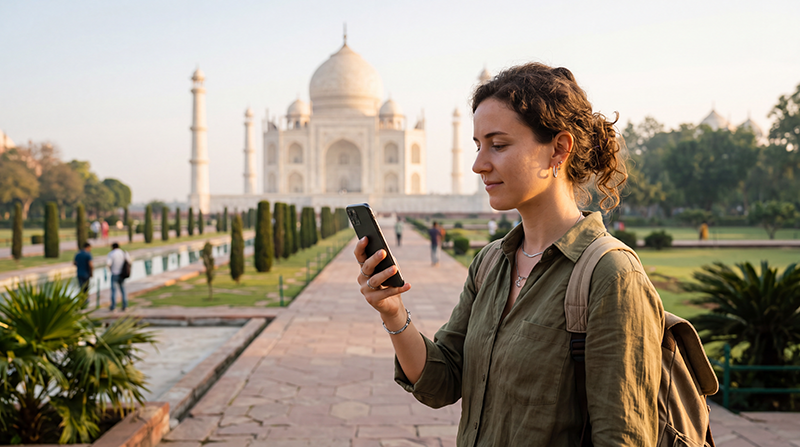

The Taj Mahal is one of the most visited landmarks in India, and reliable mobile internet can make your visit much easier. You may need data to open digital tickets, find the correct entrance, contact your driver, check your hotel reservation or navigate back through Agra after your visit.
Mobile coverage is generally available around the Taj Mahal and the surrounding tourist area. However, public WiFi should not be considered your main connection, and signal quality may vary inside enclosed buildings or during the busiest visiting hours.
For most international visitors, an India eSIM is the easiest way to stay connected. You can install it before departure and use mobile data throughout Agra without buying a physical SIM card after arrival.
Quick answer: mobile data normally works around the Taj Mahal. Install an India eSIM before travelling, select it for Mobile Data after arriving, enable Data Roaming and download your ticket and maps before entering the complex.
Top India eSIMs


Does Mobile Internet Work at the Taj Mahal?
Yes. Mobile coverage is generally strong around the Taj Mahal, nearby hotels, Fatehabad Road and the main tourist districts of Agra.
You should normally be able to use mobile data for:
- Google Maps and navigation.
- WhatsApp messages and calls.
- Digital ticket access.
- Hotel and driver communication.
- Ride-hailing and transport searches.
- Restaurant and attraction information.
- Sharing photos and light social media use.
Signal strength may become weaker inside thick stone structures, enclosed rooms or areas with large crowds. Even when mobile coverage is available, network congestion can temporarily reduce internet speed.
Internet Coverage Around the Taj Mahal
| Location | Expected Mobile Coverage |
|---|---|
| Taj Mahal entrance areas | Excellent |
| Main gardens | Excellent |
| Central viewing area | Very Good to Excellent |
| Inside enclosed structures | Good to Variable |
| Nearby hotels and restaurants | Excellent |
| Fatehabad Road | Excellent |
| Mehtab Bagh | Very Good |
| Roads outside central Agra | Good to Variable |
Is Free WiFi Available at the Taj Mahal?
You should not rely on free public WiFi during your visit. WiFi availability around major attractions can change, and any network you find may have limited coverage, require registration or become slow when many visitors are connected.
Nearby hotels, cafés and restaurants may provide customer WiFi, but this will usually only work inside the property.
A mobile data plan is much more useful because it continues working while you travel between your hotel, the Taj Mahal, Agra Fort and other parts of the city.
Why Use an India eSIM?
An eSIM is a digital mobile plan installed directly on a compatible smartphone. It allows you to use mobile data without removing your regular physical SIM card.
- Install it before departure.
- No physical SIM card replacement.
- Avoid airport and mobile-store queues.
- Keep your existing phone number active.
- Use mobile data shortly after arrival.
- Continue using WhatsApp with your regular number.
- Use the same plan in Agra, Delhi, Jaipur and other destinations.
India eSIM vs Local SIM for Visiting the Taj Mahal
| Feature | India eSIM | Local SIM Card |
|---|---|---|
| Buy before travelling | Yes | Usually no |
| Physical SIM required | No | Yes |
| Local registration | No additional registration after arrival | Usually required |
| Keep home SIM active | Yes | Depends on the phone |
| Local Indian number | Usually no | Usually yes |
| Best for short Agra visits | Excellent | Fair |
Because many tourists visit Agra for only one or two days, buying and activating a physical local SIM specifically for the Taj Mahal is rarely the most convenient choice.
How to Prepare Before Visiting
Even with reliable mobile data, preparing essential information offline is always a good idea.
- Download your entrance ticket or save a screenshot.
- Save a copy of your identification details.
- Download offline Google Maps for Agra.
- Save your hotel address.
- Store your driver’s phone number.
- Confirm your entrance and meeting point.
- Charge your phone before leaving.
- Carry a compact power bank if permitted.
Entry procedures and permitted items can change, so review the latest visitor instructions before arriving at the security checkpoint.
How to Install and Activate an India eSIM
- Choose an India eSIM plan for your trip.
- Complete your purchase online.
- Receive the QR code and installation instructions by email.
- Find the same eSIM details in your NoveSIM account if needed.
- Install the eSIM while connected to reliable WiFi.
- Keep the eSIM profile installed.
- After arriving in India, enable the eSIM.
- Select it for Mobile Data.
- Turn on Data Roaming for the eSIM.
- Keep Network Selection on Automatic.
Do not delete the eSIM after installation. Many QR codes are designed for one-time installation and may not work again after the profile has been removed.
Recommended Mobile Settings
| Setting | Recommended Value |
|---|---|
| India eSIM | Enabled |
| Mobile Data | India eSIM |
| Calls | Primary SIM |
| SMS | Primary SIM |
| Data Roaming on India eSIM | On |
| Data Roaming on primary SIM | Off |
| Automatic Data Switching | Off |
| Network Selection | Automatic |
| Preferred Network | 5G Auto or 4G/LTE |
| APN | data.esim if required |
India eSIM APN Settings
Most compatible smartphones configure the APN automatically. If your phone shows signal but websites and apps do not load, enter the APN manually.
| Field | Value |
|---|---|
| Name | NoveSIM |
| APN | data.esim |
| Username | Leave blank |
| Password | Leave blank |
| Authentication | None |
How Much Data Do You Need for the Taj Mahal?
| Usage | Suggested Data |
|---|---|
| One-day Taj Mahal visit | 1–2 GB |
| Two days in Agra | 2–4 GB |
| Delhi and Agra trip | 5–10 GB |
| Golden Triangle itinerary | 10–20 GB |
| Frequent video and social uploads | 20 GB or more |
Navigation, messaging and digital tickets use very little data. Uploading videos, streaming and automatic photo backups consume much more.
Can You Share Photos from the Taj Mahal?
Yes. Mobile internet is generally sufficient for sending photos through WhatsApp or uploading smaller images to social media.
Uploading multiple high-resolution photos or videos can be slow during crowded visiting hours. For large uploads, wait until you return to your hotel and use a stable WiFi connection.
You can also pause automatic cloud backups to prevent your phone from using large amounts of mobile data while taking photos.
Does WhatsApp Work at the Taj Mahal?
Yes. WhatsApp works normally over your India eSIM mobile data connection.
Your account continues using your existing registered phone number. You do not need to change your WhatsApp number when installing a travel eSIM.
You can use WhatsApp to:
- Contact your hotel.
- Message your driver.
- Share your live location.
- Send photos.
- Make voice or video calls.
Can You Keep Your Home SIM Active?
Yes. Most modern Dual SIM smartphones allow you to keep your primary SIM active for calls, SMS and verification codes while using the India eSIM for mobile data.
To avoid roaming charges, disable Data Roaming on your primary SIM and turn off Automatic Data Switching.
Internet at Mehtab Bagh
Mehtab Bagh is located across the Yamuna River and offers a popular view of the Taj Mahal. Mobile coverage is generally available for navigation, messaging and contacting your driver.
Because the area can become busy around sunset, arrange your return transport and meeting point before arriving. Save the driver’s number and your hotel address offline.
Internet Between Delhi and the Taj Mahal
Many visitors travel from Delhi to Agra by train, private car or coach. Mobile coverage is generally available along much of the route, although temporary interruptions may occur in rural areas or while travelling at high speed.
Before departure, download:
- Your train or transport ticket.
- Offline maps.
- Your Agra hotel address.
- Your Taj Mahal ticket.
- Your driver’s contact details.
What to Do If Mobile Internet Is Not Working
- Confirm that the India eSIM is enabled.
- Select it for Mobile Data.
- Enable Data Roaming on the eSIM.
- Disable Automatic Data Switching.
- Keep Network Selection on Automatic.
- Confirm that the APN is data.esim.
- Turn Airplane Mode on for 30 seconds.
- Turn Airplane Mode off and wait several minutes.
- Restart your phone.
Do not delete the eSIM while troubleshooting. If the phone is connected to an unstable 5G signal, temporarily switch to 4G/LTE and test the connection again.
How to Save Mobile Data During Your Visit
- Download offline Google Maps.
- Save tickets and bookings as screenshots.
- Pause automatic photo backups.
- Upload large videos using hotel WiFi.
- Disable automatic app updates.
- Reduce social media video quality.
- Monitor data usage in your phone settings.
Related India Guides
- India eSIM
- Internet in Agra for Tourists
- Internet in Delhi for Tourists
- Internet in Jaipur for Tourists
- Mobile Data in India
- Best Network in India for Tourists
- How to Use an eSIM in India
- India eSIM APN Settings
FAQ
Does mobile internet work at the Taj Mahal?
Yes. Mobile coverage is generally strong around the Taj Mahal, its entrances, gardens and nearby hotel districts.
Is free WiFi available at the Taj Mahal?
You should not rely on public WiFi during your visit. Mobile data from an India eSIM or local SIM is more dependable.
Can I use WhatsApp at the Taj Mahal?
Yes. WhatsApp works normally through mobile data and continues using your existing phone number.
How much data do I need for one day?
Approximately 1–2 GB is usually enough for maps, messaging, digital tickets and moderate social media use.
Should I download my ticket before visiting?
Yes. Save an offline copy or screenshot of your ticket and important booking information before arriving.
Can I keep my home SIM active?
Yes. Most Dual SIM phones allow you to keep your primary SIM for calls and SMS while using an India eSIM for mobile data.
Do I need Data Roaming enabled?
Yes. Enable Data Roaming on the India eSIM and keep it disabled on your primary SIM.
What APN should I use?
If manual configuration is required for a NoveSIM India eSIM, use data.esim.
Final Recommendation
Mobile internet generally works well around the Taj Mahal, but public WiFi should not be your main connection. An India eSIM allows you to prepare before departure, stay connected throughout Agra and keep your regular SIM active.
Install the eSIM while connected to WiFi, select it for Mobile Data after arriving in India, enable Data Roaming and keep Network Selection on Automatic.
Before visiting the Taj Mahal, download your ticket, save your hotel and driver details and keep offline maps available as a backup.