


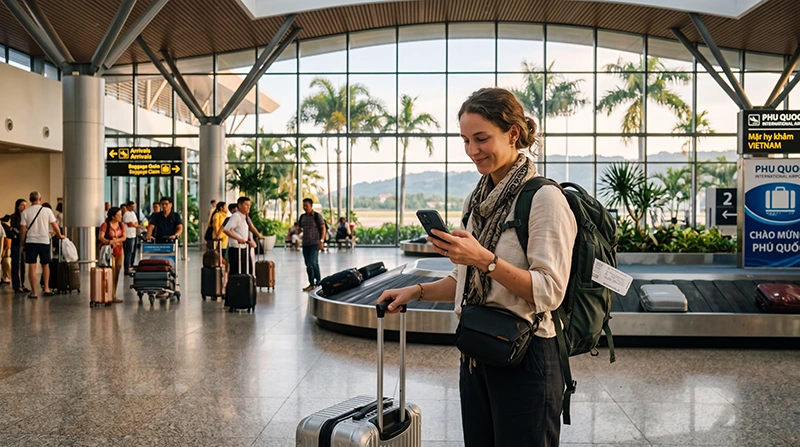

You can use free terminal Wi-Fi at Phu Quoc International Airport to open a reservation or contact your accommodation after landing. For mobile internet during the transfer, choose a suitable travel eSIM, local SIM or home-roaming package and check that it works before leaving Wi-Fi coverage.
The first connection should help you find your driver, confirm the accommodation address and read any changes to the pickup instructions. Save those details before flying as well: neither airport Wi-Fi nor mobile data guarantees that every arrival task will work immediately.
Our NoveSIM travel eSIMs provide mobile data on compatible, carrier-unlocked phones. We do not include a Vietnamese number, ordinary calls or carrier SMS. Internet calling and messaging apps can use our data connection where service is available.
Quick answer: Use the airport’s free Wi-Fi to open your booking and contact your accommodation or driver. Before leaving terminal Wi-Fi coverage, test your chosen mobile connection with Wi-Fi switched off. Prepare a travel eSIM according to its installation and validity rules, or use a suitable local SIM or home-roaming package. Keep pickup instructions and the accommodation address available offline.
Top Vietnam eSIMs

Vietnam eSIM
Fixed
1 GB, 7 days€ 3.122 GB, 15 days€ 4.453 GB, 30 days€ 5.79Unlimited
Unlimited, 1 day€ 3.12Unlimited, 3 days€ 7.13Unlimited, 5 days€ 11.14
Asia eSIM
Fixed
1 GB, 7 days€ 4.452 GB, 15 days€ 8.023 GB, 30 days€ 10.69Unlimited
Unlimited, 1 day€ 5.79Unlimited, 3 days€ 15.59Unlimited, 5 days€ 25.39What Internet Options Are Available after Landing?
Choose according to the service you already have, your phone and the tasks ahead. You do not need to buy another SIM if your existing roaming package covers Vietnam on acceptable terms.
| Option | Useful for | Check before relying on it |
|---|---|---|
| Airport Wi-Fi | Opening bookings and sending messages inside terminal coverage | Current network name, access instructions and a working connection; it does not follow your vehicle across the island |
| NoveSIM travel eSIM | A separate mobile-data connection for the transfer and stay | Exact phone compatibility, unlocked status, validity, remaining allowance and successful network registration |
| Local SIM | A local package or in-person setup assistance | Seller availability, registration, actual included services and whether a Vietnamese number with the required calling features is provided |
| Home-SIM roaming | Using your existing line in Vietnam | Vietnam inclusion, data limits, pass activation and charges under your exact tariff |
Our Phu Quoc Airport SIM card guide covers buying and testing a local subscription. For our data-only option, compare the current Vietnam eSIM plans against your travel dates and expected usage.
Connect to the Airport’s Free Wi-Fi
The airport operator’s 2026 service announcement confirms free Wi-Fi across terminal areas. That describes availability, not a guaranteed speed or successful connection on every device.
- After arriving in the public arrivals area, check airport signage or ask airport staff for the official network name.
- Select that network in Wi-Fi settings rather than choosing a similar-looking hotspot.
- Complete any access or terms screen shown for the current service.
- Open a normal webpage to confirm that the connection actually works.
- Open your booking and the latest message from your driver or accommodation, then save the meeting instructions for offline access.
If an access page does not appear or Wi-Fi does not work, ask staff about the current instructions or use a mobile connection you have already arranged. Do not accept an unexpected certificate warning to reach a booking or payment page.
Check When Your Plan’s Validity Starts
Read your plan and order instructions before installing an eSIM. Adding the profile, activating the service and starting the validity period are separate checks. Do not assume that every plan starts only when the phone first connects in Vietnam.
Where the specific plan permits advance installation without starting validity earlier than intended, install over a stable internet connection before departure. Keep the instructions accessible and label the line clearly so that you can select it after landing.
Confirm that the plan will remain valid through the last day you need data, including the return journey to the airport. If you have already used it elsewhere or activated it earlier, check its current expiry and remaining allowance rather than counting again from the day you arrive in Phu Quoc.
Test Mobile Data before Starting the Transfer
For NoveSIM, use the supplied settings in Vietnam. A profile installed on the phone is not proof that it has registered on a supported network or that its package is still usable.
- Leave Airplane Mode and switch on the installed NoveSIM line.
- Select that line for Mobile Data and enable Data Roaming on it as instructed.
- Keep Data Roaming off on the home line and disable automatic mobile-data switching where available.
- Start with Automatic Network Selection and allow time for network registration.
- Switch Wi-Fi off briefly and open a normal website to confirm that mobile data works.
- Open the map or booking page you need for the transfer and check for updated pickup instructions.
For a local SIM or home-roaming package, follow that provider’s settings and tariff. Do not apply NoveSIM’s APN or roaming instructions to an unrelated local subscription.
Make the Pickup Instructions Usable Offline
Save the accommodation’s full name, address, booking reference and exact entrance or reception instructions before your flight. A resort name alone may not identify the right gate or meeting point. Save a route for the intended destination and keep a screenshot or offline copy of the booking alongside it.
For a pre-booked airport transfer, check the terminal, meeting location, identifying details and contact method in your own confirmation. Read any new message after landing; do not assume a general airport map pin is the agreed pickup point.
Ask whether the driver or resort representative can be contacted through the internet app you already use. NoveSIM can provide data for supported internet calls and messages, but an ordinary call to a telephone number requires another suitable service. Arrange that contact option in advance if the booking depends on it.
If the connection drops, use the saved confirmation and the meeting procedure supplied by your transport provider. Airport staff may help you identify the indicated meeting area, while your booking remains the source for the transfer arrangements.
Understand Coverage beyond the Airport
Working data in arrivals confirms service at that location and time. It does not establish reception throughout the drive, inside your room, at a beach or during an offshore excursion. Available service depends on the plan, permitted partner network, phone, buildings, terrain, congestion and local conditions.
Airport Wi-Fi, your mobile connection on the road and accommodation Wi-Fi are separate services. Check each where you use it. A 4G or 5G indicator does not promise a particular speed, and an airport signal improvement does not demonstrate island-wide coverage.
Keep addresses, return arrangements and essential confirmations offline for beach trips and boat outings. Do not rely on a land-based mobile plan for continuous reception at sea. Our Phu Quoc eSIM guide covers the wider stay, while the Vietnam eSIM travel guide helps with an itinerary beyond the island.
If You Have Signal but No Internet
First check whether every app fails or only the booking or messaging app. If a normal website loads with Wi-Fi off, the mobile connection is working; an app login, permission or verification problem needs a different check.
- Confirm that the correct profile is enabled and selected for Mobile Data, and check the plan’s validity and remaining allowance.
- For NoveSIM, confirm Data Roaming is on for the travel line and automatic switching to the home line is off.
- Keep Network Selection on Automatic initially. If registration has stalled, briefly toggle Airplane Mode, then allow time to reconnect.
- If manual APN entry is required by your NoveSIM instructions, use data.esim with username and password blank.
- If data still fails, contact NoveSIM Support with the order details, exact phone model, location and safe screenshots that conceal activation credentials.
Do not repeatedly scan the QR code once the profile is installed. Keep the installed eSIM and do not delete it unless NoveSIM Support specifically instructs you to do so.
Related Articles
FAQ
Does Phu Quoc Airport have free Wi-Fi?
Yes. The airport operator confirms free Wi-Fi across terminal areas. Check current signage or ask airport staff for the official network and access instructions; performance can vary.
How do I check that mobile data works before my transfer?
Select the intended SIM for mobile data, switch Wi-Fi off and open a normal website. Then open your map or booking page. Signal bars alone do not confirm that the mobile-data connection works.
Can I install my eSIM before flying to Phu Quoc?
Follow the selected plan’s installation and validity rules. Where they permit advance installation, use a stable internet connection before departure and keep the instructions accessible. Installation does not guarantee immediate registration after landing.
Does eSIM validity always start when I land?
No. Check the specific start event in your plan and order instructions. Do not assume that installation, activation and first network connection have the same effect on every package.
Can I contact my driver without a Vietnamese phone number?
You can use an agreed internet messaging or calling app over working Wi-Fi or mobile data. NoveSIM does not include ordinary calls or carrier SMS. Arrange another contact option if your driver requires a conventional telephone call.
Does a working airport connection guarantee coverage at my resort or at sea?
No. Reception depends on the plan, network, phone and local conditions. Test at your accommodation and keep essential information offline for outings. Land-based mobile coverage should not be treated as continuous service at sea.
What if my eSIM shows signal but webpages do not load?
Check the selected data line, plan validity, allowance and NoveSIM roaming settings. Use data.esim only when manual APN entry is required. Keep the profile installed and contact Support if the supplied settings do not resolve the problem.
Can I keep my home SIM active during the trip?
On a compatible dual-SIM phone, you can usually retain the home line while selecting NoveSIM for mobile data. Keep home-line Data Roaming off and disable automatic data switching where available. Calls, SMS and voicemail on that line remain subject to your home provider’s terms and charges.
Final Recommendation
Use Phu Quoc Airport’s free Wi-Fi to check the latest arrival arrangements, and save what you need before leaving terminal coverage. Choose mobile data through a suitable eSIM, local SIM or existing roaming package for the transfer.
Prepare a NoveSIM profile only in line with its installation and validity rules, then test the selected data line with Wi-Fi off after landing. Arrange a separate voice option if the pickup requires an ordinary telephone call.
Keep the exact accommodation address, meeting instructions and return booking accessible offline. A successful airport test is useful preparation for the first journey, while coverage at each later stop still needs its own check.