


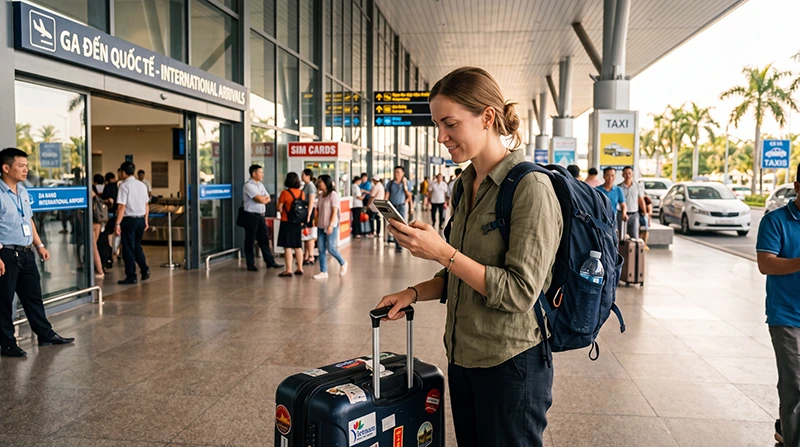

You can get internet after landing at Da Nang International Airport (DAD) through terminal Wi-Fi, a compatible travel eSIM, a local SIM or your home operator’s roaming service. The useful choice is the one that gets you connected for the journey ahead under terms you have checked.
Before leaving arrivals for Da Nang or Hoi An, test mobile data separately from airport Wi-Fi. Keep your hotel address, transfer confirmation and meeting instructions available offline so a connection problem does not leave you without the details needed to reach your accommodation.
Our NoveSIM travel eSIM plans are data-only. They do not include a Vietnamese number, traditional calls or carrier SMS. Internet messaging and calling apps can use the data connection where service is available.
Quick answer: Prepare a compatible, carrier-unlocked phone according to the purchased plan’s instructions. After landing, enable the travel line, select it for mobile data, apply its required Data Roaming setting and test a normal webpage with Wi-Fi off. Save the destination address and pickup instructions offline before heading to your transfer.
Top Vietnam eSIMs

Vietnam eSIM
Fixed
1 GB, 7 days€ 3.112 GB, 15 days€ 4.443 GB, 30 days€ 5.77Unlimited
Unlimited, 1 day€ 3.11Unlimited, 3 days€ 7.10Unlimited, 5 days€ 11.09
Asia eSIM
Fixed
1 GB, 7 days€ 4.442 GB, 15 days€ 7.993 GB, 30 days€ 10.65Unlimited
Unlimited, 1 day€ 5.77Unlimited, 3 days€ 15.53Unlimited, 5 days€ 25.30Get Connected Before Leaving Arrivals
A message sent over airport Wi-Fi does not confirm that your mobile data is working. Make a separate test before depending on a transport app outside the terminal.
- Check that the travel profile appears in the phone’s SIM settings and that the plan is ready for use under its conditions.
- Enable the travel line and select it for Mobile Data or Cellular Data.
- Apply the Data Roaming setting required by the NoveSIM instructions on that travel line.
- Disable automatic mobile-data switching when you do not want the home line supplying data.
- Start with Automatic network selection and allow time for registration where supported coverage is available.
- Turn Wi-Fi off briefly and load a normal webpage.
- Check the transport app or transfer contact you intend to use, then confirm that the hotel address and meeting instructions are saved offline.
If the profile has not been installed, use a dependable connection and follow the order instructions first. The Vietnam eSIM installation guide explains preparation and setup; installing a profile is different from confirming usable mobile data.
Airport Wi-Fi, Travel eSIM, Local SIM or Roaming?
| Option | When it helps | What to check |
|---|---|---|
| Airport Wi-Fi | Sending a first message, opening a reservation or contacting the hotel. | Whether access and the connection work at your current location. |
| NoveSIM travel eSIM | Using mobile data after leaving the terminal on a compatible phone. | Device support, carrier unlocking, plan validity, settings and supported coverage. |
| Local physical SIM | Using a phone without eSIM support or choosing a suitable domestic package. | Registration, included services, validity and the full price. |
| Home-operator roaming | Using an existing line under its Vietnam roaming terms. | Country eligibility, allowance, daily fees and charges beyond the allowance. |
If you need a physical card, read the Da Nang Airport SIM card guide and verify the package before paying. Confirm that any local number or calling service you need is actually included rather than assuming every tourist package offers it.
Use Airport Wi-Fi for the First Connection
The airport’s published Wi-Fi instructions identify #Wifi@DanangAirport: enable Wi-Fi, select the network and choose Connect on the connection page. Check the current network name against airport signage or ask staff if it differs. See the official Da Nang Airport Wi-Fi FAQ.
Use the connection to retrieve your booking, contact the person meeting you or complete a necessary setup step. Do not assume it will remain usable at every outdoor pickup point or during the drive. Save the details you need before moving away from the terminal.
If the connection page does not open or internet is unavailable, ask the information desk for assistance. Avoid repeatedly changing the travel eSIM settings to solve a problem that occurs only on airport Wi-Fi.
Prepare the Transfer to Da Nang or Hoi An
Before flying, install and set up any transport or messaging app you intend to use. Keep the reservation and contact details accessible without signing in again after arrival. Select the correct terminal in an app or confirm it with the transfer provider.
| Destination | Save before leaving arrivals | Confirm with the driver or provider |
|---|---|---|
| Da Nang | Full hotel address, a map pin and booking reference. | The pickup location for your terminal and the vehicle or driver details. |
| Hoi An | Transfer confirmation, accommodation contact and an offline copy of the destination address. | The meeting instructions and the exact accessible drop-off point for your accommodation. |
For Da Nang, check that the destination pin points to the correct hotel rather than another property with a similar name. For Hoi An, agree where you will be dropped off and whether there are any final walking directions to the accommodation. Save those instructions before starting the journey.
Follow current terminal signs and the provider’s instructions for your transport type. Airport pickup areas differ by terminal and service; a taxi stand, tour-coach area and app-based ride meeting point are not interchangeable. Use the airport’s official transport guide to check the arrangement rather than relying on an old screenshot.
Agree a fallback meeting point or a way to obtain help if you cannot message the driver. A pre-arranged transfer and saved instructions reduce the amount of live coordination needed; they do not require a promise of continuous mobile coverage. The Da Nang eSIM guide and Hoi An internet guide cover the stay after the airport journey.
Check When Your Plan’s Validity Begins
Read the purchased plan’s rules before installing or enabling it. Do not assume that every eSIM starts its validity period on arrival in Vietnam or with the first use of data.
- Installation: the travel profile is added to the phone and appears in SIM settings.
- Start of validity: the service period begins under the specific plan’s conditions.
- Network registration: the enabled line connects to an authorised network where service is available.
- Working data: a normal webpage loads with Wi-Fi off while the travel line is selected for data.
Where stated, check the deadline for installing or activating the plan, the duration of service and the expiry date or time. Allow for the whole Vietnam stay, not only the airport transfer. If the timing is unclear, ask NoveSIM Support before taking a step that could start the service period.
Install before departure when the purchased plan permits it and leave time to resolve a problem. An installed profile, Activating message or No Service status alone does not prove when validity begins.
Coverage from the Terminal to Your Destination
Mobile service depends on the partner network available under the plan, the phone, its settings and your exact location. Buildings, terrain, network load and local conditions can affect reception and performance. A working connection inside arrivals does not guarantee identical service along the drive or in a hotel room.
Check the current NoveSIM Vietnam plan details for the networks and technologies included in the package you are considering. Do not assume the eSIM can switch to every Vietnamese operator or that 5G is available wherever you travel.
If you continue towards Hue, Ba Na Hills or My Son, save the relevant route, tickets and accommodation contacts before departure. Keep offline directions for the parts of the journey where a live map or message may be unavailable. Test a connection at the place you will actually use it rather than treating a city-level coverage claim as a room-level guarantee.
Choose Data for the Stay, Not Only the Transfer
Messages, a hotel pin and a transport booking are different demands from video calls, streaming or cloud-photo uploads throughout a holiday. Estimate the allowance from your recent mobile usage, the number of travel days and any devices that will share the connection.
Check hotspot permission and limits before relying on a laptop or a companion’s phone. For unlimited-style plans, inspect the high-speed allowance, fair-use conditions and any speed changes. Pause large backups and downloads if you want to preserve data for navigation and communication.
Compare the complete cost and validity of the chosen package, including what happens if the data runs out. Do not assume that a top-up extends validity or that every plan supports adding data.
If Mobile Data Does Not Work After Landing
- Confirm that the travel profile is installed, enabled and selected for mobile data.
- Check that Vietnam is included and that the plan is valid with data remaining.
- Apply the required Data Roaming setting to the correct travel line.
- Leave network selection on Automatic initially and allow time to register where supported coverage is available.
- Check the APN only when manual entry is required. For NoveSIM, use data.esim, leaving username and password blank and unrelated fields unchanged.
- Repeat a small webpage test with Wi-Fi off after each relevant change. If appropriate, try a brief aeroplane-mode refresh or one restart.
Do not delete the installed eSIM unless NoveSIM Support instructs you to do so. Avoid repeated QR scans, guessed APN changes and network or factory resets as initial steps. Use the NoveSIM Vietnam APN guide or the Vietnam eSIM troubleshooting guide for the symptom you see.
If you need help, note the model, operating-system version, location, displayed network and exact error. Explain which data line is selected and what happened during the Wi-Fi-off test. Hide QR codes, activation credentials and personal details in screenshots.
Keep Home-Number Services Separate
On a compatible dual-SIM setup, you may keep the home line enabled while the NoveSIM eSIM supplies data. Disable automatic data switching when you do not want the home line supplying internet, and keep its Data Roaming off when you do not intend to use home-carrier roaming data.
Calls, carrier SMS and voicemail remain subject to the home operator’s terms. Turning off data roaming does not determine those charges. Internet messaging apps can use available travel data, but that does not make ordinary calls or SMS part of the NoveSIM plan.
Related Vietnam Travel Guides
FAQ: Internet at Da Nang Airport
How can I get online after landing at Da Nang Airport?
Use airport Wi-Fi, a compatible travel eSIM, a local SIM or home-operator roaming under its Vietnam terms. For an installed travel eSIM, check validity, select the line for data and test a normal webpage with Wi-Fi off before relying on it for the transfer.
Which airport Wi-Fi network should I use?
The airport’s published instructions identify #Wifi@DanangAirport and a Connect option on the connection page. Verify the current network name with airport signage or staff. Do not assume the connection reaches every outdoor pickup point.
How do I know mobile data works rather than airport Wi-Fi?
Select the travel eSIM for mobile data, apply its required roaming setting and temporarily turn Wi-Fi off. Load a normal webpage, then check the transport or messaging app you need.
What should I save for a transfer to Hoi An?
Keep the transfer confirmation, terminal-specific pickup instructions, provider contact and exact accommodation address offline. Confirm the accessible drop-off point and agree a fallback meeting arrangement before leaving arrivals.
Can I install the eSIM before flying to Da Nang?
Yes, when the purchased plan’s instructions permit it. Use dependable Wi-Fi and leave time to get help. Check the validity trigger and any installation or activation deadline before proceeding.
Does the plan always start when I land in Vietnam?
No universal arrival rule applies. The purchased package determines when validity begins. Installation, network registration and working mobile data are separate checks.
Will I have continuous coverage to Da Nang or Hoi An?
Continuous service is not guaranteed. Reception depends on the plan’s partner network, the phone and conditions at the exact location. Save the route and transfer details offline even if data works in the terminal.
What should I do if the travel eSIM has no internet?
Check the selected line, validity, balance, required roaming and network registration, then the NoveSIM APN if manual entry is needed. Keep the installed profile and contact Support with safe diagnostic details if service does not return.
Final Recommendation
Prepare for Da Nang Airport by checking your phone, plan validity and the details of the first transfer. Choose Wi-Fi, a SIM, roaming or a travel eSIM according to the services and conditions you actually need.
Before leaving arrivals, test mobile data with Wi-Fi off and save the meeting point and destination offline. Check the correct terminal and transport instructions for Da Nang or Hoi An.
Treat coverage as dependent on the network and location throughout the journey. If the connection fails, keep the installed profile, follow the relevant checks and use your saved transfer arrangements while seeking help.