
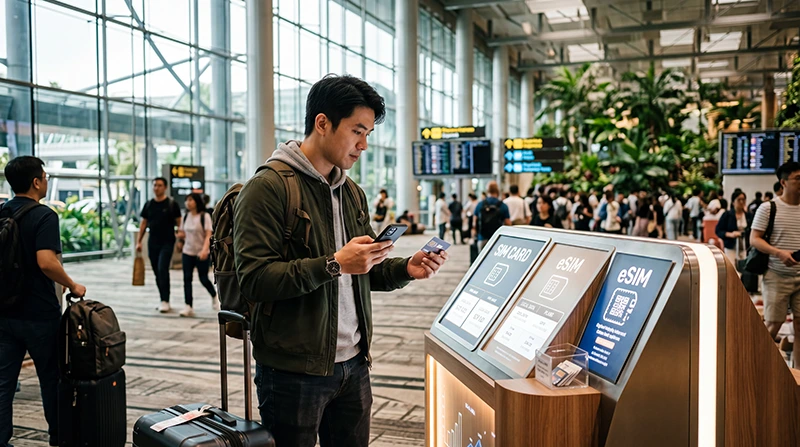

Traveler using mobile internet at Singapore Changi Airport after arrival

Internet at Changi Airport (2026 Singapore Arrival Guide)

Most travelers need internet immediately after arriving at Singapore Changi Airport.

Internet access is useful for booking Grab rides, opening Google Maps, checking MRT routes, contacting hotels, using WhatsApp, accessing booking confirmations, and navigating Singapore after landing.

Quick answer: Changi Airport offers internet options for travelers, including airport WiFi. However, many visitors prefer using a Singapore eSIM because it provides mobile internet not only inside the airport but throughout the entire trip.

Top Singapore eSIMs

Why You Need Internet at Changi Airport

Many travelers need internet immediately after landing for:

  • Booking Grab rides
  • Opening Google Maps
  • Checking MRT directions
  • Messaging hotel reception
  • Using WhatsApp
  • Accessing booking confirmations
  • Finding airport transfer services
  • Contacting family and colleagues
  • Using travel apps

Ways to Get Internet at Changi Airport

Option Best For Main Limitation
Singapore eSIM Most tourists with compatible phones Requires eSIM-compatible unlocked phone
Airport WiFi Short-term airport usage Works mainly inside airport areas
Airport SIM Card Phones without eSIM support Requires purchase and activation
International Roaming Travelers with roaming plans Costs vary by provider
Pocket WiFi Groups and multiple devices Requires carrying extra equipment

Why Many Travelers Use a Singapore eSIM

A Singapore eSIM allows travelers to prepare mobile internet before arriving.

You can install the eSIM before departure while connected to WiFi. After landing at Changi Airport, simply select the eSIM for mobile data, enable data roaming, and connect to the network.

  • No physical SIM card required
  • No airport SIM card queue
  • No need to remove your existing SIM card
  • Works beyond the airport
  • Useful for navigation throughout Singapore
  • Supports Grab, WhatsApp, Google Maps, and travel apps
  • Can keep your primary SIM active on many devices

Internet for Grab at Changi Airport

Grab is one of the most commonly used transportation apps in Singapore.

Internet access is useful for:

  • Booking airport transfers
  • Finding pickup locations
  • Communicating with drivers
  • Managing payments
  • Tracking routes

While airport WiFi may help initially, mobile data is usually more convenient because it remains available throughout the journey.

Internet for Google Maps

Google Maps is often used immediately after arriving in Singapore.

Travelers use it for:

  • Hotel directions
  • MRT routes
  • Walking navigation
  • Restaurant searches
  • Tourist attractions
  • Shopping centers
  • Airport transportation

Mobile data generally provides a better experience because maps can update continuously.

Internet for MRT Navigation

Singapore’s MRT system is one of the easiest ways to travel around the city.

Internet access helps with:

  • Route planning
  • Transfer information
  • Station exits
  • Walking directions
  • Real-time travel planning

Many travelers continue using mobile internet throughout their journey rather than relying solely on airport WiFi.

Internet for WhatsApp

WhatsApp works with both WiFi and mobile data.

Travelers often use WhatsApp immediately after landing to:

  • Contact family
  • Message hotel staff
  • Coordinate airport pickups
  • Communicate with colleagues
  • Share locations

Mobile internet provides uninterrupted connectivity throughout Singapore.

Internet for Hotel Check-In

Internet access is often useful before reaching your accommodation.

Travelers frequently need internet for:

  • Opening hotel directions
  • Contacting reception
  • Messaging apartment hosts
  • Checking reservations
  • Arranging transportation

Internet for Stopovers

Singapore is one of the world’s leading stopover destinations.

Travelers leaving the airport during a stopover often need internet for:

  • City navigation
  • Attraction bookings
  • Transportation
  • Restaurant searches
  • Returning to the airport

A Singapore eSIM can provide internet access throughout the stopover experience.

Internet for Business Travelers

Business travelers frequently require internet immediately after arrival.

Common uses include:

  • Email access
  • Video meetings
  • Calendar synchronization
  • Conference applications
  • Messaging services
  • Hotel communication

Mobile internet provides reliable connectivity between meetings and locations.

Airport WiFi vs Singapore eSIM

Feature Airport WiFi Singapore eSIM
Works inside airport Yes Yes
Works outside airport No Yes
Useful for Grab Limited Yes
Useful for Google Maps Limited Yes
Can be installed before travel No Yes
Continuous connectivity No Yes

Airport SIM Card vs Singapore eSIM

Feature Airport SIM Card Singapore eSIM
Requires physical SIM Yes No
Requires airport purchase Yes No
Can be prepared before travel No Yes
Requires SIM replacement Usually yes No
Can keep primary SIM active Depends on device Often yes

How Much Data Do Travelers Need?

Trip Type Recommended Data
Short stopover 1GB – 3GB
Weekend trip 5GB – 10GB
One-week trip 10GB – 20GB
Business travel 15GB – 30GB
Remote work and hotspot 30GB+ or unlimited

What Uses the Most Data?

  • Video streaming
  • YouTube
  • TikTok
  • Instagram Reels
  • Video calls
  • Cloud backups
  • Hotspot sharing
  • Large downloads

Google Maps, Grab, WhatsApp messages, emails, and restaurant searches generally consume much less data.

Can You Keep Your Home SIM Active?

Yes. Many modern smartphones support dual SIM functionality.

You can use a Singapore eSIM for mobile data while keeping your regular SIM active for calls, SMS verification codes, banking messages, and authentication services.

Do You Need Data Roaming Enabled?

Yes. Most travel eSIM plans require data roaming to be enabled on the eSIM line.

This applies only to the travel eSIM and does not require enabling roaming on your primary SIM.

APN Settings for NoveSIM eSIM

Setting Value
APN data.esim
Username Leave blank
Password Leave blank

How to Activate Internet at Changi Airport Using eSIM

  1. Purchase a Singapore eSIM before departure.
  2. Install the eSIM while connected to WiFi.
  3. Arrive at Changi Airport.
  4. Select the Singapore eSIM for mobile data.
  5. Enable data roaming on the eSIM.
  6. Wait for network connection.
  7. Start using mobile internet.

Where to Find Your NoveSIM eSIM Details

Your NoveSIM QR code, installation instructions, and eSIM details are available:

  • In your confirmation email
  • Under My Account → Orders → View → eSIM details

More Singapore Airport and Internet Guides

FAQ: Internet at Changi Airport

Can I get internet immediately after landing at Changi Airport?

Yes. Travelers can use airport WiFi, roaming, airport SIM cards, or a Singapore eSIM for internet access after arrival.

What is the easiest way to get internet at Changi Airport?

For many travelers with compatible devices, a Singapore eSIM is one of the easiest options because it can be installed before travel.

Can I use Grab after landing?

Yes. Internet access allows you to book Grab rides, communicate with drivers, and navigate to your destination.

Can I use Google Maps at Changi Airport?

Yes. Google Maps works with airport WiFi, roaming, SIM cards, and eSIM mobile data.

Can I keep my existing phone number?

Many travelers can keep their existing SIM active while using a Singapore eSIM for mobile data.

Final Recommendation

Internet access at Changi Airport is essential for transportation, navigation, communication, and travel planning.

While airport WiFi can be useful initially, many travelers prefer a Singapore eSIM because it provides continuous internet access throughout Singapore for Google Maps, Grab, WhatsApp, MRT routes, hotel communication, business travel, and tourism.

View Singapore eSIM plans

Scroll to Top