


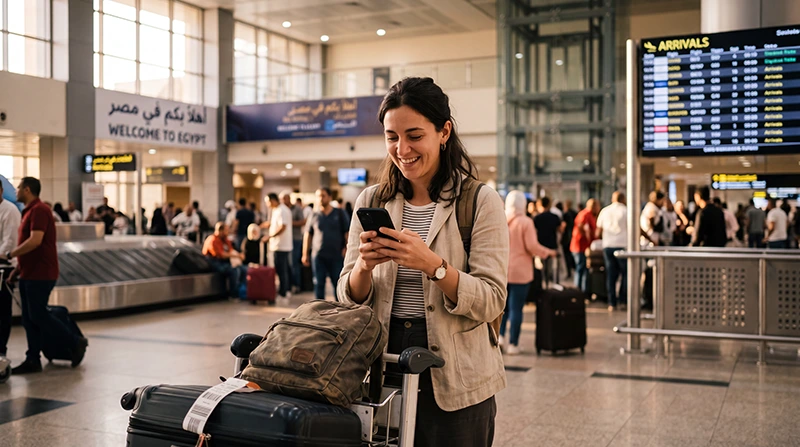

Internet at Cairo Airport is most useful between landing and meeting your driver. Prepare a connection that works outside the terminal, but also save the pickup instructions so a failed login or delayed network connection does not strand you.
Your arrival terminal matters. A transfer booked for the wrong terminal or an outdated pickup pin is not solved by buying more data. Confirm the terminal, meeting point and fallback contact with your transfer company before flying.
On a compatible, unlocked phone, an Egypt travel eSIM lets you arrange mobile data in advance. Our NoveSIM plans are data-only; we do not provide an Egyptian number, conventional calls or SMS.
Quick answer: Install a suitable eSIM before departure, following its validity rules, or confirm your home carrier’s Egypt roaming package. After landing, select the correct data line and test it with Wi-Fi off. Terminal Wi-Fi and local SIM shops are alternatives, but save your hotel address and pickup details before relying on either.
Top Egypt eSIMs

Egypt eSIM
Fixed
1 GB, 7 days€ 4.442 GB, 15 days€ 7.103 GB, 30 days€ 9.76Unlimited
Unlimited, 1 day€ 4.88Unlimited, 3 days€ 11.54Unlimited, 5 days€ 18.64
Africa eSIM
Fixed
1 GB, 7 days€ 10.202 GB, 15 days€ 19.083 GB, 30 days€ 26.62Unlimited
Unlimited, 1 day€ 13.75Unlimited, 3 days€ 39.49Unlimited, 5 days€ 65.22Choose a connection for the arrival you actually have
| Arrival situation | Useful option | Check first |
|---|---|---|
| You want to leave directly with a driver | Pre-installed travel eSIM | Compatible unlocked phone, valid package and supported network coverage |
| You need an Egyptian number | Local operator service | Registration documents, accessible shop and time for activation |
| You only need a brief message inside the terminal | Verified passenger Wi-Fi | Current network name and login conditions |
| You prefer to keep your existing service | Home-carrier roaming | Egypt allowance, activation and charges outside the bundle |
There is no need to buy a Cairo-only eSIM for a journey that continues elsewhere in Egypt. Check the actual destinations, validity and data allowance of the Egypt eSIM package you are considering. It still relies on local mobile reception, not airport infrastructure.
Prepare before the flight—not in the pickup queue
First, check your exact phone model and carrier lock. An eSIM-compatible device can still be locked to its home carrier. Install the profile using a stable internet connection and read the supplied activation instructions; do not assume all providers start validity at the same point.
Then save your hotel’s full address, the booking confirmation and the driver’s contact method. If the transfer company expects an ordinary phone call, tell it that your travel eSIM is data-only and agree another method or fixed meeting point.
For the profile and device steps, use how to activate an Egypt eSIM. Avoid leaving the QR code only in an email account you cannot open without a connection.
After landing: prove that cellular data works
- When permitted to use your phone, disable flight mode and enable the installed travel line.
- Select that line for cellular or mobile data and apply the package’s data-roaming instructions.
- Keep home-line data roaming off and disable automatic data switching if you do not want the home SIM to provide data.
- Leave network selection automatic while the phone registers.
- Switch Wi-Fi off briefly. Load a new webpage, then send your arrival message or open your transport app.
- Check that the data line is still the one you intended to use before leaving for the pickup point.
Bars on the screen may belong to your home SIM, so inspect the line label if you are unsure. Keeping a home number active can help with verification codes, but conventional calls and SMS remain subject to that carrier’s roaming terms.
Finding your driver with a working connection
For a booked hotel transfer, follow the company’s instructions and report your terminal if plans change. Send a description of your location rather than assuming a location pin identifies the correct exit or level.
If you use Uber, its Cairo Airport pickup guidance says to follow the in-app directions after requesting your ride. Instructions differ by terminal and can change, so this guide does not prescribe one gate for every arrival.
Do not request a ride on terminal Wi-Fi and then walk beyond its range without checking your mobile data. You may need to read a new driver message or revised meeting instruction after stepping outside.
If you need a SIM shop or airport Wi-Fi instead
Cairo Airport’s official shop directory lists telecom outlets, including Vodafone in Terminal 1 and Terminal 3 arrivals and Orange in Terminal 2 arrivals. These listings do not guarantee opening hours or stock for your flight.
Local registration takes more than inserting the card. Bring the documents required by the operator and ask staff to test the service before you leave. The Cairo Airport SIM-card guide is the relevant next step if a local number is your priority.
For Wi-Fi, confirm the passenger network in your terminal and complete any browser sign-in. We do not promise a universal SSID, unlimited free access or reception at the car park. See Cairo Airport Wi-Fi login help if the portal is the problem.
What if the installed eSIM still has no internet?
Check the allowance and validity first, then the selected data line and roaming setting. For NoveSIM, the APN is data.esim if manual configuration is needed; do not apply that setting to another provider’s SIM.
Keep the installed profile and contact support if the line does not register or data remains unavailable. Use the Egypt eSIM troubleshooting steps rather than repeatedly scanning the QR code. While resolving the issue, follow your pre-arranged offline pickup plan.
Related Articles
- Internet for sightseeing and daily travel in Cairo
- Egypt roaming charges to check before travelling
- Using mobile internet across Egypt
FAQ
Can I use mobile data straight after landing at Cairo Airport?
Yes, if your service is valid, configured correctly and connects to a supported local network. Pre-installing an eSIM removes the installation step at arrival but does not guarantee immediate reception.
Can I buy a local SIM at Cairo Airport?
The airport’s official directory lists telecom shops in several terminals. Check which outlet is accessible from your arrival, its current opening hours and the documents needed for registration.
Is airport Wi-Fi enough to book a ride?
It may let you request one inside the terminal, but you still need to receive pickup instructions outside. Test cellular data before moving out of Wi-Fi range or use a transfer with an agreed offline meeting point.
Does a NoveSIM Egypt eSIM let my driver call an Egyptian number?
No. Our travel eSIM is data-only. Agree an internet messaging method or fixed meeting point, or use separate voice service if a conventional call is necessary.
Final Recommendation
Arrange internet at Cairo Airport around the handover from terminal to driver. A prepared data line is useful, but the saved pickup instructions are your fallback if it fails.
After landing, test the selected line with Wi-Fi disabled before relying on it for a transport app. Verify the terminal and current pickup instructions rather than following an old airport map blindly.
Once you have met your driver, the same Egypt package can support the onward trip where its partner network has coverage; no separate airport plan is required.