


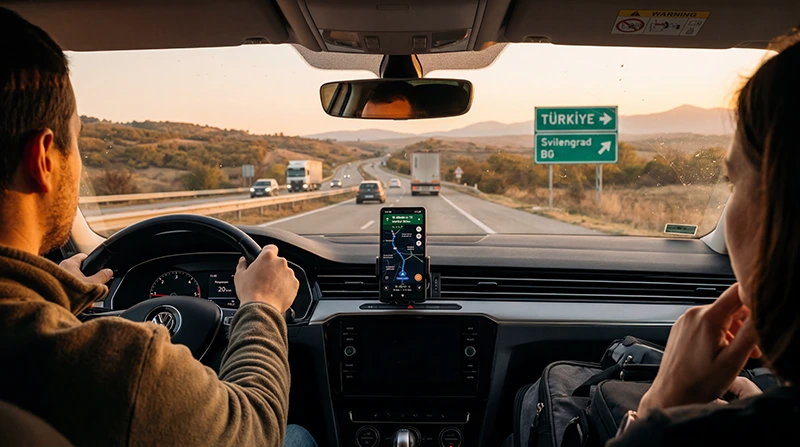

Internet from Bulgaria to Turkey by road requires a plan that explicitly covers both countries or two correctly prepared country plans. Bulgaria’s EU roaming context does not automatically continue after the Turkish border.
Download the route and border documents before joining the crossing queue. Network switching can take time, and congestion around the checkpoint may affect data just when travellers need directions or accommodation messages.
NoveSIM travel eSIMs are data-only. They do not provide Bulgarian or Turkish numbers, traditional calls or SMS, although messaging and maps work over data.
Quick answer: Verify Bulgaria and Turkey in the plan’s destination list, keep automatic network selection on and save the onward route offline. After crossing, confirm that the phone has registered on a supported Turkish network and that the correct eSIM is selected for data.
Top Turkey eSIMs

Turkey eSIM
Fixed
1 GB, 7 days2.50$2 GB, 15 days3.50$3 GB, 30 days4.50$Unlimited
Unlimited, 1 day3.00$Unlimited, 3 days6.50$Unlimited, 5 days10.50$
Europe Extra eSIM
Fixed
1 GB, 7 days2.50$2 GB, 15 days4.00$3 GB, 30 days5.00$Unlimited
Unlimited, 1 day3.00$Unlimited, 3 days6.00$Unlimited, 5 days10.00$Europe+ eSIM
Fixed
1 GB, 7 days3.00$2 GB, 15 days4.50$3 GB, 30 days6.00$Unlimited
Unlimited, 1 day3.00$Unlimited, 3 days7.00$Unlimited, 5 days11.50$Europe Lite eSIM
Fixed
1 GB, 7 days2.50$2 GB, 15 days4.00$3 GB, 30 days5.00$Unlimited
Unlimited, 1 day3.00$Unlimited, 3 days6.00$Unlimited, 5 days10.00$How do you keep internet from Bulgaria to Turkey by road?
A regional plan is convenient only when both countries are named. If using separate plans, label them clearly and switch the data line after the border. Keep roaming disabled on the home SIM unless its Turkey charges are acceptable.
The Balkans and Turkey eSIM guide covers regional plan checks. For the wider driving setup, use the Turkey road-trip guide.
What should be downloaded before the border?
- The complete route through the checkpoint and to the first stop.
- Accommodation name, address and arrival instructions.
- Booking, insurance and vehicle documents.
- Fuel stops and an alternative route where practical.
- Essential contacts and expected arrival time.
What happens to the network after crossing?
- Allow the phone several minutes to find a Turkish partner.
- Toggle aeroplane mode if it remains on the Bulgarian network.
- Verify the travel eSIM is selected for data.
- Enable roaming on that eSIM when required.
- Use manual selection only if automatic registration fails.
Near the border, a phone may retain the signal from the previous country. Check the displayed operator before using large amounts of data.
Why might EU roaming stop?
Bulgaria is within the EU roaming area; Turkey is not automatically included. Read the EU roaming in Turkey guide and confirm the home operator’s tariff before enabling its line.
What if the eSIM does not register in Turkey?
Check coverage, plan validity, selected data line and required roaming. The NoveSIM manual APN is data.esim. Do not delete the eSIM unless support instructs you; follow the Turkey troubleshooting guide.
Related Articles
FAQ
Will an EU SIM roam free from Bulgaria into Turkey?
Not automatically. EU roaming applies in Bulgaria, while Turkey depends on the operator’s separate tariff.
Can one eSIM cover Bulgaria and Turkey?
Yes, if both countries are explicitly included in that plan and its validity covers the drive.
Why does the phone remain on a Bulgarian network?
Near the border it may still detect the previous network. Allow time, toggle aeroplane mode and check automatic selection.
Should I depend on live navigation at the crossing?
No. Download the border and onward route before joining the queue.
Final Recommendation
Prepare internet from Bulgaria to Turkey by road as a two-country connection, not an ordinary domestic drive.
Verify both destinations, protect the home SIM from Turkish roaming and inspect the active network after crossing.
Keep the complete onward route and first-night details offline.