


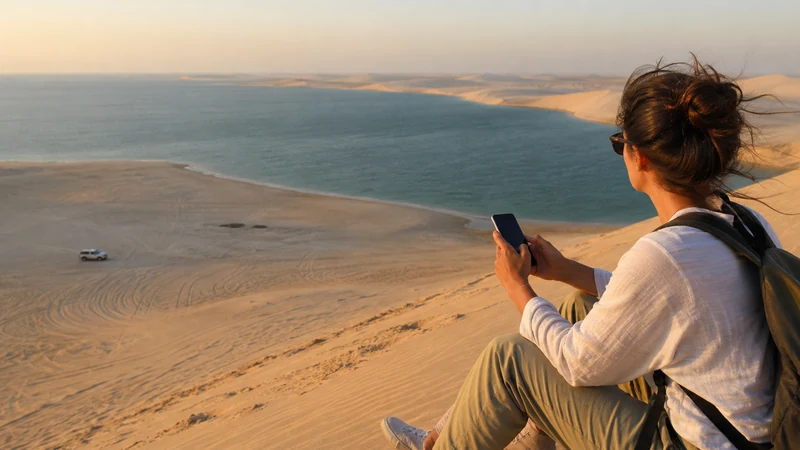

Inland Sea Qatar mobile internet may be available during parts of a Khor Al Adaid journey, but travellers should not depend on continuous reception across dunes, remote beach areas or camp locations.
The route leaves Doha’s dense urban environment and often involves off-road travel. Download the full area, meeting point and return instructions before departure, even when the phone shows strong service at the start.
NoveSIM Qatar plans are data-only and do not include a local number, calls or SMS. Mobile data is useful for coordination where coverage exists, but it is not an emergency or desert-navigation system.
Quick answer: install and test the Qatar eSIM in Doha, save maps and tour contacts offline, carry sufficient power and follow the guide or operator’s safety instructions instead of treating signal bars as a route guarantee.
Top Qatar eSIMs


Plan Inland Sea Qatar Mobile Internet Before Departure
- Save the complete route and meeting point offline.
- Keep the tour operator or driver contact available locally.
- Share the itinerary and expected return with another person.
- Charge the phone and carry a suitable power bank.
- Download tickets, identification details and accommodation information.
- Follow current weather, access and safety instructions from the operator.
An organised desert safari should provide its own meeting and safety process. Mobile coverage does not replace an experienced driver, suitable vehicle or current access information.
Why Coverage Changes Outside Doha
Qatar’s Communications Regulatory Authority tests mobile networks on roads, off-road routes and indoor locations, but no general result promises service at each dune or shoreline. Distance from a mast, terrain, vehicle position, device bands and local network conditions affect the connection.
A travel eSIM uses partner access included with the selected product. Qatar’s public networks are Ooredoo Qatar and Vodafone Qatar, but a network appearing in a scan does not prove that the plan can register on it. Review the Qatar coverage guide before the excursion.
Prepare the Phone in Doha
- Confirm the Qatar eSIM is installed and active.
- Select it for Mobile Data.
- Enable Data Roaming on the travel line.
- Disable automatic data switching.
- Leave Network Selection on Automatic.
- Turn Wi-Fi off and test a map plus a webpage.
- Download the map area while a stable connection is available.
Use the Qatar activation guide before leaving the city. Do not wait until the vehicle reaches sand or an isolated stop to discover that the home SIM is still selected for data.
Data and Battery on a Desert Trip
Navigation, photos and weak-signal searching can increase battery use. Keep the phone shaded and ventilated; do not leave it on a hot dashboard or inside a parked vehicle. A power bank should be charged before departure, not treated as storage in the luggage compartment.
Pause cloud photo backup and automatic uploads. The trip may generate many large images and videos, and uploading them while coverage fluctuates can consume allowance and battery without completing. Use the Qatar data guide to plan the allowance.
Hotspot and Group Connectivity
Sharing the phone’s connection can be useful at a camp, but every device uses the same mobile link and allowance. Confirm that the exact plan supports tethering. Disconnect tablets or laptops that begin updates or cloud synchronisation.
Do not let a hotspot become the only copy of the map or booking. Each adult responsible for the trip should have key details offline. The Qatar hotspot guide covers security, heat and data controls.
If Signal Disappears
Loss of service in a remote area is not proof that the eSIM installation has failed. Stay with the planned route or group, follow the guide’s instructions and wait until the phone returns to supported coverage. Do not wander to search for bars.
After returning towards coverage, leave network selection on Automatic and allow time for registration. Use Airplane Mode for 30 seconds or restart the phone if necessary. If signal returns without data, use data.esim only when manual APN entry is required.
Do not delete the installed profile. If the problem continues in Doha, use the Qatar eSIM troubleshooting guide and contact NoveSIM Support with the device, location and safe screenshots.
Related Articles
- Mobile Internet in Qatar
- Best eSIM for Qatar
- Slow eSIM in Qatar
- Manual Network Selection
- Contact NoveSIM Support
FAQ
Is there mobile coverage at Qatar’s Inland Sea?
Coverage may be available in parts of the area, but it should not be assumed continuous. Prepare the route and contacts offline.
Can I use an eSIM on a desert safari?
Yes where an included partner has service, but the eSIM should supplement rather than replace the operator’s safety and navigation plan.
Why does the phone lose battery quickly in the desert?
Heat, navigation, photography and repeated weak-signal searches can increase consumption. Keep the phone cool and carry charged backup power.
Should I select a network manually?
Keep Automatic for normal travel. Manual selection is only a diagnostic and cannot create coverage where no usable signal exists.
Final Recommendation
Treat Inland Sea Qatar mobile internet as useful when available, not as a continuous service or safety guarantee.
Test the eSIM in Doha, download the complete plan, pause background transfers and carry adequate power.
Stay with the organised route and preserve the installed profile if coverage disappears during the desert journey.