


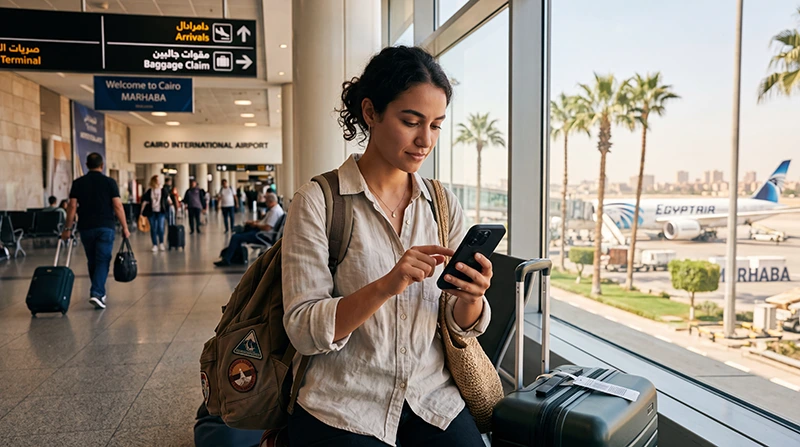

If you are arriving at Cairo International Airport, having mobile internet ready can make your first moments in Egypt much easier. You may need data for airport transfers, Uber, hotel directions, WhatsApp, online bookings, maps and contacting your driver.
A travel eSIM is one of the easiest ways to get connected after landing because you can install it before your flight and start using mobile data once you arrive in Egypt.
Quick answer: the easiest way to use internet at Cairo Airport is to install an Egypt eSIM before departure, then enable Data Roaming and select the eSIM for Mobile Data after landing.
Top Egypt eSIMs

Egypt eSIM
Fixed
1 GB, 7 days€ 4.402 GB, 15 days€ 7.053 GB, 30 days€ 9.69Unlimited
Unlimited, 1 day€ 4.84Unlimited, 3 days€ 11.45Unlimited, 5 days€ 18.49
Africa eSIM
Fixed
1 GB, 7 days€ 10.132 GB, 15 days€ 18.933 GB, 30 days€ 26.42Unlimited
Unlimited, 1 day€ 13.65Unlimited, 3 days€ 39.19Unlimited, 5 days€ 64.73Why Use an eSIM at Cairo Airport?
- No airport SIM card queue.
- No physical SIM card required.
- Install before departure.
- Use mobile data shortly after landing.
- Keep your home SIM active.
- Use WhatsApp with your existing number.
- Contact your driver or hotel immediately.
- Avoid expensive roaming data charges.
eSIM vs SIM Card at Cairo Airport
| Feature | Egypt eSIM | Airport SIM Card |
|---|---|---|
| Buy before arrival | Yes | No |
| Physical SIM needed | No | Yes |
| Airport queue | No | Possible |
| Ready after landing | Yes | After purchase and setup |
| Keep home SIM active | Yes | Depends on phone |
| Use existing WhatsApp number | Yes | Yes |
| Local phone number | No | Usually yes |
eSIM vs Airport WiFi
| Option | Best For |
|---|---|
| Egypt eSIM | Internet after landing and outside the airport |
| Airport WiFi | Short backup connection inside the terminal |
| Local SIM card | Travelers who need a local Egyptian number |
| International roaming | Emergency use, often expensive |
How to Use an eSIM After Landing at Cairo Airport
- Install your Egypt eSIM before your flight while you have stable WiFi.
- Land at Cairo International Airport.
- Turn on your Egypt eSIM.
- Select the eSIM for Mobile Data.
- Enable Data Roaming on the eSIM.
- Keep Network Selection on Automatic.
- Wait for your phone to connect to a supported local network.
- If mobile data does not work, check the APN settings.
Recommended Phone Settings at Cairo Airport
| Setting | Recommended Value |
|---|---|
| Mobile Data | Egypt eSIM |
| Calls | Primary SIM |
| SMS | Primary SIM |
| Data Roaming | ON for the eSIM |
| Primary SIM Data Roaming | OFF |
| Network Selection | Automatic |
| Automatic Data Switching | OFF |
| APN | data.esim if required |
APN Settings for Cairo Airport eSIM
Most phones configure APN settings automatically. If your mobile data does not work after arrival at Cairo Airport, enter the APN manually.
| Field | Value |
|---|---|
| APN | data.esim |
| Username | Leave blank |
| Password | Leave blank |
| Authentication | None |
Where Can You Use the Same eSIM After Cairo Airport?
An Egypt eSIM can be used across supported destinations in Egypt, not only at Cairo Airport. This makes it useful for travelers continuing to Cairo, Giza, Alexandria, Luxor, Aswan or Red Sea resorts.
- Cairo
- Giza
- Alexandria
- Luxor
- Aswan
- Hurghada
- Sharm El Sheikh
- Marsa Alam
How Much Data Do You Need After Cairo Airport Arrival?
| Trip Type | Recommended Data |
|---|---|
| Cairo stopover | 1–3 GB |
| Cairo and Giza trip | 3–10 GB |
| One-week Egypt vacation | 5–10 GB |
| Two-week Egypt trip | 10–20 GB |
| Family trip with hotspot | 20 GB+ |
| Heavy social media use | 20 GB+ or unlimited |
Can You Keep Your Home SIM Active?
Yes. Most modern Dual SIM phones allow you to keep your home SIM active while using your Egypt eSIM for mobile data after arriving at Cairo Airport.
- Use the Egypt eSIM for internet.
- Keep your regular SIM for calls and SMS.
- Receive bank verification codes.
- Use WhatsApp with your existing number.
- Avoid roaming data charges on your primary SIM.
Does WhatsApp Work with an eSIM at Cairo Airport?
Yes. WhatsApp works with mobile data or WiFi at Cairo Airport. Your WhatsApp account stays linked to your existing phone number, even if you use an eSIM only for internet.
Can You Use Hotspot After Arrival?
Yes. Most smartphones allow hotspot sharing with an eSIM. This is useful if you want to connect another phone, laptop or tablet after landing.
Hotspot can use data quickly, so choose a larger plan if you plan to share your connection often during your Egypt trip.
Common eSIM Problems at Cairo Airport
- Data Roaming is not enabled on the eSIM.
- The wrong SIM is selected for Mobile Data.
- Automatic Data Switching is turned on.
- APN settings are missing.
- Network Selection is set manually.
- The eSIM was deleted after installation.
- The phone does not support eSIM.
What to Do If Your eSIM Does Not Work at Cairo Airport
- Check that your Egypt eSIM is turned ON.
- Select the Egypt eSIM for Mobile Data.
- Enable Data Roaming on the eSIM.
- Turn off Data Roaming on your primary SIM.
- Restart your phone.
- Turn Airplane Mode on for 30 seconds.
- Keep Network Selection on Automatic.
- Set APN to data.esim if required.
Related Egypt and Cairo Airport Guides
- Egypt eSIM
- Internet at Cairo Airport
- WiFi at Cairo Airport
- SIM Card at Cairo Airport
- Best eSIM for Cairo
- Internet in Cairo for Tourists
- Mobile Data in Cairo
- Egypt eSIM APN Settings
FAQ
Can I use an eSIM at Cairo Airport?
Yes. If your eSIM is already installed, you can turn it on after landing, enable Data Roaming and select it for Mobile Data.
Is an eSIM better than buying a SIM card at Cairo Airport?
For most tourists, yes. An eSIM avoids airport queues, does not require a physical SIM card and can be installed before departure.
Can I use the same eSIM in Cairo and Giza?
Yes. An Egypt eSIM can be used in Cairo, Giza and other supported destinations across Egypt.
Does WhatsApp work with an eSIM at Cairo Airport?
Yes. WhatsApp works with mobile data, and your account remains linked to your existing phone number.
What APN should I use at Cairo Airport?
If manual APN setup is required, use data.esim.
Final Recommendation
For most tourists, an Egypt eSIM is the easiest way to get internet at Cairo Airport. It can be installed before your flight, helps you connect after landing and gives you mobile data for airport transfers, maps, WhatsApp, hotel communication and onward travel.
Install your eSIM before departure, enable Data Roaming after arrival, keep Network Selection on Automatic and use data.esim as the APN if manual setup is required.